
Overview
Description
[Updated: Jul. 21, 2026 Rev. 1.10] [Notes] Emulator and Flash Memory Programmer Products Notice Regarding Changes to Windows Driver Policy (PDF | English, 日本語)
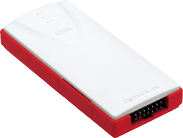
The E8a on-chip debugging emulator is a development of the E8, maintaining the same functionality and ease of use whilst reducing both cost to the end user and the size of the unit.
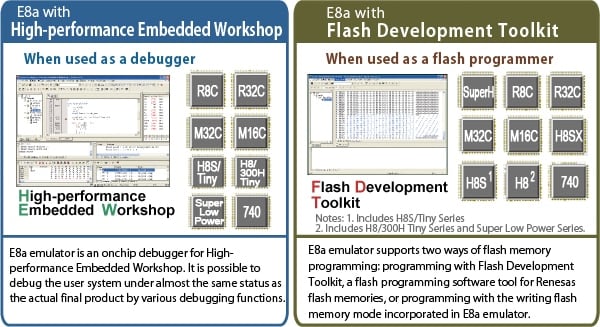
The E8a is designed to be used both as an on-chip debugger for R8C Family, M16C Family, H8 Family H8/Tiny and Super Low Power Series, and 740 Family in conjunction with Renesas High-performance Embedded workshop, providing the user with a range of debugging features as well as a handy device programmer. E8a is ideal for the modern development and prototyping environment with programming support for devices from all the main MCU families.
The product is supplied with USB host interface cable, a user interface cable, the E8a itself and a software pack containing High-performance Embedded Workshop, Flash Development Toolkit, debugger support software for the E8a and evaluation versions of the Renesas compiler toolchains. Supported versions of the toolchains are available from your Renesas supplier.
Important: See here about details of Target Devices
Features
- Ultra-compact dimensions:92 mm × 42 mm × 15 mm
- Biodegradable material : E8a's plastic case is made from a biodegradable material. (a vegetable-based polylactide [PLA])
- Complete debug functions
- Real-time emulation possible even at highest CPU operating frequency. Ample built-in Break and Trace functions for Tiny MCU System developments.
- Memory expansion mode is supported. (Device Permitting)
- See Specifications for further details.
- Close to target system actual evaluation
- The user system can be debugged in conditions as close as possible to the end-product.
- Superior capabilities : The debugger ensures high-efficiency debugging with a dedicated window for setting Break-points and Break conditions, trace data window display and command line functions. High-speed downloading of a load-module file also supported.
- High-performance Embedded Workshop (Renesas IDE) offers seamless support for system development
- The High-performance Embedded Workshop IDE brings the debugger component, compiler toolchain and some FLASH programming capability together within a single application environment, there is no need to keep launching different applications - the IDE takes care of it all.
- USB bus-powered: no external power supply required
- The host PC supplies power to the E8a via the USB bus meaning no external power supply is necessary. Use it anywhere, anytime. Power can also be supplied on to the user system from the E8a emulator.
- On-board programming : The E8a can be used as a FLASH memory programming interface in conjunction with the Flash Development Toolkit.
- E7/E8 compatibility means smooth environment migration
- No special adjustments are necessary to connect to any system designed to connect to the predecessor E8 or ancestor E7 debug modules, the E8a will slot directly into such designs, an example of this is the Renesas Starter Kits (RSK) which will work just as well with E8a as with an E8.
- Learn more
Release Information
The Emulator Software for the E8a Emulator
- Latest Ver.: V.1.05 Release 02
- Released: Feb 01, 2013
- Details of upgrade (See Tool News)
- New IO Files (See Tool News)
- Operating Environment
FAQ
| Title |
|---|
| FAQ portal site for E8a/E8 Know-How |
| Provide usage notes of E8a connection methods and the target system. |
| Collection of Error message_E8a_E8 |
Target Devices
Additional Details
Functions
On-chip Debugging Features
- Used as an on-chip debugger, the E8a utilizes the on-chip functions built into the device and allows the user to perform complete system debug, from MCU operations to electrical characteristics.
- The Renesas integrated development environment "High-performance Embedded Workshop" provides the user with a common GUI front end, it supports both the debugger functionality of E8a and a variety of development software tools, such as the C compiler and simulators. The result is a seamless toolchain enabling highly efficient program development from coding to building and debugging.
- E8a product is ready for system development and debugging the minute it reaches the user, the software package includes evaluation versions of cross tools for immediate connection and all necessary cables to enable connection to the target system are included.
Flash Memory Programming Features
- The E8a supports flash memory programming of the Renesas microcontrollers using the Flash Development Toolkit, enabling the user to program the devices using the E8a as a hardware interface.
- The High-performance Embedded Workshop includes a function that allows quick programming of the flash memory in the R8C, M16C, and H8 family microcontrollers; this can be useful when building and debugging code.
START/STOP Function
This emulator has the START/STOP function so that it is available to execute the designated routine of the user's program, immediately before starting the user's program execution or immediately after stopping the execution. Therefore you can interrupt the function you would like to halt during debugging and also resume it.
Image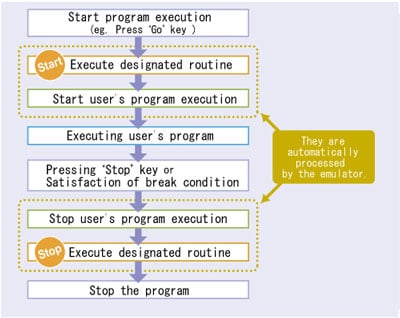
How to program
- The following two programming methods are available.
- Using the Flash Development Toolkit (Flash programming tool for Renesas flash memories)
- Using the "Writing Flash Memory" mode of the E8a emulator
Supported MCUs are the same as those enable on-chip debug features.
- The following two programming methods are available.
Specifications
| Item | Description | |
|---|---|---|
| Emulator Part. No. | R0E00008AKCE00 | |
| MCU supported mode | R32C/100 Series M32C/80 Series M16C/60 Series M16C/30 Series | Single-chip mode Memory expansion mode (Limited by the MCU modes supported by the target MCU.) |
| Other MCUs | Single-chip mode | |
| Debugging function | Refer to On-Chip Debugger Functional Overview (PDF | English, 日本語). | |
| Flash memory programming function | Enable | |
| Operating Environment | Refer to Operating Environments of Products. | |
| Emulator power supply | Not required (USB bus-powered from PC) | |
| User interface (between emulator and target) | 14-pin connector [Product Type 2514-6002: 3M (Minnesota Mining and Manufacturing Company)] *Same as E7, E8 Emulator *14-pin connector [Product Type 2514-6002: 3M] is not included. | |
| Target power supply | Target board can draw 3.3V or 5.0V power (Max: 300mA) from Emulator | |
| Operating environment conditions | [Temperature] : 10-35 ºC [Humidity] : 30-85%RH (no condensation, no corrosive gas) [Dirt/Dust] : general office conditions | |
| Storage environment conditions | [Temperature] : -10-50 ºC [Humidity] : 30-85%RH (no condensation, no corrosive gas) [Dirt/Dust] : general office conditions | |
| Size (Emulator unit) | 92mm x 42mm x 15mm | |
| Overseas standard | European Standards: EN 55022 Class A, EN 55024 US FCC Standard: FCC part 15 Class A | |
Components
- E8a emulator
- USB-interface cable
- User-interface cable
- CD-ROM bundled with following software
- High-performance Embedded Workshop
- M16C E8a emulator debugger
- M32C E8a emulator debugger
- R32C E8a emulator debugger
- R8C E8a emulator debugger
- H8S/Tiny E8a emulator debugger
- H8 Tiny/Super Low Power E8a emulator debugger
- 740 E8a emulator debugger
- free-of-charge evaluation version of C Compiler Package for R32C Series Note1
- free-of-charge evaluation version of C Compiler for M32C Series [M3T-NC308WA] Note1
- free-of-charge evaluation version of C/C++ Compiler Package for the M16C Series and the R8C Family [M3T-NC30WA] Note1
- free-of-charge evaluation version of C/C++ Compiler Package for the H8SX, H8S, and H8 Families Note1
- free-of-charge evaluation version of Assembler for 740 Family [M3T-SRA74] Note1
- free-of-charge evaluation version of Flash Development Toolkit Note1
Note
- It might not be up to date because emulator software is revised after compilers' revision. Visit here and download the latest evaluation software.
Optional Products
The following products are also available for the E8a.
Conversion Adapter
| Product name and Orderable part number | Overview |
|---|---|
| Small Connector Conversion Adapter for the E1 Emulator R0E000010CKZ11 | A conversion adapter that converts the standard 14-pin/2.54mm pitch connector for the E1 emulator to the 14-pin/1.27mm pitch connector to reduce connector space on the board. |
Isolator
| Product name and Orderable part number | Overview |
|---|---|
| Isolator for the E1 Emulator R0E000010ACB10 | Enables debugging in an environment where there is a difference in potential between the user system GND and the host PC GND. |
System Configuration
Shown here is a representation of the debugging system configuration, the E8a package contains everything the user needs to connect the host PC with the target and start debugging the target.
To know the programming system configuration, please refer to the Flash Development Toolkit site.
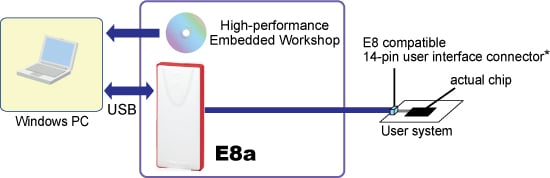
*: When you use the E8a emulator with the board currently used for the M3A-0665 FoUSB, please use the E8 14PIN-10PIN Convert Board.
Design Support
Target Devices
- When using as a debugger
Target Devices for E8a (PDF | English, 日本語) - When using as a flash programmer
Available MCUs' for Flash Development Toolkit (PDF | English, 日本語)
Support
Support Communities
- FDT Serial Port and R8C
"Hello. I am trying to get FDT 4.09 to work with a USB to RS232 FTDI converter. FDT does not manage any of the ports (RST, DTR, etc.). I gave up!!! I wrote a Python script that controls a real COM port with a USB converter. The script ...
Apr 25, 2025 - MCU test setup question
... for this setup and how to connect emulator user interface to the socket. I know I need a socket for 14x20x0.65 pitch. Renesas has discontinued their socket for this long time ago. Need to find 3rd party socket and how to connect user interface cable to that socket. I ...
Jul 18, 2024 - M30800FCGP Programmer?
Hi friendscan i use E8a emulator for program M16C/80 MCUs on board?if not which programmer can do this?
Jul 27, 2011
Knowledge Base
- ID code error on E1,E20,E8a,E8(discontinued product) with M16C,R8C Family MCUs
Confirm the following:Make sure the directory, file, or workspace name is composed of ASCII characters only.If the directory, file, or workspace name has multi-byte characters, the ID code may not be set correctly.Use only ASCII characters for the directory, file, or workspace name. If one of ...
Apr 26, 2017 - Dialog of asking for ID code at connection of an emulator with a MCU
... completely erased. Therefore, we recommend activating the emulator in "Erase Flash and Connect" mode.M16C and R8C Family MCUsWhen activated in:"Erase Flash and Connect" (E8a/E8(discontinued product)/E7(discontinued product) mode"Keep Flash and Connect" (E8a/E8(discontinued product)/E7(discontinued product) mode"Debugging ...
Apr 26, 2017

Support Communities

