
Overview
Description
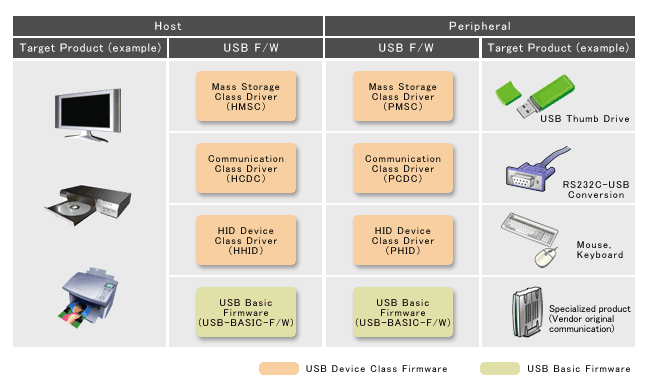
The USB target device class drivers consist of USB basic firmware and firmware for the appropriate USB class. You can use these drivers and firmware with our MCU USB IP to jump start your development.
Renesas offers a wide network of partners to help support your development process. Please contact a Renesas sales office if necessary. Please check the USB overview for more details.
Features
- USB sample firmware is available for various USB applications. [Learn More]
- USB Device Class Firmware (Host/Peripheral)
- USB Basic Firmware (Host/Peripheral)
- For non-OS/For Real-time OS
Target Devices
Design & Development
Additional Details
System Configuration and Functions
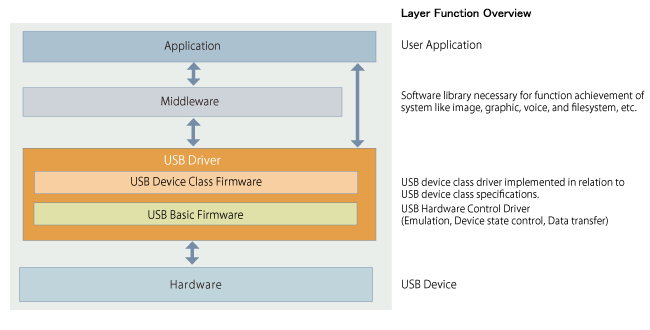
Layer configuration of USB Driver
Firmware and Application Notes
Download: Refer to the Target Devices (MCU/MPU) and Product Lineup. Please contact a Renesas sales office if you need any other USB sample drivers.
Target Devices (MCU/MPU) and Product Lineup
Target integrated development environments (IDE) are as follows.
| Renesas Electronics | |
Image  | |
Image  : CS+ | |
Image  | |
Image  : PM+ | |
| Partners | |
Image  : IAR Embedded Workbench | |
Image  : Green Hills Software MULTI | |
Image  : Arm DS-5 Development Studio | |
USB MCU
For non-OS
Host
| Target USB MCU/IDE * | Host | |||||
|---|---|---|---|---|---|---|
| USB Basic Firmware (USB-BASIC-F/W) | USB Device Class Firmware | USB F/W Updater | ||||
| Mass Storage (HMSC) | Comm. (HCDC) | HID (HHID) | ||||
| RL78 | RL78/G1C Image Image Image | lens | — | lens | lens | — |
| RX | RX111, RX113, RX231, RX23W, RX261 Image | (Note8) | lens (Note4) (Note8) | lens (Note8) | lens (Note8) | lens |
RX62x, RX63T, RX63N/RX631 Image | (Note2) | lens (Note4) | lens | lens | lens | |
RX64M, RX65N/RX651, RX66N, RX66T, RX71M, RX72M, RX72N, RX72T Image | (Note8) | lens (Note4) (Note8) | lens (Note8) | lens (Note8) | lens | |
| RZ | RZ/T1 Image Image Image | (Note2) | lens | lens | lens | — |
RZ/A1H Image Image Image | (Note2) | lens | lens | lens | — | |
RZ/A2M Image | (Note2) | lens (Note9) | — | lens (Note9) | — | |
| R8C | R8C/3xU Image | lens | lens | lens | lens | — |
| V850 | V850E2/ML4 Image | lens (Note7) | lens (Note4) | lens | — | — |
| SuperH | SH7700 Image | lens | — | — | — | — |
lensSample (free of charge) | — Not Available
* We offer a USB Driver with an application program on our website. Refer to Firmware Integration Technology (FIT) for details of FIT module.
Peripheral
| Target USB MCU/IDE * | Peripheral | |||||||
|---|---|---|---|---|---|---|---|---|
| USB Basic Firmware (USB-BASIC-F/W) | USB Device Class Firmware | LibUSB | USB F/W Updater | |||||
| Mass Storage (PMSC) | Comm. (PCDC) | HID (PHID) | Printer | |||||
| RL78 | RL78/G1C, RL78/L1C Image Image Image | lens | lens | lens | lens | — | — | lens (Note3) |
| RX | RX111, RX113, RX231, RX23W, RX261 Image | (Note8) | lens (Note8) | lens (Note8) | lens (Note8) | — | — | lens |
RX62x, RX630/63T, RX63N/RX631 Image | (Note2) | lens | lens | lens | — | lens | lens | |
RX64M, RX65N/RX651, RX66N, RX66T, RX71M, RX72M, RX72N, RX72T Image | (Note8) | lens (Note8) | lens (Note8) | lens (Note8) | — | — | lens | |
| RZ | RZ/T1 Image Image Image | (Note2) | lens | lens | — | — | — | — |
RZ/A1H Image Image Image | (Note2) | lens | lens | lens | — | — | — | |
RZ/A2M Image | (Note2) | — | lens (Note9) | — | — | — | — | |
| R8C | R8C/3xU,R8C/3xK Image | lens | lens | lens | lens | |||
| V850 | V850ES/Jx3-H/U Image | lens (Note2) | lens | lens | lens | lens | lens | |
V850ES/Jx3-E/L Image | lens (Note2) | lens | lens | lens | — | — | lens | |
V850E2/MN4 Image Image Image | lens (Note2) | lens | lens | lens | — | — | — | |
V850E/Ix4-H Image | lens (Note2) | — | lens | — | — | — | — | |
V850E2/ML4 Image | lens (Note2) | lens (Note5) lens (Note6) | lens (Note5) | — | — | lens | — | |
| SuperH | SH7280 Image | lens (Note2) | lens | lens | — | — | — | — |
SH7216 Image | lens (Note2) | lens | lens | lens | lens | lens | lens | |
SH7700 Image | lens (Note2) | lens | lens | — | lens | — | — | |
| H8SX | H8SX/1600 Image | lens (Note2) | lens | lens | — | lens | — | — |
| H8S | H8S/2200,H8S/2400 Image | lens (Note2) | lens | lens | lens | lens | — | — |
lensSample (free of charge) | — Not Available
* We offer a USB Driver with an application program on our website. Refer to Firmware Integration Technology (FIT) for details of FIT module.
For Real-time OS
| Target USB MCU/IDE * | Host | Peripheral | |||||||
|---|---|---|---|---|---|---|---|---|---|
| USB Basic Firmware (USB-BASIC-F/W) | USB Device Class Firmware | USB Basic Firmware (USB-BASIC-F/W) | USB Device Class Firmware | ||||||
| Mass Storage (HMSC) | Comm. (HCDC) | HID (HHID) | Mass Storage (PMSC) | Comm. (PCDC) | HID (PHID) | ||||
| RX (Note1) | RX64M, RX65N/RX651, RX66N, RX66T, RX71M, RX72M, RX72N, RX72T Image | — | lens (Note4) (Note8) | lens (Note8) | lens (Note8) | — | lens (Note8) | lens (Note8) | lens (Note8) |
RX111, RX113, RX231, RX23W, RX261 Image | (Note8) | lens (Note4) (Note8) | lens (Note8) | lens (Note8) | (Note8) | lens (Note8) | lens (Note8) | lens (Note8) | |
lensSample (free of charge) | — Not Available
* We offer a USB Driver with application program on our website. Refer to Firmware Integration Technology (FIT) for details of FIT module.
NOTES
- The supported Real-time OS are FreeRTOS and µITRON (RI600V4).
- USB Basic Firmware is included in each USB Device Class Firmware.
- Refer to RL78 microcontroller USB Peripheral Firmware Updater GNU/IAR Ver. Rev.1.10 (PDF) when using IAR / GCC compiler.
- Bundled simplified FAT file system.
- V850E2/ML4 Example of USB Multifunction Operation
- V850E2/ML4 MultiMediaCard Control Over USB Sample Program
- V850E2/ML4 USB Host Software (Support USB Hub)
- The FIT module compatible versions are available. Refer to Firmware Integration Technology (FIT) for details of FIT module.
- Bundled in the RZ/A2M Simple Applications Package
Partners
Renesas offers a wide network of partners to help support your development process. Please contact a Renesas sales office if necessary.
Support
Support Communities
- how to get microcontroller serial number(Part number : R7FS5D97E2A01CBG) , how to create virtual serial port to find serial number of microcontroller ? any usb driver need to install ?
1) We are trying to get serial number of microcontroller(Part number : R7FS5D97E2A01CBG), we found some driver mismatching, unable to find a driver for that, could you share driver for that . 2) Procedure for how to find the serial number of microcontroller?
Mar 8, 2023 - PC-7501 Emulator Debugger for M16C/62P usb driver issue in Windows-7
I am trying to work with M16/62P Microcontroller with PC-7501 emulator debugger. I have installed the specified versions of the software [Link1 and Link2] for windows 7. The drivers that are provided with the High Performance Embedded Workshop IDE is not able to detect the emulator or ...
Jun 24, 2019 - E2 Lite USB driver Code 39 on Windows 11 25H2 due to Code Integrity / Windows Driver Policy
... RTE0T0002LKCE00000R- OS: Windows 11 25H2 ***-bit- PC domain: corporate managed PC- Driver installer: USB_Driver_x64_for_Renesas_MCU_Tools_V27700.exe- Device HW ID: USB\VID_045B&PID_82A0 症状:- E2 Lite を接続すると Code 39 になる- USB ドライ ...
May 14, 2026
Knowledge Base
- Host Computer Loads Incorrect USB Driver for Synergy USB CDC Device
... host forget the association between the USB CDC device and the USB drivers; if you don't reboot, the host still tries to load a USB driver)3) Once rebooted, connect your USB CDC device. The host should now allow you to pick the correct driver when it appears as ...
- The documentation for the USB driver is not helpful to specify descriptors.
... an MCU, see the following:https://www.renesas.com/us/en/document/scd/rx-family-sample-program-using-usb-peripheral-communication-device-class-driver-pcdc-usb-mini (2) If you use the RX700 series or RX600 series (other than RX63x or RX62x) of ...
Mar 21, 2024 - RA Family: How to enable debug logging for USB driver
FSP's USB driver is equipped with a debug log output function to check the execution status of the driver's internal program (e.g., enumeration status and event information). You can enable the debug output of the USB driver by defining the USB_DEBUG_ON with compiler options as ...
Oct 25, 2024

Support Communities

