
Overview
Description
e² studio supports the new device RX14T.
e² studio is an Eclipse-based integrated development environment (IDE) for Renesas MCUs. In addition to Eclipse’s own powerful code editor, e² studio offers a rich range of extended functions. e² studio covers all development processes, from the downloading of sample code to debugging.
Release Information
| Architecture | Ver. | Released |
|---|---|---|
| 64-bit version | 2026-04.2 | May 20, 2026 |
| 32-bit version (Note1) | V7.8.0 | Apr 20, 2020 |
Note
- Henceforth, only the 64-bit version of the e² studio is to have regular updates. Updates to the 32-bit version of the e² studio, on the other hand, will be limited to essential modifications.
- Details of upgrade (See Tool News)
- Operating Environment
- How to install: User's Manual Chapter 2
Information on Usage
| Installation | Building and Debugging |
| |
|---|---|---|---|
| e² studio Integrated Development Environment User's Manual: Getting Started Guide RX, RL78, RH850 Family Rev.1.00 (PDF | English, 日本語) | RX Smart Configurator User's Guide: e² studio (PDF | English, 日本語) | ||
FAQ
Target Devices
Downloads
Please be sure to check software agreement before downloading e² studio installer.
|
|
|
|
|---|---|---|
| Type | Title | Date |
| Upgrade - IDE | e² studio 2026-04.2 installer for Windows
|
|
| Upgrade - IDE | e² studio 2026-04.2 installer for Linux
|
|
| Upgrade - IDE | e² studio 2026-04.2 installer for macOS
|
|
| Upgrade - IDE | IO header files for RX66N V1.00D
|
|
| Upgrade - IDE | IO header files for RX72M V1.00D
|
|
| Upgrade - IDE | IO header files for RX72N V1.00D
|
|
| Upgrade - IDE | IO header files for RX26T V1.10B
|
|
| Upgrade - IDE | IO header files for RX671 V1.00B
|
|
|
8 items
|
||
Documentation
|
|
|
|
|---|---|---|
| Type | Title | Date |
| Release Note |
PDF
2.85 MB
The e² studio 2026-04.2 Release Note describes product information, supported devices and supported features such as toolchains, emulators, code generation (Smart Configurator), and Smart Manual. Refer to "What is new" section for new the features and improvements in this version. Notifications of known issues are found in 'Useful workarounds and information' and 'Open issues' section.
|
|
| Tool News - Release |
PDF
174 KB
日本語
Tool news to announce the upgrade to the e² studio 2026-04.2. This document explains improvements of functionality and how to update. The main enhancements are upgrading eclipse/CDT, Smart Configurator and debugger features.
|
|
| Tool News - Release | PDF 358 KB 日本語 | |
| Tool News - Release | PDF 176 KB 日本語 | |
| Tool News - Note |
PDF
108 KB
日本語
This is a tool news announcing notes for the CS+ and e² studio integrated development environment. Debugging the RX660 group of the RX family in user boot mode does not work properly. This document explains Conditions, Workaround, and Schedule for Fixing the Problem.
|
|
| Tool News - Release | PDF 182 KB 日本語 | |
| Application Note |
PDF
777 KB
日本語
AI-generated Summary:
This section explains how to set up and build the CUnit testing framework in e² studio for Renesas CC-RX. It instructs downloading CUnit version 2.1-2, creating a new Renesas CC-RX C/C++ Library Project, and configuring the project settings. It details copying necessary source and header files into the project, adjusting compiler settings to use C99, and creating a custom time.h header due to CC-RX limitations. Finally, it guides building the project to generate the static library file CUnit.lib.
|
|
| Application Note |
PDF
908 KB
日本語
AI-generated Summary:
This section explains how to set up and use CUnit version 2.1-2 with e² studio for Renesas RX using GCC. It details building the CUnit static library by downloading the package, creating a new Renesas RX C/C++ library project, configuring toolchain and device settings, and copying necessary source and header files. It also covers project configuration steps such as deleting unnecessary folders and adding include directories. Finally, it describes building the library to generate the static library file libCUnit.a, which can be used for unit testing in C/C++ projects.
|
|
| Release Note |
PDF
2.92 MB
The e² studio 2025-12 Release Note describes product information, supported devices and supported features such as toolchains, emulators, code generation (Smart Configurator), and Smart Manual. Refer to "What is new" section for new the features and improvements in this version. Notifications of known issues are found in 'Useful workarounds and information' and 'Open issues' section.
|
|
| Tool News - Release |
PDF
174 KB
日本語
Tool news to announce the upgrade to the e² studio 2025-12. This document explains improvements of functionality and how to update. The main enhancements are Renesas 365 support and adding supported devices.
|
|
| Flyer |
PDF
1.04 MB
日本語
, 简体中文
e² studio is an integrated development environment consisting of the Eclipse-standard code editor and various extended functions such as functions for referencing manuals and technical information, Smart Configurator, which facilitates code generation and QE tools aiding application development.
Facilitates all development processes up to building in a seamless manner within a single environment with a Renesas compiler.
|
|
| Tool News - Release |
PDF
155 KB
日本語
This is the Tool News announcing the revision upgrade to QE for Capacitive Touch V4.2.0, Development Assistance Tool for Capacitive Touch Sensors.
QE for Capacitive Touch is a tool for assisting in the development of embedded systems that include the use of capacitive touch keys.
This tool simplifies the initial settings of the touch user interface and the tuning of the sensitivity.
The main revisions are improvements to the sensor drive pulse frequency determined by automatic tuning (CTSU2) and support for the new device "RA0L1 Group, RL78/F22, RL78/F25, and RL78/L23".
|
|
| Tool News - Release |
PDF
150 KB
日本語
This is a Tool News announcing the revision of QE for Motor V1.5.1, Development Assistance Tool for Motor Applications.
QE for Motor is a development support tool that supports the development of embedded systems for motors that can be tuned and analyzed in conjunction with Renesas Motor Workbench, in addition to configuring the motor middleware and related drivers of Renesas microcontrollers.
The main revision upgrades is support for MCK-RA6T2 Version 2.
|
|
| Tool News - Release |
PDF
153 KB
日本語
This is the Tool News announcing the revision upgrade to QE for Display [RX,RA] V3.7.0, Development Assistance Tool for Display Applications.
QE for Display [RX,RA] is a development assistance tool that supports the development of embedded systems using the LCD display functions of display controllers from Renesas.
With this revision upgrade, the tool now supports the new device RA8D2.
|
|
| Release Note |
PDF
2.93 MB
The e² studio 2025-10 Release Note describes product information, supported devices and supported features such as toolchains, emulators, code generation (Smart Configurator), and Smart Manual. Refer to "What is new" section for new the features and improvements in this version. Notifications of known issues are found in 'Useful workarounds and information' and 'Open issues' section.
|
|
| Tool News - Release |
PDF
163 KB
日本語
Tool news to announce the upgrade to the e² studio 2025-10. This document explains improvements of functionality and how to update. The main enhancements are updating the Smart Configurator (RX, RL78) and adding supported devices.
|
|
| Tool News - Release | PDF 596 KB 日本語 | |
| Release Note | PDF 3.25 MB | |
| Tool News - Release | PDF 184 KB 日本語 | |
| Tool News - Release | PDF 156 KB 日本語 | |
| Tool News - Release | PDF 152 KB 日本語 | |
| Tool News - Release | PDF 284 KB 日本語 | |
| Tool News - Release | PDF 261 KB 日本語 | |
| Release Note | PDF 3.09 MB | |
| Tool News - Release | PDF 194 KB 日本語 | |
| Manual - Development Tools | PDF 4.85 MB 日本語 | |
| Tool News - Release | PDF 144 KB 日本語 | |
| Release Note | PDF 3.22 MB | |
| Tool News - Release | PDF 174 KB 日本語 | |
| Tool News - Note | PDF 150 KB 日本語 | |
| Tool News - Note | PDF 114 KB 日本語 | |
| Tool News - Release | PDF 170 KB 日本語 | |
| Tool News - Release | PDF 147 KB 日本語 | |
| Release Note | PDF 3.27 MB | |
| Tool News - Release | PDF 191 KB 日本語 | |
| Quick Start Guide | PDF 1.73 MB 日本語 | |
| Application Note |
PDF
666 KB
日本語
AI-generated Summary:
The document explains how to integrate and use IAR Systems compilers within the e² studio development environment for Renesas microcontrollers. It details the installation of IAR Embedded Workbench and IAR Eclipse plugins, project creation, build configuration, and build execution using IAR compilers. The guide focuses on the RA family with the IAR ARM compiler but applies similarly to other Renesas devices. It also recommends using standalone Flexible Software Package configurators for RA and RZ families to enhance development. The environment setup assumes Windows 10 64-bit, e² studio 2024-07, and IAR tools installed.
|
|
| Release Note | PDF 3.64 MB | |
| Tool News - Note | PDF 95 KB 日本語 | |
| Tool News - Release | PDF 181 KB 日本語 | |
| Application Note |
PDF
678 KB
日本語
AI-generated Summary:
This document explains how to use Doxygen within the e* studio integrated development environment. It details the confirmed environment setup, including Windows 10, e* studio 2024-04, Doxygen 1.8.16 bundled with the Eclox plugin, and Graphviz 11.0.0. It guides users through installing the Eclox plugin via Eclipse Marketplace and configuring the Doxygen version in e* studio preferences to generate documentation efficiently. The document notes that Doxygen, Eclox, and Graphviz are third-party open-source tools without Renesas technical support.
|
|
| Tool News - Release | PDF 148 KB 日本語 | |
| Manual - Development Tools | PDF 8.52 MB 日本語 | |
| Tool News - Release | PDF 175 KB 日本語 | |
| Release Note | PDF 2.91 MB | |
| Application Note |
PDF
1.98 MB
日本語
AI-generated Summary:
Porting projects from CS+ for the V850 family to e2 studio for the RX family involves understanding differences in emulator usability and functionality. Emulators like E2 Lite, E2, E1, and E20 support RX devices, with E2 and E2 Lite recommended for new RX microcontrollers. Key debugging features include hardware and software breakpoints, tracing, performance measurement, and hot plug-in support. Settings for emulator connection, launching debuggers, and debugging techniques are detailed, focusing on efficient migration and usage of emulators in the RX environment.
|
|
| Application Note |
PDF
852 KB
日本語
AI-generated Summary:
Cyclomatic complexity measures the complexity of source code, indicating software quality by quantifying how complex the code is. Higher values suggest increased complexity and a greater chance of bugs. Using e² studio, cyclomatic complexity can be measured via two external tools: SourceMonitor and Lizard. These tools integrate with e² studio through its external tools feature, allowing users to measure and display complexity results directly within the IDE. The document details installation, configuration, and execution steps for both tools on a Windows 10 environment with e² studio 2024-01.
|
|
| Tool News - Release | PDF 180 KB 日本語 | |
| Tool News - Release | PDF 147 KB 日本語 | |
| Release Note | PDF 2.64 MB | |
| Tool News - Release | PDF 170 KB 日本語 | |
| Application Note |
PDF
1.87 MB
日本語
AI-generated Summary:
This document explains how to port projects from CS+ to e2 studio for the Renesas RX family using emulators such as E2 Lite, E2, and E20. It details the differences in emulator settings, connection configurations, and debugging operations within e2 studio. Users learn how to open CS+ projects in e2 studio, configure emulator connections via the Debug Configurations window, and manage target devices. The document covers debugging features including breakpoints, tracing, memory and register manipulation, and performance measurements, facilitating smooth migration and effective debugging in the e2 studio environment.
|
|
| Tool News - Note | PDF 139 KB 日本語 | |
| Tool News - Release | PDF 237 KB 日本語 | |
| Application Note |
PDF
980 KB
日本語
AI-generated Summary:
e² studio allows users to install, update, and add features or toolchains without rerunning the installer. It supports three installation types: Lite, Standard, and Custom, catering to different user needs from basic editing to advanced debugging. Updates can be performed via the installer or through the built-in update function, though adding device families or features requires separate procedures. The update process involves checking for updates, accepting licenses, and restarting the IDE to complete installation.
|
|
| Tool News - Release | PDF 176 KB 日本語 | |
| Tool News - Release | PDF 217 KB 日本語 | |
| Tool News - Release | PDF 154 KB 日本語 | |
| Guide | PDF 1.43 MB 日本語 | |
| Tool News - Release | PDF 156 KB 日本語 | |
| Tool News - Release | PDF 182 KB 日本語 | |
| Tool News - Release | PDF 262 KB 日本語 | |
| Tool News - Release | PDF 129 KB 日本語 | |
| Tool News - Featured Tool | PDF 864 KB 日本語 | |
| Tool News - Release | PDF 154 KB 日本語 | |
| Tool News - Note | PDF 191 KB 日本語 | |
| Application Note |
PDF
1.11 MB
日本語
AI-generated Summary:
This guide explains how to create and build CMake projects using e² studio. It covers installing necessary tools such as e² studio, CMake, and GNU Make, creating a new CMake project, and configuring the builder by disabling the default CDT Core Builder and adding CMake and Make commands. The instructions include setting up environment variables and specifying CMake command parameters to generate native build files from platform-independent CMakeLists.txt configurations.
|
|
| Application Note |
PDF
2.26 MB
日本語
AI-generated Summary:
This document explains how to automate CUnit tests in Renesas e² studio using EGit and Jenkins. It covers creating a Git repository, pushing code changes via EGit, and setting up Jenkins to build and run CUnit tests automatically. The process includes configuring Jenkins to poll the repository, build the project, execute tests, and generate reports. It also details modifying the SampleC Unit project to link the CUnit static library and output test results to a file for automation.
|
|
| Application Note |
PDF
2.00 MB
日本語
AI-generated Summary:
This section explains how to install and set up Jenkins on Windows 10 for standalone use. It covers downloading the Jenkins installer from the official site, running the installer, and starting Jenkins via localhost. The initial admin password is retrieved from a specific file to unlock Jenkins. Users can skip plugin installation initially and start using Jenkins immediately. It also describes how to add more users through the Jenkins UI under Manage Jenkins > Manage Users.
|
|
| Tool News - Note | PDF 217 KB 日本語 | |
| Tool News - Note | PDF 155 KB 日本語 | |
| Application Note |
PDF
322 KB
日本語
AI-generated Summary:
CMake generates native build tool files from platform-independent configuration files named CMakeLists.txt. It enables building C/C++ projects for the Renesas RX Family (CC-RX) on Windows by generating appropriate project files and executing builds in two steps. Installation requires Renesas CC-RX compiler, CMake, and GNU Make, with environment variables set accordingly. The project structure includes key files like ccrx.cmake (toolchain file), CMakeLists.txt (configuration), and Linker.tmp (linker subcommand). The ccrx.cmake file specifies compiler, assembler, linker paths, and build options essential for cross-compiling with CC-RX.
|
|
| Tool News - Note | PDF 223 KB 日本語 | |
| Application Note |
PDF
1.79 MB
日本語
AI-generated Summary:
This section explains how to install and configure EGit within the e² studio environment. It details selecting Git integration during e² studio installation, updating EGit via the Help menu, and adding the EGit update repository. The guide also covers setting user identification for Git commits by configuring user name and email in the preferences. Finally, it describes opening the EGit perspective to start using Git features within e² studio.
|
|
| Tool News - Note | PDF 169 KB 日本語 | |
| Tool News - Note | PDF 169 KB 日本語 | |
| Application Note |
PDF
1.01 MB
AI-generated Summary:
e2 studio integrates a Partner OS Debugging Plug-in to enable RTOS-aware debugging for Renesas RX devices using FreeRTOS with IoT libraries. It allows developers to create FreeRTOS projects, view and manage RTOS resources such as tasks, queues, timers, and stacks during debugging sessions. The environment supports Renesas RX family devices with specific toolchains and debuggers, enhancing real-time OS resource visibility and control within the development workflow.
|
|
| Manual - Development Tools | PDF 3.73 MB 日本語 | |
| Tool News - Release | PDF 194 KB 日本語 | |
| Tool News - Note | PDF 1.66 MB 日本語 | |
| Tool News - Note | PDF 160 KB 日本語 | |
| Tool News - Note | PDF 127 KB 日本語 | |
| Tool News - Note | PDF 147 KB 日本語 | |
|
83 items
|
||
Design & Development
Explore
Videos & Training
This video demonstrates how to show or hide toolbar buttons for each perspective in e² studio.
News & Blog Posts
Blog Post Jul 11, 2022 |
Blog Post Apr 5, 2022 |
Blog Post Feb 1, 2022 |
Additional Details
See the table below for features of the software and tools available for use with the e² studio on RX-family products.
For an overview of the functions and features of the e² studio, refer to e² studio (the general page).
Code generation support and other useful functions for the RX family
| Tool name | Description |
|---|---|
| Smart Configurator | A GUI-based tool that provides support for downloading and importing middleware for code generation and configuring various settings |
| Smart Manual | A function that allows you to find various information in a hardware manual, such as on registers, without opening the actual hardware manual |
| Smart Browser | A function that allows you to easily search and show the latest version of the hardware manual, technical updates, application notes, and tool news for the Renesas microcontroller you are using |
| Assistant for Optimization | A function that assists in optimizing the size of program code |
Compilers for the RX Family
| Supported Compiler | Information on Usage |
|---|---|
| Renesas C/C++ Compiler Package for RX Family [CC-RX] |
|
| Open Source ・GCC for Renesas RX |
|
| IAR IAR C/C++ Compiler for Renesas RX |
|
Note:
- CC-RX V3.06.01 supports Ubuntu version 20.04. Support for other versions of Ubuntu is under consideration for the next version.
Debugging tools for the RX Family
- e² studio Simulator (Note1)
- E2 Emulator (Note2,3)
- E2 Emulator Lite (Note2)
- E20 Emulator (Note3)
- E1 Emulator(Discontinued product)
- Segger J-Link (Note4)
Note
- Installed in the e² studio as a standard item.
- Compatible with tools from IAR
- The usable functions of the E20 emulator for RX family MCUs other than those of the RX600 and RX700 series are the same as for the E1.
- Product from a Renesas partner
QE: Tools for Particular Applications for RX Family
- QE for Capacitive Touch: Development Assistance Tool for Capacitive Touch Sensors
- QE for BLE: Development Assistance Tool for Bluetooth® Low Energy
- QE for Display: Development Assistance Tool for Display Applications
- QE for USB: A Dedicated Tool for USB
- QE for OTA: Development Assistance for Cloud
Details: QE(Quick and Effective tool solution)
Simpler Development of IoT Devices Connectable with Cloud Service
The e² studio supports the development of software for IoT devices to be connectable with Amazon Web Services (AWS) or Microsoft Azure Cloud Computing Service. The e² studio offers the following powerful functions for FreeRTOS or Azure RTOS.
- Quick building after downloading the latest version of FreeRTOS or Azure RTOS project directly from GitHub®
- Assisting in configuring RTOS, all required drivers, network stacks (TCP/IP, Wi-Fi, and MQTT), and component libraries (Device Shadow, Azure RTOS NetX duo so on)(Note1)
- Embedding additional middleware and drivers (such as for USB and file-system support) in IoT devices
Usage in detail (RX Family Amazon FreeRTOS download with e² studio Rev.1.00 (PDF | English, 日本語))
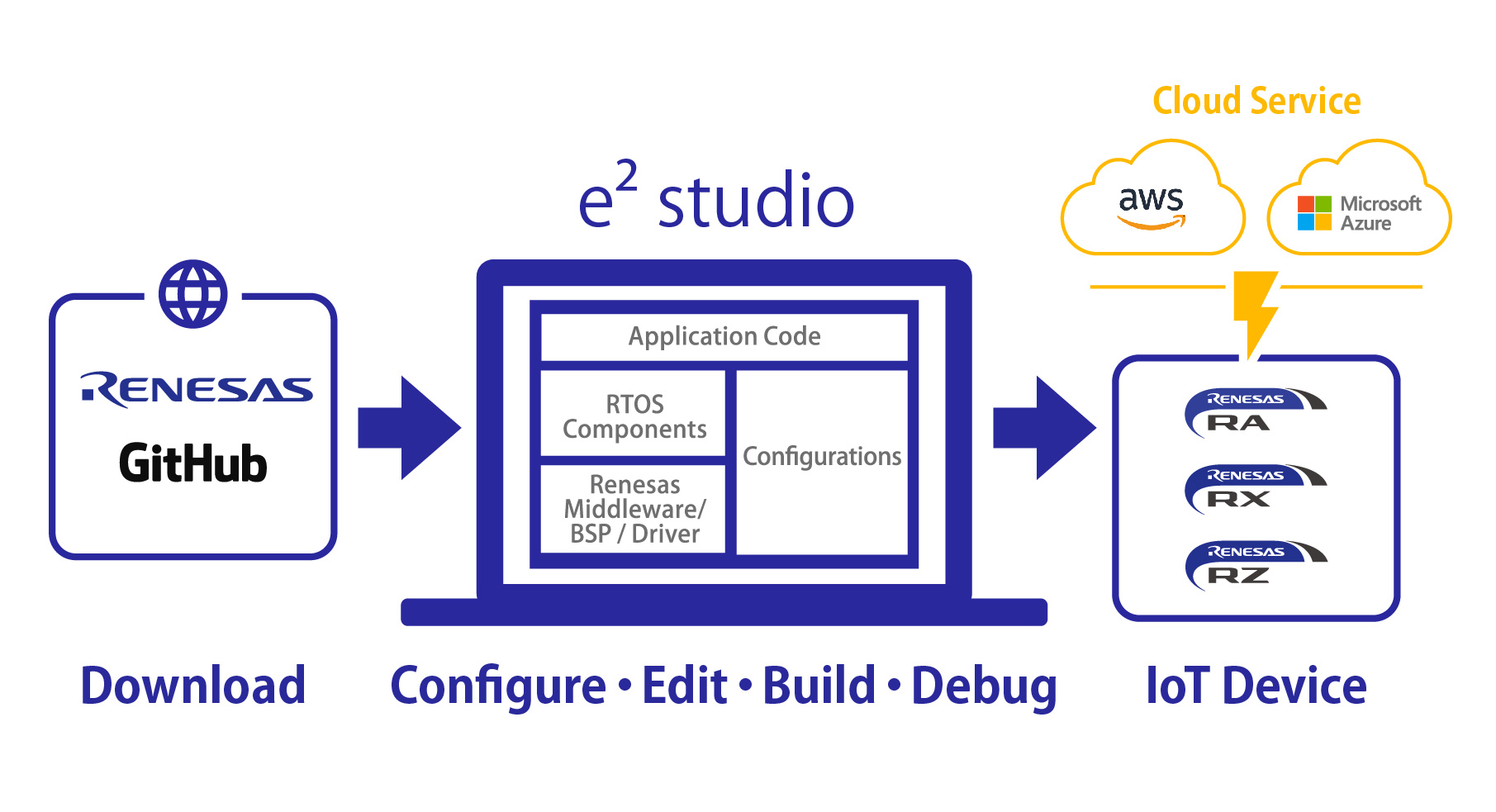
Note
- The settable components of RTOS are as follows: MQTT, Greengrass Discovery, Device Shadow, Azure RTOS NetX duo , Secure Sockets, and TCP/IP
- AWS and Amazon Web Services are trademarks of Amazon.com, Inc. or its affiliates in the United States and/or other countries. (https://aws.amazon.com/trademark-guidelines/)
- Azure is a trademark owned by Microsoft Corporation and its affiliated companies.(https://www.microsoft.com/en-us/legal/intellectualproperty/Trademarks/)
- Microsoft has announced the open sourcing of Azure RTOS.
Azure RTOS will now be provided by the Eclipse Foundation as Eclipse ThreadX. For details, see the Microsoft website. - FreeRTOS is a trademark of Amazon Web Services, Inc. (http://www.openrtos.net/copyright.html)
- GitHub® is a trademark of GitHub, Inc. (https://github.com/logos)
- See below for building FreeRTOS projects in e² studio: Knowledge Base "Building FreeRTOS projects in e² studio"
Support
Support Communities
- ADC setting
everyone, im new here in renesas, i want to setting ADC for RX 26T series, does have anyone here can show me the way to set up and how to use it in course code, i verry expecting your respond. thank you in advance. please help meee.
Feb 26, 2025 - Rx140 Questions
hello, I bought the Rx140 kit and it's working.The debugger is using e2 lite, and the IC says R5F51406ADFN. Rx140 Cap Touch CPU Borad와 Self-Capacitance Button/Whee/Slider Electrode Board를 사용중입니다. I'd like to see Rawdata, Diffdata ...
Jan 7, 2026 - I need pinout for 20 pin 0.05 inch header on E2 emulator
... the E2 emulator. I am using E1/E20/E2 Emulator, E2 Emulator Lite Additional Document for User’s Manual (Notes on Connection of RX Devices) as a reference to connect a RX63 device to the 14 pin connector. The E2 studio can't initialize the E2 emulator. I ...
Oct 24, 2023
Knowledge Base
- Where Can I Find the e² studio Tutorials?
... at the e2 studio information web page for each device family. The manual shows basics of operation. It is recommended to read it through.e2 studio for RA Family: https://www.renesas.com/e2studio-rae2 studio for RZ Family: https://www.renesas.com/e2studio ...
Dec 28, 2022 - I don’t know the ID code when I turn on E1 or E20. (E2, E2 Lite, E1, E20)
... in the ROM (flash memory for code storage) of the RX Family MCU. If you know which program (MOT or ABS file) you downloaded to the target MCU, you can obtain the ID code by reading the address of the program download with a simulator, etc.For more information on ...
Mar 3, 2021 - How to See Toolchain Information of e² studio Project
... As shown in the examples below, toolchain type and version will be found in "Current Toolchain" box.Note that, if this box is empty, check the .cproject file description as mentioned later. Example of C/C++ Compiler Package for RX Family (CC-RX) : Example of GCC Arm Embedded toolchain ...
Jul 26, 2019

Support Communities


