
Overview
Description
Topics
- Support has been added for the Secure Factory Programming feature of the RA8E1 and RA8E2.
Security Key Management Tool is a support tool for key management systems and secure functions using Renesas security IP.
Note: The descriptions and screenshots in the Secure Boot/Secure Update samples included with RX TSIP Driver FIT V.1.20 to V.1.22 (R20AN0371JJ0120 to R20AN0371JJ0122) and RX RSIP CM Driver FIT V.1.00 are based on Security Key Management Tool V.1.07. Use V.1.07 when using these samples.
Features
- Compliant with key-management systems that use security IP modules incorporated in Renesas MCUs and MPUs
- Wrapping of user application keys and DLM keys for secure key injection and secure key updating
- Key data files can be output in a variety of file formats
- Generate data for using security functions with Renesas security IP
- See details for functions
Release Information
- Latest Ver. V.1.12
- Released:Sep 30, 2026
- Operating Environment
| Supported Device Family | Security IP |
|---|---|
| RA | SCE9 (Protected Mode, Compatibility Mode), SCE7, SCE5, SCE5_B, RSIP-E51A, RSIP-E50D, RSIP-E31A, RSIP-E11A, RSIP-E31B |
| RX | TSIP, TSIP-Lite, RSIP-E11A, RSIP-E50D |
| RZ | RZ/T2M RSIP, RZ/T2ME RSIP, RZ/T2L RSIP, RZ/N2L RSIP |
| Synergy | SCE7, SCE5 |
Target Devices
Additional Details
Functions
Output key data files for use in the installation and updating of secure keys
The Security Key Management Tool supports the following functions required for using Renesas security IP modules to inject and update secure keys.
- Generating User Factory Programming Key (UFPK) files in the Renesas Key Wrap Service format
- Wrapping DLM/AL Keys by using the UFPK for the injection of secure keys*
- Wrapping user keys by using the UFPK for the injection of secure keys
- Wrapping user keys by using the Key Update Key (KUK) for the updating of secure keys
* Only MCU families/security engines that support DLM/AL Keys are supported.
Output files support a variety of file formats
Wrapped key files can be output for different purposes in the file formats listed below.
| Format | Use Case |
|---|---|
| Renesas key file*1 | Factory key injection |
| Motorola HEX | Factory key injection |
| C source files | Field key update, prototype key injection*2 |
| Binary data | Field key update |
*1 Only MCU families/security engines that support key injection functionality in the boot firmware are supported.
*2 Not supported for RA RSIP-E51A and SCE9 Protected Mode.
Example of using the Security Key Management Tool during secure key installation
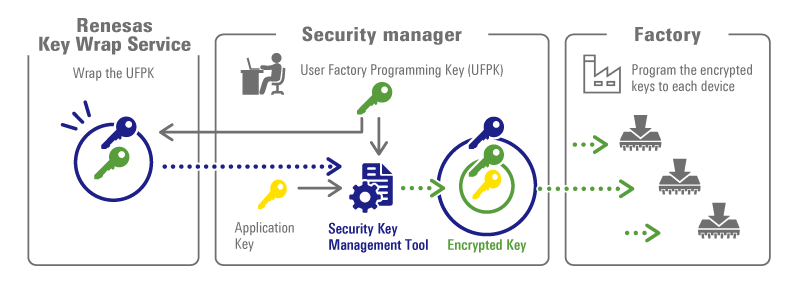
For more information about secure key injection and update on Renesas devices, please see www.renesas.com/iot-security.
Data generation for using security features with Renesas security IP
In addition to secure key injection and updating, it generates data for use in the following functions of the device.
Please refer to the hardware user's manual or application note of your MCU/MPU for the functions supported by your device.
- Generate Key Certificate and Code Certificate for FSBL
- Encrypt code/data for use with Decryption On-The-Fly
- Prepare a file for use with Secure Factory Programming
- Prepare a file for use with the TSIP UPDATE solution
Support
Support Communities
- Security Key Management Tool
Hello. I need to use Security Key Management Tool for RA4M2 MCU on Ubuntu OS. I have downloaded the application v1.06 for Linux. When I am trying to start ./skmt H (CLI version), I have next result (I tried to use with and without SUDO, result the same ...
Oct 24, 2024 - RA8D1 AES key inject
... EE FF 00 11 22 33 44 55 66 77 88 99 AA BB CC DD EE FF AES KEY: 000102030405060708090a0b0c0d0e0f IV: 7BCADD2D955686B6D2433583D8EFBBA4(Random value)Security key Management Tool operation log: Output File: D:.....\csource.hOutput File: D:.....\csource.cUFPK: 00112233445566778899AABBCCDDEEFF00112233445566778899AABBCCDDEEFFW-UFPK: 00000000B95A9F847C4B10283E559BCF283D21FAB95A9F847C4B10283E559BCF283D21FAIV: 7BCADD2D955686B6D2433583D8EFBBA4Encrypted key: 682FEE599F5AC58805F714BC4E9F3B3254E642FC80C15B0D65CC2BECB92B3347操作成功 ...
Oct 10, 2024 - Difference between Hardware Root Key and Hardware Unique Key in RA
... Security Key Management Tool (R20UT5349EJ0107 Rev.1.07 Aug.30.24). I'd like to make sure I understand the difference between the "Hardware Root Key" and the "Hardware Unique Key". The graphics show the HRK is used by the Renesas Key Wrap server to wrap the UFPK. So the ...
Oct 2, 2024
Knowledge Base
- RA Family: Secure key injection and flash programming in mass production using RFP CLI interface
... MCU’s boot firmware. Only the RSIP security engines and SCE9 support Protected Mode. This key generation and injection process involves three tools: Gpg4win (PGP tool): Establishes a PGP-encrypted communication channel between the user and the Renesas Key Wrap Server. Renesas Security Key Management Tool (SKMT): Generates the key ...
Jan 29, 2026 - RA Family: How to Manage UFPK and W-UFPK When Developing Multiple RA Series
... UFPK for each RA series. When developing multiple RA series, separate UFPK and W-UFPK management and ensure the correct RA series is specified when using the Key Wrap Service. References Injecting and Updating Secure User KeysKey Wrap ServiceSecurity Key Management ToolSuitable Products RA 日本語
Jan 6, 2026 - RZ/G3E: JTAG disablement process in RZ/G3E
... security package also contains sample keys: ufpk.key and wrapped-ufpk.keyStep2: Download SKMT tool: As mentioned in security startup guide install the secure-key-management-tool (SKMT) to generate the keys. Link: https://www.renesas.com/software-tool/security-key-management-toolUse SKMT ...
Mar 9, 2026

Support Communities

