
Overview
Description
RX Smart Configurator V2.30.0 supports the new device RX14T.
RX Smart Configurator automatically generates initial-setting programs for MCUs.
It provides a quick and smart way of combining and configuring software to meet your needs, such as by configuring peripheral pins and importing middleware and drivers.
Features
- Importing Middleware/Drivers
- Generating Driver Code
- Pin Settings
- Learn More
Release Information
| Supported IDEs and user guides(Note1) | Related documents | Latest Ver. Released | Operating Environment | ||
|---|---|---|---|---|---|
| e² studio | CS+ | IAR | |||
| e² studio plug-in (Note2) RX Smart Configurator User's Guide: e² studio (PDF | English, 日本語) | Download RX Smart Configurator User's Guide: CS+ (PDF | English, 日本語) | Download RX Smart Configurator User's Guide: IAREW (PDF | English, 日本語) | Smart Configurator User's Manual RX API Reference (PDF | English, 日本語) | V2.30.0 Jul 21, 2026 | Operating Environment |
Note
- These user guides cover everything from installation to the setting of peripheral functions and the generation of code. Statements in each user guide are specific to the stated target integrated development environment.
- The package of the e² studio includes this plug-in.
End of Support for Windows 32-Bit Versions
- Smart Configurator released after Dec. 2021 will support the 64-bit versions of Windows® only.
Microsoft® Windows® has shifted to the 64-bit environment. Therefore, Renesas will focus on supporting Smart Configurator for the 64-bit environment.
(Microsoft®, Windows® are registered trademarks of Microsoft Corporation in the United States and/or other countries. https://www.microsoft.com/legal/intellectualproperty/trademarks.aspx)
FAQ
| Title |
|---|
| Adding FIT Module for QE for Capacitive Touch on Smart Configurator |
| Smart Configurator Device Selection (Renesas Starter Kit+ for RX65N-2MB) |
| Using downloaded FIT Modules in e² studio |
Target Devices
Explore
Videos & Training
This video demonstrates how to install the Smart Configurator and IAR Embedded Workbench for RX.
Next Video
Related Resources
Additional details
Importing Middleware/Drivers
Importing FIT Modules
Renesas offers a range of FIT (Firmware Integration Technology) modules which you can import and then modify their settings, such as pin assignments. You can also use them with code from the driver code generator.
Details of FIT >>
List of FIT Modules >>
Generating Driver Code
The Smart Configurator provides you with a GUI environment for generating driver code that handles the details of the settings of peripheral modules.
Clock settings
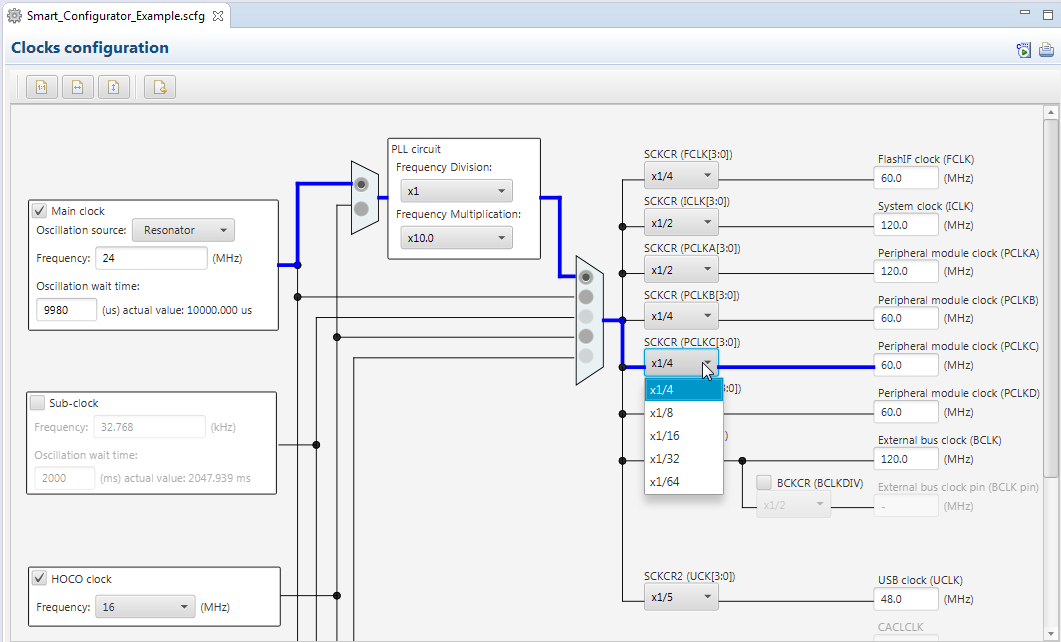
You can make clock settings by selecting a clock source and making connections in the block diagram in the [Clocks configuration] window.
Component settings
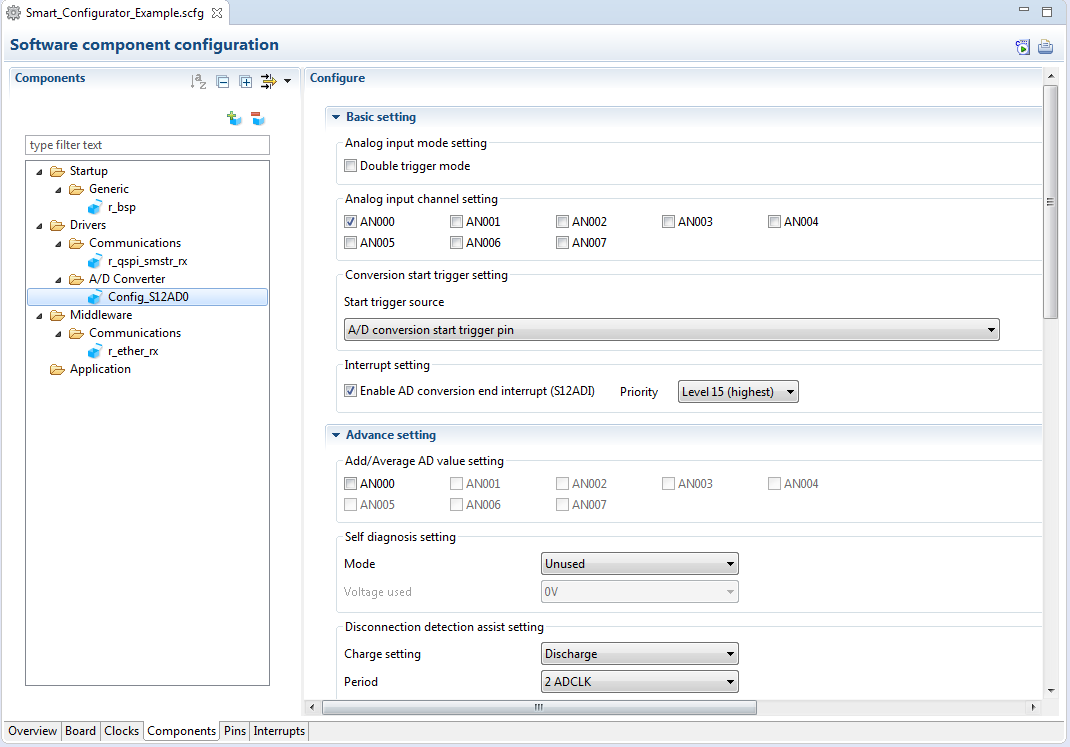
In the [Software component configuration] window, you can embed sample code and make settings for peripheral modules. After selecting the module you wish to set up for use, you can check for errors in settings (with some types indicated on the display) or switch the channels for use by drivers of multi-channel modules.
Pin Settings
The assignments of pins can be set up through a GUI, which also checks and offers solutions for cases of contention for the same pin by multiplexed functions.
The [Pins Configuration] window (displayed per peripheral module)
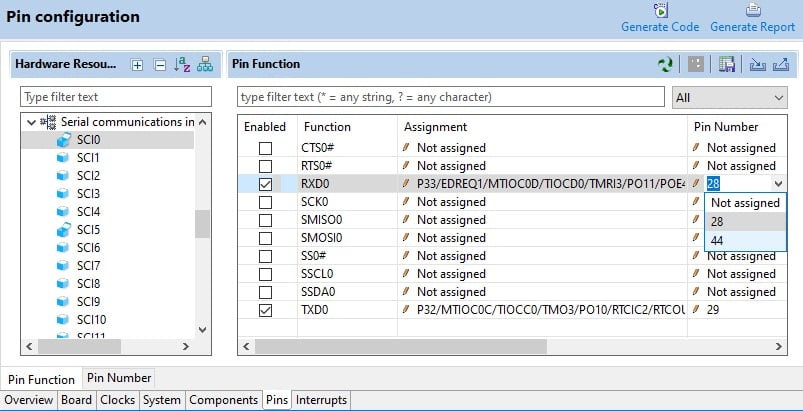
Specifying a peripheral module in the [Pins Configuration] window displays the pin functions for use by the module and allows you to set the assignment of the functions to pins.
[MCU Package] window
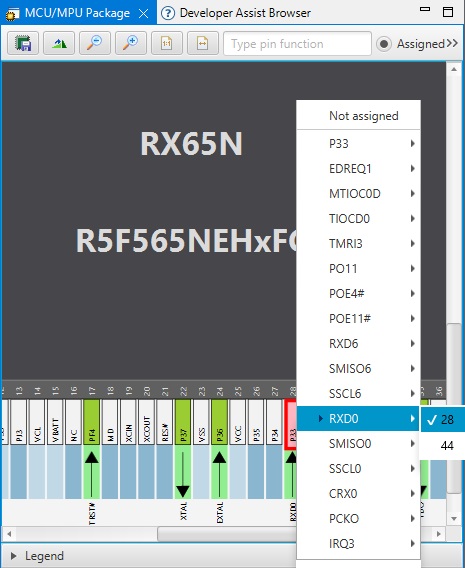
The [MCU Package] window displays a symbolic view of the pins, indicating by colors which pins are and are not in use, which have been assigned contending multiplexed functions, and so on. This makes it easy to check the overall situation.
Automatic resolution of contention between pin functions
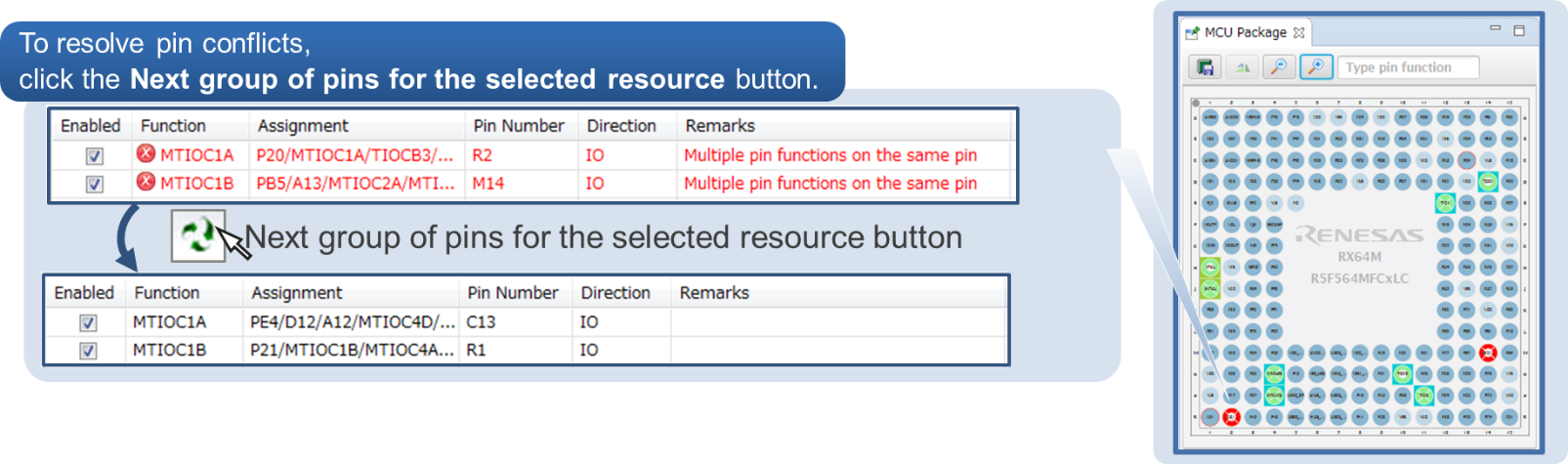
In cases of contention for a pin, clicking on the pin brings up a list allowing automatic changing of the assignment of the pin to resolve the contention.
How to migrate from Code Generator project to Smart Configurator project
Please refer to the following video for more information on code generation project migration.
How To Migrate From Code Generator Project to Smart Configurator Project
Support
Support Communities
- RX Smart Configurator FIT Module Ticks
Hello colleagues. Is there a driver for ticks in the Smart Configurator?Preferably in ms.After all, there is also a R_BSP_SoftwareDelay();Or should I program a timer myself? Best regards,Roger
Oct 21, 2024 - RX72M smart configurator 并口配置问题
RX72M smart configurator 配置报错是什么原因
Aug 23, 2021 - Compiler error after I Load the files generated by "RX Smart Configurator" into IAR Embedded Workbench for RX
... RX Smart Configurator" into IAR Embedded Workbench for RX: Fatal Error[Pe1696]: cannot open source file "platform.h" Tools used: IAR embedded workbench for renesas rx 4.14.1 Renesas Smart Configurator Version: 2.5.0 Steps I followed: 1] Used "RX Smart Configurator" to auto-generate files (containing driver ...
May 2, 2020
Knowledge Base
- RX Smart Configurator has FIT and Code Generation types. How should I use them differently?
Last Updated: 06/30/2026 Question:RX Smart Configurator has FIT and Code Generation types. How should I use them differently? Answer:RX Family Development Environment Software FIT Software Modules Peripheral functions are set up with smart configurator components, but there are FIT types and code generation types ...
Jun 30, 2026 - I2C communications by using the I2C master mode component (SCI) in RX Smart Configurator
#include "r_smc_entry.h"static uint8_t tx_buf[10] = "0123456789";volatile static uint8_t tx_flg;void main(void);void transmit_complete(void);void main(void){ /* Start I2C Communication (Enable Interrupt) */ R_Config_SCI0_Start(); /* Send I2C Data */ tx_flg = 0u; R_Config ...
May 14, 2024 - Error Handling When Using RIIC Master Mode in RX Smart Configurator
... callbacks function only. Error recovery logic must be implemented by the application. Related FAQ:I2C communications by using the I2C master mode component (RIIC) in RX Smart Configurator | Renesas Customer Hub Related Video:How to Set Up I2C Communication Using the RX Smart Configurator | Renesas Suitable ProductsRX日本 ...
Apr 20, 2026

Support Communities

