
Overview
Description
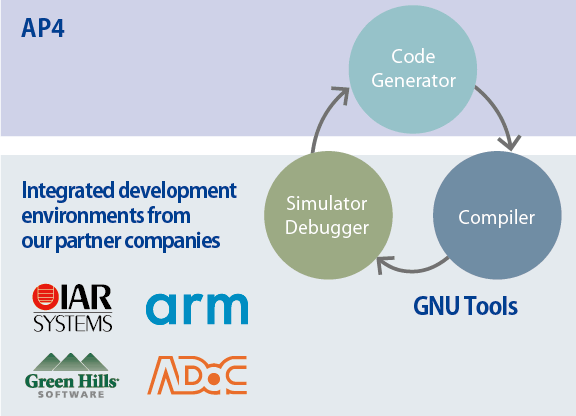
An AP4 and Applilet is a standalone tool for automatically generating control programs (device driver programs) for peripheral modules in accordance with user settings. You can select the type of build tool (compiler). The control programs generated for the peripheral modules by the AP4 or Applilet are intended to suit the selected build tool.
Source code can also be generated for the IAR Embedded Workbench from IAR Systems and for MULTI® (support for RH850 and V850 family) from Green Hills Software and for the Development Studio (DS-5™; support for RZ family) from Arm® Limited.
Important: A Note to Users of the AP4 for RX: We recommend that you consider migrating to the Smart Configurator, as it supports the following three functions: importing middleware in the form of FIT modules, generating driver code, and setting pins from the AP4
The Code Generator plug-in is useful in conjunction with the GNU tools or Renesas compiler packages.
Features
- Standalone coding assistance tool
- Control programs generated for the peripheral modules suit the selected build tool (compiler).
- Simple operation by an easy-to-follow GUI
- Includes a feature to check for contention by peripheral modules for pins
- Supplies functions for operating peripheral modules in the form of an API
- Learn More
Release Information
Details of upgrade (See Tool News)
Target Devices
Downloads
|
|
|
|
|---|---|---|
| Type | Title | Date |
| Software & Tools - Software | AP4 for RL78 V1.23.0
|
|
| Software & Tools - Software | Applilet3 for RL78 V1.26.0
|
|
| Software & Tools - Software | AP4 for RL78 V1.21.0
|
|
| Software & Tools - Software | AP4 for RZ V1.11.0 Attachment
|
|
| Software & Tools - Other | AP4 for RH850 V1.05.00
|
|
5 items
|
||
Documentation
|
|
|
|
|---|---|---|
| Type | Title | Date |
| Release Note |
PDF
2.56 MB
日本語
This document describes support features and important notes for using the RL78 Code Generator, which automatically generates initial configuration programs for microcontrollers. It lists supported RL78 microcontrollers, changes, limitations, and precautions. Please read it before using the tool.
|
|
| Tool News - Note | PDF 232 KB 日本語 | |
| Release Note | PDF 1.64 MB 日本語 | |
| Manual - Development Tools | PDF 7.07 MB 日本語 | |
| Tool News - Note | PDF 183 KB 日本語 | |
| Tool News - Release | PDF 187 KB 日本語 | |
| Release Note | PDF 1.06 MB 日本語 | |
| Tool News - Note | PDF 168 KB 日本語 | |
| Tool News - Note | PDF 105 KB 日本語 | |
| Tool News - Release | PDF 87 KB 日本語 | |
| Release Note | PDF 708 KB 日本語 | |
| Release Note | PDF 438 KB 日本語 | |
| Tool News - Note | PDF 130 KB 日本語 | |
| Tool News - Release | PDF 98 KB 日本語 | |
| Manual - Development Tools | PDF 1.21 MB 日本語 | |
| Tool News - Release | PDF 146 KB 日本語 | |
| Tool News - Release | PDF 138 KB 日本語 | |
| Tool News - Note | PDF 227 KB 日本語 | |
| Tool News - Release | PDF 91 KB 日本語 | |
| Tool News - Note | PDF 181 KB 日本語 | |
| Tool News - Note | PDF 94 KB 日本語 | |
| Tool News - Release | PDF 101 KB 日本語 | |
| Tool News - Note | PDF 418 KB 日本語 | |
| Tool News - Release | PDF 134 KB 日本語 | |
| Release Note | PDF 271 KB 日本語 | |
| Tool News - Release | PDF 99 KB 日本語 | |
| Tool News - Release | PDF 105 KB 日本語 | |
| Tool News - Note | PDF 98 KB 日本語 | |
| Tool News - Release | PDF 103 KB 日本語 | |
| Tool News - Release | PDF 101 KB 日本語 | |
| Tool News - Note | PDF 142 KB 日本語 | |
| Tool News - Release | PDF 75 KB 日本語 | |
| Tool News - Release | PDF 73 KB 日本語 | |
| Tool News - Note | PDF 96 KB 日本語 | |
| Tool News - Note | PDF 205 KB 日本語 | |
| Tool News - Note | PDF 218 KB 日本語 | |
| Tool News - Note | PDF 116 KB 日本語 | |
| Tool News - Release | PDF 99 KB 日本語 | |
| Tool News - Release | PDF 95 KB 日本語 | |
| Manual - Development Tools | PDF 1.86 MB 日本語 | |
| Tool News - Release | PDF 95 KB 日本語 | |
| Tool News - Release | PDF 88 KB 日本語 | |
| Tool News - Release | PDF 117 KB 日本語 | |
| Tool News - Release | PDF 151 KB 日本語 | |
| Tool News - Release | PDF 124 KB 日本語 | |
| Tool News - Note | PDF 55 KB 日本語 | |
| Manual - Development Tools | PDF 1.08 MB 日本語 | |
| Tool News - Note | PDF 60 KB 日本語 | |
| Tool News - Note | PDF 62 KB 日本語 | |
| Tool News - Note | PDF 204 KB 日本語 | |
| Tool News - Note | PDF 247 KB 日本語 | |
| Tool News - Release | PDF 326 KB 日本語 | |
| Tool News - Note | PDF 210 KB 日本語 | |
| Tool News - Release | PDF 259 KB 日本語 | |
| Tool News - Release | PDF 262 KB 日本語 | |
| Tool News - Release | PDF 260 KB 日本語 | |
| Tool News - Note | PDF 207 KB 日本語 | |
| Tool News - Note | PDF 204 KB 日本語 | |
| Tool News - Release | PDF 322 KB 日本語 | |
| Tool News - Release | PDF 315 KB 日本語 | |
| Tool News - Release | PDF 378 KB 日本語 | |
| Tool News - Note | PDF 274 KB | |
| Tool News - Release | PDF 380 KB | |
| Tool News - Release | PDF 368 KB | |
| Tool News - Release | PDF 551 KB | |
| Tool News - Note | PDF 201 KB | |
| Tool News - Note | PDF 202 KB | |
| Tool News - Release | PDF 313 KB | |
| Tool News - Release | PDF 314 KB | |
| Tool News - Note | PDF 202 KB | |
| Tool News - Note | PDF 204 KB | |
| Tool News - Release | PDF 315 KB | |
| Tool News - Release | PDF 372 KB | |
| Tool News - Release | PDF 371 KB | |
| Tool News - Release | PDF 261 KB | |
| Tool News - Release | PDF 312 KB | |
| Tool News - Release | PDF 312 KB | |
| Tool News - Release | PDF 418 KB | |
| Tool News - Release | PDF 368 KB | |
| Tool News - Note | PDF 202 KB | |
| Tool News - Note | PDF 202 KB | |
| Tool News - Release | PDF 415 KB | |
| Tool News - Release | PDF 314 KB | |
| Tool News - Note | PDF 205 KB | |
| Tool News - Note | PDF 203 KB | |
| Tool News - Note | PDF 203 KB | |
|
86 items
|
||
Videos & Training
This video shows how to use AP4 in IAR Embedded Workbench for RL78.
Additional Details
Product Lineup
| MCU | Product Name | Latest Ver. Released | ||
|---|---|---|---|---|
| Family | Series | Group | ||
| RZ | RZ/T | RZ/T1 | AP4 for RZ | V1.10.00 Oct 06, 2020 |
| RH850 | RH850/E1x | RH850/E1M-S, RH850/E1L | AP4 for RH850 (Please contact us.) | V1.02.00 Jan 22, 2018 |
| RH850/F1x | RH850/F1K | AP4 for RH850 | V1.05.00 Jul 20, 2018 | |
| RL78 | RL78/F1x | RL78/F1E | AP4 for RL78 | V1.21.00 Jan 20, 2022 |
| RL78/G1x | RL78/G10, RL78/G11, RL78/G1C, RL78/G1D, RL78/G1E, RL78/G1F, RL78/G1G, RL78/G1H | |||
| RL78/H1x | RL78/H1D | |||
| RL78/I1x | RL78/I1C, RL78/I1D, RL78/I1E | |||
| RL78/L1x | RL78/L13, RL78/L1A, RL78/L1C | |||
| RL78/D1x | RL78/D1A | Applilet3 for RL78 | V1.26.00 Jan 20, 2026 | |
| RL78/F1x | RL78/F12, RL78/F13, RL78/F14, RL78/F15 | |||
| RL78/G1x | RL78/G1A, RL78/G12, RL78/G13, RL78/G13A, RL78/G14 | |||
| RL78/I1x | RL78/I1A | |||
| RL78/L1x | RL78/L12 | |||
| V850 | V850ES/Jx | V850ES/Jx3, V850ES/Jx3-E, V850ES/Jx3-H, V850ES/Jx3-L | Applilet3 for V850 | V1.01.00 Apr 6, 2015 |
| V850E/Sx | V850E/Sx3-H | |||
| 78K | 78K0/Ix | 78K0/Ix2 | Applilet3 for 78K | V1.02.00 Apr 6, 2015 |
| 78K0/Kx | 78K0/Kx2-L | |||
| 78K0R/Fx | 78K0R/Fx3 | |||
| 78K0R/Ix | 78K0R/Ix3 | |||
| 78K0R/Kx | 78K0R/Kx3, 78K0R/Kx3-A, 78K0R/Kx3-L | |||
| 78K0R/Lx | 78K0R/Lx3 | |||
| V850 | V850ES/Fx | V850ES/Fx3 | Applilet2 for V850ES/Fx3 | V2.43 Oct 10, 2012 |
| V850ES/Sx | V850ES/Sx3 | Applilet2 for V850ES/Sx3 | V2.41 Oct 18, 2012 | |
| 78K | 78K0/Fx | 78K0/Fx2 | Applilet2 for 78K0/Fx2 | V2.42 Oct 18, 2012 |
| 78K0/Kx | 78K0/Kx2 | Applilet2 for 78K0/Kx2 | V2.42 Oct 18, 2012 | |
| 78K0/Lx2 | 78K0/Lx2 | Applilet2 for 78K0/Lx2 (Note2) | V2.41 Oct 18, 2012 | |
| 78K0/Lx3 | Applilet2 for 78K0/Lx3 | V2.41 Oct 18, 2012 | ||
| 78K0S/Kx | 78K0S/Kx1+ | Applilet2 for 78K0S/Kx1+ | V2.41 Oct 18, 2012 | |
Notes
- The Smart Configurator supports these devices of the RX Family. We recommend using the Smart Configurator for new development.
Regarding the Smart Configurator >> - Discontinued products. Technical support is available.
Support
Support Communities
- Using I2C / IIC API code from AP4 / Applilet / Code Generator for RL78... only getting first clock
Overall I've been loving the AP4 Code Generator from Renesas for the RL78 (except for the billion possible names for the tool, not to mention I2C versus IIC, makes internet searches hard), but I'm having a problem getting I2C to work on my RL78 project and I've ...
Apr 1, 2016 - programming RL78/G14
hello, i am not very experienced with embedded systems. i worked with stm32f4 before but keil pretty much did all the initial clock settings, adding libraries and things like that. Now i have R5F104GEDFB in my hand and i need to program it . I setup iar with kick-starter license ...
Sep 25, 2018 - RL78/G14 SPI
How to read and write sensor data via CSI01(SPI) data in RL78/G14. Please provide example code of SPI communication with same MCU. I am trying to interface BMP280 sensor with R5F104LG. Thanks.
Jun 24, 2023
Knowledge Base
- Failure to generate a stop condition when using simple I2C in RL78 code generation
Observe the following timing requirement when writing 1 to the CKOmn bit in the flow chart for stop condition generation in simple I2C:Timing that satisfies the SCL low width standard of the I2C busSee section 12.8.4, Stop condition generation, in RL78/G13 User’s Manual: Hardware ...
May 24, 2017 - Output the API for the source code using a code generator
... Preview] by following the instructions here. *2: The above screen shot is from CS+, but you can set the source code output for e² studio, AP4, and Applilet3 in the same way. 2. The API function set by the instructions in the above step has been set to output the ...
May 17, 2017

Support Communities


