
Overview
Description
To respond to the rapid development of Renesas devices (CPU), Renesas provides the "Device File Updater" for the Renesas IDE, High-performance Embedded Workshop.
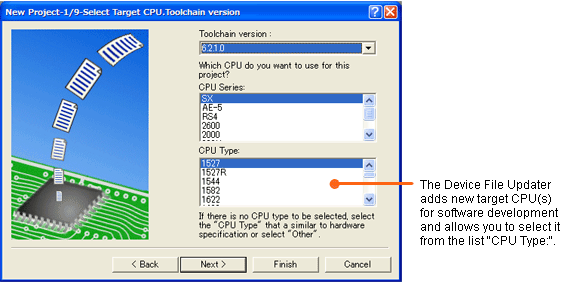
The Device File Updater is the program that adds new devices (CPU) to the target CPU type select list(Note1) of the High-performance Embedded Workshop.
Note
- The CPU type select list appears when you create a new project workspace (see below figure).
Release Information
- The latest programs can be downloaded from the Download site.
- For details about the release information, see Tool News.
- For details about the added CPUs, please refer to The Product Versions and the Added CPU Types (PDF | English, 日本語) below.
Target Devices
Additional Details
Product Linup
The Device File Updater is released depending on the compiler package for High-performance Embedded Workshop :
- Device File Updater for C/C++ Compiler Package for SuperH Family
- Device File Updater for C/C++ Compiler Package for RX Family
- Device File Updater for C Compiler Package for R32C Series
- Device File Updater for C Compiler Package for M16C Series and R8C Family [M3T-NC30WA]
- Device File Updater for C/C++ Compiler Package for H8SX, H8S, H8 Family
Conditions of Use
[Compiler Packages]
If you use the following version of the compiler packages, the added CPUs in the Device File Updater can be selected from the "CPU Type" list when you are creating a new project workspace.
- C/C++ Compiler Package for SuperH Family V.9.00 Release 00 or later (Note1)
- C/C++ Compiler Package for RX Family V.1.01 Release 00 or later
- C Compiler Package for R32C Series V.1.01 Release 00 or later
- C Compiler Package for M16C Series and R8C Family [M3T-NC30WA] V.5.42 Release 00 or later (Note2)
- C/C++ Compiler Package for H8SX, H8S, H8 Family V.6.02 Release 00 or later
Notes
- If the C/C++ Compiler Package for SuperH Family V.9.03 Release 02 or later has not been installed in your PC, the Device File Updater cannot be downloaded. It is required that you install the latest compiler package in advance to download the Device File Updater. Even if the latest version of the compiler package is installed, the previous version is not deleted, so you can use the latest and the previous versions of it in High-performance Embedded Workshop. When downloading the Device File Updater under this environment, the added CPUs in the Device File Updater can be selected in all versions of the C/C++ Compiler Package for SuperH Family V.9.00 Release 00 or later.
- If the C Compiler Package for M16C Series and R8C Family [M3T-NC30WA] V.5.45 Release 00 or later has not been installed in your PC, the Device File Updater cannot be downloaded. It is required that you install the latest compiler package in advance to download the Device File Updater. Even if the latest version of the compiler package is installed, the previous version is not deleted, so you can use the latest and the previous versions of it in High-performance Embedded Workshop. When downloading the Device File Updater under this environment, the added CPUs in the Device File Updater can be selected in all versions of the C Compiler Package for M16C Series and R8C Family [M3T-NC30WA] V.5.42 Release 00 or later.
[Integrated Development Environment (IDE)]
Support
Support Communities
- Specify Section Address in new V6.00R00 Compiler
... it also requires the address of each section (or range of sections) to be specified. How do I tell the linker to use the addresses I specify in my assembler source file (i.e. the sect30.inc file) without having to repeat them on the linker command line ?Cheers - Geert
Jun 20, 2012 - 38c group
How can i create new project for 38c group?? There is no option for 38c group.. or i have to select other in group list to create new project for that group??
Jun 4, 2012 - data flash driver application note (M3S-DATFA)
I'm looking for M3S-DATFA application note i need to work on the same kind if any one has the same, please share it with me.Thanks and regards.
Sep 21, 2011
Knowledge Base
- How to connect to E1/E20 Emulator with RX High-Performance Embedded Workshop
... updated. MCUs that do not support the following software cannot be used in HEW. RX E1/E20 Emulator debugger V.1.03.00 MCU Files Updater for RX E1/E20 Emulator Debugger Note that E1USBDRIVER.exe below only contains a USB driver. Renesas E-Series USB Driver V ...
Feb 26, 2021

Support Communities

