
Overview
Description
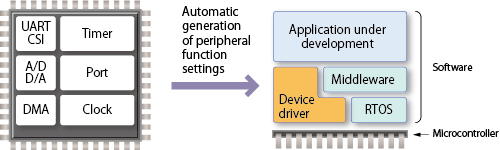
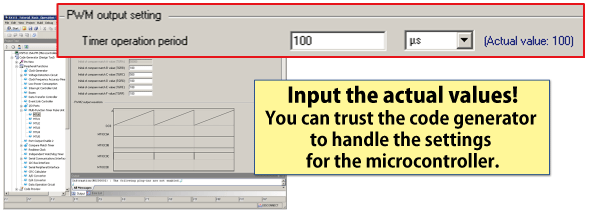
The code generator plug-in can automatically generate control programs for peripheral modules (device driver programs). By generating needed source code in accordance with user settings, the plug-in shortens development terms and dramatically reduces costs.
Important: A Note to Users of the Code Generator Plug-in for RX and the RL78/G23 group: We recommend that you consider migrating to the Smart Configurator, as it supports the following three functions: importing middleware in the form of FIT modules, generating driver code, and setting pins from the Code Generator Plug-in.
Features
- Simple operation of all processes through an easy-to-understand GUI
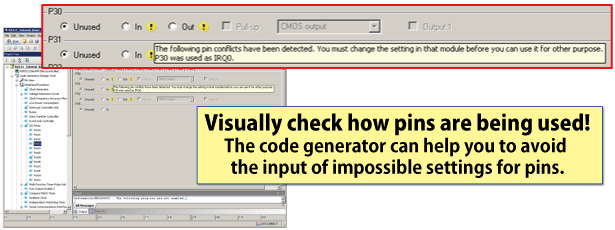
- Handles checking for cases where multiple peripheral modules are contending for the same pins
- An API provides functions to make the peripheral functions operate
- Since this tool is included in the CS+ and e² studio integrated development environments from Renesas, all processes from editing and building code to debugging can be smoothly executed from the same integrated environment
- Many application notes and sample code [Learn More]
- Learn More
Release Information
CS+ Code Generator:
- RL78 (CS+ for CA,CX)
- RL78 (CS+ for CC)
- RX (Some RX200 and RX600 Series MCUs are supported by Peripheral Driver Generator (a free tool), which operates independently of the integrated development environment.)
- RH850
- V850
- 78K
Details of upgrade (See Tool News)
FAQ
| Title |
|---|
| About Code Generator Plug-in setting when MCU is changed in CS+ or e² studio |
| Option Byte Setting in Code Generator Plug-in for RL78 |
| Decimal Point/Digit Grouping Separator in Code Generator Plug-in |
Target Devices
Design & Development
Additional Details
Microcontrollers for Code Generation
| Target Device | IDE | |||
|---|---|---|---|---|
| MCU | Series | Group | CS+ | e² studio |
| RL78 | RL78/F1x | RL78/F12, RL78/F13, RL78/F14, RL78/F15, RL78/F1E | lens | lens |
| RL78/G1x | RL78/G10, RL78/G11, RL78/G12, RL78/G13, RL78/G13A, RL78/G14, RL78/G1A, RL78/G1C, RL78/G1D, RL78/G1E, RL78/G1F, RL78/G1G, RL78/G1H | |||
| RL78/H1x | RL78/H1D | |||
| RL78/I1x | RL78/I1A, RL78/I1C, RL78/I1D, RL78/I1E | |||
| RL78/L1x | RL78/L12, RL78/L13, RL78/L1A, RL78/L1C | |||
| RX | RX100 | RX110 (Note1), RX111 (Note1), RX113 (Note1), RX130 (Note1) | lens | lens |
| RX200 | RX230 (Note1), RX231 (Note1), RX23T (Note1), RX24T (Note1), RX24U (Note1) | |||
| RX600 | RX64M (Note1), RX651 (Note1), RX65N (Note1) | |||
| RX700 | RX71M (Note1) | |||
| RZ | RZ/T | RZ/T1 | — | lens |
| RH850 | RH850/E1x | RH850/E1M-S (Please contact us.), RH850/E1L (Please contact us.) | lens | — |
| RH850/F1x | RH850/F1K | lens | — | |
| 78K0R | 78K0R/Kx | 78K0R/Kx3, 78K0R/Kx3-A, 78K0R/Kx3-L | lens | — |
| 78K0R/Lx | 78K0R/Lx3 | |||
| 78K0R/Ix | 78K0R/Ix3 | |||
| 78K0R/Fx | 78K0R/Fx3 | |||
| 78K0 | 78K0/Kx | 78K0/Kx2-L | ||
| 78K0/Ix | 78K0/Ix2 | |||
| V850 | V850E/Sx | V850E/Sx3-H | ||
| V850ES/Jx | V850ES/Jx3, V850ES/Jx3-L, V850ES/Jx3-H, V850ES/Jx3-E | |||
lens Available | — Not Available
Note
- You cannot use the code generator plug-in when creating a new project for devices of this group with CS+ or the e² studio since they are supported by the Smart Configurator.
Regarding the Smart Configurator >>
Support
Support Communities
- Inquiries regarding the use of Code Generator
When I create a C project with rx64m target in e2 studio, There is a "Code Generator not in registrered" warning as shown below and it is not selected. Please let me know what to do.
Dec 28, 2023 - R7F701441 code generator is not active...
Dear All. I use RH850/D1M1A. But I cannot find how to generate driver's code for RH850/D1M1A on code generator(CS+) and Smart configurator. Thank you for your help....
Jun 13, 2020 - P40/tool0 pin as GPIO in RL78
... tool0 pin as GPIO. i have configured it as output in code generator. my hardware was already designed and it working fine with my previous code in which p40 pin used as output. i want to write new code for same hardware. i have also not use debug mode in ...
Jul 21, 2018
Knowledge Base
- Decimal Point/Digit Grouping Separator in Code Generator Plug-in
For error-free operation of the code generator plug-in, use a period (”.”) as the decimal point and a comma (”,”) as the digit grouping separator.Which of ”.” (period), ”,” (comma) or ”, ” (space) is used as the decimal point or digit grouping separator differs depending on the language setting of the Windows ...
Jul 12, 2019 - About Code Generator Plug-in setting when MCU is changed in CS+ or e² studio
When only the ROM/RAM size of an MCU is changed, the Code Generator Plug-in settings are inherited.When the type or the number of pins of an MCU is changed, the Code Generator Plug-in settings are initialized without being inherited because the peripheral function or pin ...
Aug 2, 2017 - Deleting creation date in source code in Code Generator Plug-in
You can set “Creation Date” in the property of Code Generator Plug-in. By selecting “Not Create” for this setting, “Creation Date:” in source codes becomes blank and is not output.“Create” a creation date(example)/******************************************************************* File Name : r_main.c* Version : CodeGenerator for RL78/G13 V2.03 ...
Aug 2, 2017

Support Communities

