
Overview
Description
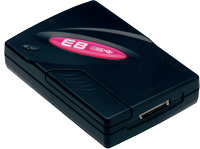
Reasonably priced and packed with special features, E8 products fully support speedy market-entry for the low-cost R8C/Tiny System products. Not only sophisticated various debug features, E8 offers flash memory programming features. [Learn More]
Release Information
E8 Emulator Software
- Latest Ver.: V.2.12 Release 00
- Released: Mar 19, 2009
- Details of upgrade (See Tool News)
- Operating Environment (See E8 Emulator R0E000080KCE00 User's Manual (PDF | English, 日本語))
Target Devices
Downloads
|
|
|
|
|---|---|---|
| Type | Title | Date |
| Upgrade - IDE | High-performance Embedded Workshop V.4.09.01 Differential Update(From V.4.09.00)
|
|
| Upgrade - IDE | High-performance Embedded Workshop V.4.09.01 Full Update
|
|
| Software & Tools - Evaluation Software | [Evaluation Software] C/C++ Compiler Package for M16C Series and R8C Family M3T-NC30WA V.6.00 Release 00
|
|
| Software & Tools - Evaluation Software | [Evaluation Software] C Compiler Package for M16C Series and R8C Family M3T-NC30WA V.5.45 Release 01
|
|
| Software & Tools - Evaluation Software | [Evaluation Software] C Compiler Package for M32C Series M3T-NC308WA V.5.42 Release 00
|
|
| Software & Tools - Evaluation Software | [Evaluation Software] C/C++ Compiler Package for H8SX,H8S,H8 Family V.7.00 Release 00
|
|
| Upgrade - Debugger | E8 Emulator Software V.2.12 Release 00 for M16C, H8 Upgrade (Debugger package version)
|
|
| Upgrade - Debugger | E8 Emulator Software V.2.11 Release 00 for M16C, H8 Upgrade (Full package)
|
|
| Software & Tools - Evaluation Software | [Evaluation Software] Flash Development Toolkit V.3.07 Release 04
|
|
9 items
|
||
Documentation
|
|
|
|
|---|---|---|
| Type | Title | Date |
| Tool News - Note | PDF 203 KB 日本語 | |
| Tool News - Release | PDF 194 KB 日本語 | |
| Tool News - Release | PDF 195 KB 日本語 | |
| Manual - Development Tools | PDF 330 KB 日本語 | |
| Tool News - Note | PDF 195 KB 日本語 | |
| Tool News - Release | PDF 198 KB 日本語 | |
| Manual - Development Tools | PDF 329 KB 日本語 | |
| Manual - Development Tools | PDF 338 KB 日本語 | |
| Manual - Development Tools | PDF 343 KB 日本語 | |
| Manual - Development Tools | PDF 1.17 MB 日本語 | |
| Manual - Development Tools | PDF 967 KB 日本語 | |
| Manual - Development Tools | PDF 967 KB 日本語 | |
| Manual - Development Tools | PDF 931 KB 日本語 | |
| Application Note |
PDF
1.71 MB
日本語
AI-generated Summary:
The E8 emulator programs on-chip flash memory of H8/300H Tiny-series microcomputers by erasing existing data and writing user program data. It operates in programmer mode without debugging capabilities. Users must register load modules in the workspace. Software setup involves installing the E8 emulator software, High-performance Embedded Workshop, and a compatible C/C++ compiler. The document details activating the workshop, opening workspaces, viewing memory maps, and programming flash memory using the emulator connected via USB.
|
|
| Application Note |
PDF
365 KB
日本語
AI-generated Summary:
The document explains the usage of C++ language features with the SuperH RISC engine C/C++ compiler V.9, focusing on global class object initialization and post-processing. It emphasizes the necessity of calling _CALL_INIT before main and _CALL_END after main to properly invoke constructors and destructors of global objects. It provides code examples for implementing this process, especially within embedded applications, and highlights the behavior differences when these calls are omitted.
|
|
| Application Note |
PDF
2.37 MB
日本語
AI-generated Summary:
This document provides important usage guidelines and disclaimers for Renesas products, emphasizing that the information is for reference only and subject to change. It restricts use in military and life-critical applications, highlights the need to operate within specified product ranges, and advises implementing safety measures to prevent failures. Liability disclaimers and export control compliance are also detailed.
|
|
| Tool News - Release | PDF 199 KB 日本語 | |
| Guide | PDF 1.04 MB 日本語 | |
| Guide | PDF 943 KB 日本語 | |
| Guide | PDF 944 KB 日本語 | |
| Manual - Development Tools | PDF 1.12 MB 日本語 | |
| Manual - Development Tools | PDF 1.09 MB 日本語 | |
| Manual - Development Tools | PDF 1.16 MB 日本語 | |
| Manual - Development Tools | PDF 951 KB 日本語 | |
| Manual - Development Tools | PDF 935 KB 日本語 | |
| Manual - Development Tools | PDF 939 KB 日本語 | |
| Manual - Development Tools | PDF 942 KB 日本語 | |
| Manual - Development Tools | PDF 940 KB 日本語 | |
| Manual - Development Tools | PDF 2.28 MB 日本語 | |
| Quick Start Guide | PDF 1.08 MB 日本語 | |
| Tool News - Note | PDF 196 KB 日本語 | |
| Manual - Development Tools | PDF 338 KB 日本語 | |
| Manual - Development Tools | PDF 338 KB 日本語 | |
| Manual - Development Tools | PDF 326 KB 日本語 | |
| Manual - Development Tools | PDF 334 KB 日本語 | |
| Manual - Development Tools | PDF 331 KB 日本語 | |
| Manual - Development Tools | PDF 330 KB 日本語 | |
| Manual - Development Tools | PDF 325 KB 日本語 | |
| Quick Start Guide | PDF 336 KB 日本語 | |
| Application Note |
PDF
971 KB
日本語
AI-generated Summary:
The document explains how to use the realtime RAM monitoring function in the H8SX/1651 E6000H emulator, which displays memory contents during program execution without interrupting realtime operation. It supports up to eight monitoring channels covering 256 bytes, with overlapping ranges allowed. The guide includes software installation steps, setup procedures, and operation instructions using the High-performance Embedded Workshop. It highlights limitations such as monitoring areas without internal write signals and differences in memory display methods across products.
|
|
| Tool News - Note | PDF 194 KB 日本語 | |
| Application Note |
PDF
1.54 MB
日本語
AI-generated Summary:
The document provides an introductory guide for the Renesas E8 Emulator tailored for the H8/300H Tiny microcontroller series. It includes important notes on specification changes, copyright restrictions, and trademark acknowledgments. The guide also contains a glossary explaining key terms such as CPU, MCU, LED, and development tools like HEW and RSK. It emphasizes the proprietary nature of the documentation and the right of Renesas to modify content without notice.
|
|
| Tool News - Note | PDF 196 KB 日本語 | |
| Tool News - Release | PDF 198 KB 日本語 | |
| Tool News - Note | PDF 195 KB 日本語 | |
| Tool News - Release | PDF 194 KB 日本語 | |
| Tool News - Note | PDF 197 KB 日本語 | |
| Tool News - Note | PDF 195 KB 日本語 | |
| Tool News - Release | PDF 203 KB 日本語 | |
| Tool News - Note | PDF 196 KB 日本語 | |
| Tool News - Note | PDF 196 KB 日本語 | |
| Tool News - Note | PDF 197 KB 日本語 | |
| Tool News - Release | PDF 196 KB 日本語 | |
| Tool News - Note | PDF 196 KB 日本語 | |
| Tool News - Release | PDF 193 KB 日本語 | |
| Tool News - Release | PDF 197 KB 日本語 | |
| Tool News - Note | PDF 197 KB 日本語 | |
| Tool News - Release | PDF 194 KB 日本語 | |
| Tool News - Note | PDF 194 KB 日本語 | |
| Tool News - Release | PDF 195 KB 日本語 | |
| Tool News - Release | PDF 197 KB 日本語 | |
| Tool News - Note | PDF 197 KB 日本語 | |
| Tool News - Note | PDF 194 KB 日本語 | |
| Tool News - Release | PDF 194 KB 日本語 | |
| Tool News - Note | PDF 193 KB 日本語 | |
| Tool News - Note | PDF 192 KB 日本語 | |
| Tool News - Release | PDF 193 KB 日本語 | |
| Tool News - Release | PDF 197 KB 日本語 | |
| Tool News - Note | PDF 192 KB 日本語 | |
| Tool News - Release | PDF 195 KB 日本語 | |
| Tool News - Note | PDF 194 KB 日本語 | |
| Tool News - Release | PDF 195 KB 日本語 | |
| Tool News - Release | PDF 195 KB 日本語 | |
| Tool News - Release | PDF 194 KB 日本語 | |
| Tool News - Note | PDF 195 KB 日本語 | |
| Tool News - Release | PDF 193 KB 日本語 | |
| Tool News - Release | PDF 195 KB 日本語 | |
77 items
|
||
Additional Details
Successor
For details of the migration from the E8 to the E8a, refer to "Migration from E8 to E8a" in the E8a Design Support page.
Target Devices
| Supported MCUs | Functions Availability | ||
|---|---|---|---|
| On-chip debugging | Flash memory programming | ||
| High-performance Embedded Workshop graphic interface | High-performance Embedded Workshop graphic interface | Flash Development Toolkit graphic interface | |
| Target Devices for E8 (PDF | English, 日本語) | Available MCUs' for Flash Development Toolkit (PDF | English, 日本語) | ||
| M16C Family | |||
| M32C/80 Series | lens | lens | lens |
| M16C/60 Series | lens | lens | lens |
| M16C/30 Series | lens | lens | lens |
| R8C/Tiny Series | lens | lens | lens |
| M16C/Tiny Series | lens | lens | lens |
| H8 Family | |||
| H8/300H Tiny Series | lens | lens | — |
| H8/300H Super Low Power Series | lens | lens | — |
| H8/300L Super Low Power Series | lens | lens | — |
| 740 Family | |||
| 740 Series (QzROM) | — | — | |
| 38000 Series (QzROM) | — | — | lens |
lens Available | — Not Available
Note that flash memory quick programming at the Flash Momory Writing mode included in E8 emulator is available for the M16C and H8 family microcomputers that support the on-chip debug functions in the matrix above.
Support
Support Communities
- FDT Serial Port and R8C
"Hello. I am trying to get FDT 4.09 to work with a USB to RS232 FTDI converter. FDT does not manage any of the ports (RST, DTR, etc.). I gave up!!! I wrote a Python script that controls a real COM port with a USB converter. The script ...
Apr 25, 2025 - Programmer renesas D70F3379
Dear, Programmer E8a not manage MCU renesas D70F3379? What is the programmer i can use please? Thank you.
Jun 5, 2021 - M30800FCGP Programmer?
Hi friendscan i use E8a emulator for program M16C/80 MCUs on board?if not which programmer can do this?
Jul 27, 2011
Knowledge Base
- ID code error on E1,E20,E8a,E8(discontinued product) with M16C,R8C Family MCUs
Confirm the following:Make sure the directory, file, or workspace name is composed of ASCII characters only.If the directory, file, or workspace name has multi-byte characters, the ID code may not be set correctly.Use only ASCII characters for the directory, file, or workspace name. If one of ...
Apr 26, 2017 - Dialog of asking for ID code at connection of an emulator with a MCU
... completely erased. Therefore, we recommend activating the emulator in "Erase Flash and Connect" mode.M16C and R8C Family MCUsWhen activated in:"Erase Flash and Connect" (E8a/E8(discontinued product)/E7(discontinued product) mode"Keep Flash and Connect" (E8a/E8(discontinued product)/E7(discontinued product) mode"Debugging ...
Apr 26, 2017

Support Communities


