
Overview
Description
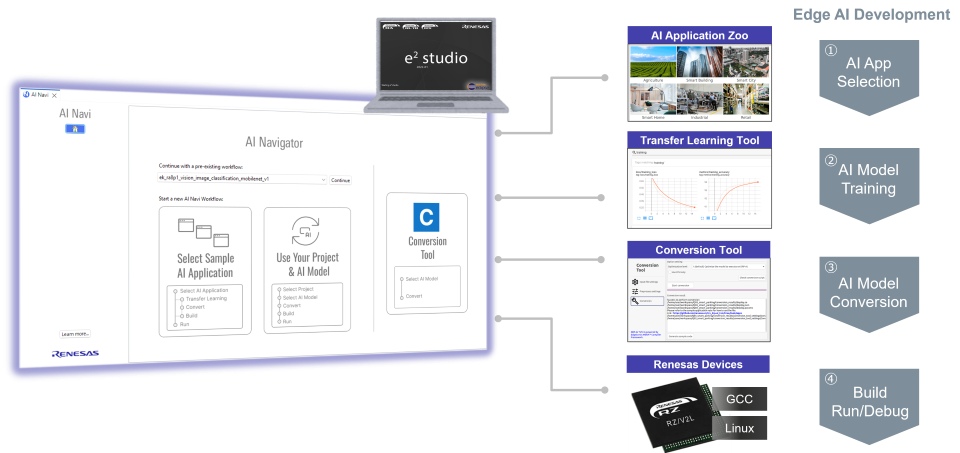
AI Navigator, which integrates the functionality required for edge AI development, can be used to shorten development time.
Please refer to the AI Navigator Quick Start Guide for the installation and basic usage.
[RA8] Quick Start Guide : in Chapter "Running RUHMI with AI Navigator" within Renesas RUHMI Framework Quick Start Guide
[RZ/V] Quick Start Guide : in RZ/V AI Web (GitHub)
Features
- Navigating through the simple development of AI applications
- Providing a variety of sample AI applications and sample AI models to shorten the periods for evaluating devices and developing applications
- Providing a transfer learning feature for the sample AI models to shorten the design processes and learning times for AI model
- Converting the AI models into executable files that are optimized for Renesas devices and making effective use of the hardware accelerator
- Learn More
Release Information
| Product Name | Latest Ver. | Released | Target Device (Note1) | Details of upgrade | Operating Environment |
|---|---|---|---|---|---|
| AI Navigator | V2.2.0 | Jun. 12, 2026 | RA Family RZ Family | See Release Note | e² studio plug-in Operating Environment |
Notes
- For details on supported MCUs and MPUs, refer to the section Target Devices.
Target Devices
Design & Development
Videos & Training
AI Navigator simplifies the process of developing and running AI applications within the e2 Studio integrated development environment.
This video demonstrates how to install AI Navigator and import and run RZ/V AI applications.
Additional Details
Features
Navigating through the simple development of AI applications
AI Navigator provides navigation through the development of AI applications via a GUI and supports the implementation of AI applications to run on Renesas devices through the shortest steps.
This tool also provides guidance on downloading and installing toolchains for use in the development of AI applications. Accordingly, you can easily construct a development environment for AI applications by installing this plugin into e² studio.
Providing a variety of AI applications and AI models
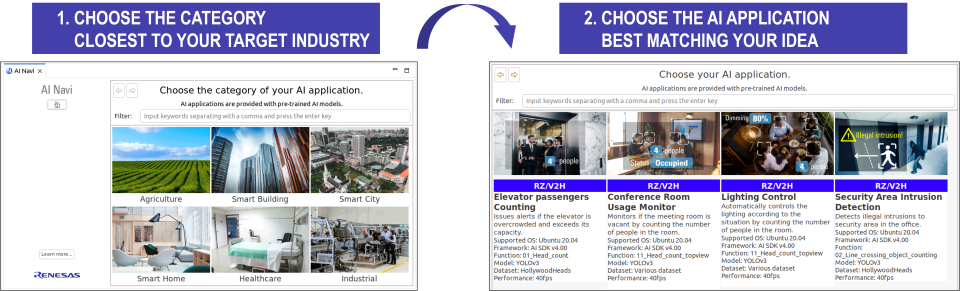
You can import a variety of AI applications provided by Renesas from the application catalog available in the GUI of AI Navigator.
Use any of the evaluation boards listed below to quickly experience examples of embedded applications employing AI and see the performance of Renesas devices.
| Supported evaluation boards | EK-RA8D1, EK-RA8P1 |
|---|---|
| RZ/V2H Evaluation Board Kit, RZ/V2L Evaluation Board Kit, RZ/V2N Evaluation Board Kit |
Shortening the periods for developing applications
The AI application also contain converted AI models which are executable on the target devices, so you can easily try AI applications on an evaluation board.
The executable AI models have been released as open source. Accordingly, you can use them with your own applications and thus shorten the periods for the development of AI models.
Providing a transfer learning feature for the AI models
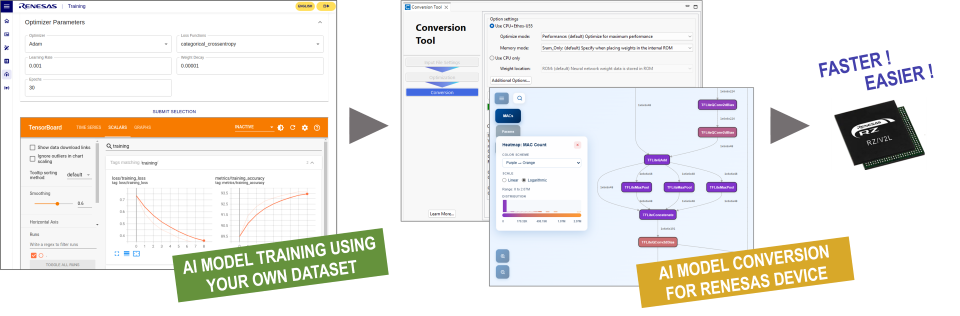
In combination with the transfer learning tool, AI Navigator provides a transfer learning feature for AI models in the AI applications with the use of desired datasets.
| AI transfer learning tool | Supported Devices | Related web page |
|---|---|---|
| RZ/V AI TLT | RZ/V2H, RZ/V2L, RZ/V2N | How to Re-train AI model (GitHub) |
Shortening the design processes and learning times for AI models
You can tune the AI models in the AI applications which have already been designed and learned to suit your purposes, thus shortening the design processes and learning times for AI models.
Converting the AI models into executable files that are optimized for Renesas devices
In combination with the AI model conversion tools provided by Renesas, a desired AI model can be converted into an executable format that takes advantage of the hardware accelerator on the target device.
The AI models converted into executable files that are optimized for Renesas devices achieve more lightweight model sizes and faster performance on inference.
| AI Model Conversion Tool | Supported Devices |
|---|---|
| RUHMI Framework | RA8 Series RZ/V2H, RZ/V2L, RZ/V2N |
Support

Support Communities

