
Overview
Description
The EK-RA8P1 evaluation kit is designed to enable users to easily evaluate the RA8P1 MCU features and develop embedded system applications using Renesas' Flexible Software Package (FSP) and e2 studio IDE. Users can utilize the rich onboard features and their choice of popular ecosystem add-ons to implement a broad range of applications, including artificial intelligence (AI) and the Internet of Things (IoT). A bundle of example projects is available for users to download and quickly evaluate key peripherals to accelerate the proof-of-concept development.
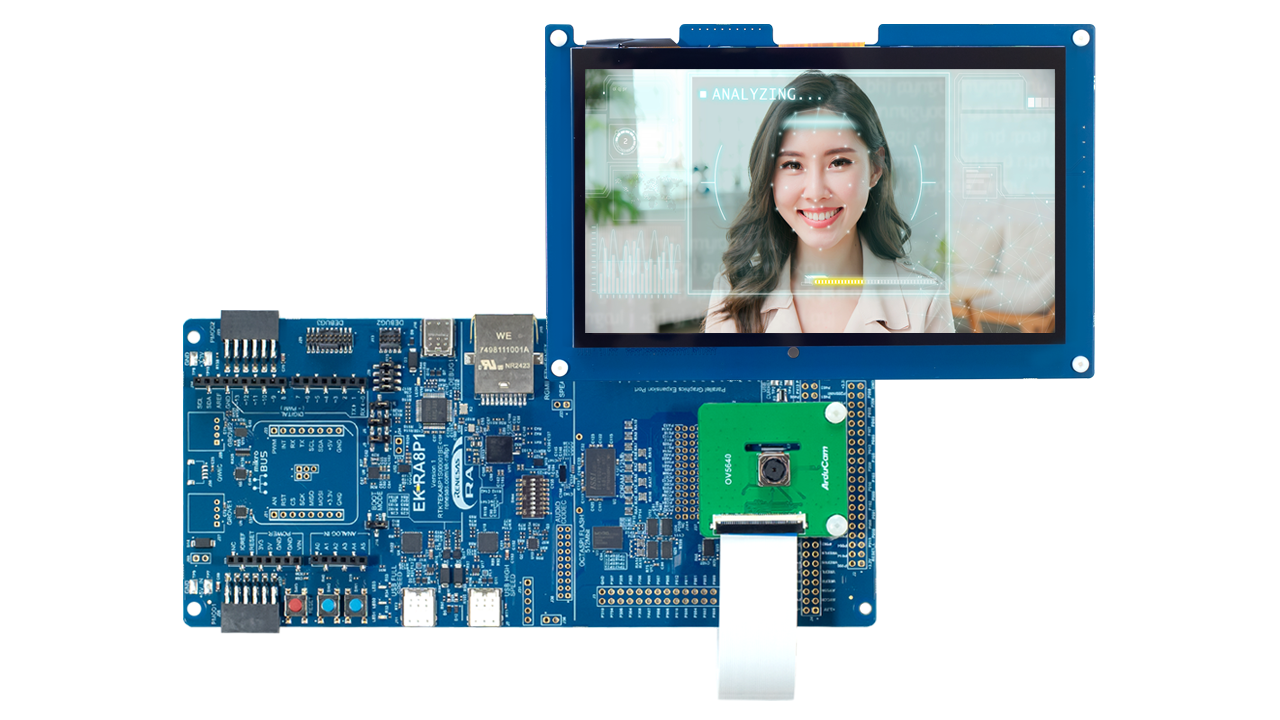
This kit is packed with a 7.0-inch, 1024x600 parallel LCD board and a 5Mpx camera module. Preloaded demonstrations that showcase the excellent performance of the RA8P1 can be found within the kit. Combine the LCD board and camera module with the EK-RA8P1 board to enable rapid voice, vision, and real-time analytics AI developments.
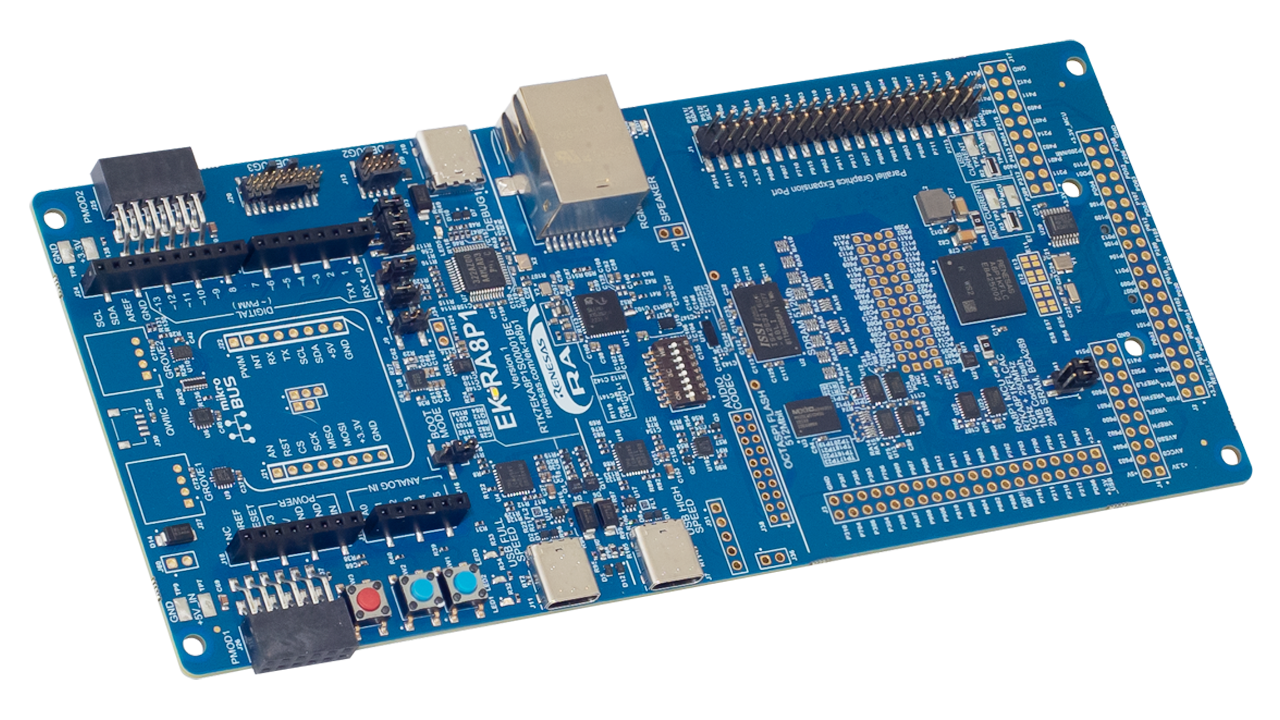
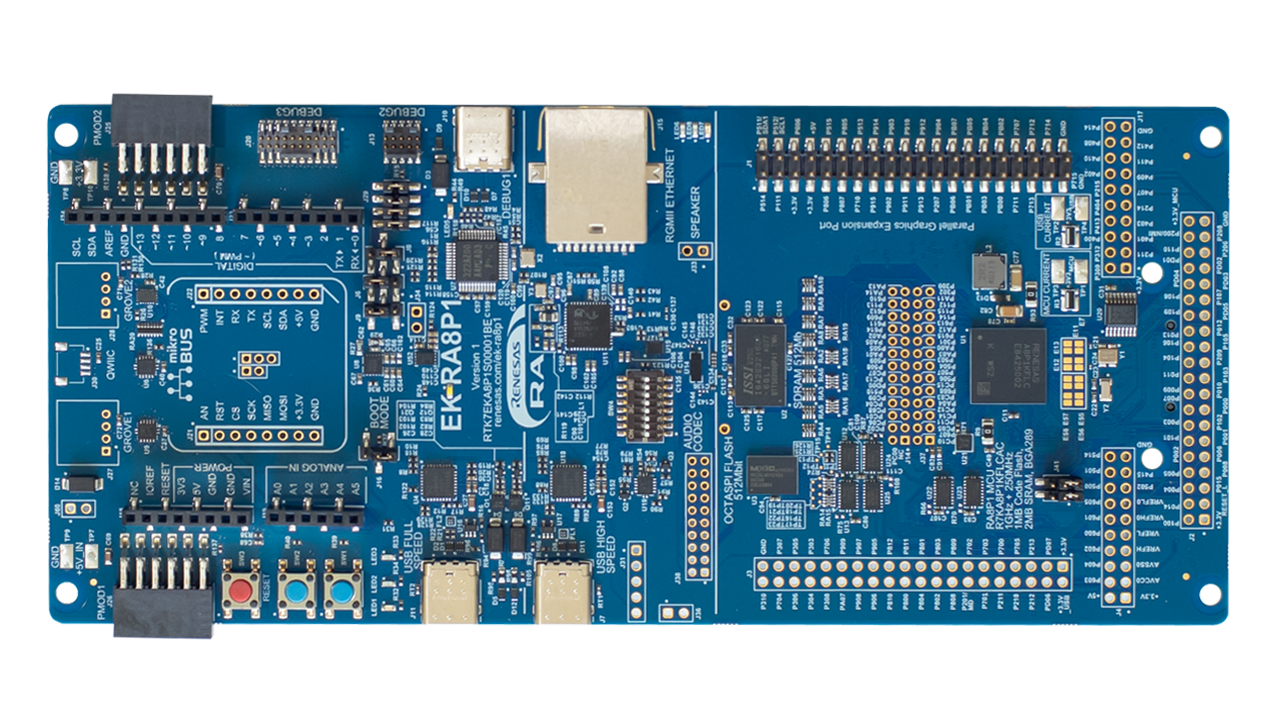
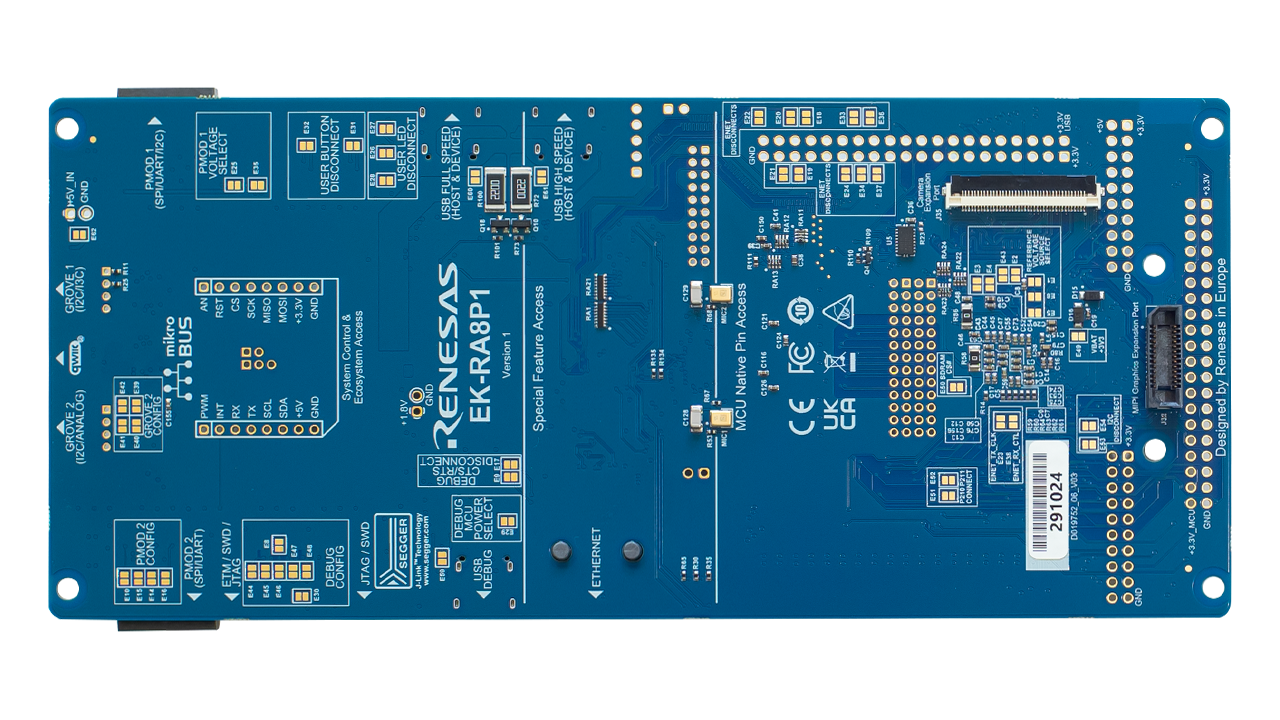
Features
- MCU Native Pin Access Area
- R7KA8P1KFLCAC MCU
- 1GHz, Arm® Cortex®-M85 core
- 250MHz, Arm Cortex-M33 core
- 1MB MRAM, 2MB SRAM with ECC
- 289 pins, BGA package, 12mm x 12mm x 1.38mm, 0.65mm pitch
- Native pin access through 2 x 20-pin, and 2 x 40-pin headers
- Camera expansion connector
- 2-lane MIPI display connector
- Parallel graphics display interface connector
- MCU current measurement
- R7KA8P1KFLCAC MCU
- Special Feature Access Area
- Ethernet (RGMII)
- USB High Speed Host and Device
- 64MB External Octo-SPI Flash
- 64MB SDRAM
- PDM MEMS microphones
- Audio codec with speaker out connections
- Ecosystem & System Control Access Area
- USB Full Speed Host and Device
- Multiple 5V input sources
- USB (Debug, Full Speed, High Speed)
- External power supply
- SEGGER J-Link™ on-board programmer and debugger
- Debug modes
- Debug on-board (SWD and JTAG)
- Debug in (ETM, SWD, SWO, and JTAG)
- Debug out (SWD, SWO, and JTAG)
- User LEDs and buttons
- Three user LEDs (red, blue, green)
- Power LED indicating availability of regulated power (white)
- Debug LED indicating the debug connection (yellow)
- Two user buttons
- One reset button
- Five most popular ecosystem expansions
- MikroElektronika™ mikroBUS connector
- SparkFun® Qwiic® connector *not populated
- Two SeeedGrove® system (I2C and Analog) connectors *not populated
- Two Digilent Pmod™ (SPI/UART/I2C) connectors
- Arduino™ (Uno R3) connector
- MCU boot configuration jumper
- MIPI Graphics Expansion Board
- 7.0 Inch backlit TFT display, 18.7M display colors
- 1024x600 pixels resolution
- Capacitive touch overlay (I2C)
- Camera Expansion Board
- Off-the-shelf Arducam CMOS OV5640 Camera Module
- ¼ Inch 5.0 Megapixel image sensor
- Up to 15fps in QXSGA (2592x1944 pixels) resolution
- Kit Contents: EK-RA8P1 board, MIPI graphics expansion board, camera expansion board, USB device cables (TypeC-to-TypeC, TypeA-to-TypeC , TypeA-to-TypeC female), Ethernet patch cable, camera FFC cable, and mounting hardware
Applications
Documentation
|
|
|
|
|---|---|---|
| Type | Title | Date |
| Manual - Development Tools |
PDF
5.63 MB
日本語
The EK-RA8P1 is a feature-rich evaluation kit built around Renesas’ high-performance RA8P1 MCU. It offers extensive connectivity, debug options, and expansion support. With built-in USB HS/FS, Ethernet, Octo-SPI Flash, SDRAM, and audio interfaces, plus compatibility with Arduino™, mikroBUS™, Pmod™, Grove®, and Qwiic® ecosystems, EK-RA8P1 empowers developers to prototype advanced embedded applications with speed and flexibility.
|
|
| Quick Start Guide | PDF 3.70 MB 日本語 | |
| PCB Design Files | EK-RA8P1 v1 - Design Package
|
|
| Manual - Development Tools |
PDF
646 KB
日本語
The Parallel Graphics Expansion Board 1 v1 features a high-resolution 7-inch capacitive touch display and 2 options for LCD connectivity, empowering developers to quickly prototype and showcase embedded applications with stunning visuals.
|
|
| Manual - Development Tools |
PDF
471 KB
日本語
Renesas RA8 MIPI Graphics Expansion Board 1 v1 adds high-resolution LCD and capacitive touch functionality to RA8 MCU evaluation kits via a 2-lane MIPI DSI interface. It features a 4.5-inch 480×854 TFT display and PWM-controlled backlight, and complies with global EMC and safety standards—ideal for embedded display applications in lab environments.
|
|
| Tool News - Release | PDF 229 KB 日本語 | |
| Application Note |
PDF
719 KB
The EK-RA8P1 example project bundle demonstrates how to write code for various Renesas Flexible Software Package (FSP) modules supported by the EK-RA8P1 kit. It includes multiple example projects that highlight peripheral usage and system functionality, while leveraging the optimized, scalable, and high‑quality FSP for embedded system design.
|
|
| Application Note |
PDF
2.30 MB
Learn more about the guidelines for implementing vision AI applications using Renesas RA8P1 MCUs with Ethos-U NPU support. It can be used as a reference for developing other vision AI applications.
|
|
| Application Note |
PDF
3.85 MB
Learn how Renesas MCU security is built around integrated security engines. The RA family includes various types, which can be identified in each MCU’s hardware manual. These engines operate in two modes: Compatibility and Protected. This application note defines both and outlines their use cases.
|
|
| Quick Start Guide |
PDF
5.58 MB
日本語
The Modbus protocol stack operates on RA evaluation boards to enable efficient development of Modbus TCP applications. This quick start guide provides an overview of the protocol stack features and introduces a Modbus sample application to assist with the development and implementation of applications using the stack.
|
|
| Application Note |
PDF
2.83 MB
Learn multicore application project creation using the MCUboot module on the Renesas EK-RA8P1 kit using FSP v6.4.0, and recreate the bootloader and link the application projects to work with the bootloader using the FSP solution project. Understand the procedures for configuring an application to work with the bootloader, and for downloading and updating a new application image.
|
|
| Application Note |
PDF
3.40 MB
Renesas RA8 Series Device Lifecycle Management (DLM) is a security and control framework unique to the RA MCU Family, built on the Arm Cortex-M85 core. DLM identifies the current phase (development, production, or deployment) of the device and controls the capabilities of the debug function, the serial programming interface, and Renesas test mode.
|
|
| Manual - Development Tools |
PDF
2.93 MB
日本語
The e² studio integrated development environment demonstrates the process of generating, building, and debugging projects designed for multicore devices in the Renesas RA Family of microcontrollers. Read “Renesas RA Family e² studio 2023-10 or Higher Quick Start Guide” before reading this document.
|
|
| Application Note |
PDF
4.16 MB
日本語
Featuring a 1GHz Arm Cortex-M85 and 250MHz Arm Cortex-M33, the RA8 dual-core MCU delivers high performance through asymmetric processing. The document explains the architecture, illustrates effective task partitioning, and provides practical use cases, demonstrating how developers can leverage both cores to optimize application throughput and responsiveness.
|
|
| Application Note |
PDF
1.44 MB
Gain an overview of the Renesas RA8 dual-core MCU family, with a particular focus on its dual-core architecture and the cache memory subsystem. It aims to help developers understand the structure, configuration, and practical usage of cache memory while developing high-performance, real-time applications on RA8 devices.
|
|
| Device Errata |
PDF
434 KB
日本語
The EK-RA8P1 v1 errata document outlines known issues and deviations from the functional specifications for the RA8P1 MCU evaluation kit. It details exceptions that may affect expected behavior and serves as a reference for developers and engineers working with this hardware.
|
|
| Application Note |
PDF
2.35 MB
Learn how to inject plaintext keys into RA MCUs using various security engines operating in Compatibility Mode. This application note details the protection of the Root of Trust, emphasizing secure key storage through hardware unique keys (HUK) and isolated cryptographic operations within the security engine. The security engines support multiple cryptographic algorithms and key handling methods, enabling secure and efficient key management.
|
|
| Application Note |
PDF
4.24 MB
Learn how to effectively interface with the boot mode on Renesas RA Family MCUs through practical examples and guidance. This application note builds on the official boot mode interface specifications (such as those for RA8M1 and RA8P1) to provide hands-on insights from both hardware and software perspectives. It helps developers understand the process of accessing boot mode on these devices, making it easier to implement and troubleshoot boot mode features in their applications.
|
|
| Application Note |
PDF
4.90 MB
The RA8 MCU has the Octal Serial Peripheral Interface (OSPI). This is the OSPI_B version of the OSPI peripheral module on the RA8 MCUs. The Decryption On-The-Fly (DOTF) peripheral on the RA8 MCUs enables secure external storage of application code or data on the OSPI memory.
|
|
| Application Note | ||
| PCB Design Files | Parallel Graphics Expansion Board 1 v1 for EK-RA8xx - Design Package
The design data includes the schematic, BOM, PCB layout files, and Gerber artwork for the parallel graphics expansion board which is compatible with the EK-RA8D2 and EK-RA8P1 kits.
|
|
| Application Note | ||
| Tool News - Release | PDF 152 KB 日本語 | |
| Tool News - Release | PDF 152 KB 日本語 | |
| Quick Start Guide | PDF 1.02 MB | |
| Quick Start Guide | PDF 994 KB | |
| Quick Start Guide | PDF 1017 KB | |
| PCB Design Files | MIPI Graphics Expansion Board 1 v1 for EK-RA8xx - Design Package
|
|
| Report | PDF 187 KB 日本語 | |
29 items
|
||
Design & Development
Software & Tools
Software & Tools
| Software title
|
Software type
|
Company
|
|---|---|---|
| Adaptive Pedestrian Traffic Light Controller Enables adaptive pedestrian traffic light control by detecting and counting pedestrians and calculating wait times in real-time, with no network connection required. Runs entirely at the edge on the Renesas RA8P1 MCU, accelerated by the Arm® Ethos-U55 Neural Processing Unit (NPU), achieving 11ms inference time within a 1630kB RAM and 320kB ROM footprint. Retrofits into existing traffic lights and lighting poles with low-power, compact sensors. Supports remote software updates for future-proof, scalable deployment across smart city and municipal transportation infrastructure.
|
Application Specific SW | Irida Labs |
| AI Navigator: IDE for AI Applications The functions required for the development of embedded systems that use artificial intelligence (AI) have been integrated in AI Navigator, shortening the development periods.
|
Solution Toolkit | Renesas |
| Edge AI Solutions for Automotive Safety & Intelligent Monitoring Provides in‑cabin safety and monitoring solutions using NPU compatible technology to enhance vehicle safety during operation. Supports real‑time vision‑based analytics such as driver monitoring and crowd counting, optimized for Renesas RZ/V2H MPU with the DRP-AI3 accelerator to achieve high accuracy with low-power consumption. NetsPresso® enables hardware‑aware AI optimization and deployment on Renesas RA8D1 and RA8P1 MCUs and RZ/V MPUs, allowing developers to build lightweight and efficient AI applications.
|
AI | Nota AI |
| e² studio - information for RA Family Eclipse-based Renesas integrated development environment (IDE).
|
IDE and Coding Tool | Renesas |
| PALMiCE4 PALMiCE4 is a professional JTAG emulator designed for microprocessors (MPUs) and microcontrollers (MCUs) based on Arm® Cortex®‑A, Cortex‑R, and Cortex‑M cores. It supports Arm CoreSight™ and Serial Wire Debug (SWD) interfaces, enabling multi‑core debugging, on‑board flash programming, and debugging in Arm TrustZone® environments. Broad device support includes the RZ MPU and RA MCU families, providing efficient software development from MCUs to SoC and multi‑core MPU platforms.
|
Development Tool | Computex Co., Ltd. |
| QE for Camera: Development Assistance Tool for Camera Applications This development assistance tool supports the development of embedded systems which use the camera functions of display controllers from Renesas. [Plugin for Renesas IDE "e2 studio"]
|
Solution Toolkit | Renesas |
| QE for Display: Development Assistance Tool for Display Applications This development assistance tool supports the development of embedded systems which use the LCD display functions of display controllers from Renesas. [Plugin for Renesas IDE "e² studio"] [Standalone Version] [Support MCU/MPU:RZ, RX, RA]
|
Solution Toolkit | Renesas |
| QuickConnect Platform QuickConnect platform enables fast prototyping by providing compatible hardware and software building blocks.
|
Software and Hardware Development Tools | Renesas |
| RA Flexible Software Package (FSP) FSP is an enhanced software package designed to provide easy-to-use, scalable, high-quality software for embedded system designs using Renesas RA Family of Arm Microcontrollers.
Note: FSP with e² studio Installer (Platform Installer) will install the e² studio tool, FSP packs, GCC toolchain, and Segger J-Link drivers required to use this software. No additional installations are required.
|
Software Package | Renesas |
| Renesas Flash Programmer (Programming GUI) Flash memory programming software [Support MCU/MPU and devices: RA, RE, RX, RL78, RH850, RISC-V MCU, Renesas Synergy, DA1453x, DA1459x, DA1469x, DA1470x, DA148xx, Power Management, Renesas USB Power Delivery Family, ICs for Motor Driver/Actuator Driver, V850, 78K0R, 78K0]
|
Programmer (Unit/SW) | Renesas |
| RUHMI Framework Accelerate AI application development with a comprehensive platform featuring heterogenous compiler with software frameworks.
|
Solution Toolkit | Renesas |
| Scalable Embedded UI Platform for MCUs/MPUs LVGL is an embedded UI ecosystem that enables companies to build consistent user interfaces across their product portfolios. LVGL Open is a free, open source graphics library supporting 2D and 3D graphics on both MCUs and MPUs. LVGL Safe targets functional safety applications, while LVGL Pro provides professional UI development tools. With no royalties and a scalable architecture, LVGL allows OEMs to standardize UI development across products and teams while maintaining full control over their software stack.
|
HMI | LVGL |
| Slint Slint allows product teams to build modern user interfaces for any device. Slint tools enable teams to transform Figma designs into production-ready code and iterate quickly with live preview on target devices. With automated GUI testing in continuous integration and continuous delivery (CI/CD) pipelines, regressions and UI bugs can be detected early. Slint delivers efficient rendering for resource-constrained hardware and supports Rust, C++, JavaScript, and Python. Slint also offers Safety-critical graphics capabilities to support UI in systems requiring functional safety certification.
|
HMI | Slint |
| Ultra-Low Latency Traffic & Pedestrian Analytics on RA8P1 MCU Enables real-time vehicle and pedestrian detection and analytics using computer vision on the Renesas RA8P1 MCU, powered by the Arm® Ethos-U55 Neural Processing Unit (NPU) accelerator for an 11ms inference time within a 1630kB RAM and 320kB ROM footprint. Processes all AI workloads on-device, ensuring data privacy with no cloud dependency. Supports traffic flow monitoring, people counting, curb management, and parking occupancy detection. Provides a cost-effective, energy-efficient alternative to magnetic sensors for scalable smart city deployments.
|
Application Specific SW | Irida Labs |
| Vision AI Development & Deployment Platform An end-to-end software and services platform for deploying and scaling computer vision-based Artificial Intelligence of Things (AIoT) solutions, compatible with RZ/V2L, RZ/V2H, and RA8D1 hardware. Covers the full stack from vision system design, embedded software, and AI model development to sensor management, third-party API integrations, and analytics. Supports DRP-AI acceleration for RZ/V platforms and enables rapid development cycles from proof-of-concept to large-scale deployment. Serves smart city, traffic analytics, Industry 4.0, and warehouse monitoring applications.
|
AI | Irida Labs |
15 items
|
||
Sample Code
Sample Code
Filters
|
||
|---|---|---|
| Type | Title | Date Date |
| Sample Code | Quick-Start Example Project for EK-RA8P1
Demonstrates some of the capabilities of the EK-RA8P1 and Flexible Software Package (FSP) by using multiple peripherals. The example project initializes the QSPI, MIPI CSI, GLCD, and GPIO modules along with various supporting stacks to create an interactive user demo.
|
|
| Sample Code | EK-RA8P1 Example Project Bundle
The EK-RA8P1 example project bundle demonstrates how to write code for various Renesas Flexible Software Package (FSP) modules supported by the EK-RA8P1 kit. The sample code provides ready‑to‑build reference implementations that illustrate peripheral operation and system behavior, enabling developers to quickly evaluate FSP features and accelerate embedded application development.
|
|
| Sample Code | Building a Vision AI Application using the RA8P1 MCU with Ethos-U55 NPU
This application project is designed to provide guidelines for implementing vision AI applications using Renesas RA8P1 MCUs with Ethos-U NPU support.
|
|
| Sample Code | Using MCUboot with Dual-core RA8 MCUs
Learn multicore application project creation using the MCUboot module on the Renesas EK-RA8P1 kit using FSP v6.4.0, and recreate the bootloader and link the application projects to work with the bootloader using the FSP solution project. Understand the procedures for configuring an application to work with the bootloader, and for downloading and updating a new application image.
|
|
| Sample Code | Device Lifecycle Management for RA8 MCUs
Renesas RA8 Series Device Lifecycle Management (DLM) is a security and control framework unique to the RA MCU Family, built on the Arm Cortex-M85 core. DLM identifies the current phase (development, production, or deployment) of the device and controls the capabilities of the debug function, the serial programming interface, and Renesas test mode.
|
|
| Sample Code | Getting Started with Cache on RA Dual-Core MCUs
The accompanying code example is developed for the RA8P1 dual-core MCU as a reference. However, since RA8T2, RA8D2, and RA8M2 MCUs share the same architecture, these resources can also serve as valuable references for other dual-core MCUs. The application projects can serve as a reference for recreating applications for other RA8 dual-core MCUs.
|
|
| Sample Code | Injecting Plaintext User Keys
Learn how to inject plaintext keys into RA MCUs using security engines operating in Compatibility Mode. Example projects for various MCUs and security engines demonstrate plaintext key injection with Renesas Flexible Software Package (FSP) APIs and PSA Certified Crypto APIs.
|
|
| Sample Code | Implementing Production Programming Tools for RA Cortex-M85 with Device Lifecycle Management
The accompanying demo code, provided in Python, demonstrates how to access and interact with the boot mode on RA8M1 and RA8P1 MCUs. It serves as a practical example for developers to see the boot mode interface in action, showing step-by-step procedures for communication and control. Although targeted at RA8M1 and RA8P1, the code and methodology can be adapted to other RA8 MCU devices by following the guidelines laid out in the application note, thereby accelerating development and reducing errors when working with boot mode features.
|
|
| Sample Code | Application Design using RA8 Series MCU Decryption On the Fly for OSPI
Use Decryption On-The-Fly (DOTF) with the RA8 MCU Renesas Secure IP (RSIP) in compatibility mode and protected mode. For the Renesas Secure IP (RSIP) compatibility mode, runtime-encrypted data is stored and decrypted using DOTF. For the RSIP protected mode, a securely injected DOTF key is used. This application project also demonstrates how the DOTF feature operates in a dual-core environment using the RA8P1 MCU.
|
|
| Sample Code | Asset Movement Detection for EK-RA8P1 - Demo project
|
|
| Sample Code | Baby Cry Detection for EK-RA8P1 - Demo project
|
|
| Sample Code | Glass Break Detection for EK-RA8P1 - Demo project
|
|
12 items
|
||
Product Options
| Part Number | Status | Stock | Budgetary Price (USD) | Sampleable |
|---|---|---|---|---|
| RTK7EKA8P1S01001BE | Active | In Stock | 1u | $183.92 | Available |
Videos & Training
Take the guesswork out of your innovation experience by following a systematic and methodical approach to start developing with Renesas Advanced microcontrollers kits. It allows for a structured and orderly exploration of resources that you can utilize to create smart IoT and embedded products.
Additional Videos
News & Blog Posts
News Jul 1, 2025 |
Blog Post Jan 28, 2022 |
Blog Post Jan 28, 2022 |
Blog Post Nov 18, 2021 |
Blog Post Nov 11, 2021 |
Certifications
The EK-RA8P1 kit meets the following certifications/standards. Refer to the EK-RA8P1 user manual for the disclaimer, precautions and more details on the certifications.
EMC/EMI Standards
- FCC Notice (Class A) – Part 15
- Innovation, Science and Economic Development Canada ICES-003 Compliance: CAN ICES-3 (A)/NMB-3(A)
- CE Class A (EMC Directive 2004/108/EEC)
- UKCA Class A (EMC)
- Taiwan Chinese National Standard 13438, C6357 compliance, Class A limits
- Australia/New Zealand AS/NZS CISPR 32:2015, Class A
Material Selection, Waste, Recycling, and Disposal Standards
- EU RoHS
- WEEE
- China SJ/T 113642014, 10-year environmental protection use period
Safety Standards
- UL 94V-0
Partners

Zephyr Project
The Zephyr Project is an open-source, scalable real‑time operating system (RTOS) designed for resource-constrained embedded systems and supports a wide range of hardware architectures and development boards. For the Renesas RA8P1 Evaluation Kit, Zephyr provides focused documentation covering board features, supported peripherals, and basic build, flashing, and debugging workflows to help developers quickly get started.
Support
Support Communities
- EK-RA8P1 Ping Request with FreeRTOS_plus_TCP
... file for more details on Example Project and FSP User's Manual for more information about Ethernet using FreeRTOS+TCP ******************************************************************************** -------------------------------------------------------------------------------- Ethernet adapter Configuration for Renesas EK-RA8P1: Pre IP Init -------------------------------------------------------------------------------- Ethernet adapter for Renesas EK-RA8P1: Description . . . . . . . . . . . : Renesas EK-RA8P1 Ethernet Physical Address. . . . . . . . . : 00-11-22-33-44-55 DHCP ...
Dec 2, 2025 - EK-RA8P1 fails on the initialization of eMMC (r_SDHI)
I am trying to use eMMC without success. At least, I could use microSD as follows: https://esa-pages.io/p/sharing/6206/posts/17919/9c714ccfecdc4ed689e5.html When I use eMMC, the initialization fails: https://esa-pages.io/p ...
Sep 25, 2025 - Any plan for an EK-RA8P1 face unlock demo?
Hi Renesas team,I am currently evaluating the EK-RA8P1 board for a hobby embedded AI project.I noticed that the current EK-RA8P1 AI application examples mainly include image classification and face detection.I would like to ask whether Renesas has any plan to provide a face recognition or ...
Apr 27, 2026
Knowledge Base
- RA Family: Initializing and Loading SDRAM from OSPI and Code Flash
... Copied from Code Flash into SDRAM Copied from OSPI flash into SDRAM at runtime Memory-mapped OSPI enables seamless access using standard C operations ReferencesEK-RA8P1 SDRAM initialization with OSPI_B as well as internal flash example project : EK_RA8P1_SDRAM_EP.zip Suitable Products RA 日本語
Jan 29, 2026 - RA Family: AES & ChaCha20 with RSIP-E50D
Last Updated: 05/21/2026 Overview This article provides a brief introduction on ChaCha20-Poly1305. This algorithm is available with the RSIP-E50D security engine. Article compares its basic performance with the cryptographically equivalent AES-256 algorithm. For example purpose, EK-RA8P1 has been considered. RSIP-E50D is ...
May 21, 2026 - RA Family: 16-Bit boundary byte swap in Macronix OSPI Memory DTR (DDR) Mode
... 0x12345678 0x34127856 MX25L25645G (QSPI)(EK-RA6M3, EK-RA6M4, EK-RA6M5, EK-RA4M2, EK-RA4M3) 0x12345678 0x12345678 0x12345678 N/A N/A MX25LW51245G (OSPI)(EK-RA8P1) 0x12345678 N/A N/A N/A (Not supported by RA8 MCU) 0x34127856 The results indicate three main findings: The ...
Sep 5, 2025

Support Communities


