
Overview
Description
The Renesas Flexible Software Package (FSP) is an enhanced software package designed to deliver user-friendly, scalable, high-quality software for embedded system designs using the Renesas RA family of Arm Microcontrollers, ensuring software compatibility across the RA family, from entry-level to high-performance microcontrollers. With the support of new Arm® TrustZone® and other advanced security features, FSP provides a quick and versatile way to build secure, connected IoT devices using production-ready drivers, Azure® RTOS, FreeRTOS™, and other middleware stacks.
download Download Latest FSP (v6.6.0):
FSP Platform Installer (Includes e² studio IDE, toolchain, and FSP packs):
RA Smart Configurator (RASC) Installer (FSP packages to use with 3rd party IDEs with IAR Embedded Workbench, Arm Keil MDK):
FSP Standalone Installer (FSP packs for the users who only update the FSP and no e² studio update):
- Download from the Assets section of the GitHub
The installation instructions can be found here. All the FSP Releases and Patches can be found on GitHub.
FSP includes best-in-class HAL drivers with high performance and low memory footprint. Middleware stacks with Azure RTOS and FreeRTOS integration are included to ease the implementation of complex modules like communication and security. The e² studio IDE provides support with intuitive configurators and intelligent code generation to make programming and debugging easier and faster.
FSP uses an open software ecosystem and provides flexibility in using bare-metal programming, including Azure RTOS or FreeRTOS, your preferred RTOS, legacy code, and third-party ecosystem solutions. FSP and e² studio can be used free of charge on any Renesas device.
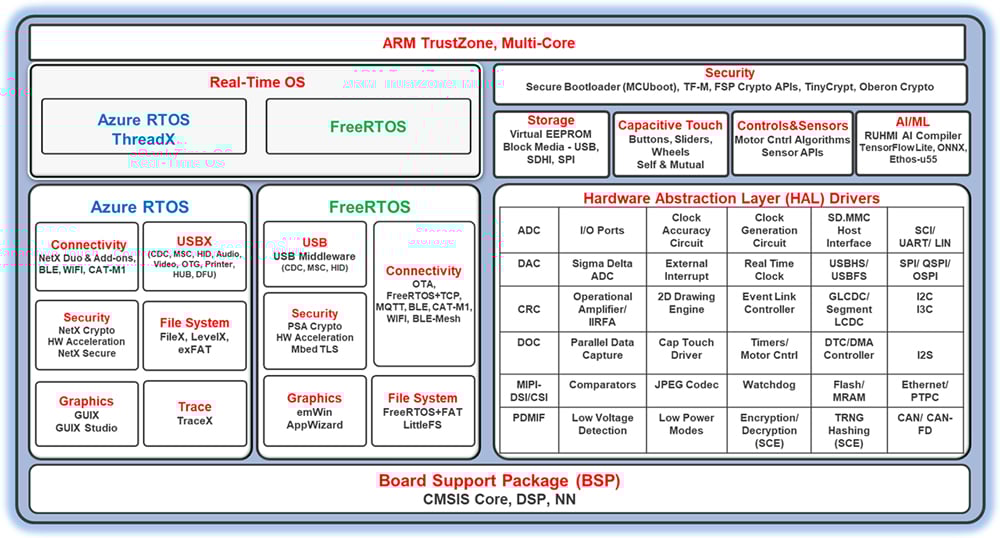
Features
- Multi-Core and Single Core support of Arm® Cortex®- M-based RA MCUs
- Small memory footprint HAL drivers
- Intuitive configurator and code generator
- Static and dynamic analysis using industry-standard tools
- Application support using RTOS and non-RTOS environments
- Azure RTOS and its middleware stacks with Flexible Software Package
- Azure RTOS ThreadX, NetX Duo & Add-ons, USBX, GUIX & GUIX Studio, FileX, TraceX, exFAT, LevelX, NetX Duo Secure & NetX Crypto (HW acceleration)
- FreeRTOS support – Includes Kernel and set of software libraries
- FreeRTOS Kernel, FreeRTOS-Plus-TCP, Core MQTT, Core HTTP/HTTPS, Task pool, Secure Sockets, Cellular Interface
- Tool configurable RTOS resources (Threads, mutexes, etc.)
- Middleware stacks from Renesas and third parties
- Ethos-U55 support for CM85-based MCUs for efficient AI/ML integration
- TCP/IP and other connectivity protocol stacks including MQTT
- USB middleware support for CDC, HID, and MSC
- Wireless connectivity through Cellular (Cat-M1), Wi-Fi, and Bluetooth Low Energy LE 5.0 (BLE Mesh)
- File System support with FreeRTOS+FAT and LittleFS
- Storage (Block Media) support for SDMMC, SPI, and USB.
- Virtual EEPROM on Flash
- Capacitive touch middleware to implement widgets like Button, Slider, and Wheels.
- Motor control algorithms
- Secure Bootloader through MCUboot
- Sensor Module APIs
- TrustZone support (for applications on CM33-based MCUs)
- TrustZone-enabled drivers and middleware
- Easy-to-use tool support for TrustZone configuration
- PSA Level 2 Certified
- AWS-qualified for FreeRTOS
- Easy connectivity options to major cloud providers
- Secure connections through NetX Duo Secure and Mbed TLS
- Cryptographic APIs and integrated Hardware Acceleration support
- Arm PSA Cryptographic APIs
- Azure RTOS NetX Crypto APIs
- Ultimate security with FSP Crypto APIs (SCE9 protected mode)
- Oberon Ocrypto targeting low end RA2E1 devices
- TinyCrypt targeting constrained devices
- Graphics interface support and tools
- LVGL integration support for RA devices
- Segger emWin (RA customers can use Segger emWin graphic tools and libraries for free from Downloads below)
- Azure RTOS GUIX and GUIX Studio (available free on Microsoft Apps Store)
- Secure debugging capabilities
- Extensive tool support from Renesas and leading third-party solutions
- Integrated package with all required components for easy setup and starting development (single installer with e2 studio, CMSIS packs, toolchain, and Segger J-Link drivers)
- Complete source code available through GitHub
Release Information
For additional information and links, go to GitHub.
v6.6.0
Release Notes
Flexible Software Package (FSP) for Renesas RA MCU Family, version 6.6.0.
Minimum e² studio version for FSP 6.6.0 is e² studio 2026-07.
Download the FSP with e² studio Windows installer for this release from here.
Download the FSP with e² studio Linux installer for this release from here. Refer to the installation steps for information on installing e² studio and related software components on a Linux PC.
Download the FSP with e² studio macOS (Apple Silicon) installer for this release from here. Refer to the installation steps for information on installing e² studio and related software components on a macOS PC.
If you are using IAR or Keil MDK, download the Renesas Advanced Smart Configurator for your operating system.
- For Windows download: FSP RASC Windows Installer
- For Linux download: FSP RASC Linux Installer
- For Mac OS (Apple Silicon) download: FSP RASC macOS Installer
All installers are available in the Assets section of this release.
Refer to the "README.md" in the FSP root folder for setup instructions, hardware details, and related links.
FSP 6.6.0 onwards changes to GCC support
FSP 6.6.0 onwards no longer ships with the GCC toolchain integrated within the combined e² studio/FSP platform installer, and GCC is no longer installed by default. The use of the GCC toolchain with FSP is still currently supported, and if GCC use is required, then an option in the 'Custom Install' of the platform installer allows GCC to be downloaded from the internet and installed as part of the overall install process. Alternatively, it is possible to link e² studio to an installation of the GCC toolchain already on the user's computer.
Note: The LLVM toolchain/Arm Toolchain for Embedded (ATfE) continues to be integrated within the e² studio/FSP platform installer.
FSP 6.3.0 onwards changes to LLVM optimization levels
With FSP 6.3.0 and later, when using the LLVM toolchain, the compiler optimization level is set to -Os by default for RA4/RA6/RA8 MCUs, whereas previous FSP's would use -O2. This has been done because with LLVM, -Os causes a balance of optimizations similar to GCC's -O2 option. Note that for RA0/RA2 MCUs, where keeping memory size to a minimum is typically of primary importance, the -Oz optimization level is selected by default.
New Features
- Updated to MCUboot 2.4
- MCUBoot solution template additions:
- Added MCUboot single image bootloader solution template with mbedTLS for RA2 Non-Ocrypto licensed devices
- Added MCUboot templates with TrustZone for e50d and e51a
- Removed secondary app projects from bootloader templates and added explicit trailer regions
- Supported zero copy of FreeRTOS+TCP
- Added R_OSPI_B_TargetReset API to reset the target flash device using the OM_RESET pin or in-band reset patterns (CS + SIO0, or CS-only) for the r_ospi_b module
- Supported Peripheral USB Video Class driver (PUVC)
- Cryptography and Security Updates:
- Added support for using the shared secret generated by ECDH secp521r1 with KDF-SHA 512 on RSIP-E51A and RSIP-E50D PM driver
- AES-GCM multi-part is now hardware-accelerated on all supported MCUs
- Reduced code size for RSIP-E11A CM drivers
- Reduced code size for RSIP-E31A CM drivers
- Reduced code size of control procedures for SCE9 Compatibility Mode
- Updated Ethos-U stack to version 26.05
- Supported Complementary PWM mode for GPT module
- Added support for EK-RA8P1 V2 board
- Added the decimation feature to the Renesas Advanced Motor Control Platform
- Enabled NetXDuo IP Instance Module to add an additional NetX Duo Ether Driver for Extended Network Interface
- Supported USBX Host Hub combination of CDC-MSC
Fixes and Improvements
- Added guidance in the SAU SPI usage notes for different transfer operating modes
- Updated document for transparent bridge
- Updated copyright headers for rm_psa_crypto chacha20 and chachapoly
- Resolved an issue where SCE Protected Mode was incorrectly displayed in the configurable stack for RA4E1 and RA6E1 devices
- Resolved an issue where RSIP Protected Mode was incorrectly displayed in the configurable stack for RA8E1 and RA8E2 devices
- Added HOCOCR2 register in iodefine file for RA8
- Fixed the issue where the OSPI_B driver overwrites other channel DSSFTCSx OM_DQS shift values in WRAPCFG
- Added run time error to check packet chaining for NetX Duo Ethernet
- Fixed incorrect PLL/4 value for RA4M1 and RA4W1 (PLLCCR_TYPE = 2)
- Added D-Cache enabled support DMAC for RA8 devices for the following modules:
- DMAC: Review DMAC documentation for details
- Updated DMACCHSAR and DMACSAR TrustZone initialization for RA8
- Fixed incorrect TrustZone secure alignment
- Fixed the missing gratuitous ARP in lwIP
- Fixed the issue where IIC Master stop condition may be cleared unexpectedly when IIC ISRs are delayed
- Fixed an issue that the HAUD driver may be unable to correctly get HAUD device descriptor information
- Fixed the issue where the network could be reported as up before a valid IP address was assigned
- Changed the subclass code for PCDC in the device descriptor (template descriptor file) from 0 to 2
- Fixed build error when adding the r_ethercat_phy stack with the unsupported target board
- Fixed issues of bus error when using SDRAM in TrustZone projects
- Fixed the following issue regarding the ChaCha feature of the RSIP-E50D PM driver:
- The operation would fail when the total length of the input data was a multiple of 64 bytes
- Updated the ospi_b usage note with a more detailed FSP documentation guide for MCUboot upgrade
- Updated MCUBoot signing script to make python pqc library optional dependency, this allows users to use the signing script without having to install the pqc library if they are not using ML-DSA keys
- Fixed an issue in r_uarta that could cause transmission interrupts to be missed under nested interrupt conditions
- Fixed resource page for r_rmac_phy module to correct the URL for the Ethernet PHY-LSI driver
- Fixed build error in BareMetal project for rm_ble_abs_gtl
- Removed callback requirement when interrupt priority is configured in r_adc and r_adc_d
- Updated MCUboot to support OSPI with erase sizes different than internal flash
- Fixed the issue where r_adc could not generate a GPT trigger event for Double Trigger Extended Mode
- Updated MSB address mask handling for supported memory profiles based on MCU OSPI memory region layouts
- The following improvements have been made to the RSIP PM Driver User’s Manual:
- Added detailed descriptions of the supported features
- Added usage instructions and use cases for each feature
- Added diagrams such as state transition diagrams and API call flows
- Added IICCLK/PCLKA clock constraint for RA6T2
- RMAC/Layer3_Switch:
- Modified TX timestamp descriptor handling
- New API is added: R_LAYER3_SWITCH_GetTxTimestamp
- Added support for RMAC_LINK_DETECTION_DEFAULT_PORTS_UP mode in RMAC link status checking
- gPTP middleware:
- Fixed the timestamp adjustment feature
- Fixed an issue in time and timestamp conversion functionality
- Fixed an issue where r_sce_protected, r_sce_protected_cavp and r_rsip_e51a_protected_cavp displayed an incorrect supported device list
Known Issues
- Solution Projects (TrustZone, Multicore):
- There are issues related to pin configuration in e² studio 2026-04.2. Refer to this document for workarounds
- For RA0x devices:
- HS400x and ZMOD4xxx sensors cannot be used
- FS3000 sensor does not support SAU-I2C driver
- Selecting 'Safely Remove Hardware and Eject Media' on Windows and eject the mass storage (PMSC), when using USBX composite device (PCDC+PMSC), the Windows Explorer for PMSC does not disappear.
- PMSC may not work properly when USBX Composite Device (PCDC+PMSC) is connected to specific Linux OS (USB Host).
- EWARM version 9.70.4 does not contain support for RA0E3. To develop with IAR for these devices, it is necessary to install a support patch file for which can be downloaded by EWARM v9.70.4 users from the IAR MyPages system
- RA0E3 (arm_Renesas_RA0E3_20260106_1.zip)
- When importing projects in e² studio that were created using a previous toolchain version be sure that the version specified in the project is integrated (Window->Preferences->Renesas->Renesas Toolchain Integration) or select the appropriate toolchain version if upgrading the project to a later FSP version.
- When upgrading RA6T2 projects to FSP 6.4.0, the GTETRGx pin assignments might be lost, please re-assign the pins manually.
- When upgrading RA0E1/E2/L1 projects to FSP 6.4.0, the SAU_SPI00 pin group might be changed, please restore the pin group manually.
- For known issues in the tools, please refer to the respective tool's release notes e² studio RN.
Target Devices
Design & Development
Videos & Training
Learn how to import and run Flexible Software Package (FSP) example projects in e² studio using the RZ/A3UL Evaluation Board Kit. The same workflow applies to both RZ and RA device families. This video walks through three demos covering ADC configuration, USB PCDC communication, and LCDC display control.
Events & Webinars

News & Blog Posts
Blog Post Nov 15, 2022 |
Blog Post Apr 28, 2022 |
Blog Post Jan 28, 2022 |
Blog Post Jan 28, 2022 |
News Jun 15, 2021 |
Additional Details
Components
- CMSIS compliant pack files for e2 studio integrated development environment
- BSPs for RA MCUs and boards
- HAL drivers to access peripherals
- Real Time Operating Systems (RTOS)
- Middleware stacks and protocols
- Module configurators and code generators
- Source files to integrate with any development environment and third-party tools
Supported Toolchains
Software components in the FSP support following toolchains:
- e2 studio Integrated Development Environment, with toolchain supports of GCC Arm Embedded and LLVM Embedded Toolchain for Arm
- IAR Embedded Workbench
- Arm Keil MDK
Software Installation Instructions
Refer to the FSP GitHub page for installation and usage instructions: FSP GitHub Instructions
e2 studio Integrated Development Environment
The FSP provides a host of efficiency-enhancing tools for developing projects targeting the Renesas RA series of MCU devices. The e2 studio Integrated Development Environment provides a familiar development cockpit from which the key steps of project creation, module selection and configuration, code development, code generation, and debugging are all managed. FSP uses a Graphical User Interface (GUI) to simplify the selection, configuration, code generation and code development of high level modules and their associated Application Program Interfaces (APIs) to dramatically accelerate the development process.
e2 studio is equipped with set of options to configure various aspects of your application project. Some of these options include:
BSP configuration
Configure or change MCU and board-specific parameters from the initial project selection.
Clock Configuration
Configure the MCU clock settings for your project. The Clock Configuration presents a graphical view of the MCU's clock tree, allowing the various clock dividers and sources to be modified.
Pin Configuration
The Pin Configuration provides flexible configuration of the MCU's pins. This configures the electrical characteristics and functions of each port pin. As many pins are able to provide multiple functions, the pin configurator makes it easy to configure the pins on a peripheral basis. The Pin Configuration tool simplifies the configuration of large packages with highly multiplexed pins by highlighting errors and presenting the options for each pin or for each peripheral.
Module Configuration
The Module Configuration provides options to add FSP modules (HAL drivers, Middleware stacks and RTOS) for RTOS and non-RTOS based applications and configure various parameters of the modules. For each module selected, the Properties window provides access to the configuration parameters, interrupt priorities, pin selections etc.
Interrupt Configuration
Interrupt Configuration allows to add new user interrupts or events and set interrupt priorities. This will also allow the user to bypass a peripheral interrupt and have user-defined ISRs for the peripheral interrupts.
Components Configuration
The Components configuration enables the individual modules required by the application to be included or excluded. All modules that are necessary for the modules added to the application are included automatically. You can easily include or exclude additional modules by ticking the box next to the required component.
QE Tools
QE for Capacitive Touch is an assistance tool for applications which operate under the e2 studio. For the development of embedded systems that work with capacitive touch sensors, this tool simplifies the initial settings of the touch user interface and the tuning of the sensitivity, thus shortening developing times.
The QE for BLE is a dedicated tool for developing embedded software in systems which support the Bluetooth®low energy protocol stack. This solution toolkit runs in the e2 studio integrated development environment. The combination of the e2 studio and QE for BLE makes it easy to test the communications features of Bluetooth®low energy.
Other Tool Features
- Context-sensitive Autocomplete feature that provides intelligent options for completing a programming element
- Developer Assistance tool for selection of and drag and drop placement of API functions directly in application code
- Smart Manual that provides driver and device documentation in the form of tooltips right in the code
- Edit Hover feature to show detailed descriptions of code elements while editing
- Welcome Window with links to example projects, application notes and a variety of other self-help support resources
- Information Icon for each module is provided in the graphic configuration viewer that links to specific design resources for that module in the user manual.
Third Party Tool Support
In addition to the Renesas e2 studio IDE, FSP supports third party tools and IDEs as well. This support is provided through RA Smart configurators (RASC) application. The Renesas RA Smart Configurator is a desktop application that allows you to configure the software system (BSP, drivers, RTOS and middleware) for a Renesas RA microcontroller when using a 3rd-party IDE and toolchain. The RA Smart Configurator can currently be used with IAR Embedded Workbench, Keil MDK and the Arm compiler 6 toolchains.
Resources
Support
Support Communities
- Is there FSP(Flexible Software Package) in RL78/G23 as RA has like /ra, /ra_cfg, and ra_gen?
... product which has RA Flexible Software Package (FSP). I generated the code using Smart Configurator in RL78, but couldn't see the code style like RA on /ra, /ra_cfg, and ra_gen. Does Renesas support FSP(Flexible Software Package) for RL78/G23 and may I get ...
Feb 12, 2025 - RA2A1 and FSP package missing peripheral driver
Hi I see the SJ1A and RA2A1 are the same chip but using the RA Flexible Software Package (FSP) in the E2Studio Configurator are missing the driver for some analog pheripheral. The driver for OPAMP, SigmaDeltaADC, DAC8 driver .. are not in the TAB stack and are not selecteble using NewStack ...
Nov 28, 2019 - Endless loop situation in r_agt_common_preamble() (FSP 16 bit AGT)
Hello, I'm using the R7FA6E10D2CFM with the Renasas RA FSP 5.5.0 and FreeRTOS Kernel V10.6.1. I've experienced an endless loop situation in r_agt_common_preamble(). The problem happens when AGT1 (16 bit) interrupt occurs while my FreeRTOS task is calling R_AGT_Stop ...
Aug 13, 2025
Knowledge Base
- LVGL: Using 32-bit Color Formats with GLCDC
... is a lightweight open-source embedded graphics library designed for microcontroller-based user interfaces. A Renesas-maintained port of LVGL is now included in the RA Flexible Software Package (FSP), making it straightforward to integrate LVGL into RA MCU projects through the FSP Configurator*. Several Renesas MCU families are designed ...
Jan 6, 2026 - RA Family: Secure key injection and flash programming in mass production using RFP CLI interface
... Mode and Protected Mode: In Compatibility Mode, the security engines can inject secure keys as well as plaintext keys. Key injection must be performed using RA Family Flexible Software Package (FSP) APIs. All security engines support Compatibility Mode. In Protected Mode, the security engines can inject only secure keys. Key ...
Jan 29, 2026 - How to Use Event Link Controller to Link Peripherals on RA6M5 Evaluation Kit
... Timer (GPT) with the Analog-to-Digital Converter (ADC) on the EK-RA6M5 board. Flexible Software Package (FSP) supports event linking with the r_elc FSP module, timer operation with the r_gpt FSP module, and ADC conversion with the r_adc FSP module. This example demonstrates configuring the GPT ...

Support Communities

