
概要
説明
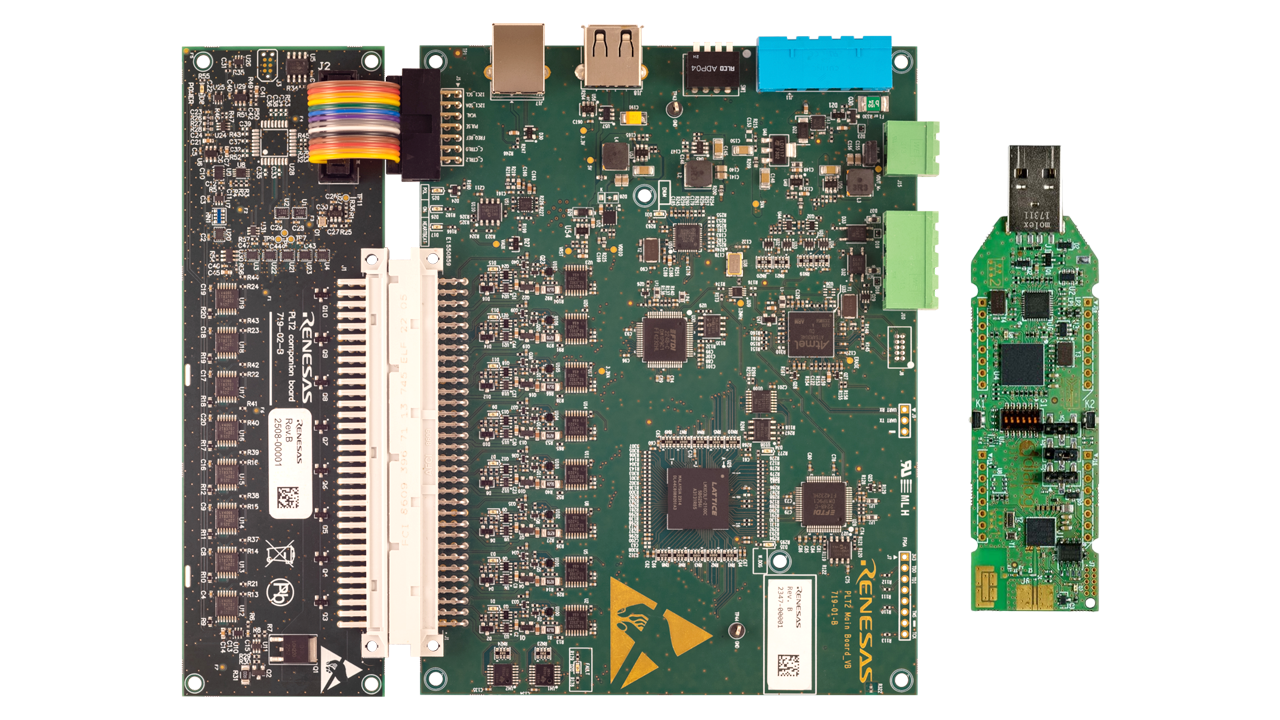
ルネサスは、低コストで立ち上げまでの時間を短縮できる量産テストおよびプログラミングユニットを提供しています。 コネクティビティ・プロダクション・ライン・ツール(PLT)は、ルネサス・コネクティビティICを中心としたユニットのボリューム・テストとプログラミングのスループットを向上させるための柔軟なプラットフォームです。
Connectivity PLTは、複数のテスト対象デバイス(DUT)のメモリ操作を並行してテスト、キャリブレーション、および実行するように設計されています。 それぞれに8つのテストサイトを備えた最大4つのPLTボードをデイジーチェーン接続して、32の同時テストサイトをサポートできます。
特長
- 最大32の並列プログラミングとテスト
- OTP/Flash/eFlashのプログラミングの柔軟性
- 統合の容易さ:CLIツールが付属
- モジュラーアプローチ: Bluetooth® Low Energy(LE)、Wi-Fi、DECT
- 含まれるテスト:
- Xtalトリミング
- センサーテスト
- GPIOテスト
- RSSIテスト
- 電流測定
- 多く
- カスタマイズ可能なテストステップ
ターゲットデバイス
ドキュメント
|
|
|
|
|---|---|---|
| 分類 | タイトル | 日時 |
| マニュアル-ソフトウェア |
PDF
9.11 MB
The Connectivity Production Line Tool Manual provides comprehensive guidance on the setup, configuration, and operation of the Renesas Connectivity Production Line Tool (PLT). These manuals detail both the hardware and software components of the PLT system, offering step-by-step instructions for installation, initialization, and troubleshooting. It covers Core and Database Services, communication error fixes, and demo mode for visual setup without execution. Designed for production use, it ensures reliable, efficient deployment of connectivity testing workflows.
|
|
| リリースノート |
PDF
585 KB
The Connectivity Production Line Tool (PLT) Release Note summarizes the release of the Connectivity PLT, detailing new features, known issues, and limitations introduced in the current version. It supports production testing and programming for Renesas devices and includes updates to hardware support, software functionality, and integration capabilities. The release notes also outline versioning rules and compliance information.
|
|
| クイックスタートガイド |
The Connectivity Production Line Tool (PLT) User Guides provide technical documentation for deploying and operating Renesas' production test tools across Bluetooth Low Energy SoC platforms, such as the DA1453x. They detail the command-line interface (CLI) used on Windows for UART communication with devices running test firmware supporting Bluetooth SIG HCI commands and proprietary extensions. The guides also cover binary integration, setup, and hardware configuration to streamline testing and accelerate Bluetooth LE product delivery.
|
|
3件
|
||
設計・開発
関連ボード&キット
接続生産ラインツールBluetooth Low Energyキット
コンパニオンボードを備えたこのコネクティビティ生産ラインツール(PLT)は、DA1453xファミリなどのルネサスのBluetooth Low ® Energy(LE)デバイスの生産テストを開始するために必要なコンポーネントを提供します。 このキットには、PLTメインボード、PLTセルフテスター「コンパニオンボード」、およびRFテストユニット(RFTU)として事前構成された DA14695 USB開発キットが含まれています。
Connectivity PLTソフトウェアの組み合わせは、ランプアップ時間を短縮し、生産コストを削減するように設計されています。
接続性生産ラインツール8サイトメインボード
Connectivity Production Line Tool (PLT) 8サイトメインボードは、ルネサスコネクティビティデバイスの生産テストの出発点です。 独自のRFテストユニット(RFTU)を提供する予定がある場合に最適です。
このボードは、Connectivity PLTソフトウェアと組み合わせることで、最大8台のデバイスの並列テストをサポートし、デイジーチェーン接続して最大32のテストサイトまで拡張できます。 ランプアップ時間の短縮、スループットの向上、生産コストの削減に役立ち、効率的で大量のテストに最適な選択肢となります。

デバッグ用接続性生産ラインツールコンパニオンボード
コネクティビティPLTコンパニオンボードは、PLTセットアップのセルフテストに使用され、正確な結果と信頼性の高いテスト実行を保証します。 VDUT、VDDIO、AIN、UART/GPIOなどの主要な信号が仕様内で機能していることを検証します。
このボードは、ランプアップ時間を短縮し、生産コストを削減するように設計されたConnectivity Production Line Toolソフトウェアをサポートしています。 コンパニオンボードは、ボリュームテストを開始する前にハードウェアを検証することで、スループットを向上させ、テストプロセス全体を通じて信頼性を維持するのに役立ちます。

接続生産ラインツールBluetooth Low Energy RFテストユニット
このBluetooth® Low Energy(LE)RFテストユニット(RFTU)を使用すると、ルネサスのコネクティビティ生産ラインツール(PLT)を使用して、本番環境でBluetooth® LEデバイスをテストできます。 Connectivity Production Line Toolソフトウェアは、大量生産でテストを実行するように設計されています。 Bluetooth® LE RFTUを搭載したPLTは、高いテストスループットを実現しながら、低コストでルネサスのBluetooth® LEデバイスの生産を増強することができます。 キットの内容には... 続きを読む
モデル
ビデオ&トレーニング
Discover how the Renesas Connectivity Production Line Tool (PLT) streamlines wireless device production. It enables automated testing, high-speed programming, and reliable RF validation to support efficient and high-quality manufacturing.
ニュース&ブログ
ブログ 2025年8月28日 |
サポート
サポートコミュニティ
- e-AI フォーラム開設しました
... AIの機能は特定分野に偏るのではなく,"実世界"を把握するツールとし て,広く一般的に使われていくと考えておりま ...
2017年7月13日 - RL78/G23 Fast Prototyping Boardを買いました
... ートが含まれていなかったので、ちょっと五分五分の可能性?、というところですが、内蔵周辺機能のシミュレーション ...
2021年4月15日 - CS+3デバッグツールの不具合?
... ドも返ってこないみたい? 尚、以上の不具合はRS+3デバッグツールのプロパティで「トレース機能を有効にする」をONに ...
2015年5月4日
ナレッジベース
- 外部バスに接続されたフラッシュメモリへのダウンロードは可能か [RX]
... もなう機能(メモリウィンドウでのフラッシュの書き換え、ソフトウェアブレーク)は使用できません。ダウンロード時 ...
2025年3月21日 - デバッグ時には正常動作するプログラムが単体では動作しない [RX]
... レジスタ設定がない場合も動作してしまいます。ソフトウェアスタンバイモードを使用している場合、ソフトウェア ...
2024年5月14日


