
Overview
Description
RZ Smart Configurator is a tool that automatically generates initial-setting programs for MPUs.
It provides a quick and smart way of combining and configuring software to meet your needs, such as by configuring pins for peripheral functions of RZ Family MPUs and importing middleware and drivers.
We provide users of RZ Family devices with a platform installer that includes the above features of the Smart Configurator and the Flexible Software Package (FSP). Please obtain the installer from the RZ Flexible Software Package (FSP) Web page at the following link and use it.
Features
- Importing Middleware/Drivers
- Generating Driver Code
- Pin Settings
- Learn More
Release Information
For detailed release information, please refer to Overview > Release Information on the RZ Flexible Software Package (FSP) page.
Target Devices
Documentation
| Type | Title | Date |
|---|---|---|
| Flyer | PDF 977 KB 日本語 , 简体中文 This is a flyer for the Smart Configurator, which can automatically generate initial setup programs for microcontrollers. It details the features and information about the Smart Configurator. Supported microcontrollers include RL78, RX, RH850, RISC-V, RA, and RZ. | |
1 item | ||
Videos & Training
This video shows you how to use the FSP - Pin Configuration function for RZ/T and RZ/N devices. It teaches you how to set up pins using the Pins tab and shows examples of pin conflicts. It also shows what the pin setup looks like when it’s done, so you can check your work.
FSP links
Board links
Additional Details
Pin Settings
The assignments of pins can be set up through a GUI, which also checks and offers solutions for cases of contention for the same pin by multiplexed functions.
The [Pins Configuration] window (displayed per peripheral module)
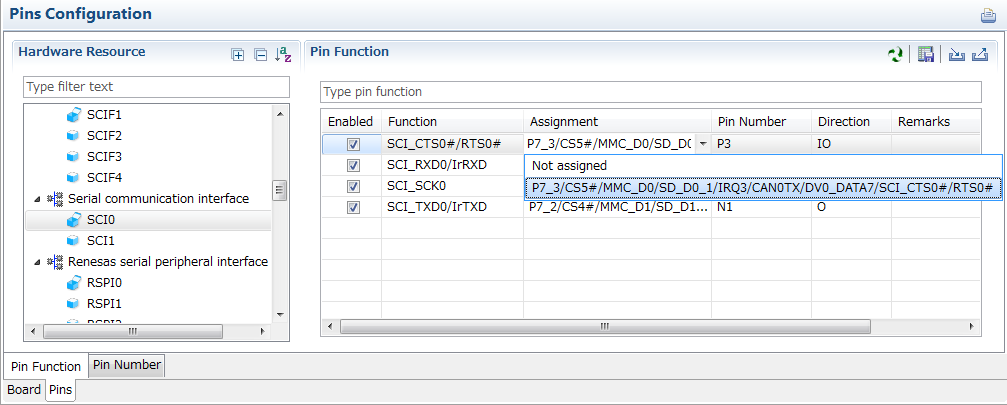
Specifying a peripheral module in the [Pins Configuration] window displays the pin functions for use by the module and allows you to set the assignment of the functions to pins.
[MCU/MPU Package] window
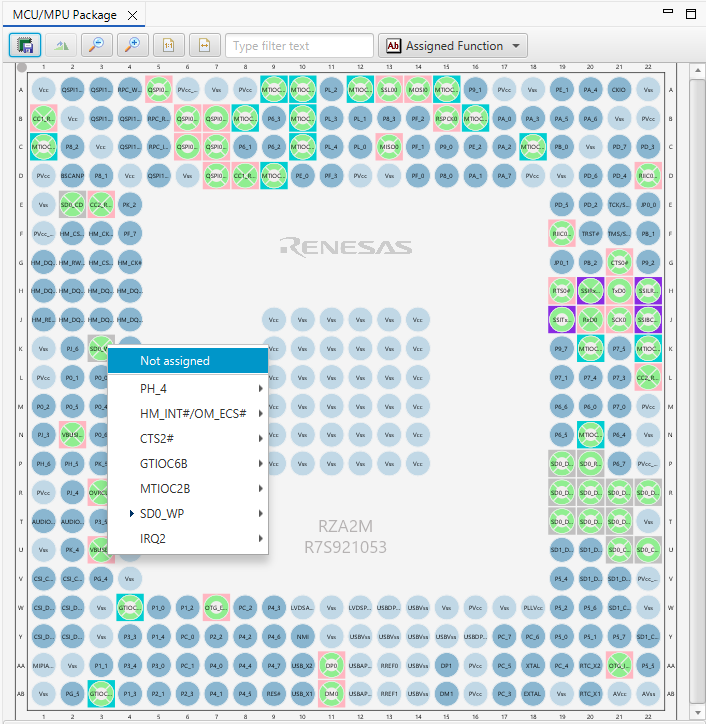
The [MCU/MPU Package] window displays a symbolic view of the pins, indicating by colors which pins are and are not in use, which have been assigned contending multiplexed functions, and so on. This makes it easy to check the overall situation.
Automatic resolution of contention between pin functions
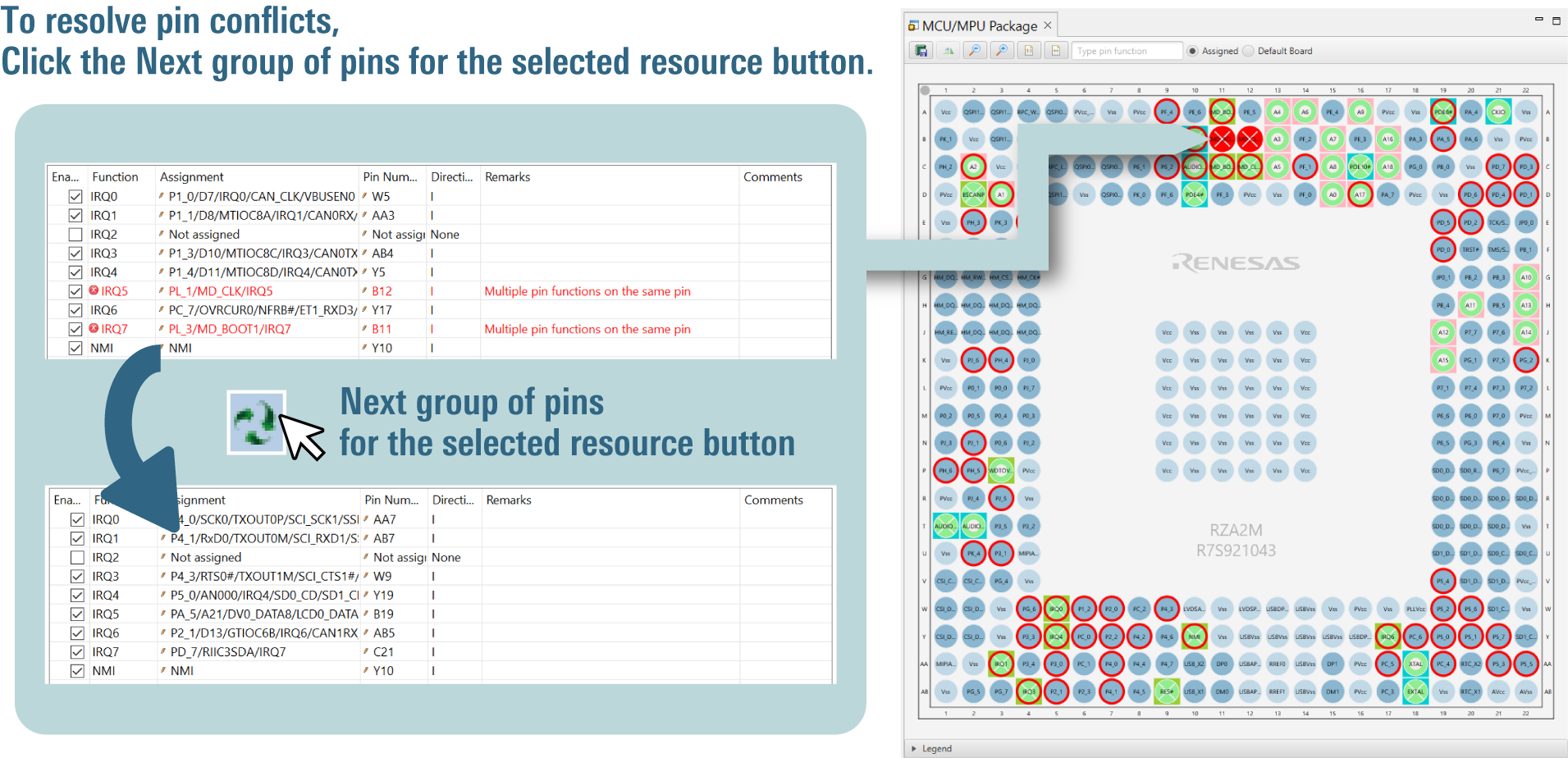
In cases of contention for a pin, clicking on the pin brings up a list allowing automatic changing of the assignment of the pin to resolve the contention.
Importing Middleware/Drivers
Flexible Software Package (FSP)
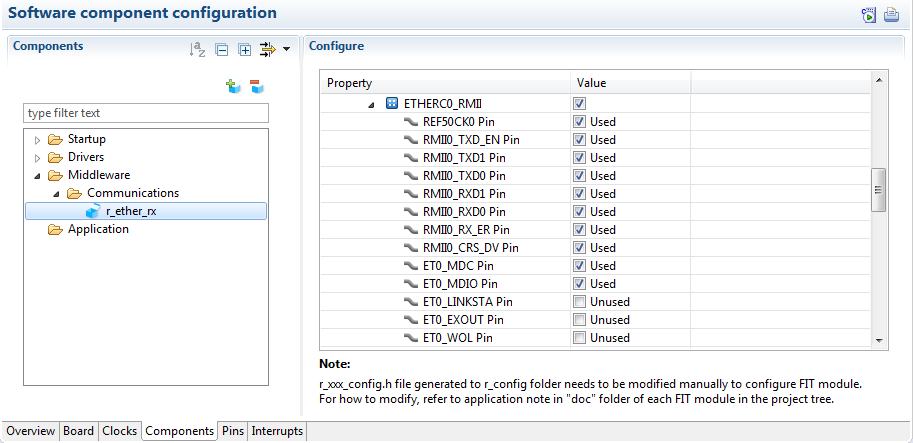
You can change the settings of FSP pins and components by using the Smart Configurator GUI.
Support
Support Communities
- RZ Smart Configurator - Unable to Find RZ/T2M in list
Hi, I am planning to use R9A07G075M24GBG#AC0 for my project. I have installed the RZ Renesas Smart Configurator 1.17.0 to check the pin configurations, but I'm unable to find RZ/T Series in the list. Please see the below screenshot: Please let me know ...
Apr 30, 2024 - Smart Configurator
I want to use ARM-Keil to program R7FA4M2AD3CFP. I know I still need to use RA Smart Configurator to generate code, but I can't find RA Smart Configurator on the official website. There is RZ Smart Configurator on the official website, but there is no RA. Why? [locked ...
May 5, 2022 - Problems on RZN2L RAM execution without flash, evaluation board CN032-7
... mini. - smarth configurator : Version: 2026-04.1 (26.4.1)Build Id: R20260423-1325 Parts Copyright (C) 2010-2026 Renesas Electronics Corp.All rights reserved.Smart Configurator is an extension ofsoftware developed for eclipse.org.Smart Configurator is based on Eclipse Platform 4.38 (2025-12)and CDT version 12 ...
Jul 7, 2026
Knowledge Base
- Network connection error in e² studio installer
... as is. Please refer to the following FAQ for the distribution website.[FAQ] Installation of e² studio[FAQ] How can I install and update compilers for e² studioFor FSP projects working with RA and/or RZ devices:[FAQ] How to Install FSP in e² studioFor Smart Configurator for RX ...
- How to convert an e² studio FSP project into an RA or RZ Smart Configurator project that can be built in a partner IDE
Install RA or RZ SC v2022-07 or higher, open Quick Start Guide from the Help menu, and then see the chapter "From Existing e² studio Projects."
Jul 30, 2024 - e² studio FAQs
... Changing an e² studio project name If I generate code after importing a project, the source file version changes How to convert an e² studio FSP project into an RA or RZ Smart Configurator project that can be built in a partner IDE Importing DA SDK project into e² studio ...
Jul 30, 2026

Support Communities


