Features
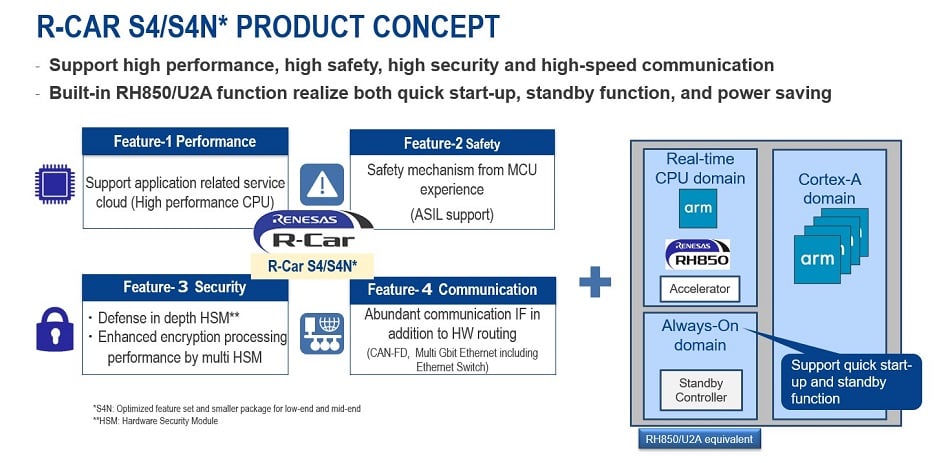
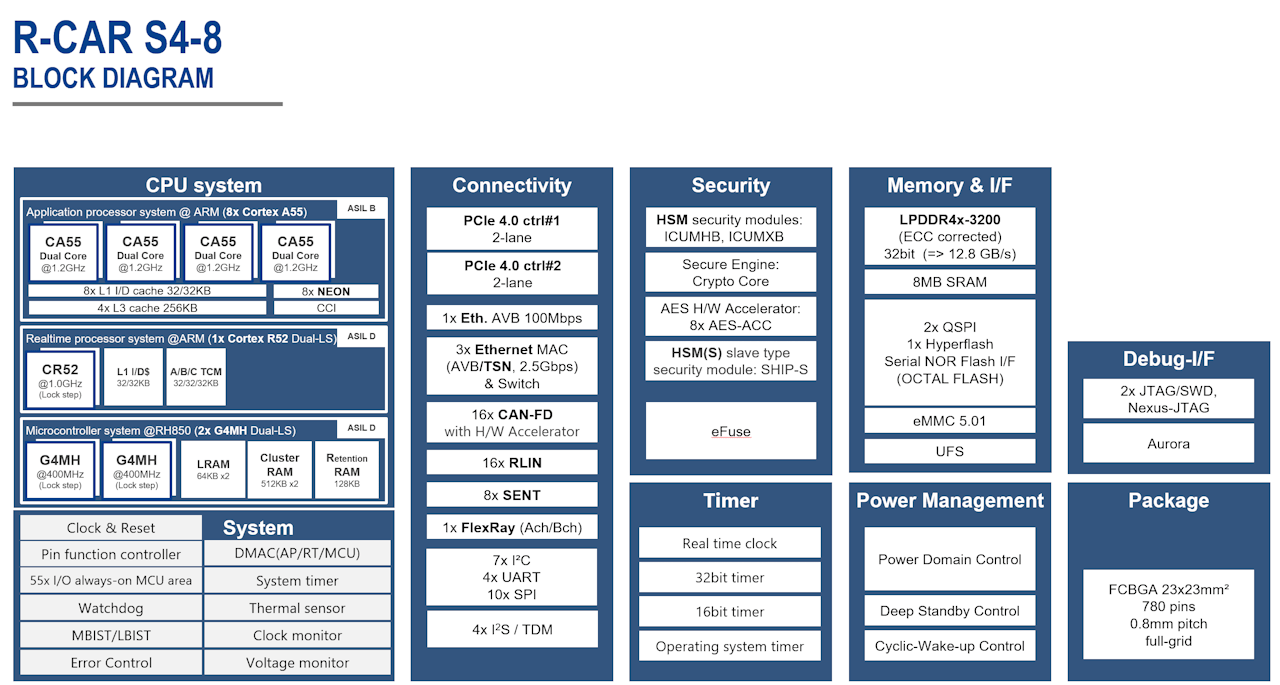
- Eight 1.2 GHz Cortex A55 cores, one 1.0 GHz Cortex® R52 dual core (lock-step) and two 400 MHz RH850 G4MH dual cores (lock-step) deliver up to 45 kDMIPS application performance plus greater than 9 kDMIPS real-time performance
- Abundant automotive interfaces including 16x CAN FD, 16x LIN, 8x SENT, 1x FlexRay, 2x 2-lane PCIe 4.0 allow a wide range of connectivity inside the vehicle
- Integrated 3-port Ethernet TSN switch offers bandwidth of 3 x 2.5 Gbps to deliver fast and low-latency communication in the vehicle backbone and to the outside world
- Incorporated 8MB SRAM to execute code on the RH850 G4MH core with low latency
- Multiple hardware security modules (HSMs) and firewall IP provide enhanced security protection against cyber attacks
- R-Car S4 is compliant to ISO-26262 and supports functional safety according to ASIL B and ASIL D
Description
R-Car S4 enables to launch Car Server/CoGW with high performance, high-speed networking, high security and high functional safety levels that are required as E/E architectures evolve into domains and zones. The R-Car S4 solution allows designers to re-use up to 88 percent of software code developed for 3rd generation R-Car SoCs and RH850 MCU applications. The software package supports the real-time cores with various drivers and basic software such as Linux BSP and hypervisors.
Parameters
| Attributes | Value |
|---|---|
| Parametric Applications | Connected Gateway |
Application Block Diagrams
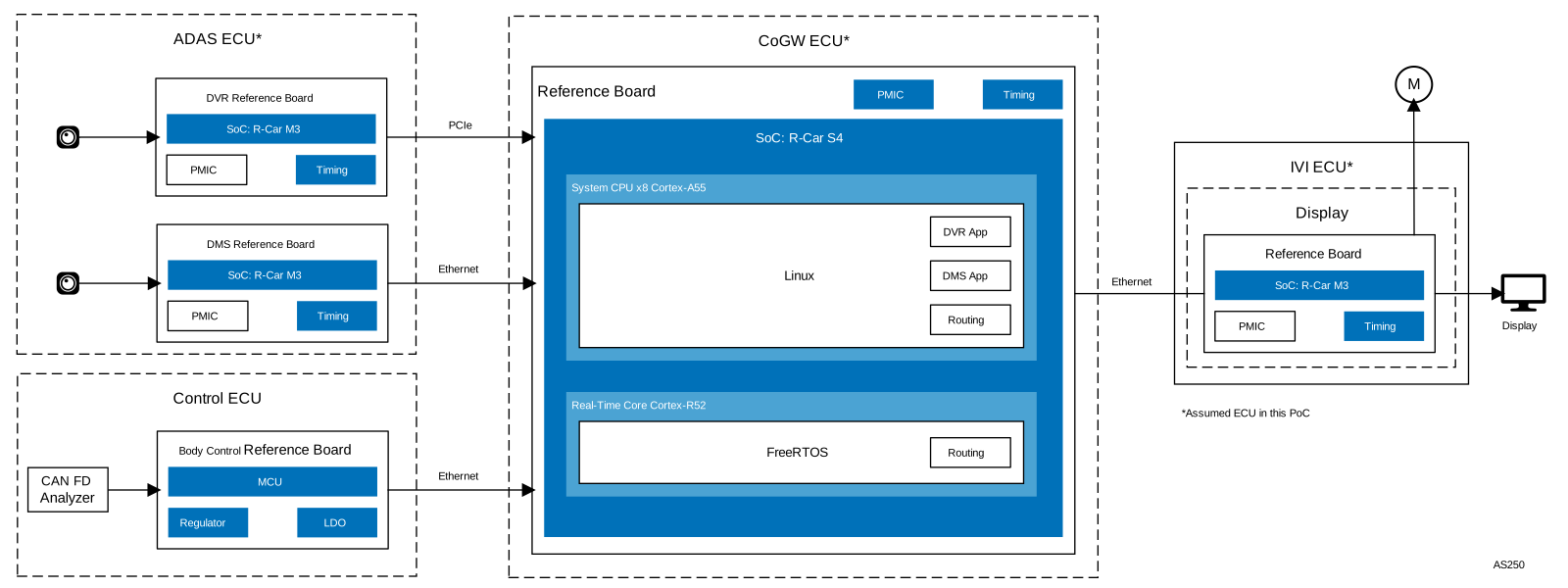
| Communication Gateway & Integrated DVR/DMS System Integrated automotive gateway merging CoGW with DVR/DMS video processing. | |
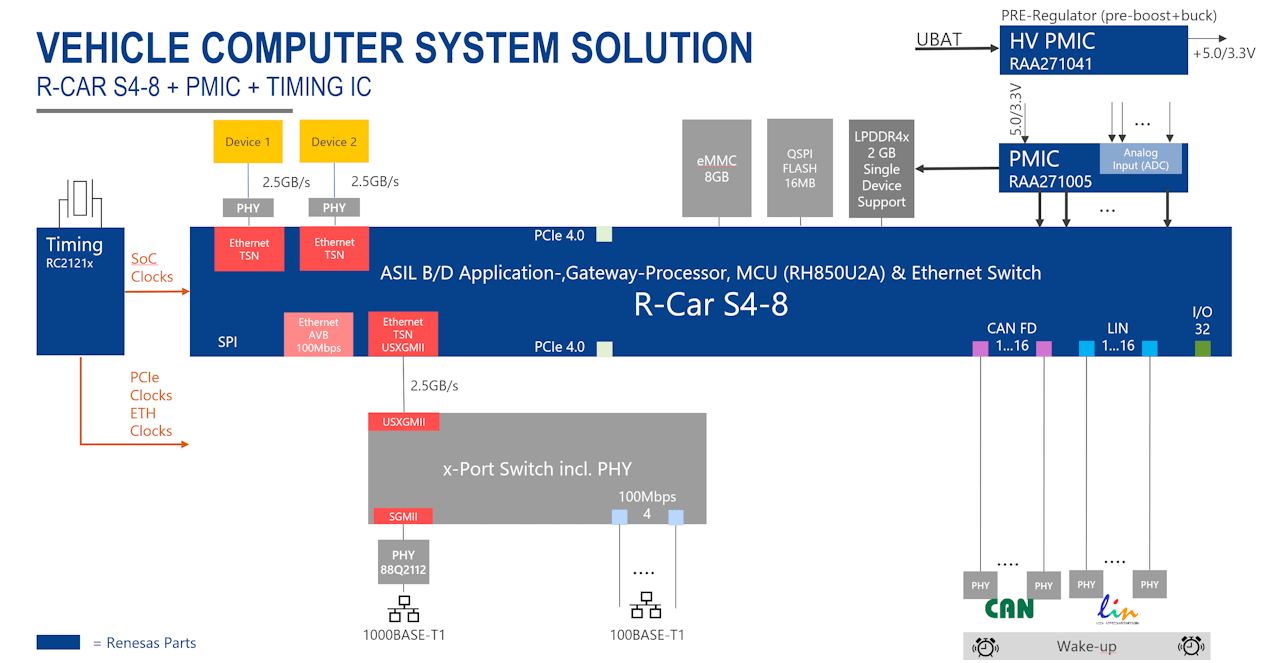
| Vehicle Computer for Future E/E Architecture Next-generation vehicle computer system for advanced E/E architecture with high computing power. | |
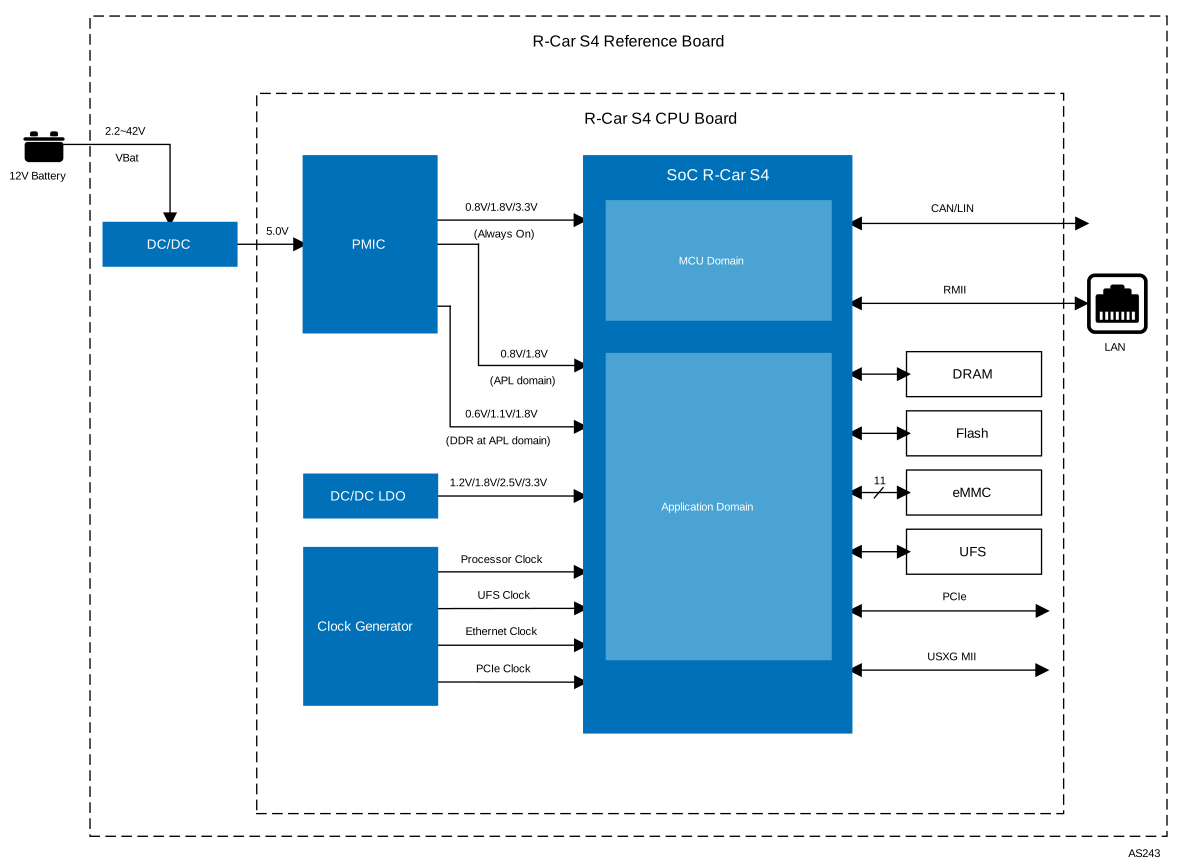
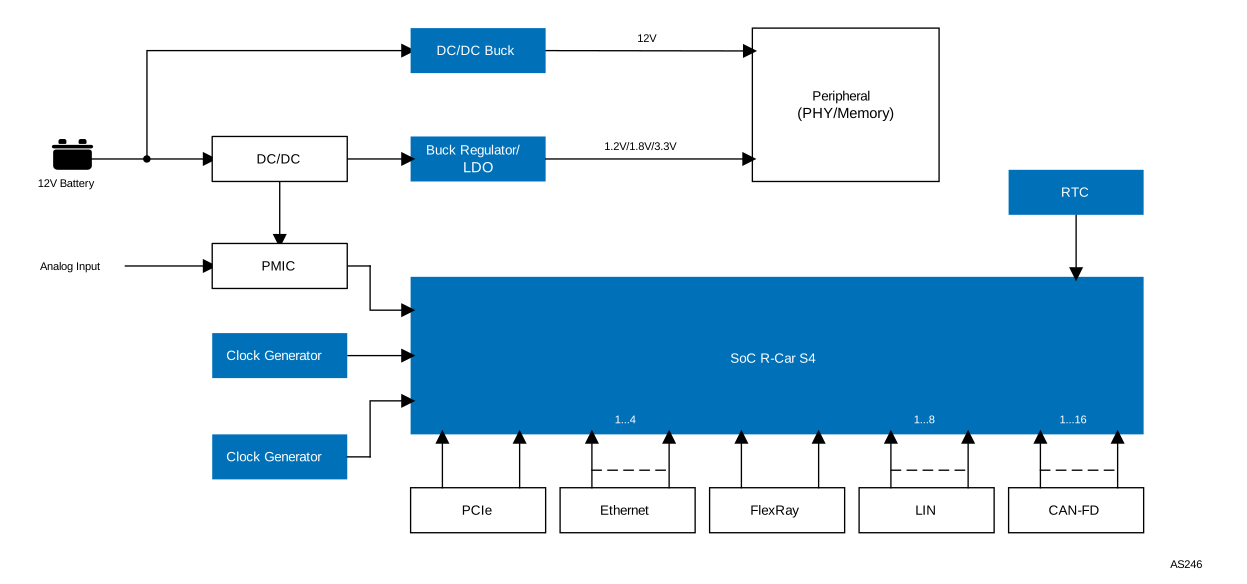
| Automotive Communication Gateway Platform Integrated automotive gateway platform with R-Car S4 SoC, multi-network support, and optimized power management. |
Additional Applications
- Vehicle computers
- Communication gateways
- Domain servers
- Application servers
Complete Your Design
Explore complementary products to elevate your design
| Part Number | Status | Samples | Stock | Package | CPU | Auto I/F | Key Features | Lead Count (#) | Pitch (mm) |
|---|---|---|---|---|---|---|---|---|---|
| R8A779F4 | Active | N/A | Out of Stock | FCBGA | Cortex-A55 x 8, Cortex-R52 x 1, G4MH x 2 | 16x CAN FD, Flexray | 4x UART, 6x SPI, 7x I2C, Security, JTAG | 780# | 0.8mm |
| R8A779F5 | Active | N/A | Out of Stock | FCBGA | Cortex-A55 x 8, Cortex-R52 x 1, G4MH x 2 | 16x CAN FD | 4x UART, 6x SPI, 5x I2C, Security, JTAG | 780# | 0.65mm |
| R8A779F6 | Active | N/A | Out of Stock | FCBGA | Cortex-A55 x 4, Cortex-R52 x 1, G4MH x 2 | 16x CAN FD | 4x UART, 6x SPI, 5x I2C, Security, JTAG | 780# | 0.8mm |
| R8A779F7 | Active | N/A | Out of Stock | FCBGA | Cortex-A55 x 4, Cortex-R52 x 1, G4MH x 2 | 16x CAN FD | 4x UART, 6x SPI, 5x I2C, Security, JTAG | 780# | 0.65mm |
Complete Your Design
Explore complementary products to elevate your design
Filters
Applied Filters
- Application NotePDF 422 KB R33AN0032EU0102 Rev.1.02 Nov 07, 2025AI-generated Summary: Guidelines detail the design of power-supply circuits for R-Car S4 SoCs using the RAA271005 Power-Supply IC. It covers power-on and power-off sequencing, pin connections, and I/O configurations including protection GPIOs and ADC inputs. The RAA271005 integrates multiple DC/DC regulators and LDOs controlled by SoC signals to manage various voltage domains. The document also specifies voltage levels, level shifting requirements, and recommended handling of unused pins, ensuring proper power allocation and system stability for automotive applications.
- Application NoteAI-generated Summary: The document explains how to modify the LPDDR4X SDRAM initialization code for the R-Car S4 series to match specific hardware configurations. It details which source files users must customize, focusing on boot_init_dram_config.c and boot_init_dram_config.h, to set board configuration, clock, and DRAM speed parameters. The initialization process includes detecting board type, clock frequency, and DRAM access rate. The document also covers adjusting refresh rates, temperature derating, and training intervals for optimal SDRAM operation.Related Files:
- EngineeringRelated Files:
- Application NoteRelated Files:
- Application Note
- Manual - HardwareRelated Files:
- EngineeringRelated Files:
- Application NoteAI-generated Summary: The tool automates flashing of R-Car Gen3 and Gen4 boards by configuring hardware settings, sending bootloader files, and setting boot modes. Users load a JSON file specifying binaries and memory addresses, select the connection port and baud rate, and configure options such as memory erase or speed-up. The tool supports multiple binary formats and provides detailed status messages during flashing. It streamlines flashing processes by managing bootloader deployment and memory configuration efficiently.
- GuideLog in to Download XLSX 1.61 MB 20250319-rs-R30AN0468EU0100-r-car-Supplement PCB Design Checklist Table-S4 Mar 14, 2025Related Files:
- GuideLog in to Download XLSX 4.36 MB 20250319-rs-R30AN0467EU0100-r-car-Supplement Schematic Design Checklist Table-S4 Mar 14, 2025Related Files:
- GuideLog in to Download PDF 384 KB 20250319-rs-R30AN0466EU0100-r-car-Supplement Guide PCB Design Flow Diagram-S4 Mar 14, 2025Related Files:
- GuideLog in to Download PDF 367 KB 20250318-rs-R30AN0465EU0100-r-car-Supplement Guide Schematic Design Flow Diagram-S4 Mar 14, 2025Related Files:
- Guide
- Manual - HardwareRelated Files:
- GuideR-Car S4 Development Environment GuideRECOMMENDED
Recommended Documents (2)
No Results Found.
Make sure all keywords are spelled correctly.
Try fewer, different, or more general terms to vary your search.
If you have filters applied, consider deselecting some to broaden your results.
- Search our extensive knowledgebase, designed to help customers with their FAQs.
- Get help from our expert Renesas technical staff and community on our support forums.
- Manual - HardwareRelated Files:
- GuideLog in to Download XLSX 1.61 MB 20250319-rs-R30AN0468EU0100-r-car-Supplement PCB Design Checklist Table-S4 Mar 14, 2025Related Files:
- GuideLog in to Download XLSX 4.36 MB 20250319-rs-R30AN0467EU0100-r-car-Supplement Schematic Design Checklist Table-S4 Mar 14, 2025Related Files:
- GuideLog in to Download PDF 384 KB 20250319-rs-R30AN0466EU0100-r-car-Supplement Guide PCB Design Flow Diagram-S4 Mar 14, 2025Related Files:
- GuideLog in to Download PDF 367 KB 20250318-rs-R30AN0465EU0100-r-car-Supplement Guide Schematic Design Flow Diagram-S4 Mar 14, 2025Related Files:View More (12)
Manuals & Guides (12)
- Application NotePDF 422 KB R33AN0032EU0102 Rev.1.02 Nov 07, 2025AI-generated Summary: Guidelines detail the design of power-supply circuits for R-Car S4 SoCs using the RAA271005 Power-Supply IC. It covers power-on and power-off sequencing, pin connections, and I/O configurations including protection GPIOs and ADC inputs. The RAA271005 integrates multiple DC/DC regulators and LDOs controlled by SoC signals to manage various voltage domains. The document also specifies voltage levels, level shifting requirements, and recommended handling of unused pins, ensuring proper power allocation and system stability for automotive applications.
- Application NoteAI-generated Summary: The document explains how to modify the LPDDR4X SDRAM initialization code for the R-Car S4 series to match specific hardware configurations. It details which source files users must customize, focusing on boot_init_dram_config.c and boot_init_dram_config.h, to set board configuration, clock, and DRAM speed parameters. The initialization process includes detecting board type, clock frequency, and DRAM access rate. The document also covers adjusting refresh rates, temperature derating, and training intervals for optimal SDRAM operation.Related Files:
- Application NoteRelated Files:
- Application Note
- Application NoteAI-generated Summary: The tool automates flashing of R-Car Gen3 and Gen4 boards by configuring hardware settings, sending bootloader files, and setting boot modes. Users load a JSON file specifying binaries and memory addresses, select the connection port and baud rate, and configure options such as memory erase or speed-up. The tool supports multiple binary formats and provides detailed status messages during flashing. It streamlines flashing processes by managing bootloader deployment and memory configuration efficiently.View More (21)
Application Notes & White Papers (21)
No Results Found.
Make sure all keywords are spelled correctly.
Try fewer, different, or more general terms to vary your search.
If you have filters applied, consider deselecting some to broaden your results.
- Search our extensive knowledgebase, designed to help customers with their FAQs.
- Get help from our expert Renesas technical staff and community on our support forums.
No Results Found.
Make sure all keywords are spelled correctly.
Try fewer, different, or more general terms to vary your search.
If you have filters applied, consider deselecting some to broaden your results.
- Search our extensive knowledgebase, designed to help customers with their FAQs.
- Get help from our expert Renesas technical staff and community on our support forums.
No Results Found.
Make sure all keywords are spelled correctly.
Try fewer, different, or more general terms to vary your search.
If you have filters applied, consider deselecting some to broaden your results.
- Search our extensive knowledgebase, designed to help customers with their FAQs.
- Get help from our expert Renesas technical staff and community on our support forums.
- EngineeringRelated Files:
Schematics & Design Files (3)
No Results Found.
Make sure all keywords are spelled correctly.
Try fewer, different, or more general terms to vary your search.
If you have filters applied, consider deselecting some to broaden your results.
- Search our extensive knowledgebase, designed to help customers with their FAQs.
- Get help from our expert Renesas technical staff and community on our support forums.
No Results Found.
Make sure all keywords are spelled correctly.
Try fewer, different, or more general terms to vary your search.
If you have filters applied, consider deselecting some to broaden your results.
- Search our extensive knowledgebase, designed to help customers with their FAQs.
- Get help from our expert Renesas technical staff and community on our support forums.
No Results Found.
Make sure all keywords are spelled correctly.
Try fewer, different, or more general terms to vary your search.
If you have filters applied, consider deselecting some to broaden your results.
- Search our extensive knowledgebase, designed to help customers with their FAQs.
- Get help from our expert Renesas technical staff and community on our support forums.
Marketing Collateral (2)
Other (1)
No Results Found.
Make sure all keywords are spelled correctly.
Try fewer, different, or more general terms to vary your search.
If you have filters applied, consider deselecting some to broaden your results.
- Search our extensive knowledgebase, designed to help customers with their FAQs.
- Get help from our expert Renesas technical staff and community on our support forums.
No Results Found.
Make sure all keywords are spelled correctly.
Try fewer, different, or more general terms to vary your search.
If you have filters applied, consider deselecting some to broaden your results.
- Search our extensive knowledgebase, designed to help customers with their FAQs.
- Get help from our expert Renesas technical staff and community on our support forums.
Renesas Boards & Kits
R-Car S4 Development Board/Spider
The Spider serves as a dedicated R‑Car S4 reference platform for assessing R‑Car S4–based systems and supporting the development of operating systems, device drivers, and applications. It offers a complete development environment with hardware and software for automotive gateway applications to... Read More
R-Car S4 Starter Kit
The R-Car S4 Starter Kit is a low-cost, readily available development board for building software using the Renesas R-Car S4 system on chip (SoC). The SoC delivers high computing performance and an array of communication features for both cloud communication and safe vehicle control. The new... Read More
Vehicle Computer Generation 4
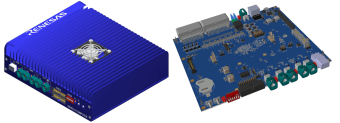
The VC4 is based on a complete Renesas chipset. The centerpiece is the R-Car S4 with 8x Cortex®A55 cores, 1x Cortex® R52 core 2x RH850 G4MH delivering up to 27K DMIPS application performance and up to 5.3K DMIPS lock step real-time performance. It incorporates an 8MB SRAM to execute code on the... Read More
Partner Boards & Kits
DRAM & Flash Memory Solutions
Filters
Applied Filters
Software & Tools
Filter by Type
Filter by Provider
Sample Code
Filter by Application
Filter by Function
Filter by Compiler
Filter by IDE
Simulation Models
Partner Solutions
Please refer to R-Car S4 SDK download guide material (PDF) to download the right packages that fit your needs.
- Software PackageThis is the ICUMX Loader and Flash Writer Package for the R-Car S4 Starter Kit.
- Software PackageThe Flash writer transfers some of binary images from Host PC via SCIF of R-Car Gen4 and writes the binary images to external flash memory. By applying the patch file to the Flash writer, it will be able to write to Winbond Octal NOR Flash (Part numbers: W35T02NW, W35T01NW, W35T51NW, W35T25NW).
- Software PackageThe R-Car S4 Whitebox SDK is an integrated development platform that accelerates the development of connected services applications. All software is provided as an all-in-one package under a Free of Charge (FoC) license.
- Software PackageRenesas' MCAL (Microcontroller Abstraction Layer) software drivers can be obtained as a stand-alone software package.
- IDE and Coding ToolThese tools facilitate the analysis and identification of the causes of problems that occur in the software that operates cooperatively on the CPUs of multiple devices.
- IDE and Coding ToolIntegrated Software Development Environment. Innovative and Open Development Environment in order to ease SW Development for Computer Vision and Deep Learning Algorithms.
- IDE and Coding ToolMultiple heterogeneous processor cores (Arm core/ RH850 core) integrated in R-Car S4 can be debugged and traced simultaneously. This allows for shorter time to identify the cause and analyze problems in systems where multiple cores work together to achieve a function.
- Solution ToolkitThis software maximizes the performance of hardware by distributing the functions of the application to multiple SoCs or CPUs and HWIPs inside the microcontroller.
- Solution ToolkitThe virtual turnkey platform is a software development kit (R-Car SDK) with pretested software libraries and sample code on the virtual development environment R-Car Virtual Platform (VPF).
- Software & Tools - Other
- Software & Tools - OtherRelated Files:
- Software & Tools - Software
No Results Found.
Make sure all keywords are spelled correctly.
Try fewer, different, or more general terms to vary your search.
If you have filters applied, consider deselecting some to broaden your results.
- Search our extensive knowledgebase, designed to help customers with their FAQs.
- Get help from our expert Renesas technical staff and community on our support forums.
- Software PackageThis is the ICUMX Loader and Flash Writer Package for the R-Car S4 Starter Kit.
- Software PackageThe Flash writer transfers some of binary images from Host PC via SCIF of R-Car Gen4 and writes the binary images to external flash memory. By applying the patch file to the Flash writer, it will be able to write to Winbond Octal NOR Flash (Part numbers: W35T02NW, W35T01NW, W35T51NW, W35T25NW).
- Software PackageThe R-Car S4 Whitebox SDK is an integrated development platform that accelerates the development of connected services applications. All software is provided as an all-in-one package under a Free of Charge (FoC) license.
- Software PackageRenesas' MCAL (Microcontroller Abstraction Layer) software drivers can be obtained as a stand-alone software package.
- IDE and Coding ToolThese tools facilitate the analysis and identification of the causes of problems that occur in the software that operates cooperatively on the CPUs of multiple devices.View More (49)
Software & Tools (49)
- Sample CodeRelated Files:
- Sample CodeView More (10)
Sample Code (10)
- Model - Thermal
- Model - Thermal
- Model - Thermal
- Model - Thermal
- Model - Thermal
Simulation Models (5)
- Application Specific SWTata Elxsi offers a multi‑core, software‑defined architecture on R‑Car S4 platform using Renesas SDK and Hypervisor. It shows parallel operation on cores with a mix of Classic AUTOSAR, Adaptive AUTOSAR, RTOS, and Linux. On G4MH, the Classic AUTOSAR stack has CAN, mode management, RTE, and OS. On ...Supported Products: R-Car-S4Provided By: Tata Elxsi Ltd.
- Application Specific SWCross platform Cinemo SDK, powering the smart cockpit with infotainment use cases like effortless onboarding, seamless media playback, BYOD, multi-screen, premium streaming, in-car gaming, and immersive entertainment.Provided By: Cinemo GmbH
- HMIHigh-performance, scalable and hardware-independent HMI software toolchain for embedded systems. Enables development of customizable 2D and 3D graphical user interfaces with a designer-centric workflow, WYSIWYG editor, no-coding methodology and AI-assisted Smart Importer. Integrated state machine and automated workflows accelerate development. Scales efficiently from low-end ...Provided By: Candera GmbH
- Application Specific SWAutomotive sound generation middleware that enables sound design and tuning on actual hardware or production-equivalent environments. Sound sources are adjusted and verified in real-time using the target device, reducing gaps between prototyping and mass production. Standardizes sound control in software to ensure consistent behavior across different microcontrollers or ...Provided By: CRI Middleware Co., Ltd.
- AIProvides reliable in-cabin sensing through Driver Monitoring Systems (DMS) and Occupant Monitoring Systems (OMS), backed by a long track record in automotive production. Supports deployment of Automotive Safety Integrity Level (ASIL)-rated software alongside advanced safety and cockpit applications on automotive systems-on-chip (SoCs).Provided By: SmarteyeView More (34)
Partner Solutions (34)
Learn how to write and read registers and memory using command‑based operations instead of the GUI when debugging R‑Car S4 devices in e² studio. This approach helps streamline low‑level debugging and gives you more direct control during development.
This video demonstrates how to connect a debugger to each CPU core booted by the master boot core on the R-Car SoC without halting execution.
Related Resources
This video introduces the method for multi-device synchronous debugging and tracing using e² studio with R-Car S4 and RH850/U2A.
Related Resources
Introduction and guide on displaying trace data for each process and its time period within the specified capture address range in the "ETM Call Flow Trace" of e² studio for R-Car.
This video shows you how to set up a simple project to debug and monitor its memories using the RPM RAM I/O monitor feature in Real-time Performance Monitor view on e² studio for R-Car.
This video demonstrates how to debug Linux applications on R-Car with e2 studio. It covers system configuration, capturing runtime data, and performing performance analysis with LTTng.
Introduction and how to acquire trace data that records the status and execution time of each core in R-Car, and to display the acquired data in the DTA trace window using e² studio for R-Car.
This video explains how to build a sample project with the R-Car SDK using e2 studio.
This video provides an Introduction and teaches how to measure the bus load inside an SoC using the Bus Monitoring Tool and display the data in e² studio.
Introduction and how to setup Real-time Performance Monitor view on e2 studio for R-Car.
This video shows how to build and debug a R-Car S4 project in Visual Studio Code (VS Code).
Related Resources
This video shows how to download a user program to an external flash memory connected to R-Car S4 using e² studio.
This video shows how to connect target boards to e2 studio for debugging Linux applications running on the R-Car.
This video describes how to build a project and run a program in e² studio.
This video describes how to install and setup the GNU ARM Toolchain.
This video explains how to use multi-device synchronous debugging with e² studio.
An introductory video on multi-device synchronous debugging is also available. Please check it out:
This video describes how to create a new project in e² studio.
This video describes how to install and setup e² studio for R-Car S4 SDK.
Renesas provides the R-Car S4 SDK, software that runs on the R-Car S4 SoC.
This video explains the following parts of the procedure for running the ICU-M Sample App.
- Build ICUM-H Firmware and Sample App
- Build ICUM-X Firmware and Sample App
- Run ICUM-X and ICUM-H Sample App
Renesas provides the R-Car S4 SDK, software that runs on the R-Car S4 SoC.
This video explains the following parts of the procedure for running the ICU-M Sample App.
- Build ICUM-H Firmware and Sample App
- Build ICUM-X Firmware and Sample App
- Run ICUM-X and ICUM-H Sample App
Renesas provides the R-Car S4 SDK, software that runs on the R-Car S4 SoC.
This video explains the following parts of the procedure for running the ICU-M Sample App.
- Build ICUM-H Firmware and Sample App
- Build ICUM-X Firmware and Sample App
- Run ICUM-X and ICUM-H Sample App
Renesas provides the R-Car S4 SDK, software that runs on the R-Car S4 SoC.
This video explains the following parts of the procedure for running Security BSP.
- Build Trusted Firmware, OPTEE OS and Dynamic TA
- Run Dynamic TA Sample App
Renesas provides the R-Car S4 SDK, software that runs on the R-Car S4 SoC.
This video explains the following parts of the procedure for running Security BSP.
- Build Trusted Firmware, OPTEE OS and Dynamic TA
- Run Dynamic TA Sample App
Macronix is a leading Non-Volatile Memory solution provider.
R-Car system can realize fastboot through extreme I/O speed.
Winbond Electronics Corp. Japan
Secure FOTA Demo on AWS - R-Car M3 and W77Q Secure Flash
Renesas provides the R-Car S4 SDK, software that runs on the R-Car S4 SoC.
This video explains the following parts of the procedure for running the Inter-CPU communication (ICCOM) Sample App.
- Install MCAL package
- Build ICCOM Sample App
- Setting system for executing ICCOM Sample App
- Running ICCOM Sample App
- Communicate between Arm® Cortex®-A55 core and Arm® Cortex®-R52 core
- Communicate between Arm® Cortex®-A55 core and G4MH core
Renesas provides the R-Car S4 SDK, software that runs on the R-Car S4 SoC.
This video explains the following parts of the procedure for running the Inter-CPU communication (ICCOM) Sample App.
- Install MCAL package
- Build ICCOM Sample App
- Setting system for executing ICCOM Sample App
- Running ICCOM Sample App
- Communicate between Arm® Cortex®-A55 core and Arm® Cortex®-R52 core
- Communicate between Arm® Cortex®-A55 core and G4MH core
Renesas provides the R-Car S4 SDK, software that runs on the R-Car S4 SoC.
This video explains the following parts of the procedure for running the CAN routing sample application on the MCAL software for G4MH core.
- Install MCAL package
- Build CAN Routing Sample App
- Setting system for executing CAN Routing Sample App
Renesas provides the R-Car S4 SDK, software that runs on the R-Car S4 SoC.
This video explains the following parts of the procedure for running the CAN routing sample application on the MCAL software for G4MH core.
- Setting system for executing CAN Routing Sample App
- Execute CAN Routing Sample App
Renesas provides the R-Car S4 SDK, software that runs on the R-Car S4 SoC.
This video, Part 1 of Linux BSP setup in the 'R-Car S4 Startup Guide', explains 'System Overview and Sample QSPI, GPIO drivers' as the following steps.
- Introduce software structure of Linux BSP.
- Build BSP Image using Yocto Recipe.
- Introduce operation of QSPI driver.
- Build and run sample application of GPIO.
Renesas provides the R-Car S4 SDK, software that runs on the R-Car S4 SoC.
This video, Part 2 of Sample Linux Application and Driver in the 'R-Car S4 Startup Guide', explains 'Sample SCIF, DMA and IPMMU drivers' as the following steps.
- Introduce change baud rate on SCIF driver.
- Build and run sample application of DMA with IPMMU driver.
Renesas provides the R-Car S4 SDK, software that runs on the R-Car S4 SoC.
This video, Part 3 of Sample Linux Application and Driver in the 'R-Car S4 Startup Guide' explains, 'Sample PCIe driver communication' as the following steps.
- Introduce connection of PCIe Test environment.
- Build PCIe driver as Root Complex and Endpoint.
- Test communication between Root Complex and Endpoint.
Renesas provides the R-Car S4 SDK, software that runs on the R-Car S4 SoC.
This video explains the following parts of the procedure for running the CAN module sample application in MCAL software for Arm® Cortex®-R52 core.
- Install MCAL package
- Build CAN Sample App
Renesas provides the R-Car S4 SDK, software that runs on the R-Car S4 SoC.
This video explains the following parts of the procedure for running the CAN module sample application in MCAL software for Arm® Cortex®-R52 core.
- Setup system for CAN Sample App
- Introduce how to execute CAN Sample App and show how CAN sends and receives
Renesas provides the R-Car S4 SDK, software that runs on the R-Car S4 SoC.
This video explains the following parts of the procedure for running the CAN module sample application in MCAL software for G4MH core.
- Install MCAL package
- Build CAN Sample App
- Run CAN Sample App
Renesas provides the R-Car S4 SDK, software that runs on the R-Car S4 SoC.
This video, Part 1 of Linux BSP setup in the 'R-Car S4 Startup Guide', explains 'Spider Board Initial Setup' as the following steps.
- System connection on Spider board.
- Flashing IPL and U-boot.
Related Resources
Renesas provides the R-Car S4 SDK, software that runs on the R-Car S4 SoC.
This video, Part 2 of Linux BSP setup in the 'R-Car S4 Startup Guide', explains 'Boot Kernel with TFTP and NFS Server' as the following steps.
- Set up TFTP and NFS environment then prepare image, DTB files, and userland.
- Boot up Kernel on Spider board by using TFTP and NFS server.
Renesas provides the R-Car S4 SDK, software that runs on the R-Car S4 SoC.
This video, Part 3 of Linux BSP setup in the 'R-Car S4 Startup Guide', explains 'Boot Kernel by using eMMC' as the following steps.
- Prepare image, DTB files, and userland to NFS.
- Write image files and userland to eMMC.
- Boot Kernel for board S4 by using eMMC.
Renesas provides the R-Car S4 SDK, software that runs on the R-Car S4 SoC.
This video explains the following parts of the procedure for running the AES-ACC Sample App for Non-OS environment.
- Build AES-ACC Sample App
- System setting for executing AES-ACC Sample App
- Run AES-CC Sample App
Renesas provides the R-Car S4 SDK, software that runs on the R-Car S4 SoC.
This video explains the following parts of the procedure for running the AES-ACC Sample App for Non-OS environment.
- Build AES-ACC Sample App
- System setting for executing AES-ACC Sample App
- Run AES-CC Sample App
News & Blog Posts
Support Communities
-
Does the latest version of ICUMX IPL for R-Car S4 support Secure Boot? how to get mcu_secureboot and related documents?
... S4 Series Application Domain Security User’s Manual 10. R-Car V4H Series Security User’s Manual 11. R-Car Series, 4th Generation Safety Application Note 13. R-Car S4 Secure Monitor Software User’s Manual 14. R-Car S4 ICUMXB, ICUMHB Firmware Startup Guide Thank you for your help.
Jul 30, 2025 -
R-Car S4 (Gateway)
R-Car S4 (Gateway)
-
R-Car S4 Whitebox SDK Build Error
Hi I would like to consult to build error to R-Car S4 sample project. I was following procedure R-Car S4 Whitebox SDK user's manual and did a Rebuild procedure to CA55 and G4MH rebuild. That page on R-Car S4 SDK User's manual as Appendix A1 ...
Sep 18, 2025
Knowledge Base
-
What is the difference between R-Car S4 Whitebox SDK and R-Car S4 SDK?
R-Car S4 Whitebox SDK allows early prototyping to begin because of its FoC (Free of Charge) software configuration, which doesn't require a license agreement.On the other hand, R-Car S4 SDK supports a variety of ASIL-D compliant software. See also: FAQ: What is "R-Car S4 ...
May 19, 2023 -
What is "R-Car S4 Whitebox SDK"?
... I do using the R-Car S4 Whitebox SDK? FAQ: Is there a fee for the R-Car S4 Whitebox SDK? FAQ: What evaluation boards are supported by the R-Car S4 Whitebox SDK? FAQ: What is the difference between R-Car S4 Whitebox SDK and R-Car S4 SDK?
Nov 30, 2023 -
How do I run benchmark software using R-Car S4 Whitebox SDK?
For execution procedure of the benchmark software, please refer to the "How to run Benchmark" in R-Car S4 Whitebox SDK Application Note.https://www.renesas.com/whitebox-sdk#document
May 18, 2026