
Overview
Description
This product is a real-time operating system (real-time OS) that is an implementation of the μITRON4.0 specification. μITRON is the predominant real-time OS for embedded systems in Japan. Its low resource requirements, outstanding real-time performance, and broad range of service calls make it very suitable for embedded systems requiring true real-time and multi-tasking capabilities.
In addition, its high degree of compatibility with the CS+ IDE and the configurator which automatically generates startup files will help you greatly reduce development times and get your products to market more quickly.
Features
- Conforms to µITRON Ver. 4.0 Specification
The design conforms with the µITRON4.0 Specification, which prescribes a representative OS architecture for embedded control. - Excellent portability
In order to support many execution environments, the hardware-dependent processing necessary for the RI78V4 to execute processes has been extracted as target-dependent and user own coding portions and is provided as sample source files. In this way, portability to many different execution environments has been improved and customization is easy - ROM-based implementation
Since the system is a real-time/multitask OS assumed to be used embedded in the execution environment, it was designed to be compact and ready for ROM-based implementations. Also, because the system can be configured linking only the service calls used in the application system by the user (rather than all the service calls provided by the RI78V4), a real-time/multitask OS can be configured which is compact and optimized for the user's needs. - Interface with CS+, the Renesas Electronics IDE
The RI78V4 OS interfaces with CS+ to support the following functions:- Auto-settings for options required in OS build
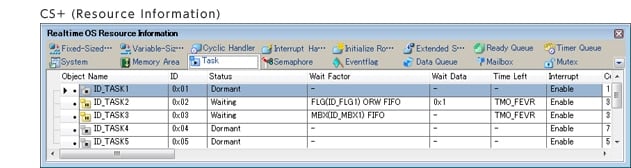
- Displays state of OS control object for tasks, semaphore, etc. (Resource Information)
- Graphical displays of task operation history and service call issuance history (system performance analyzer)
- Supported compiler: CA78K0R (the RL78, 78K family C compiler package)
- Learn More
Release Information
OS
Latest Ver.: V1.00.02
Released: Nov 1, 2012
Details of upgrade (See Tool News)
Operating Environment
Agreement Details
User's Manual ( Coding: RI78V4 Real-time OS User's Manual: Coding (PDF | English, 日本語) | All )
CS+ interface plug-ins (RTOS Common plug-in)
Latest Ver.: V3.00.00
Released: Oct 1, 2014
CS+ interface plug-ins (Plug-in for RI600PX)
Latest Ver.: V3.00.00
Released: Oct 1, 2014
Notes of Target Devices:
Devices with exceedingly low ROM or RAM capacity are not supported even if the groups they belong to are listed on the above list of supported devices. The standard capacities of ROM and RAM are stated below. Note that the required capacities also depend on the applications you will be using.
- ROM capacity: At least 16 KB
- RAM capacity: At least 4 KB
Target Devices
Additional Details
Cooperating Tools
- Supported compiler :CC-RL
- Supported IDE: CS+
Functions
The RI78V4 kernel consists of the following modules. Each module is provided by functions (service calls) .
- Task management functions
The task control functions provided by the RI78V4 include a function to reference task statuses, in addition to a function to manipulate task statuses. - Task dependent synchronization functions
Changes task status from other task, and synchronizes tasks. - Synchronization and communication functions
The synchronization and communication functions of the RI78V4 consist of Semaphores, Eventflags, and Mailboxes that are provided as means for realizing exclusive control, queuing, and communication among tasks.- Semaphores: In the RI78V4, non-negative number counting semaphores are provided as a means (exclusive control function) for preventing contention for limited resources (hardware devices, library function, etc.) arising from the required conditions of simultaneously running tasks.
- Eventflags: Provides 16-bit eventflags as a queuing function for tasks, such as keeping the tasks waiting for execution, until the results of the execution of a given processing program are output.
- Mailboxes: Provides a mailbox, as a communication function between tasks, that hands over the execution result of a given processing program to another processing program.
- Fixed-sized memory pool
When a dynamic memory manipulation request is issued from a processing program in the RI78V4, the fixed-sized memory pool is provided as a usable memory area. - Time management functions
The time management functions of the RI78V4 include Delayed Wakeup, Timeout, and Cyclic Handlers that use timer interrupts created as fixed intervals, as means for realizing time-dependent processing. - System state management functions
For changing or referencing the system state. - Interrupt management functions
Provides as interrupt management functions related to the interrupt handlers activated when a maskable interrupt is occurred. - System configuration management functions
Provides system initialization processing, which is required from the reset interrupt output until control is passed to the task, and version information referencing processing. - Scheduler
The scheduling functions provided by the RI78V4 consist of functions manage/decide the order in which tasks are executed by monitoring the transition states of dynamically changing tasks, so that the CPU use right is given to the optimum task.
Specifications
| Target device | RL78 Family, 78K0R |
|---|---|
| Maximum number of tasks | 127 |
| Number of priority levels | 15 |
| Service call number | 66 |
| Performance (Time takes for a target task to be executed after the wup_tas is issued.) | 49.2 microseconds (78K0R/Kx3, 10MHz. embedded memory) |
| Kernel code size | From 2.9K bytes to 7.7K bytes |
| Kernel RAM usage per task | data : 24 bytes stack : 28 bytes |
Components
| Provided items | Explanation | Note |
|---|---|---|
| Kernel source program | Kernel source program | Provided only with mass- production licenses which include source code. |
| Kernel library | Kernel library for system building | — |
| Standard header files | ITRON specification common definition files Kernel specification definition files Other definition files | Header files are provided both in C languages |
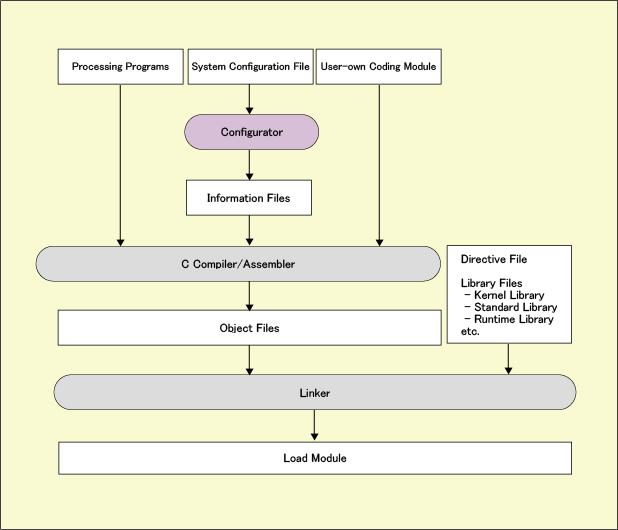
| Command line configurator | Outputs all types of definition files from the cfg file that describes the structure parameters in text. | — |
| Sample program | A simple program using ITRON. | — |
| CS+ interface plug-ins - RTOS Common plug-in - Plug-in for RI78V4 | Function for easy kernel embedding Function for referencing the OS state during debug | — |
| System performance analyzer | A tool that displays a transition diagram of the OS operation history and analyzes performance, such as CPU usage rate. | — |
| Manual | User's manual | — |
Processing Flow
Support
Knowledge Base
- Using the E1 or E20 emulator, is it possible to use the AZ78V4 performance analyzer to obtain a trace display for an application which is using the RI78V4 operating system? (E2, E2 Lite, E1, E20)
No, it is not possible. This is because the AZ78V4 uses a record of data access to obtain a trace display. To use the AZ78V4 in tracing, you need to• use IECUBE, or• use a simulator.
Mar 8, 2021 - Service calls for release sometimes return which are not contain in UM
Breaking of a task stack or a task stack breaking the OS management table are the possible reasons. Check the behavior after increasing the sizes of task stacks. Unintended incrementation of a stack before or after the task concerned might also cause this, rather than the actual stack for the ...
Jul 14, 2015 - What is the difference between dly_tsk and tslp_tsk?
... when tmout has elapsed. On the other hand, in the case of dly_tsk, other tasks do not return the given task from waiting (except for forcibly releasing it from waiting), and E_OK (normal end) is returned when dly_tsk has elapsed. Use dly_tsk for intentionally postponing processes.
Jun 12, 2015

Support Communities

