
Overview
Description
Smart Configurator for RZ supports the new device RZ/G3E.
RZ Smart Configurator automatically generates initial-setting programs for MPUs.
It provides a quick and smart way of combining and configuring software to meet your needs, such as by configuring peripheral pins and importing middleware and drivers.
*The installer format differs depending on the device. For details, refer to Release Information.
Features
- Importing Middleware/Drivers
- Pin Settings
- Learn More
Release Information
Smart Configurator supports RZ family devices as different form, functions by series or groups.
Types of Smart Configurator distributions for RZ family devices
Plug-in type of e² studio
This type of Smart Configurator is included in e² studio as plug-in.
- Plug-in type of e² studio for Flexible Software Package (FSP)
- Plug-in type of e² studio for RZ/A2M Software Package
Standalone type
Standalone type of Smart configurator supports IDE (Integrated Development Environment) of Partners or generation configuration files of Linux for target devices.
- Standalone version of FSP Smart configurator for RZ family device groups
- Smart Configurator for RZ
Refer to the table below to determine suitable type of Smart Configurator for RZ family devices and required features.
<Table> Smart Configurator types for each RZ family device group
Note
- Only supports pin setting and automatic resolution of contention between pin functions
- Only supports some devices with Sub CPU
How to get it
You can get each type of Smart Configurator from the following routes:
Plug-in type of e² studio for Flexible Software Package (FSP)
This type of Smart Configurator can be obtained as a platform installer from the FSP page for each RZ family series. Click a ‘Flexible Software Package (FSP) Platform Installer of e² studio (and Smart Configurator)’ on ’Downloads’ list.
Plug-in type of e² studio for RZ/A2M Software Package
Download e2 studio installer from ‘e² studio – inforamtion for RZ Family’.
Standalone version of FSP Smart configurator for RZ family device groups
This type of Smart Configurator can be obtained as a platform installer from the FSP page for each RZ family series. Click a ‘Flexible Software Package (FSP) Platform Installer of e² studio and Smart Configurator’ on ’Downloads’ list.
Smart Configurator for RZ
Download an installer from ’Downloads’ list. (e.g. Smart Configurator for RZ V1.19.0)
References
Please refer to the following Smart Configurator related materials.
| Device groups | Related documents, Related product pages |
|---|---|
| RZ/A2M | RZ/A2M Smart Configurator User Guide: e² studio (PDF | English, 日本語) Details of the RZ/A2M Software Package |
| RZ/A3UL, RZ/A3M | RZ/A Getting Started with Flexible Software Package V3.61 (Deprecated) (PDF) RZ/A Flexible Software Package (FSP) |
| RZ/T2M, RZ/T2ME, RZ/T2L, RZ/N2L, RZ/T2H, RZ/N2H | RZ/T2, RZ/N2 Getting Started with Flexible Software Package V3.10 (Deprecated) (PDF) |
| RZ/G2L, RZ/G2LC, RZ/G2UL, RZ/G3S | RZ/G Multi-OS Package |
| RZ/V2H, RZ/V2N, RZ/V2L | RZ/V Multi-OS Package |
Smart Configurator released after Dec. 2021 will support the 64-bit versions of Windows® only.
Microsoft® Windows® has shifted to the 64-bit environment. Therefore, Renesas will focus on supporting Smart Configurator for the 64-bit environment.
(Microsoft®, Windows® are registered trademarks of Microsoft Corporation in the United States and/or other countries. https://www.microsoft.com/legal/intellectualproperty/trademarks.aspx)
Target Devices
Downloads
|
|
|
|
|---|---|---|
| Type | Title | Date |
| Software & Tools - Software | Smart Configurator for RZ V2.1.0 installer for Linux
|
|
| Software & Tools - Software | Smart Configurator for RZ V2.1.0 installer for Windows
|
|
| Software & Tools - Software | Smart Configurator for RZ V2.1.0 installer for macOS
|
|
| Software & Tools - Other | ||
|
4 items
|
||
Documentation
|
|
|
|
|---|---|---|
| Type | Title | Date |
| Application Note |
PDF
5.90 MB
This document shows how to prepare programs for "DDR Tools" and softwares for "Install Utility". Also it shows how to operate "DDR Tools" and easy usage of "Install Utility" on Windows PC. It provides functionality for tuning and validating DDR memory parameters and a GUI that enables writing these configured images to the development board, ensuring a streamlined deployment process.
|
|
| Release Note | PDF 911 KB | |
| Tool News - Release |
PDF
185 KB
日本語
Smart Configurator for RZ has been updated from V2.0.1 to V2.1.0. DDR Configurator, Install Utility, and DDR Tools have been updated to include support for the RZ/G3E and RZ/G2L devices. Additionally, enhancements have been implemented across each tool to improve functionality and usability.
|
|
| Manual - Development Tools |
PDF
2.32 MB
This application note describes the basic usage of the RZ Smart Configurator. Smart Configurator for RZ supports funcionalities for Pin configurator enables pin assignment, and DDR Configurator enables configuration of DDR memory-related pins and parameters.
|
|
| Release Note | PDF 1.25 MB | |
| Tool News - Release |
PDF
226 KB
日本語
Smart Configurator for RZ has been updated from V1.21.0 to V2.00.0. We’ve added three new utilities to simplify DDR memory setup and optimization. DDR Configurator enables configuration of DDR memory-related pins and parameters.
Install Utility enables writing these configured images to the development board. DDR Tools provides functionality for tuning and validating DDR memory parameters.
|
|
| Flyer |
PDF
977 KB
日本語
, 简体中文
This is a flyer for the Smart Configurator, which can automatically generate initial setup programs for microcontrollers. It details the features and information about the Smart Configurator. Supported microcontrollers include RL78, RX, RH850, RISC-V, RA, and RZ.
|
|
| Release Note | PDF 1017 KB 日本語 | |
| Tool News - Release | PDF 143 KB 日本語 | |
| Tool News - Release | PDF 144 KB 日本語 | |
| Manual - Development Tools | PDF 1021 KB 日本語 | |
| Application Note | PDF 1.29 MB 日本語 | |
| Tool News - Release | PDF 149 KB 日本語 | |
| Release Note | PDF 1.08 MB 日本語 | |
| Release Note | PDF 1.08 MB 日本語 | |
| Tool News - Release | PDF 150 KB 日本語 | |
| Release Note | PDF 1.09 MB 日本語 | |
| Release Note | PDF 1.60 MB 日本語 | |
| Tool News - Release | PDF 304 KB 日本語 | |
| Tool News - Release | PDF 156 KB 日本語 | |
| Tool News - Release | PDF 231 KB 日本語 | |
| Manual - Development Tools | PDF 1.39 MB 日本語 | |
| Tool News - Note | PDF 201 KB 日本語 | |
| Release Note | PDF 1.30 MB | |
| Tool News - Note | PDF 73 KB 日本語 | |
| Manual - Development Tools | PDF 2.14 MB 日本語 | |
| Application Note |
PDF
5.08 MB
日本語
AI-generated Summary:
The document provides step-by-step guidance on using Smart Configurator with Renesas RX microcontrollers, covering device selection, clock settings, driver addition, and pin configuration. It includes application examples for peripherals like CMT, A/D, SCI, DMA, and USB. The guide details code generation, adding application codes, building, and running on hardware, along with debugging support tools.
|
|
| Application Note |
PDF
1.88 MB
日本語
AI-generated Summary:
This guide explains how to create an Ethernet echo server program using FIT modules in Smart Configurator for RX64M, RX6SN, and RX651 groups. It outlines the operating environment, including evaluation boards, debuggers, IDE, and toolchains. The basic steps involve selecting devices, configuring clocks, drivers, and pins, generating code, and adding application code. The module structure includes middleware, interface conversion, device drivers, system timer, and BSP, with specific versions listed for each FIT module.
|
|
|
28 items
|
||
Videos & Training
Follow this step-by-step tutorial to configure DDR with Smart Configurator for RZ devices. As an example, you will work with an RZ/G3S project that supports DDR configuration, learning how to set up and adjust key parameters. By the end, you will understand the basic flow for applying DDR settings in your own RZ-based projects.
Additional Details
Pin Settings
The assignments of pins can be set up through a GUI, which also checks and offers solutions for cases of contention for the same pin by multiplexed functions.
The [Pins Configuration] window (displayed per peripheral module)
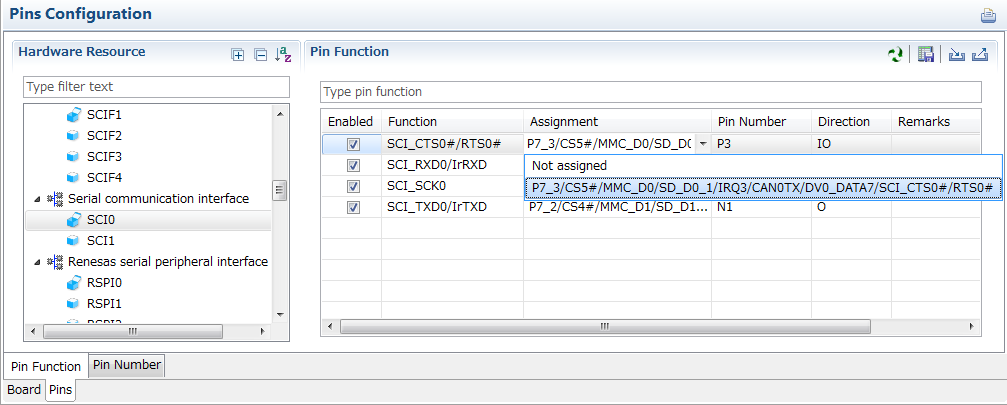
Specifying a peripheral module in the [Pins Configuration] window displays the pin functions for use by the module and allows you to set the assignment of the functions to pins.
[MCU/MPU Package] window
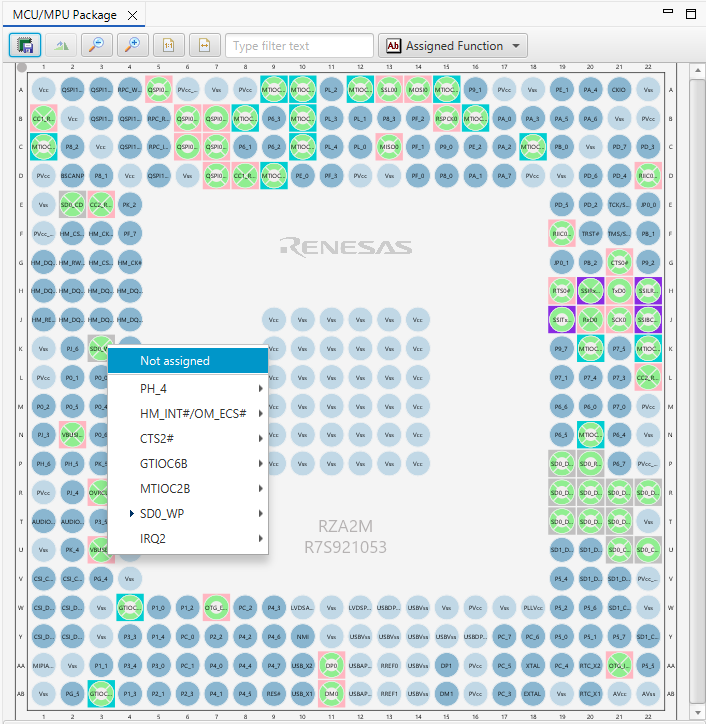
The [MCU/MPU Package] window displays a symbolic view of the pins, indicating by colors which pins are and are not in use, which have been assigned contending multiplexed functions, and so on. This makes it easy to check the overall situation.
Automatic resolution of contention between pin functions
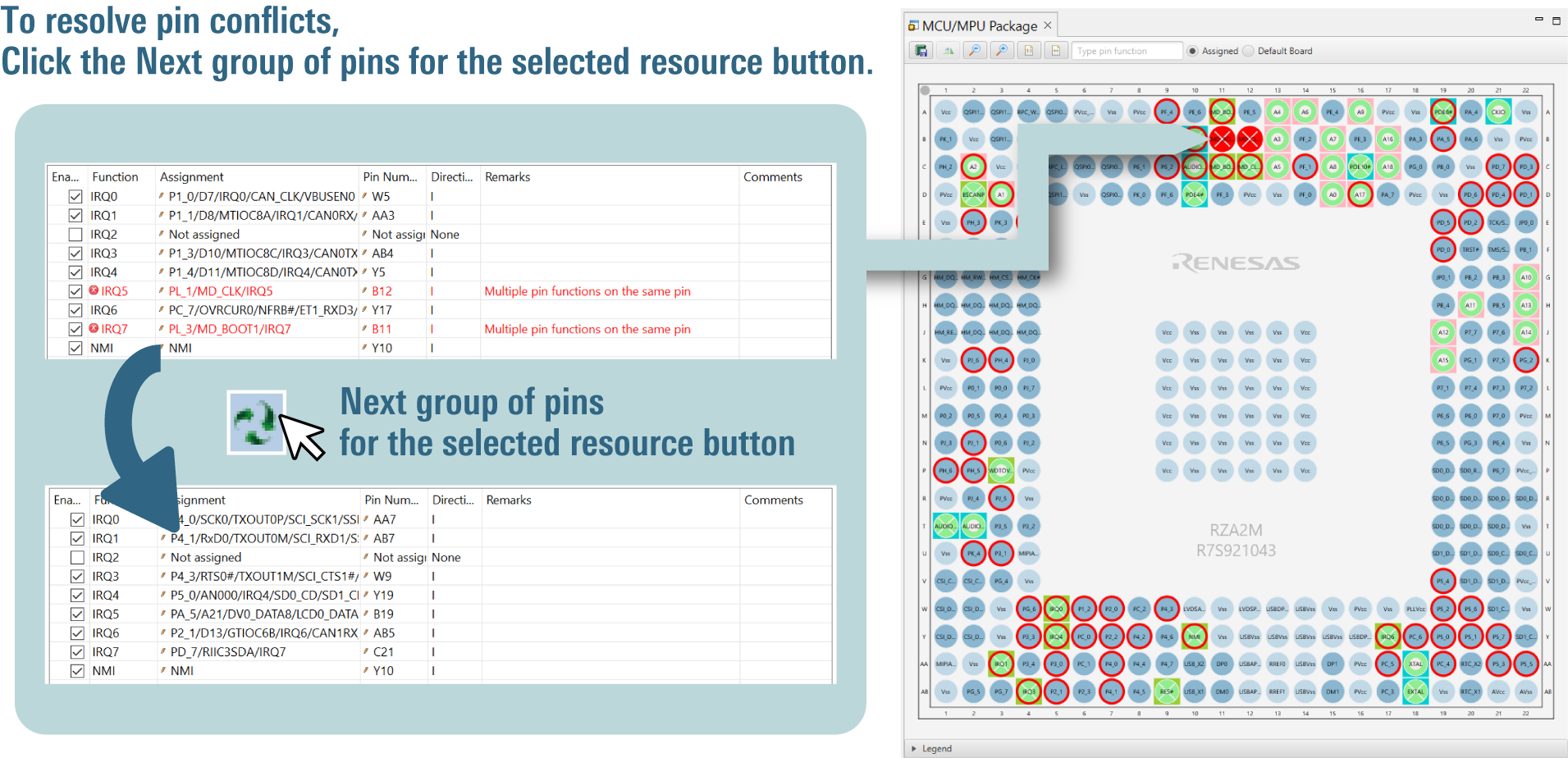
In cases of contention for a pin, clicking on the pin brings up a list allowing automatic changing of the assignment of the pin to resolve the contention.
Output a Device Settings File for Linux (Note1)
Output a DTS file that contains pin settings. You can readily apply device settings to Linux.
Importing Middleware/Drivers
Flexible Software Package(FSP)(Note2)
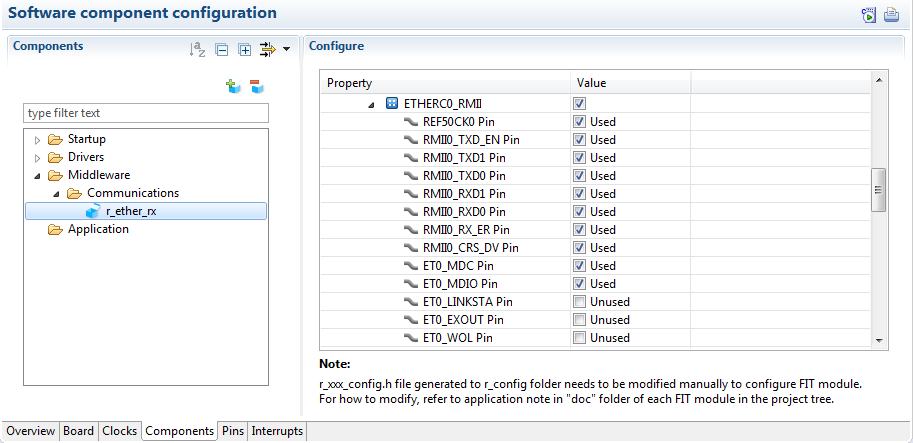
You can change the settings of FSP pins and components by using the Smart Configurator GUI.
RZ/A2M Software Package (Note3)
The RZ/A2M Software Package consists of a range of middleware and drivers, which you can import and then modify settings such as pin assignments as required.
Details of the RZ/A2M Software Package >>
DDR memory setup and optimization (Note4)
You can use the GUI to configure DDR memory settings, resolve parameter conflicts, apply changes to the hardware, and perform tuning easily.
Configuration of DDR memory-related pins and parameters (DDR Configurator)
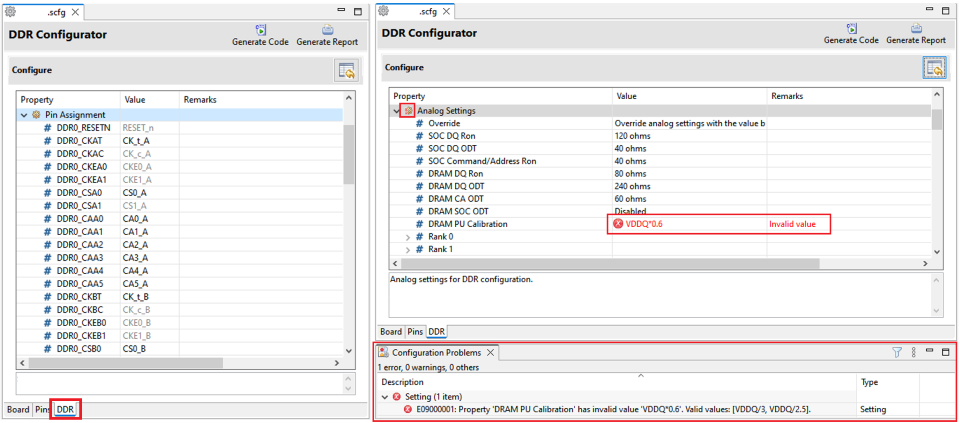
It allows seamless setup of DDR memory pins. All entered parameters are automatically validated and if any conflicts with other parameters are detected, the tool will display a warning to ensure proper configuration integrity.
Applying DDR memory configurations to the bootloader and OS disk image files (Install Utility)
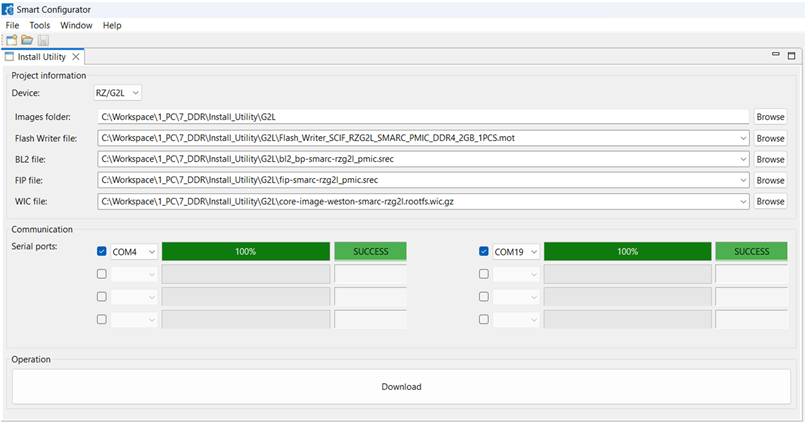
It provides a GUI that applies configurations by DDR Configurator to the bootloader and operating system disk image files for RZ Family devices and enables writing these configured images to the development board, ensuring a streamlined deployment process.
Tuning and Validating DDR memory parameters
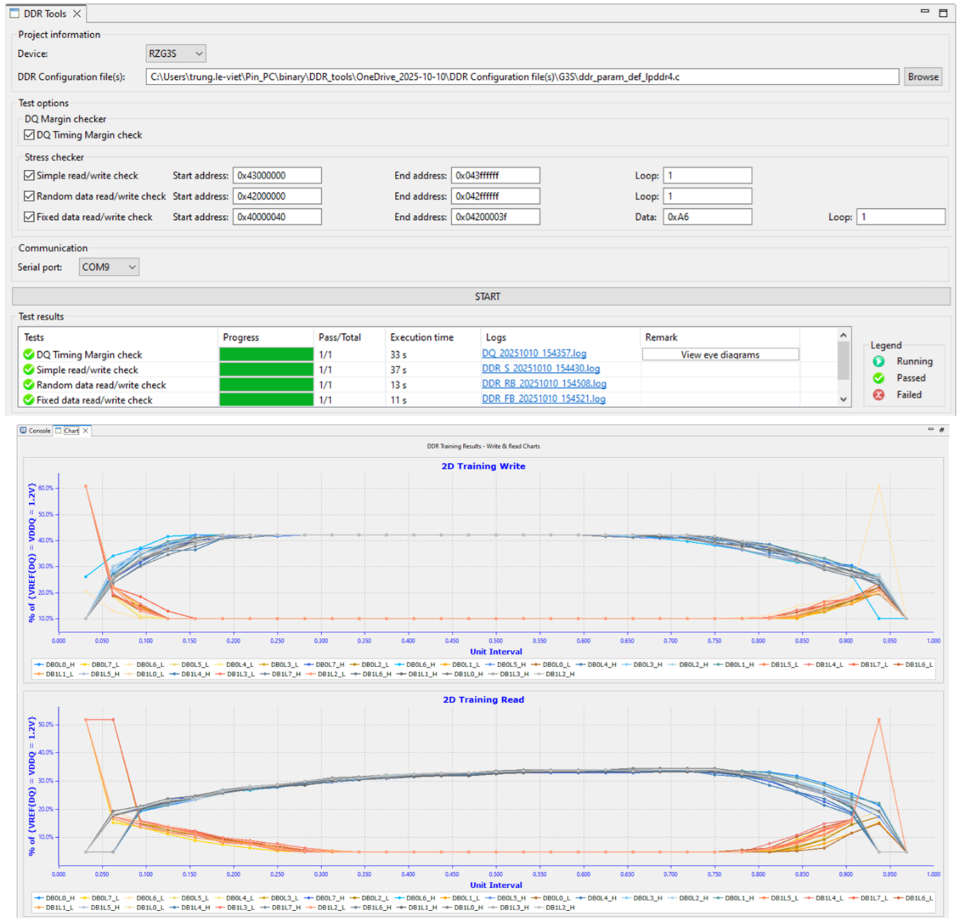
This offers a GUI that enables parameter modification, writing updated parameters to the actual hardware, and performing load tests to ensure system stability and performance.
Supported Features
| Type of Smart Configurator | Flexible Software Package support | Importing middleware | Generating driver code | Pin settings |
|---|---|---|---|---|
| Smart Configurator for RZ | — | — | — | lens |
| Plug-in type of e² studio for RZ/A2M Software Package | — | lens | lens | lens |
| Plug-in type of e² studio for Flexible Software Package (FSP) Standalone version of FSP Smart configurator for RZ family device groups | lens | lens | lens | lens |
— : Not Supported
Refer to ‘Release Information’ for detailed information on each type of Smart Configurator.
Note
- The Smart Configurator only generates Device Tree Specification (DTS) include files (dtsi), which are only usable in the development environment of the Linux platform. Manually merge the device-setting code in the generated dtsi files with the default dtsi files included in your source code produced under Linux. For details of the DTS, refer to the links on https://www.devicetree.org .
- Available only for the RZ Family devices supported by the FSP.
- We currently support version 2.0.0 and later versions of the RZ/A2M Software Package.
- It supports RZ/G2L, RZ/G3S.
Support
Support Communities
- RZ Smart Configurator - Unable to Find RZ/T2M in list
... Smart Configurator 1.17.0 to check the pin configurations, but I'm unable to find RZ/T Series in the list. Please see the below screenshot: Please let me know if i should install any addition packages to add RZ/T series to Smart Configurator. Regards, Praveen
Apr 30, 2024 - Smart Configurator
I want to use ARM-Keil to program R7FA4M2AD3CFP. I know I still need to use RA Smart Configurator to generate code, but I can't find RA Smart Configurator on the official website. There is RZ Smart Configurator on the official website, but there is no RA. Why? [locked ...
May 5, 2022 - how can I get RZ/A2M SCIF example code or data?
HELLO I have developing RZ/A2M project. But I can`t find SCIF example code as falling mode and IRQ mode. please help me
Mar 5, 2021
Knowledge Base
- How to convert an e² studio FSP project into an RA or RZ Smart Configurator project that can be built in a partner IDE
Install RA or RZ SC v2022-07 or higher, open Quick Start Guide from the Help menu, and then see the chapter "From Existing e² studio Projects."
Jul 30, 2024 - e² studio FAQs
... I generate code after importing a project, the source file version changes 3000725 How to convert an e² studio FSP project into an RA or RZ Smart Configurator project that can be built in a partner IDE 3000751 Importing DA SDK project into e² studio GNU Compilers andGCC Project issues ...
Dec 23, 2025 - Characters are garbled in CSV file read by Smart Configurator for RZ
The problem occurs because CSV files that can be output by the Smart Configurator for RZ V1.10 are coded in UTF-8.To display the file correctly, use the following procedure.1. Open the Memo Pad, and then drag the output CSV file to the Memo Pad.2. Make ...
Aug 2, 2017

Support Communities


