
Overview
Description
RZ Smart Configurator is a tool that automatically generates initial-setting programs for MPUs.
It provides a quick and smart way of combining and configuring software to meet your needs, such as by configuring pins for peripheral functions of RZ Family MPUs and importing middleware and drivers.
We provide Linux users of RZ Family devices with a standalone version of RZ Smart Configurator. It runs under Linux and includes features such as configuring pins and setting the DTS output and DDR memory.
Features
- Pin Settings
- Exporting Linux Device Configuration Files
- DDR Memory Configuration and Tuning (Note)
- Linux Image Installation (Note)
- Learn More
(Note) For supported devices, please refer to the release notes for the latest version of RZ Smart Configurator.
Release Information
| User Guides | Latest Ver. Released | Operating Environment |
|---|---|---|
| V2.2.0 Aug 20, 2026 | Operating Environments for the Latest Versions of Tool Products |
Target Devices
Downloads
| Type | Title | Date |
|---|---|---|
| Software & Tools - Software | Smart Configurator for RZ V2.2.0 installer for Linux | |
| Software & Tools - Software | Smart Configurator for RZ V2.2.0 installer for Windows | |
| Software & Tools - Software | Smart Configurator for RZ V2.2.0 installer for macOS | |
3 items | ||
Documentation
| Type | Title | Date |
|---|---|---|
| Application Note | PDF 5.92 MB This document shows how to prepare programs for "DDR Tools" and softwares for "Install Utility". Also it shows how to operate "DDR Tools" and easy usage of "Install Utility" on Windows PC. It provides functionality for tuning and validating DDR memory parameters and a GUI that enables writing these configured images to the development board, ensuring a streamlined deployment process. | |
| Release Note | PDF 631 KB | |
| Tool News - Release | PDF 146 KB 日本語 Smart Configurator for RZ has been updated from V2.1.0 to V2.2.0. DDR Configurator, Install Utility, and DDR Tools have been updated to include support for the new RZ devices. Additionally, enhancements have been implemented across each tool to improve functionality and usability. | |
| Release Note | PDF 911 KB | |
| Tool News - Release | PDF 185 KB 日本語 Smart Configurator for RZ has been updated from V2.0.1 to V2.1.0. DDR Configurator, Install Utility, and DDR Tools have been updated to include support for the RZ/G3E and RZ/G2L devices. Additionally, enhancements have been implemented across each tool to improve functionality and usability. | |
| Manual - Development Tools | PDF 2.32 MB This application note describes the basic usage of the RZ Smart Configurator. Smart Configurator for RZ supports funcionalities for Pin configurator enables pin assignment, and DDR Configurator enables configuration of DDR memory-related pins and parameters. | |
| Release Note | PDF 1.25 MB | |
| Tool News - Release | PDF 226 KB 日本語 Smart Configurator for RZ has been updated from V1.21.0 to V2.00.0. We’ve added three new utilities to simplify DDR memory setup and optimization. DDR Configurator enables configuration of DDR memory-related pins and parameters.
Install Utility enables writing these configured images to the development board. DDR Tools provides functionality for tuning and validating DDR memory parameters. | |
| Flyer | PDF 977 KB 日本語 , 简体中文 This is a flyer for the Smart Configurator, which can automatically generate initial setup programs for microcontrollers. It details the features and information about the Smart Configurator. Supported microcontrollers include RL78, RX, RH850, RISC-V, RA, and RZ. | |
| Release Note | PDF 1017 KB 日本語 | |
| Tool News - Release | PDF 143 KB 日本語 | |
| Tool News - Release | PDF 144 KB 日本語 | |
| Manual - Development Tools | PDF 1021 KB 日本語 | |
| Application Note | PDF 1.29 MB 日本語 | |
| Tool News - Release | PDF 149 KB 日本語 | |
| Release Note | PDF 1.08 MB 日本語 | |
| Release Note | PDF 1.08 MB 日本語 | |
| Tool News - Release | PDF 150 KB 日本語 | |
| Release Note | PDF 1.09 MB 日本語 | |
| Release Note | PDF 1.60 MB 日本語 | |
| Tool News - Release | PDF 304 KB 日本語 | |
| Tool News - Release | PDF 156 KB 日本語 | |
| Tool News - Release | PDF 231 KB 日本語 | |
| Tool News - Note | PDF 201 KB 日本語 | |
| Release Note | PDF 1.30 MB | |
| Tool News - Note | PDF 73 KB 日本語 | |
26 items | ||
Videos & Training
This video introduces Smart Configurator for the RZ Family. Smart Configurator (SC) is a GUI-based tool that can easily configure pins.
Additional Details
Pin Settings
The assignments of pins can be set up through a GUI, which also checks and offers solutions for cases of contention for the same pin by multiplexed functions.
The [Pins Configuration] window (displayed per peripheral module)
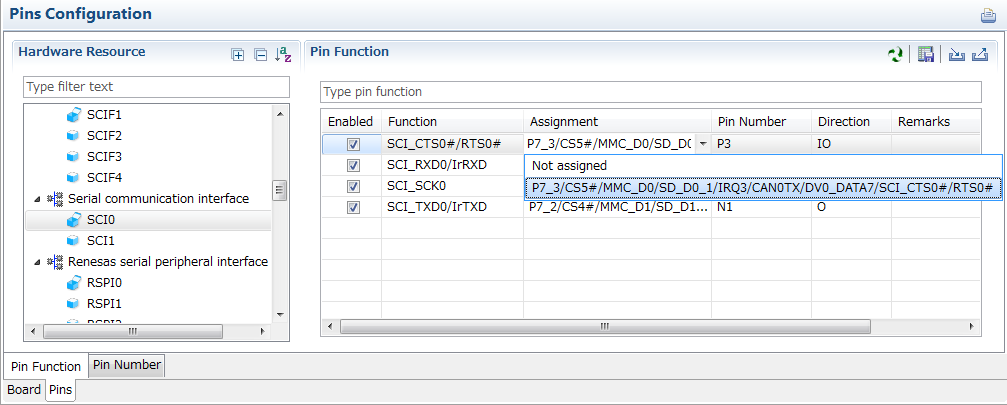
Specifying a peripheral module in the [Pins Configuration] window displays the pin functions for use by the module and allows you to set the assignment of the functions to pins.
[MCU/MPU Package] window
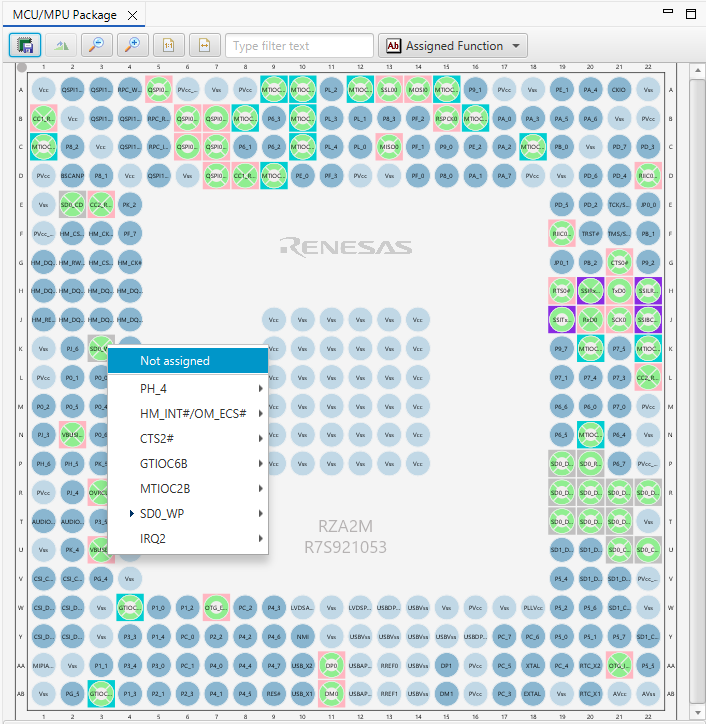
The [MCU/MPU Package] window displays a symbolic view of the pins, indicating by colors which pins are and are not in use, which have been assigned contending multiplexed functions, and so on. This makes it easy to check the overall situation.
Automatic resolution of contention between pin functions
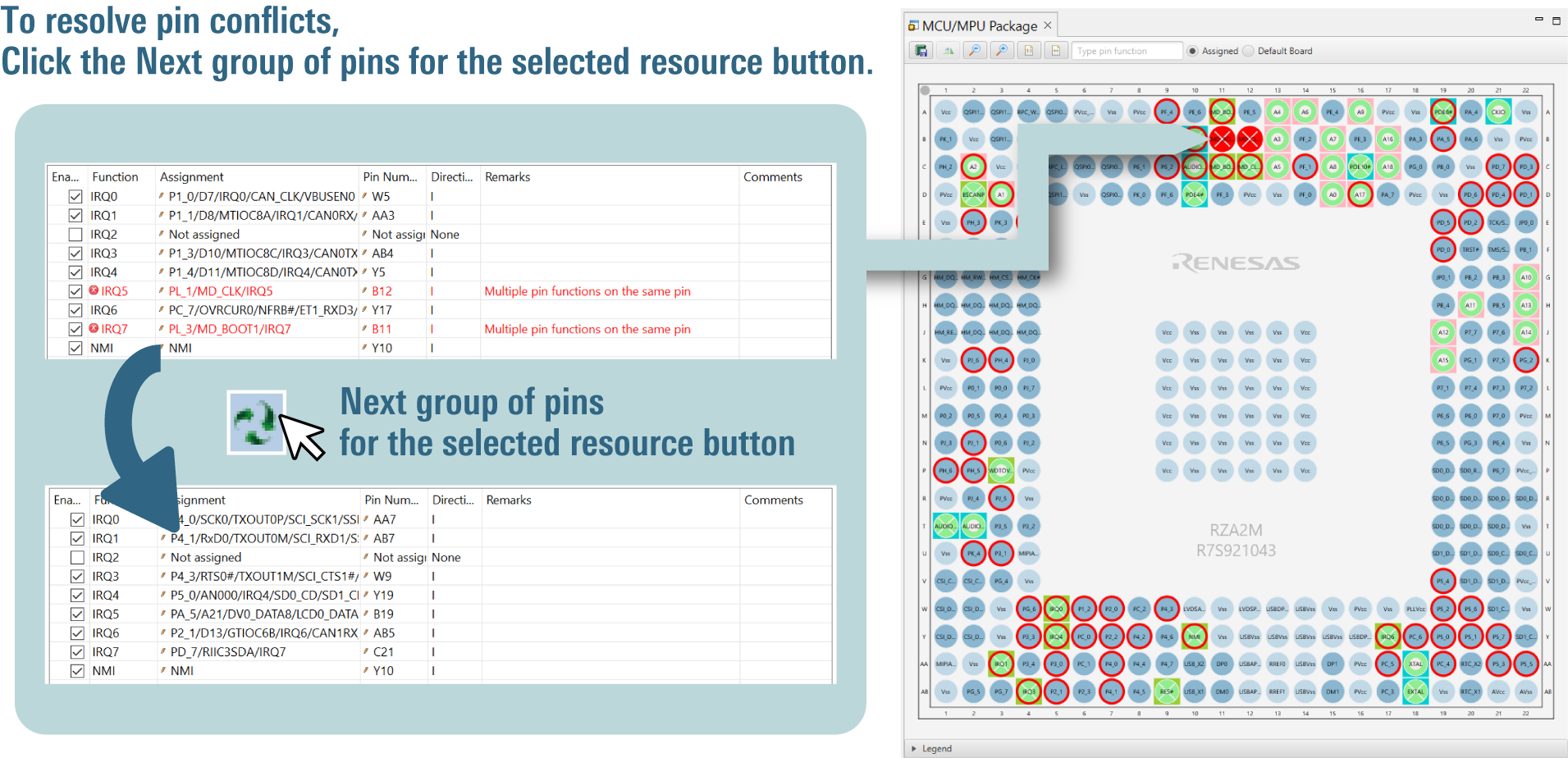
In cases of contention for a pin, clicking on the pin brings up a list allowing automatic changing of the assignment of the pin to resolve the contention.
Output a Device Settings File for Linux (Note1)
Output a DTS file that contains pin settings. You can readily apply device settings to Linux.
DDR memory setup and optimization (Note2)
You can use the GUI to configure DDR memory settings, resolve parameter conflicts, apply changes to the hardware, and perform tuning easily.
Configuration of DDR memory-related pins and parameters (DDR Configurator)
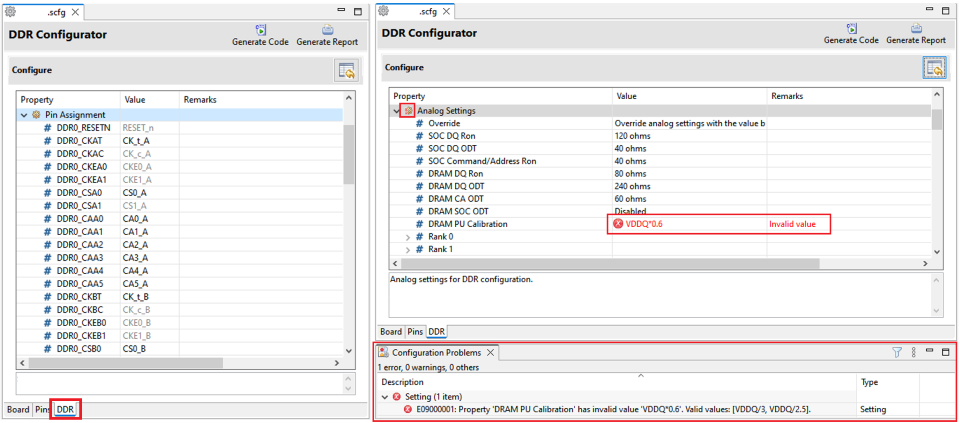
It allows seamless setup of DDR memory pins. All entered parameters are automatically validated and if any conflicts with other parameters are detected, the tool will display a warning to ensure proper configuration integrity.
Applying DDR memory configurations to the bootloader and OS disk image files (Install Utility)
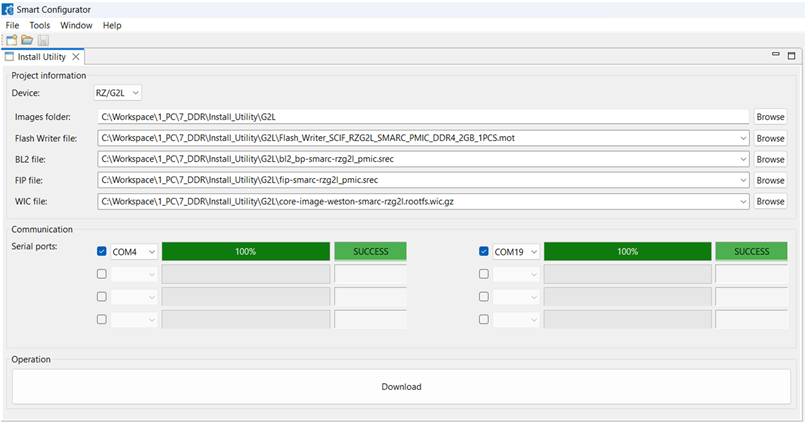
It provides a GUI that applies configurations by DDR Configurator to the bootloader and operating system disk image files for RZ Family devices and enables writing these configured images to the development board, ensuring a streamlined deployment process.
Tuning and Validating DDR memory parameters
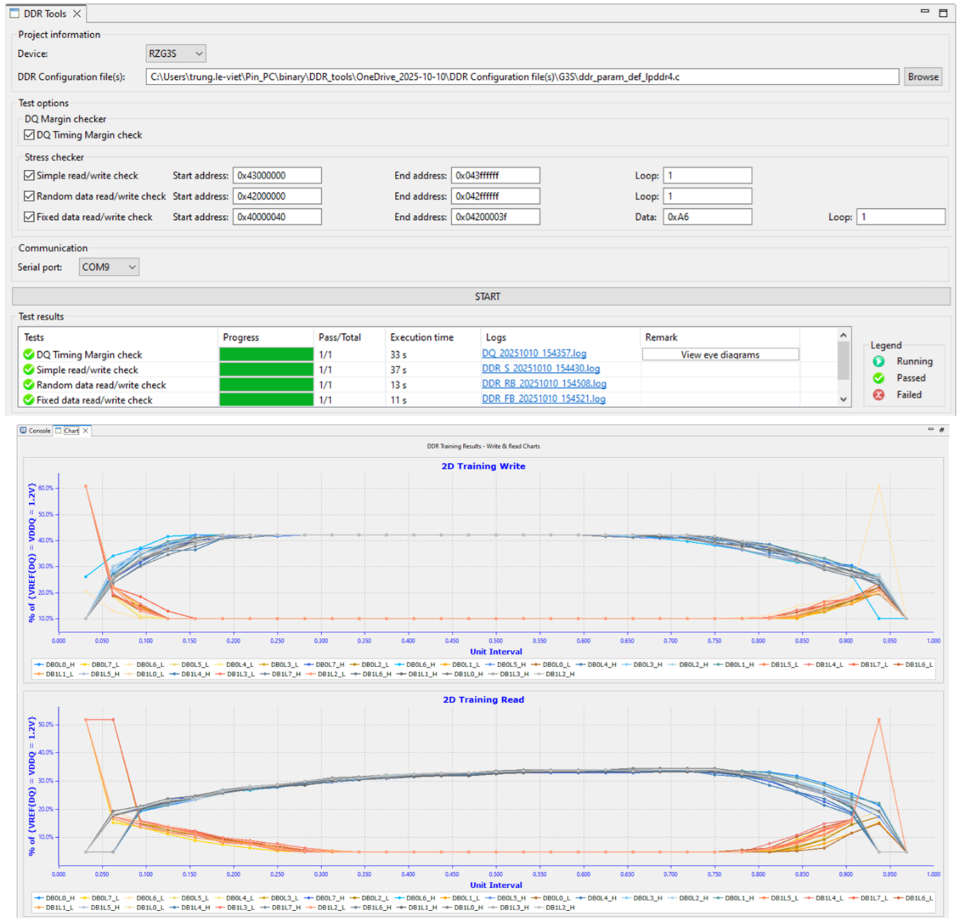
This offers a GUI that enables parameter modification, writing updated parameters to the actual hardware, and performing load tests to ensure system stability and performance.
Note
- The Smart Configurator only generates Device Tree Specification (DTS) include files (dtsi), which are only usable in the development environment of the Linux platform. Manually merge the device-setting code in the generated dtsi files with the default dtsi files included in your source code produced under Linux. For details of the DTS, refer to the links on https://www.devicetree.org .
- For supported devices, please refer to the release notes for the latest version of RZ Smart Configurator.
Support
Support Communities
- Smart Configurator for RZ v2.2.0 (RZ/G2L) - no DTS output for I2C0/I2C1 because Group column is empty. How do I create a group?
Hi Team, I'm using Smart Configurator for RZ v2.2.0 with an RZ/G2L (R9A07G044L, 15mm package) on a custom board, generating the Linux pinconf DTSI. Problem:I enabled RIIC0_SCL (B24) and RIIC0_SDA (A25) on the Pins > Pin Function tab. After clicking Generate Code, r9a07g0 ...
Sep 29, 2026 - RZ/G3E pinmux macro mismatch: Smart Configurator generates RZG2L instead of RZV2H
... controller framework as RZ/V2H in the Linux BSP, which is why RZV2H_PORT_PINMUX is used. My questions are: Is full support for RZ/G3E (particularly the 21mm package variant) currently available in Smart Configurator? What is the recommended approach to generate accurate DTSI pinmux configurations for ...
Apr 16, 2026 - Renesas RZG2L
Hi, I want to use canfd internal loopback on Renesas RZG2 because my board doesn´t have CAN transceivers, Any idea or example to use it. Regards
Sep 22, 2023
Knowledge Base
- e² studio FAQs
... If I generate code after importing a project, the source file version changes How to convert an e² studio FSP project into an RA or RZ Smart Configurator project that can be built in a partner IDE Importing DA SDK project into e² studio GNU Compilers and GCC Project issues ...
Jul 30, 2026

Support Communities


