
Overview
Description
RL78 Smart Configurator V1.17.0 supports the new device RL78/F22.
RL78 Smart Configurator automatically generates initial-setting programs for MCUs.
It provides a quick and smart way of combining and configuring software to meet your needs, such as by configuring peripheral pins and importing middleware and drivers.
Features
- Importing Middleware/Drivers
- Pin Settings
- Learn More
Release Information
| Supported IDEs and user guides(Note1) | Related documents | Latest Ver. Released | Operating Environment | ||
|---|---|---|---|---|---|
| e² studio | CS+ | IAR | |||
| e² studio plug-in (Note2) RL78 Smart Configurator User's Guide: e² studio (PDF | English, 日本語) | Download RL78 Smart Configurator User's Guide: CS+ (PDF | English, 日本語) | Download RL78 Smart Configurator User's Guide: IAREW (PDF | English, 日本語) | Smart Configurator User's Manual: RL78 API Reference (PDF | English, 日本語) | V1.17.0 Apr 20, 2026 | Operating Environment |
— Not Supported
Note
- These user guides cover everything from installation to the setting of peripheral functions and the generation of code. Statements in each user guide are specific to the stated target integrated development environment.
- The package of the e² studio includes this plug-in.
Smart Configurator released after Dec. 2021 will support the 64-bit versions of Windows® only.
Microsoft® Windows® has shifted to the 64-bit environment. Therefore, Renesas will focus on supporting Smart Configurator for the 64-bit environment.
(Microsoft®, Windows® are registered trademarks of Microsoft Corporation in the United States and/or other countries. https://www.microsoft.com/legal/intellectualproperty/trademarks.aspx)
Target Devices
Downloads
|
|
|
|
|---|---|---|
| Type | Title | Date |
| Software & Tools - Software | Smart Configurator for RL78 V1.17.0
|
|
|
1 item
|
||
Documentation
|
|
|
|
|---|---|---|
| Type | Title | Date |
| Release Note |
PDF
1.92 MB
日本語
This document describes support features and important notes for using the RL78 Smart Configurator, which automatically generates initial configuration programs for microcontrollers. It lists supported RL78 microcontrollers, changes, limitations, and precautions. Please read it before using the tool.
|
|
| Tool News - Release |
PDF
424 KB
日本語
This is Renesas ToolNews announcement regarding the version upgrade to RL78 Smart Configurator V1.17.0, which can automatically generate initial configuration programs for microcontrollers.Smart Configurator V1.17.0 includes improvements to the specifications for flash, serial programming, and security IDs.
|
|
| Manual - Development Tools |
PDF
5.23 MB
日本語
This document describes the source code (device driver programs as C source and header files) for controlling peripheral modues of the device by using a GUI to set various types of information on the requirements of the project in Smart Configurator.
|
|
| Release Note |
PDF
2.63 MB
日本語
This document describes support features and important notes for using the RL78 Smart Configurator, which automatically generates initial configuration programs for microcontrollers. It lists supported RL78 microcontrollers, changes, limitations, and precautions. Please read it before using the tool.
|
|
| Tool News - Release |
PDF
235 KB
日本語
This is Renesas ToolNews announcement regarding the version upgrade to RL78 Smart Configurator V1.16.0, which can automatically generate initial configuration programs for microcontrollers. Key functional improvements include support for SMS UARTA and support for IIC communication (master mode, EEPROM communication) components.
|
|
| Flyer |
PDF
977 KB
日本語
, 简体中文
This is a flyer for the Smart Configurator, which can automatically generate initial setup programs for microcontrollers. It details the features and information about the Smart Configurator. Supported microcontrollers include RL78, RX, RH850, RISC-V, RA, and RZ.
|
|
| Manual - Development Tools |
PDF
4.82 MB
日本語
This application note describes the basic usage of the Smart Configurator and CS+ integrated development environment, including the procedure for creating a project and adding Smart Configurator output to CS+ projects.
|
|
| Manual - Development Tools |
PDF
4.65 MB
日本語
This application note describes the basic usage of the RL78 Smart Configurator and the procedure for importing its output files to IAR Embedded Workbench. The guide helps you quickly create a project, set peripheral modules and generate the driver code for your application.
|
|
| Manual - Development Tools |
PDF
7.32 MB
日本語
This application note describes the basic usage of the Smart Configurator and the e² studio integrated development environment, including the procedure for creating a project. The guide helps you quickly create a project, set peripheral modules and generate the driver code for your application.
|
|
| Release Note |
PDF
1.94 MB
日本語
This document describes support features and important notes for using the RL78 Smart Configurator, which automatically generates initial configuration programs for microcontrollers. It lists supported RL78 microcontrollers, changes, limitations, and precautions. Please read it before using the tool.
|
|
| Tool News - Release |
PDF
164 KB
日本語
This is Renesas ToolNews announcement regarding the version upgrade to RL78 Smart Configurator V1.15.0, which can automatically generate initial configuration programs for microcontrollers. Key functional improvements and changes include support for the RL78/L23 128K device and the addition of automatic resource allocation for ELCL flexible circuits.
|
|
| Tool News - Release | PDF 404 KB 日本語 | |
| Release Note | PDF 1.73 MB 日本語 | |
| Tool News - Release | PDF 390 KB 日本語 | |
| Release Note | PDF 2.82 MB 日本語 | |
| Tool News - Release | PDF 406 KB 日本語 | |
| Tool News - Release | PDF 156 KB 日本語 | |
| Release Note | PDF 1.67 MB 日本語 | |
| Tool News - Release | PDF 162 KB 日本語 | |
| Tool News - Release | PDF 163 KB 日本語 | |
| Release Note | PDF 1.42 MB 日本語 | |
| Tool News - Release | PDF 157 KB 日本語 | |
| Release Note | PDF 1.25 MB 日本語 | |
| Guide | PDF 1.43 MB 日本語 | |
| Release Note | PDF 1.16 MB 日本語 | |
| Release Note | PDF 1.95 MB 日本語 | |
| Tool News - Release | PDF 157 KB 日本語 | |
| Tool News - Note | PDF 191 KB 日本語 | |
| Release Note | PDF 853 KB 日本語 | |
| Tool News - Release | PDF 213 KB 日本語 | |
| Release Note | PDF 1.09 MB 日本語 | |
| Tool News - Release | PDF 158 KB 日本語 | |
| Manual - Development Tools | PDF 1.39 MB 日本語 | |
| Tool News - Note | PDF 147 KB 日本語 | |
| Tool News - Release | PDF 158 KB 日本語 | |
| Tool News - Note | PDF 316 KB 日本語 | |
|
36 items
|
||
Explore
Videos & Training
This video introduces the ELCL feature built into the RL78 device. Learn how the Smart Configurator, an e2 studio plugin, can make it easier to use the ELCL feature.
Additional Details
Importing Middleware/Drivers
RL78/G23 Group: Importing middleware (e.g. capacitive touch sensing middleware)
You can also use such middleware in conjunction with code from the driver code generator.
How to Use the RL78/G23 peripheral functions
- How to Use the SnoozeModeSequencer (SMS)
- Watch the video.
Create Project | Configure Project | Add User Code and Run Project - See the application note
- Watch the video.
- How to Use the Logic and Event Link Controller (ELCL)
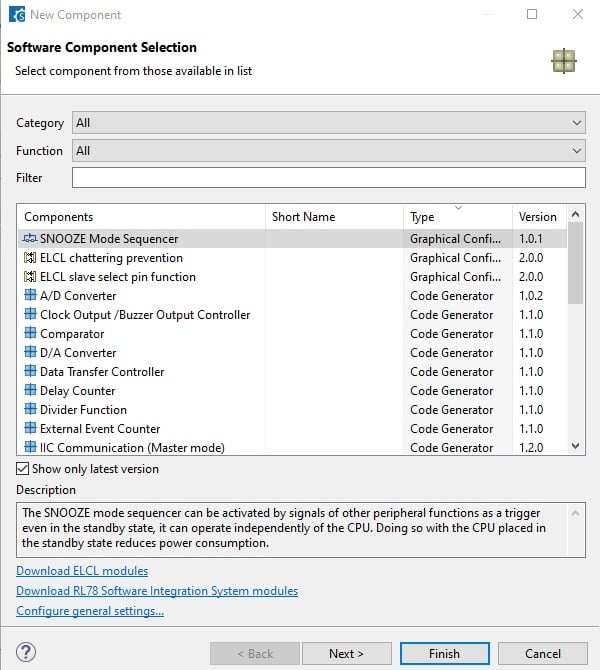
Generating Driver Code
The Smart Configurator provides you with a GUI environment for generating driver code that handles the details of the settings of peripheral modules.。
Clock settings
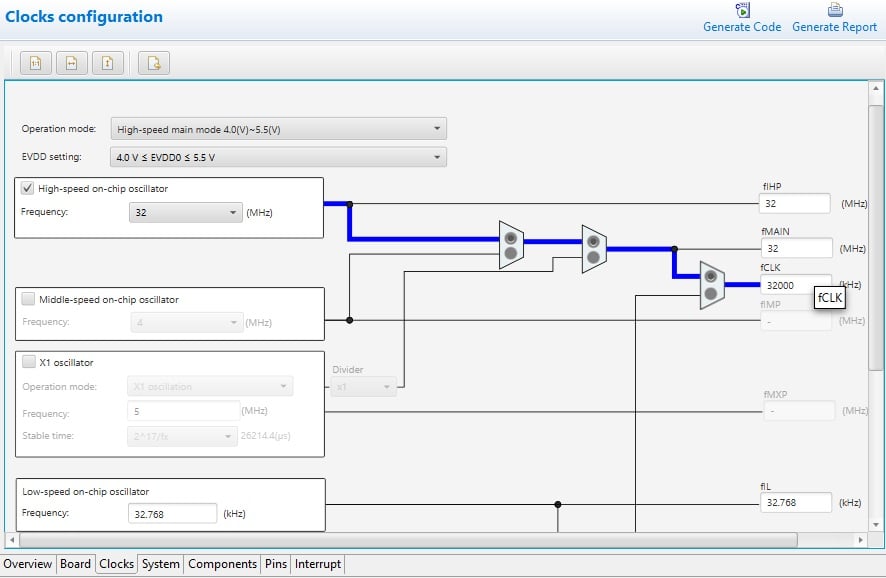
You can make clock settings by selecting a clock source and making connections in the block diagram in the [Clocks configuration] window.
Component settings
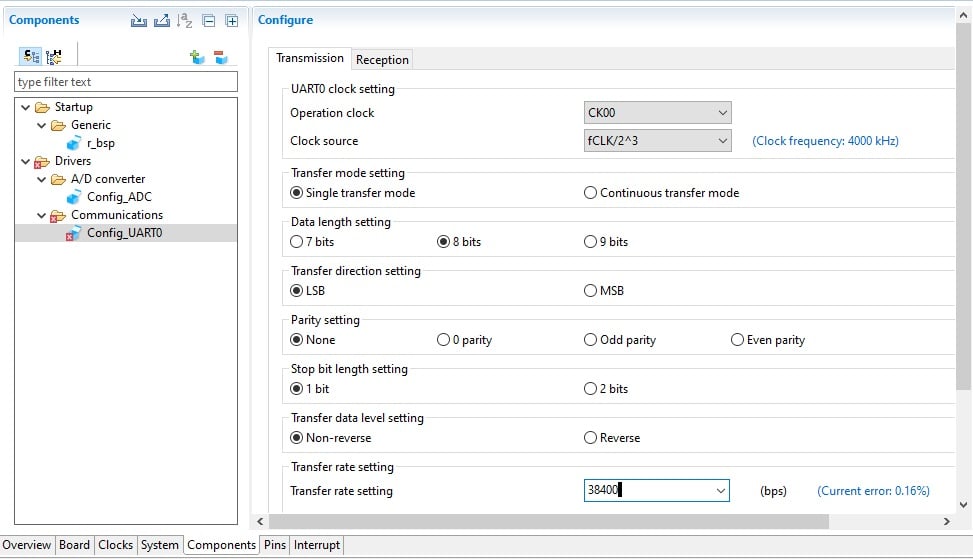
In the [Software component configuration] window, you can make settings for peripheral modules. After selecting the module you wish to set up for use, you can check for errors in settings (with some types indicated on the display) or switch the channels for use by drivers of multi-channel modules.
Pin Settings
The assignments of pins can be set up through a GUI, which also checks and offers solutions for cases of contention for the same pin by multiplexed functions.
The [Pins Configuration] window (displayed per peripheral module)
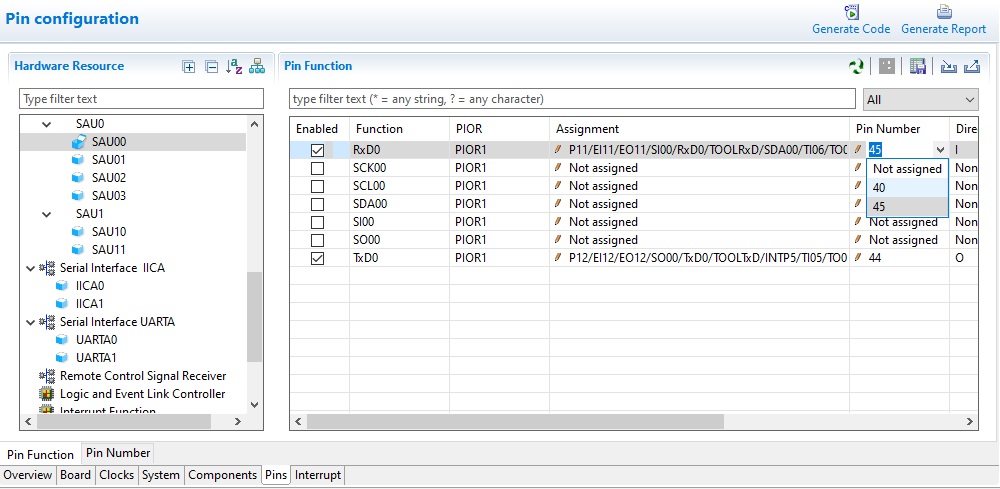
Specifying a peripheral module in the [Pins Configuration] window displays the pin functions for use by the module and allows you to set the assignment of the functions to pins.
[MCU Package] window
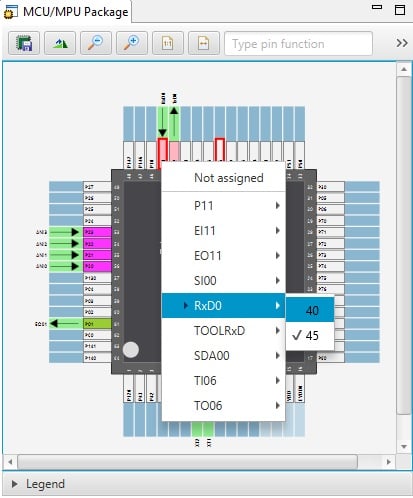
The [MCU Package] window displays a symbolic view of the pins, indicating by colors which pins are and are not in use, which have been assigned contending multiplexed functions, and so on. This makes it easy to check the overall situation.
Automatic resolution of contention between pin functions
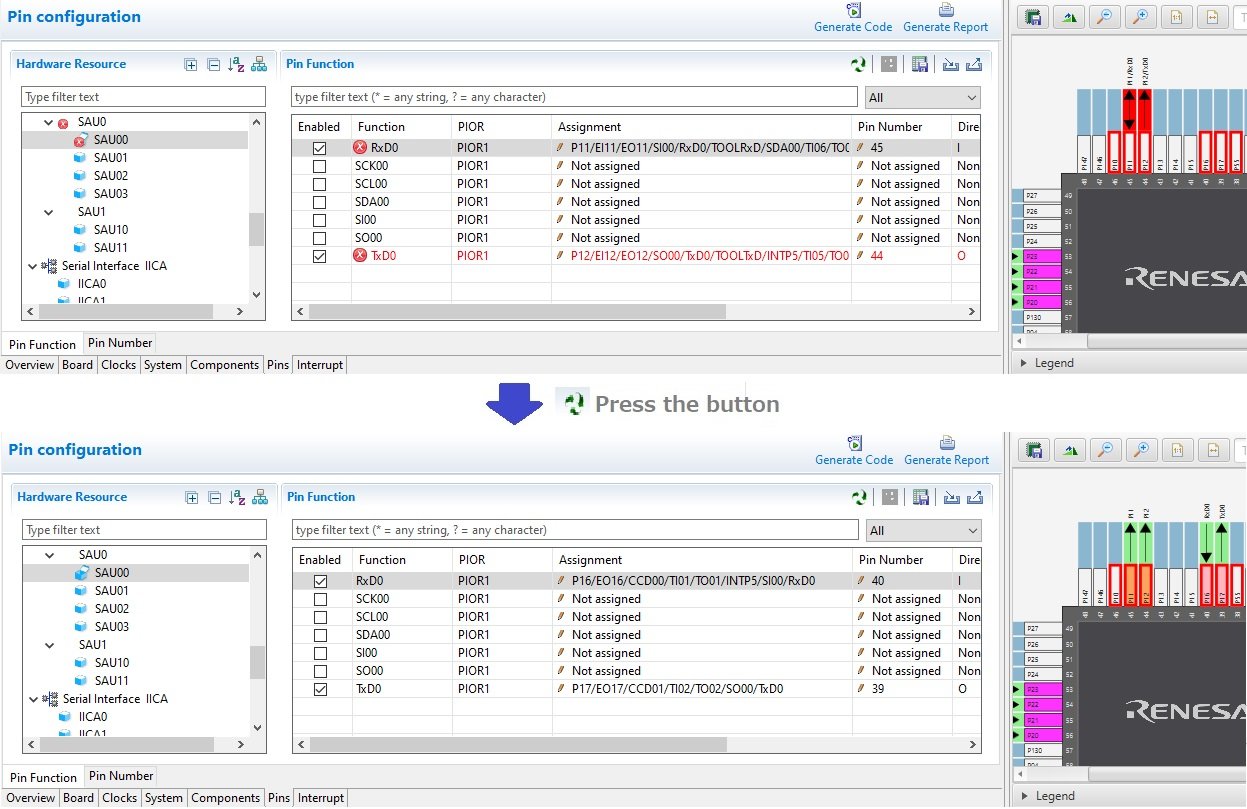
In cases of contention for a pin, clicking on the pin brings up a list allowing automatic changing of the assignment of the pin to resolve the contention.
How to migrate from Code Generator project to Smart Configurator project
Please refer to the following video for more information on code generation project migration.
How To Migrate From Code Generator Project to Smart Configurator Project
Resources
Support
Support Communities
- Is RL78/G12 R5F10268 controller support to smart configure code assistance?
Hello,RL78/G12 is not supported by the RL78 Smart Configurator, it is supported by the Code Generator. You need to install this tool during the installation process of e2studio.How to set a ADC pin configuration in code generator?You can select which ADC pins to use from ...
Feb 15, 2025 - Configure AAU unit using smart configurator
Hi I am using CC-RL compiler for my project. I am using RL78/F24 series controller. Can you please help me configuring the AAU unit in workspace through smart configurator? Regards, Kamal
Nov 17, 2024 - Sample code to count port input pulses
Hi all, New hear, been looking at the RL78/G15, started looking for counters ie want program the chip to count how pulses (or edges as well) occur in some set time period of say 10mS to 1000mS, Maybe i'm getting old I found no mention of counter ...
Oct 8, 2025
Knowledge Base
- Inclusion of RL78 Smart Configurator generated header files in CS+
The RL78 Smart Configurator can be used to generate C source code for ease of development. The RL78 Smart Configurator generates three source files for specified peripheral out of which "Config_xxx.c" contains all the function definitions which can be used with said peripheral. Prototypes of such functions are ...
Aug 19, 2025 - Smart Configurator FAQs
... 3000721 What is the base frequency displayed in the [Clocks] tab of the RL78 Smart Configurator? Communication 3000427 Why Does I²C Baud Rate Set by Smart Configurator for RX Differ from Actual Value 3000702 Interrupt vector allocation errors occurring in Smart Configurator3000709 I2C communications by using the I2C master ...
Apr 23, 2025 - I want to configure multiple A/D input pins on the RL78/G23 MCU
Last Updated: 04/15/2026 Question: I want to configure multiple A/D input pins when selecting the RL78/G23 or RL78/G24 in the RL78 Smart Configurator. Answer: When you add the A/D Converter component and select ANI2 as the A/ ...
Apr 15, 2026

Support Communities


