
Overview
Equipped with the flagship RX72N microcontroller from the 32-bit RX family, the RX72N Envision Kit supports GUI creation using an LCD, HMI development such as voice input/output, and IoT device development using Wi-Fi, Bluetooth® Low Energy (LE), Ethernet, and more. With a pre-installed demo and emulator circuit, it enables immediate hands-on experience and rapid development.
Demo Firmware
The pre-installed firmware update feature allows updates by writing this firmware to a microSD card. In addition, the latest version of the firmware and source code are published on the GitHub site.
Features
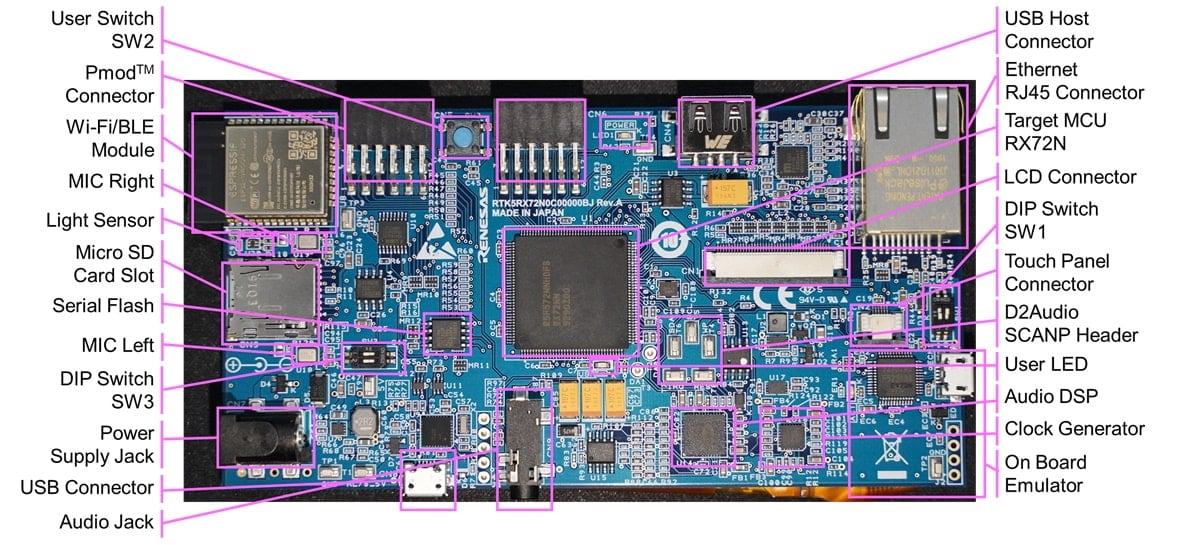
- Equipped with a 32-bit RX72N microcontroller (maximum operating frequency: 240 MHz, code flash memory: 4MB, internal RAM: 1MB)
- Includes a WQVGA LCD with a capacitive touch panel allowing GUI development using an LCD controller and a 2D drawing engine
- Provides a D2Audio audio IC with a stereo MEMS microphone to support voice input and output
- Supports communications such as Wi-Fi/BLE and Ethernet
- Extended storage available using Macronix's 32Mbit serial flash with USB and microSD slots
- Includes a variety of Renesas analog devices, such as light sensors, regulators, clock generators, hot-swap power management ICs and LCD backlight drivers
- Equipped with an onboard E2 Lite emulator
- The pre-installed demo includes source code, schematics, BOM, and more downloadable from this website
- RX72N users can use the emWin GUI software package provided by Segger at no cost.
- Download the free Eclipse-based development environment, e2 studio, from the Renesas website
- Two types of demo software using RX72N features are pre-installed
- Standard demo:
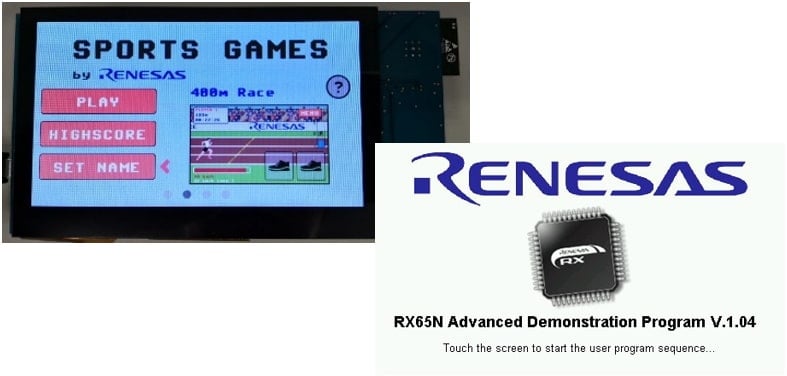
- The standard included demo is a sports game called Eyecatcher, highlighting the type of display that can be developed using the free emWin GUI tool and RX72N LCD display functions.
- Benchmark demo:
- A firmware update function is installed, and you can add features such as storage, cryptographic throughput, and AWS integration by updating to the latest firmware.
- Graphic expansion board
- 4.3-inch TFT color LCD
- 480 x 272 resolution
- Capacitive touch overlay controller
- Backlight controller
Applications
Appliances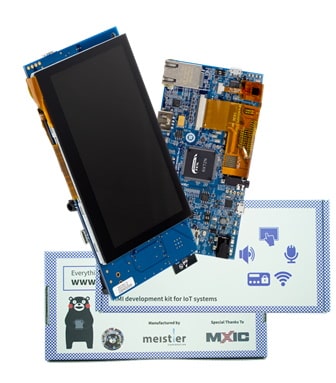
Getting Started
Test this Board Remotely with Lab on the Cloud
Sample & Buy

RTK5RX72N0C00000BJ
ActiveAdd-on Hardware

RX65N Envision Kit
Application Block Diagrams
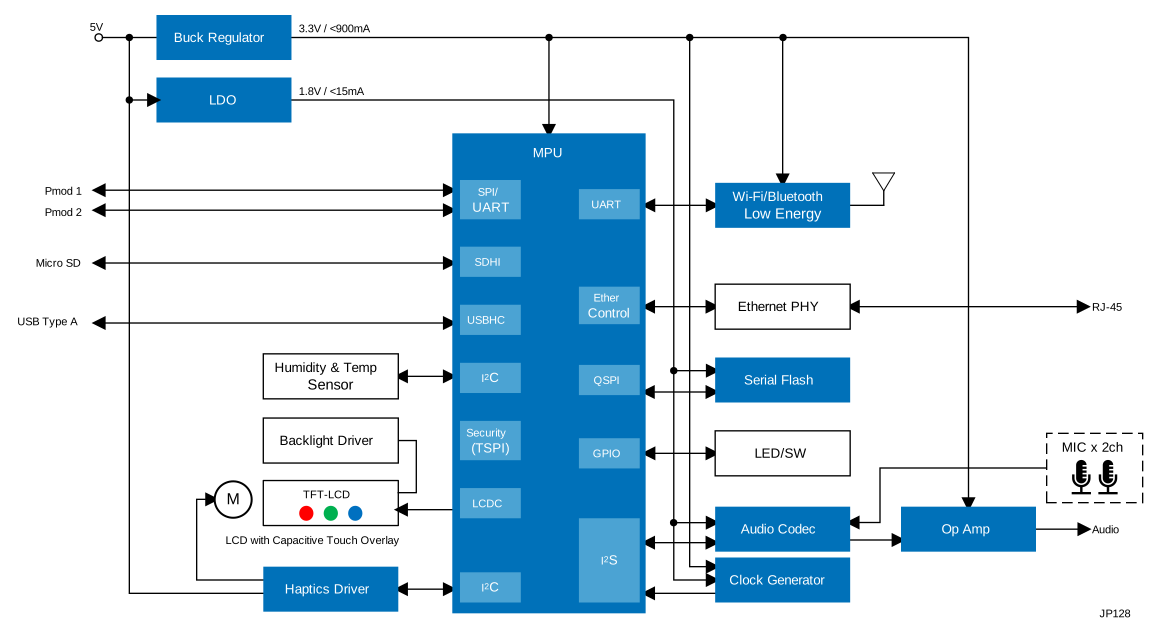 | Smart HMI System with Voice & Display Interfaces Smart HMI system with 32-bit MCU supports GUI, voice I/O, IoT connectivity, and fast development tools. |
Videos & Training
This video provides an overview of the steps to visualize sensor information on the AWS Cloud using RX72N Envision Kit.
Related resources:
Additional Videos
News & Blog Posts
Support
Support Communities
- RX72N Envision kit LCD Display showing white screen
Hey People, I have the RX72N envision kit and I tried all the process as mentioned in below documents. https://www.renesas.com/us/en/document/apn/rx-family-qe-display-rx-application-note I have installed latest driver packages FIT Modules and ...
Jun 17, 2023 - AWS RTOS examples not using the onboard WIFI on RX72N Envision Kit board ?
Hello, Have a RX72N Envision Kit on the way and was looking though some of the examples on the board product page and could not help but notice that none of the AWS RTOS examples use the boards onboard WIFI, they instead use a PMOD module. Why is this ? [locked ...
Sep 24, 2022 - RX72N - ethernet functionality testing on RX72N envision kit
... MCUs (r_t4_rx) FIT Driver having 2.10 version. And I am taking reference from here https://github.com/renesas/rx72n-envision-kit/wiki/1-Ether-TCP-IP_ to test the ethernet functionality on RX72N Envision Kit Pls give me the suggestion what ...
May 25, 2023
Knowledge Base
- LVGL: Using 32-bit Color Formats with GLCDC
... various evaluation kits that work out-of-the-box. These examples are available on GitHub and demonstrate working configurations for display, timing, color format, etc.RX72N Envision KitEK-RA8D1 EK-RA6M3G EK-RA8D2 EK-RA8P1 *Note that FSP LVGL port requires the GLCDC HAL Layer. If your MCU does ...
Jan 6, 2026 - What are the requirements for the development environment in which emWin can be used? If sample code is provided, please tell me where it is available.
... you can download the QE for Display [RX/RA] plugin from the preceding URL, you can also install it from the e2 studio. [Board]• RX72N Envision Kithttps://www.renesas.com/design-resources/boards-kits/rx72n-envision-kit• Renesas Starter Kit+ for RX72Nhttps:// ...
Jan 22, 2026

Support Communities

