
Overview
Description
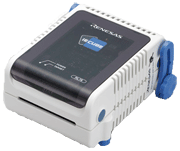
The IECUBE for RL78 Family is a high-performance full-spec emulator for the RL78 MCU family. It provides high-performance debugging functions such as time measurement, coverage, and trace. In addition, a self-testing function detects faults in the IECUBE and performs maintenance.
Features
- Simple setup
Full-spec emulator and emulation board in a single unit - Rich debugging functions
Enhanced time measurement and real-time RAM monitoring functions - Enhanced maintenance features
Self-testing function to detect faults in the IECUBE and performs maintenance - Compact and lightweight
Easy to carry. Fits in the palm of your hand.
Release Information
| Software to be used | Target devices | Latest Version | Released | Operating Environment |
|---|---|---|---|---|
| CS+ *Evaluation Software Download | RL78 [Details] Functions Supported by CS+ (XLSX) (XLSX | English, 日本語) | V8.14.00Note2 | Jul. 22, 2025 | Operating Environment |
| e² studio *Download | RL78 [Details] Target Devices | (64-bit version) 2025-07 | Jul. 22, 2025 | |
| (32-bit version) V7.8.0 | Apr. 20, 2020 | |||
| IAR Embedded WorkbenchNote1 | RL78 | For the details, contact IAR Systems. | ||
Note:
- As for tools produced by partners, contact IAR Systems.
- If you hope to continue to use the product on the Windows 32-bit version, use the CS+ IDE V8.06 and earlier that supports the 32-bit versions.
[Notification] End of Support: CS+ Integrated Development Environment for Windows 32-Bit Versions (PDF | English, 日本語)
Details of upgrade (See Tool News)
Target Devices
Additional Details
Functions
Real-Time RAM Monitor Function
Updates RAM values in real time.
Image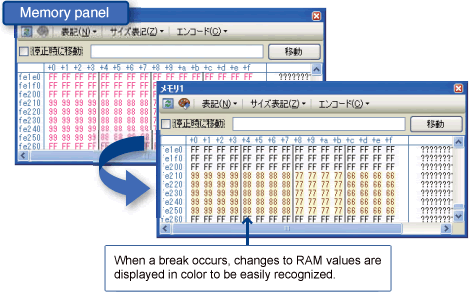
Trace Function with Time Tag Function
The time per instruction unit can be recorded in the trace window.
Image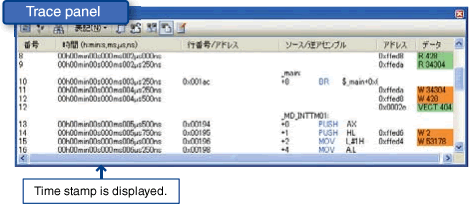
Performance Measurement Function
Measures the time required for program functions to execute.
Image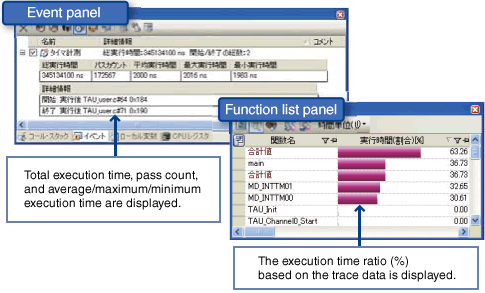
Coverage Measurement Function
The executed ratio can be measured for specific functions and actions.
Image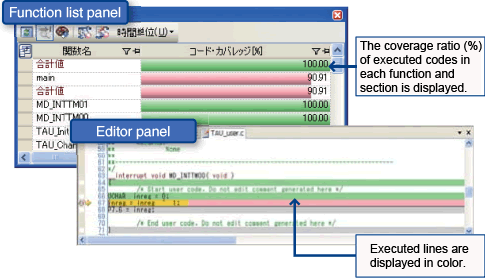
Components
- Emulator main unit (IECUBE)
- Software CD-ROM (USB driver is included)
- USB interface cable
- User's Manuals
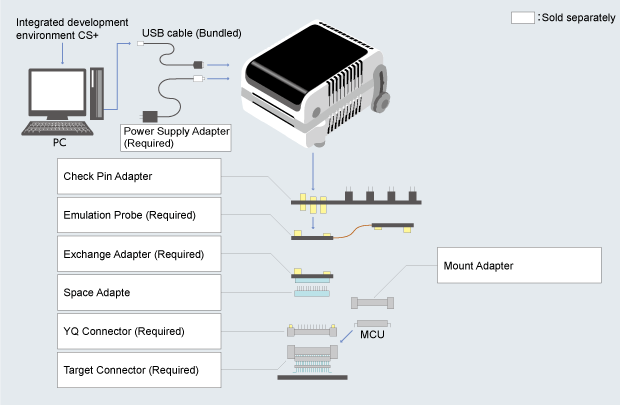
For development work, a power supply adapter and optional products such as probe or socket compatible with the target device, all sold separately, are required. Refer to the system configuration example below for details.
System Configuration Example
Optional Products (Sold Separately)
- Emulation Probe (Required)
- Exchange Adapter (Required)
- Space Adapter
- YQ Connector (Required)
- Target Connector (Required)
- Mount Adapter
For the details of above products, see Optional product list of IECUBE for RL78 family (PDF | English, 日本語) Check pin adapter Drawings of QB-144-CA-01 (PDF)
* Usable in common with RL78, 78K0R, 78K0, 78K0S, V850.
The pin header cover corresponded to the pin arrangement of the MCU is required. You can get the pin header cover package from the following package list. Please print the package and cut out the pin header cover for using.Package list of pin header cover (PDF | English, 日本語)
Usage of Pin Header Cover- Power Supply Adapter
Specifications of the power supply adapter, QB-COMMON-PW-xx, vary depending on the region. Be sure to use an adapter designed for your region.
Specifications
| Item | Description | |
|---|---|---|
| Maximum operating frequency | Depending on the target MCU | |
| Emulation memory capacity | Internal ROM | Internal ROM capacity of target MCUs |
| Internal RAM | Internal RAM capacity of target MCUs | |
| Event | For execution | 8 points |
| For access | 8 points | |
| Break | Hardware break | 20 points Note1 |
| Software break | 2,000 points | |
| Forced break | Supported | |
| Step execution | Supported | |
| Fail-safe break | Supported | |
| Trace | Trace capacity | 128K frame |
| Trace item |
| |
| Performance measurement | Execution time measurement between the start and the stop of the program | Supported |
| Measurement between events | Supported (2 segments) | |
| Result-display item of measurement between events | Total value, Number of passage, Maximum value, Minimum value, Average value | |
| Time-out break | Supported | |
| Real-time RAM monitor | PC/ Internal RAM area Note2 | |
| Coverage | Memory capacity | Internal ROM gamut + External memory area |
| Mask function | TARGET RESET, INTERNAL RESET, WAIT, NMI | |
| PC interface | USB (USB 2.0, Full-speed/ High-speed, USB 1.1) | |
| Operating Environment | Refer to Operating Environments of Products. | |
| External dimension (mm) | 113mm × 109mm × 58-67mm Note3 | |
| Conformance with overseas standards | European Standards: EN 55022 Class A, EN 55024 US FCC Standard: FCC part 15 Class A | |
Notes:
- Items are 8 points of post-execution break, 8 points of Access break, and 4 points of before-execution break. The number of before-execution break varies depending on the settings position.
- For all memory areas except target memory area (out of the range that real-time RAM monitor is supported), pseudo RRM function that implements monitoring while pausing program execution is supported.
- Not including the protruding parts.
Support
Support Communities
- how to use *.lib file in IAR IDE
I tried to use data flash library. However, the library is fdl.lib file which is not compiled by IAR. anyone knows how to convert to IAR library or create a linker file. BTW, the linker file is missing in the library package downloaded from renesas.Thanks in advance
Nov 22, 2012 - How to install Renesas plug-ins to generic eclipse installation
First of all you will need to use Juno SR2 version of eclipse. Download and review the following procedure and requirements installation for document.
Aug 21, 2013 - RL78 RAM memory corrupted problem, not able to solve (product in the field)-HELP!
... 4.10.1 (C:\Program Files (x86)\IAR Systems\Embedded Workbench 8.1\rl78\bin\rl78proc.dll C-SPY Processor Descriptor V4.10.1.2197 for RL78C-SPY OCD Emulator Driver V4.10.1.2197 for RL78RL78 E2 Lite Executor V4.02a [28 Sep 2017] OCD Control Code ...
Dec 19, 2024
Knowledge Base
- Using the E1 or E20 emulator, is it possible to use the AZ78V4 performance analyzer to obtain a trace display for an application which is using the RI78V4 operating system? (E2, E2 Lite, E1, E20)
No, it is not possible. This is because the AZ78V4 uses a record of data access to obtain a trace display. To use the AZ78V4 in tracing, you need to• use IECUBE, or• use a simulator.
Mar 8, 2021 - CS+: watch panel flickers large no. variables in watch panel
For Windows 7 and Windows Vista Open the Control Panel of Windows, and type "Performance Information and Tools" in the search box.And then, click "Performance Information and Tools" in the list of results. Click on [Adjust visual effects] in the upper left of the window. The [Performance Options] pane ...
Apr 1, 2014 - CRC Calculated on Debugger Does Not Match the Linker Result
... a linker. An emulator rewrites the following addresses in flash memory:- Device ID code (RX Family devices)- OFS register (RX Family devices)- Option byte (RL78 Family devices)- Debugging monitor area (RL78 Family devices)- Addresses with software breakpoint settingsFor details about Device ID codes and OFS registers of the RX Family ...
Feb 17, 2023

Support Communities

