
Overview
Description
Equipped with the flagship RX72N microcontroller from the 32-bit RX family, the RX72N Envision Kit supports GUI creation using an LCD, HMI development such as voice input/output, and IoT device development using Wi-Fi, Bluetooth® Low Energy (LE), Ethernet, and more. With a pre-installed demo and emulator circuit, it enables immediate hands-on experience and rapid development.
Demo Firmware
The pre-installed firmware update feature allows updates by writing this firmware to a microSD card. In addition, the latest version of the firmware and source code are published on the GitHub site.
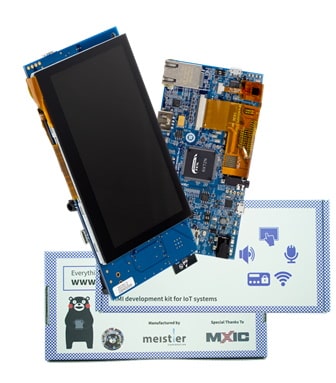
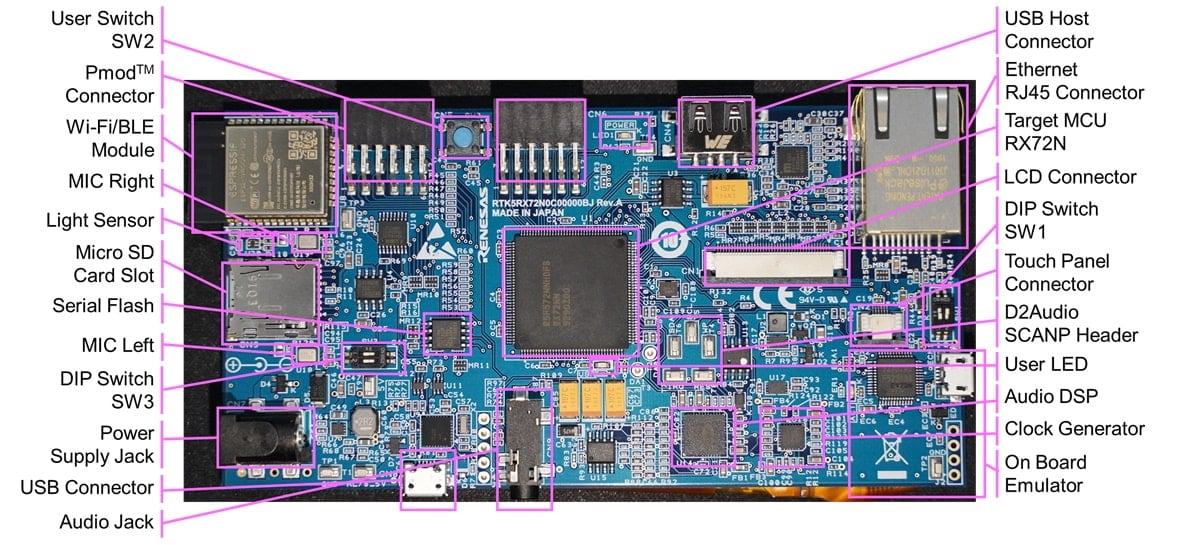
Features
- Equipped with a 32-bit RX72N microcontroller (maximum operating frequency: 240 MHz, code flash memory: 4MB, internal RAM: 1MB)
- Includes a WQVGA LCD with a capacitive touch panel allowing GUI development using an LCD controller and a 2D drawing engine
- Provides a D2Audio audio IC with a stereo MEMS microphone to support voice input and output
- Supports communications such as Wi-Fi/BLE and Ethernet
- Extended storage available using Macronix's 32Mbit serial flash with USB and microSD slots
- Includes a variety of Renesas analog devices, such as light sensors, regulators, clock generators, hot-swap power management ICs and LCD backlight drivers
- Equipped with an onboard E2 Lite emulator
- The pre-installed demo includes source code, schematics, BOM, and more downloadable from this website
- RX72N users can use the emWin GUI software package provided by Segger at no cost.
- Download the free Eclipse-based development environment, e2 studio, from the Renesas website
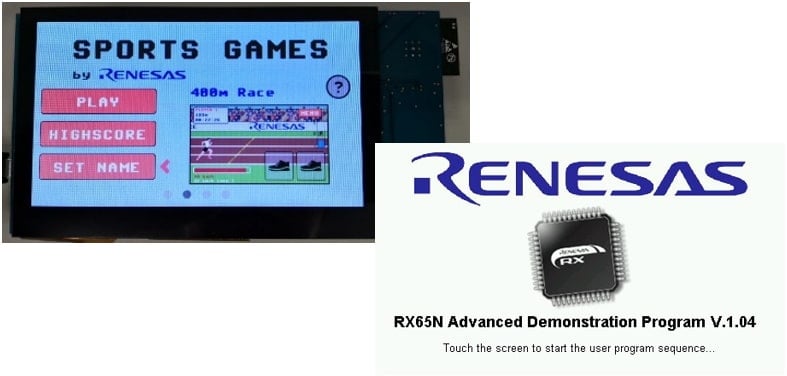
- Two types of demo software using RX72N features are pre-installed
- Standard demo:
- The standard included demo is a sports game called Eyecatcher, highlighting the type of display that can be developed using the free emWin GUI tool and RX72N LCD display functions.
- Benchmark demo:
- A firmware update function is installed, and you can add features such as storage, cryptographic throughput, and AWS integration by updating to the latest firmware.
- Graphic expansion board
- 4.3-inch TFT color LCD
- 480 x 272 resolution
- Capacitive touch overlay controller
- Backlight controller
Applications
|
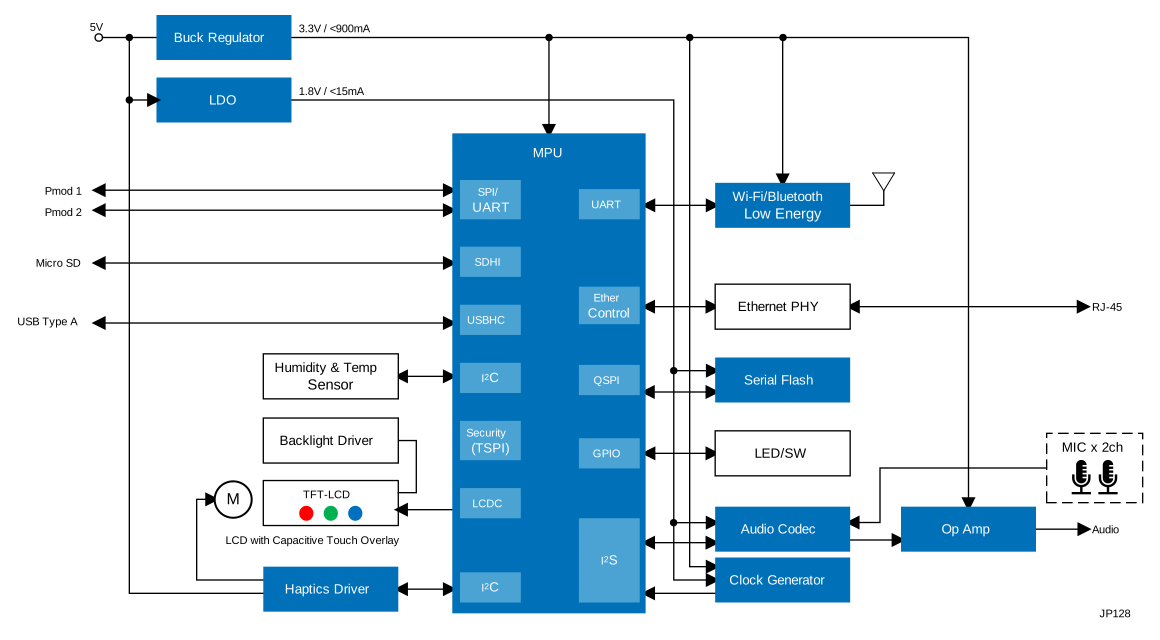
Smart HMI System with Voice & Display Interfaces
Smart HMI system with 32-bit MCU supports GUI, voice I/O, IoT connectivity, and fast development tools.
|
Documentation
|
|
|
|
|---|---|---|
| Type | Title | Date |
| Manual - Development Tools | PDF 1.81 MB 日本語 | |
| Application Note |
PDF
657 KB
日本語
The lightweight IP (lwIP) driver FIT module integrates with Firmware Integration Technology (FIT) and provides a porting layer for the lwIP FIT module, which is configured from the lwIP open-source software, on RX group microcontrollers. This FIT module is for use with the lwIP FIT module (r_lwip_rx, lwIP) as the upper layer and supports Ethernet communications in conformance with the TCP/IP.
|
|
| Application Note |
PDF
407 KB
日本語
The lightweight IP (lwIP) module FIT module integrates with Firmware Integration Technology (FIT) and is generated from lightweight IP (lwIP), which is released as open-source software, by using the FIT. This FIT module is used in combination with the lightweight IP (lwIP) driver FIT module (r_lwip_driver_rx).
|
|
| Application Note |
PDF
3.82 MB
AI-generated Summary:
Azure RTOS sample projects demonstrate how to develop applications using ThreadX, FileX, GUIX, NetX Duo, and USBX on Renesas RX family microcontrollers with e2 studio or IAR Embedded Workbench. The projects support various RX devices and include examples for IoT connectivity, low power operation, and secure bootloader integration. Microsoft has contributed Azure RTOS to open source under Eclipse ThreadX, discontinuing official updates. Renesas discontinues the RYZ014A LTE module, recommending Sequans GM01Q as a compatible replacement. Development tools and supported sample projects vary by device, with detailed setup instructions and sample descriptions provided.
|
|
| Application Note | PDF 3.72 MB 日本語 | |
| Flyer | PDF 617 KB 日本語 | |
| Flyer | PDF 931 KB 日本語 | |
| Application Note | RX72N Group Using QuickConnect IoT to Send Sensor Information to Amazon Web Services from RX72N Envision Kit Running FreeRTOS Rev.1.01
AI-generated Summary:
The document explains how to use Quick-Connect IoT with the RX72N Envision Kit running Amazon FreeRTOS to send sensor data to Amazon Web Services (AWS). It details hardware and software configurations, including connecting sensor modules via Pmod interfaces and transmitting data over Wi-Fi. The guide covers installing Amazon FreeRTOS, configuring AWS services such as the Shadow Service and Amazon OpenSearch Service for data visualization, and troubleshooting. It supports development with specific boards, tools, and software versions, enabling real-time IoT sensor monitoring and cloud integration.
|
|
| Application Note |
PDF
1022 KB
日本語
AI-generated Summary:
The RX72N Envision Kit integrates voice recognition, speech, LCD, and capacitive touch functions to provide a comprehensive HMI and IoT development platform. It supports voice commands with noise reduction and LCD control using AmiVoice®, Zoom Voice, and emWin libraries, running on Amazon FreeRTOS. The demo software includes 2D drawing, voice recognition, and calendar applications, supporting Japanese and English. Users can download executable files and operate the system via USB or power supply, with voice input optimized by directional microphones. Remote evaluation is available through Renesas Lab on the Cloud.
|
|
| Quick Start Guide |
Connecting AWS Cloud with FreeRTOS Getting Started Guide for the Renesas RX72N Envision Kit Rev.1.00
PDF
743 KB
|
|
| Manual - Software | PDF 1012 KB | |
| Application Note |
PDF
2.17 MB
日本語
AI-generated Summary:
The document provides a comprehensive guide for developing embedded systems with graphical displays using QE for Display [RX] and Renesas RX microcontrollers. It details initializing and configuring the graphics LCD controller (GLCDC) through a sample program, enabling quick setup without deep GLCDC specification knowledge. The workflow includes project creation, Smart Configurator settings, program development, real-time display adjustment, and header file generation. It supports RX65N, RX651, RX72N, RX72M, and RX66N groups and covers hardware configuration, software settings, and integration with the Smart Configurator and Firmware Integration Technology (FIT). The document also explains adapting the sample program to different environments and provides step-by-step procedures for execution and adjustment.
|
|
| Other | PDF 290 KB | |
| Other | RX72N Envision Kit - BOM List Rev.1.00
|
|
| Schematic | RX72N Envision Kit - Schematics Rev.1.00
|
|
|
15 items
|
||
Design & Development
Software & Tools
Software & Tools
| Software title
|
Software type
|
Company
|
|---|---|---|
| CS+ Renesas integrated development environment (IDE) [Support MCU/MPU: RH850, V850, RX, RL78, 78K0R, 78K0]
(Note: CS+ is not generally promoted to U.S. and European customers.)
(Note: To use Smart Configurator on CS+ for RL78/G23 and RX family MCUs, install the Smart Configurator for each MCU family separately downloading from ”Design & Support” > ”Development Tools” > ”Smart Configurator”)
|
IDE and Coding Tool | Renesas |
| e² studio - Information for the RX Family Eclipse-based Renesas integrated development environment (IDE).
|
IDE and Coding Tool | Renesas |
| QE for Display: Development Assistance Tool for Display Applications This development assistance tool supports the development of embedded systems which use the LCD display functions of display controllers from Renesas. [Plugin for Renesas IDE "e² studio"] [Standalone Version] [Support MCU/MPU:RZ, RX, RA]
|
Solution Toolkit | Renesas |
| QE for OTA: Development Assistance Tool for Firmware Update This development assistance tool helps you easily try firmware update on your device. [Plugin for Renesas IDE "e² studio"] [Support MCU/MPU: RX, RL78, RA] [Support clouds service: Amazon Web Services (AWS), Microsoft Azure]
|
Solution Toolkit | Renesas |
| Scalable Embedded UI Platform for MCUs/MPUs LVGL is an embedded UI ecosystem that enables companies to build consistent user interfaces across their product portfolios. LVGL Open is a free, open source graphics library supporting 2D and 3D graphics on both MCUs and MPUs. LVGL Safe targets functional safety applications, while LVGL Pro provides professional UI development tools. With no royalties and a scalable architecture, LVGL allows OEMs to standardize UI development across products and teams while maintaining full control over their software stack.
|
HMI | LVGL |
| SquareLine Studio SquareLine Studio enables users to create visually impressive and high-performance UI interfaces for Renesas hardware quickly and efficiently.
|
HMI | SquareLine Kft |
| Trusted Secure IP Driver Trusted Secure IP driver software: this software supports AES with 128- and 256-bit keys), AES-GCM, AES-CMAC, and random number generation. Safely executes AES key management, secure updating of firmware, and secure booting at high speeds.
|
Security / Crypto | Renesas |
7 items
|
||
Sample Code
Sample Code
Filters
|
||
|---|---|---|
| Type | Title | Date Date |
| Sample Code | RX Family Lightweight IP (lwIP) Driver Using Firmware Integration Technology Rev.1.11 - Sample Code
[Software=RX Driver Package|V1.50],[Toolchains=CC-RX|V3.07;GNURX|14.2.0.202505]
ZIP
37.17 MB
Compiler:
CC-RX, GNURX
Function:
Driver or Library
IDE:
e2 studio
|
|
| Sample Code | RX Family Lightweight IP (lwIP) Module Using Firmware Integration Technology Rev.1.11 - Sample Code
[Software=RX Driver Package|V1.50],[Toolchains=CC-RX|V3.07;GNURX|14.2.0.202505]
ZIP
2.78 MB
Compiler:
CC-RX, GNURX
Function:
Driver or Library
IDE:
e2 studio
|
|
| Sample Code | RX72N Group Using QuickConnect IoT to Send Sensor Information to Amazon Web Services from RX72N Envision Kit Running FreeRTOS Rev.1.01 - Sample Code
|
|
| Sample Code | Voice recognition / speech and LCD solution using RX72N Envision kit Rev.1.00 - Sample Code
Application:
Industrial
Function:
Communication Interface, Driver or Library, HMI, OS
IDE:
e2 studio
|
|
| Sample Code | RX Family QE for Display [RX] V1.1.0 Sample Program - Sample Code
|
|
|
5 items
|
||
Related Boards & Kits
Boards & Kits

RX65N Envision Kit
The Envision Kit allows quick and easy evaluation of the RX65N microcontrollers group, which is an excellent choice for your next low cost HMI (Human Machine Interface) project. Moreover the RX65N Envision Kit allows you to experience, through pre-installed demos, firmware updating using the new... Read More
Lab on the Cloud
Lab on the Cloud
Product Options
| Part Number | Status | Stock | Budgetary Price (USD) | Sampleable |
|---|---|---|---|---|
| RTK5RX72N0C00000BJ | Active | In Stock | 1u | $47.06 | N/A |
Videos & Training
This video provides an overview of the steps to visualize sensor information on the AWS Cloud using RX72N Envision Kit.
Related resources:
Additional Videos
News & Blog Posts
Support
Support Communities
- RX72N Envision Kit - LCD not working after launching AppWizard code
I created a GUI using AppWizard, exported the code to the main file following the QE for Display instructions and ran the code. The LCD shows nothing, and the code stops in the APPW_X_Setup() section of the main file. Upon further inspection, it seems that this behavior is ...
Oct 10, 2024 - TraceX on RX72N Envision Kit with Threadx app
I have an app using Threadx, running on RX72N Envision kit with E2Studio. The app is running fine and I can see the list of all tasks and their status using RTOS Resources View when suspending the app. When I am trying to use Tracex, from "Run->Renesas Debug Tools ...
Jun 28, 2022 - AWS RTOS examples not using the onboard WIFI on RX72N Envision Kit board ?
Hello, Have a RX72N Envision Kit on the way and was looking though some of the examples on the board product page and could not help but notice that none of the AWS RTOS examples use the boards onboard WIFI, they instead use a PMOD module. Why is this ? [locked ...
Sep 24, 2022
Knowledge Base
- What are the requirements for the development environment in which emWin can be used? If sample code is provided, please tell me where it is available.
... you can download the QE for Display [RX/RA] plugin from the preceding URL, you can also install it from the e2 studio. [Board]• RX72N Envision Kithttps://www.renesas.com/design-resources/boards-kits/rx72n-envision-kit• Renesas Starter Kit+ for RX72Nhttps:// ...
Jan 22, 2026

Support Communities


