
Overview
Description
e² studio is an Eclipse-based integrated development environment (IDE) for Renesas MCUs. In addition to Eclipse’s own powerful code editor, e² studio offers a rich range of extended functions. e² studio covers all development processes, from the downloading of sample code to debugging. For the latest information, select your device family below and see the e² studio information page for each device:
RA Family* RZ Family RL78 Family RX Family RH850 Family RISC-V MCU
*The FSP installer is available at the RA family and RZ family information page.
Features
- The e² studio IDE covers all aspects of development.
- Easily Create Projects and Code Especially for Renesas MCUs.
- Easy-to-Use Eclipse C/C++ Development Tooling (CDT) Editor
- Simple Settings for Building through a GUI; Select a Compiler from Renesas or Our Partner Vendors.
- High-Spec. Debugging Functions in Combination with the Standard GNU Debugger (GDB)
- High Expandability as an Eclipse-Based IDE
- QE: Tools for Assisting in Application Development in the e² studio
- Reuse Existing Resources by Importing Projects from Other IDEs.
- Additional_Details
Target Devices
Target Families
See the information page for each family for details of Target Devices.
*Please contact Renesas sales division for RE Family.
*For Renesas Synergy users, please refer to e² studio for Renesas Synergy™.
*RE family and Renesas Synergy™ are not supported by e² studio Linux Host version.
*SH family is only compatible with projects for SH family devices prior to V5.4.0.
Design & Development
Explore
Videos & Training
This video demonstrates how to show or hide toolbar buttons for each perspective in e² studio.
Additional Details
The e² studio IDE covers all aspects of development.
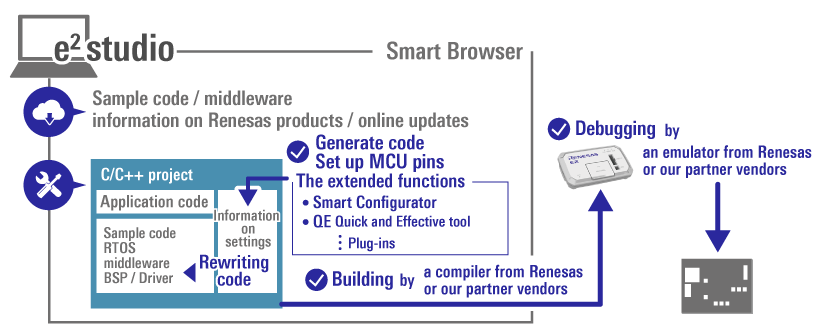
- You can view sample code for Renesas MCUs, middleware, and information on products from the Renesas Web site via the Smart Browser in the e² studio.
- The GUI environment makes complex MCU settings easy. The extended functions (such as the Smart Configurator and various QE (Quick and Effective tool solution)) support efficiency in development.
- Eclipse’s handy native editor provides powerful assistance in coding.
- You can choose a compiler from Renesas or our partner vendors for use in building from code.
- You can connect an emulator from Renesas (such as the E2 or E2 Lite) or from our partner vendors for debugging.
For details on the functions and tools supported for a family, refer to the information page for family
Easily Create Projects and Code Especially for Renesas MCUs.
You can generate projects for Renesas MCUs through simple operations of the e² studio. Select the MCU and the compiler to be used in the wizard function to generate a project which includes basic sample code. This allows you to immediately start building or debugging a project.
Adjusting the source code of a generated project to suit the specifications of a development board can be complicated. However, the e² studio’s code generators can help you resolve this. For example, you can easily set clocks, pins, and interrupts of the MCU with the Smart Configurator. Also, you can then automatically generate code which includes those settings. Downloading or importing middleware and making the various settings required for code generation are also possible.
See here for details of the Smart Configurator. >>
For detailed information on generating code for a family, refer to the information pages for the family.
Easy-to-Use Eclipse C/C++ Development Tooling (CDT) Editor
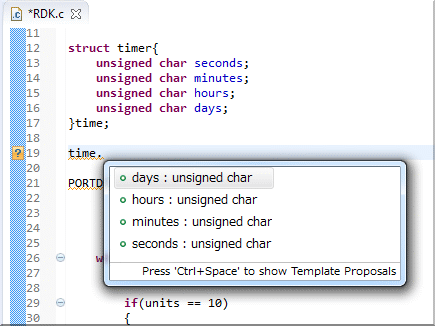
The Eclipse CDT (C/C++ Development Tooling) editor built into e² studio offers extremely powerful functionality specifically designed for C/C++ developers. These features include:
- Automatic code complementation (variable names, function names, structure and union members, #define symbols, correction of code format, spell-checking, etc.)
- Keyword color coding of source code for easy recognition of special strings, syntax, condition statements
- Powerful code navigation (Project browser, functions or variables by including #include, functions, hierarchical types, Jump to definition of functions or macros)
- Comment and code folding options
- Automated code constructs (if, while, do..while etc.)
- Pre-processor checking in edit (#ifdef code low-lighted if not true)
- Code refactoring (Changing name of variable at once, Simplifying function codes)
For detailed information on compilers supported for a family, refer to the information pages for the family
.
Simple Settings for Building through a GUI; Select a Compiler from Renesas or Our Partner Vendors.
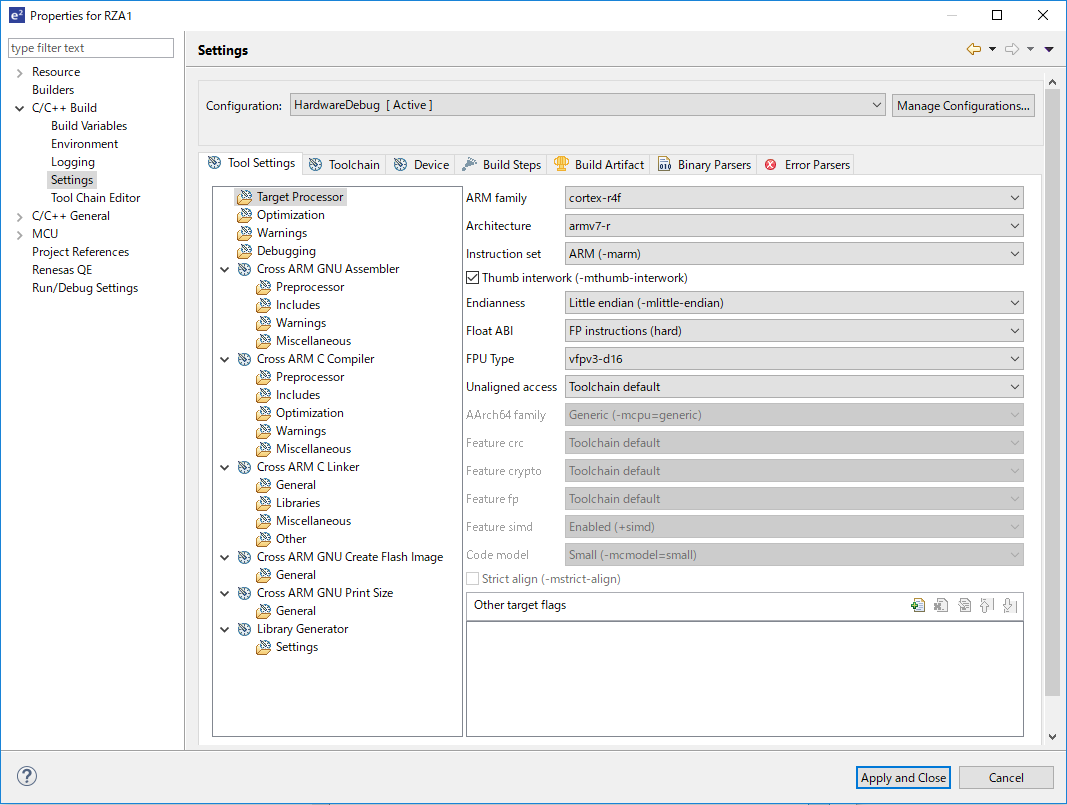
The compilers from Renesas and our partner vendors can be used in combination for building. Note that each compiler must be separately installed, since a compiler is not included as part of the e² studio product. Installing several compilers gives you a choice of which one to use.
A GUI allows you to set up the whole toolchain and automatically generates a 'makefile' for use in building.
Please refer to the information page for each family for information on support for each family.
High-Spec. Debugging Functions in Combination with the Standard GNU Debugger (GDB)
The standard GDB debugger of the Eclipse CDT provides basic functions such as displaying register values, operations on memory, setting of breakpoints, and control of execution. In addition to those general debugging functions, high-performance functions such as real-time memory display, real-time tracing, peripheral register display, and breaks by events in the hardware of Renesas MCUs are available. You can also use various emulators (the E2, E2 emulator Lite, E20, or J-Link from Segger) in combination with the e² studio.
Please refer to the information page for each family for information on support for each family.
High Expandability as an Eclipse-Based IDE
The e² studio consists of the open-source Eclipse integrated environment framework, CDT plug-in, and various plug-ins from Renesas and our partner vendors. This structure makes it easy to add or update compilers and plug-ins, making the e² studio a highly multi-functional and expandable IDE.
In addition to the tool plug-ins from Renesas and our partner vendors related to building, coding, and debugging, many open-source plug-ins, some of which you may find handy, are available for use in development.
For details, refer to the documents for the Eclipse platform and CDT plug-in on the Eclipse Web site (https://www.eclipse.org/).
Renesas is also making an expanding range of tools, such as QE (Quick and Effective Tool Solutions), available for installation as plug-ins.
QE: Tools for Assisting in Application Development in the e² studio
Installing QE tools for assisting in application development expands the functionality of the e² studio and easily starts applications. A QE provides a GUI that will guide you in setting up the various functions you require and incorporates knowhow for the development of the given functions.
For example, the QE for Capacitive Touch provides you with a GUI for setting touch buttons and adjusting tuning parameters. The QE for Display provides GUI sliders that allow you to adjust image quality while checking the results on the actual display.
QE(Quick and Effective tool solution)
Reuse Existing Resources by Importing Projects from Other IDEs.
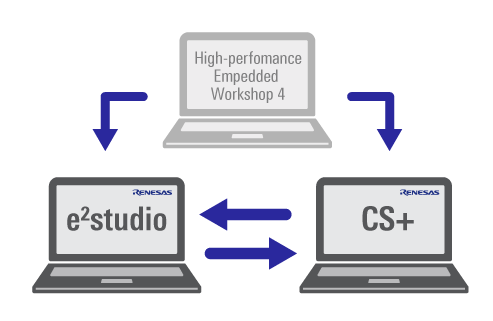
With the project importing function, you can immediately transfer projects from the CS+ Integrated Development Environment (IDE) or High-performance Embedded Workshop from Renesas to the e² studio. The e² studio is also capable of exporting projects for use with CS+.
These functions are supported for V2.1 and later versions of the e² studio, V3.00.00 and later versions of CS+, and V2.00.00 and later versions of CubeSuite+.
See here for details. >>
Support
Support Communities
- Synergy SSP 2.7.0 – Error when following QE procedure (e² studio 2025-01)
I am facing issue while working with S5D9 PK kit board with capacitive touch sample project my e2 studio version is 2025-01 (25.1.0) and Synergy SSP : 2.7.0 , QE version : 4.2 I created a project in e2 studio configured the correct pins in CTSU0 pins ...
Jan 7, 2026 - Renesas Extends Its AIoT Leadership with Integration of Reality AI Tools and e² studio IDE
TOKYO, Japan ― Renesas Electronics Corporation (TSE: 6723), a premier supplier of advanced semiconductor solutions, today announced that it has created interfaces between its Reality AI Tools® and its e2 studio integrated development environment, enabling designers to seamlessly share data, projects and AI code modules between the two programs. Modules ...
Oct 24, 2023 - After adding user code and building the project the user code vanishes(not found after build) in e2 studio
I am using e2 studio with freertos for RA0E1 board. I created one thread in blinky project using freertos and after that generated that project. After adding user code and building the project the user code vanishes(not found after build).I tried to add code in user section, but ...
Oct 16, 2025
Knowledge Base
- Considerations when reusing projects between CS+ and e² studio
... or conversely importing an e² studio project into CS+, you need to be aware of certain specification-related limitations. Please refer to the following documents and take any necessary actions. Project migration between e² studio and CS+, Notes and Tips (R20UT3239EJ0301) Suitable Productse² studioCS+ (formerly CubeSuite+) 日本語
Jan 21, 2026 - Changing an e² studio project name
Project rename (via File -> Rename menu or Rename in context menu) is available, but it is not recommended because a mismatch between project name and project folder name may cause unexpected behavior. On the project import wizard (File -> Import menu), select "Rename & Import Existing C/C++ Project into ...
Mar 25, 2024 - How can I launch debugger in e² studio?
... as clock frequency. Power supply via emulator and supply to the board should be exclusive. Emulator disconnect session if it detected confliction. Please refer to "e2 studio User Guide"→"Debugging Projects"→"General Debug Configurations" in e² studio Help for details.In cross development (i.e., embedded applications), menu items of ...
Nov 19, 2025

Support Communities

