
Overview
Description
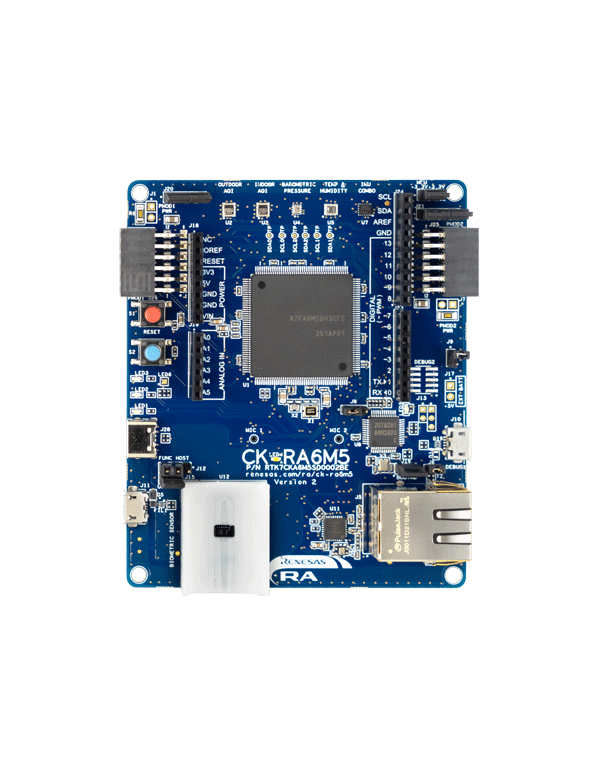
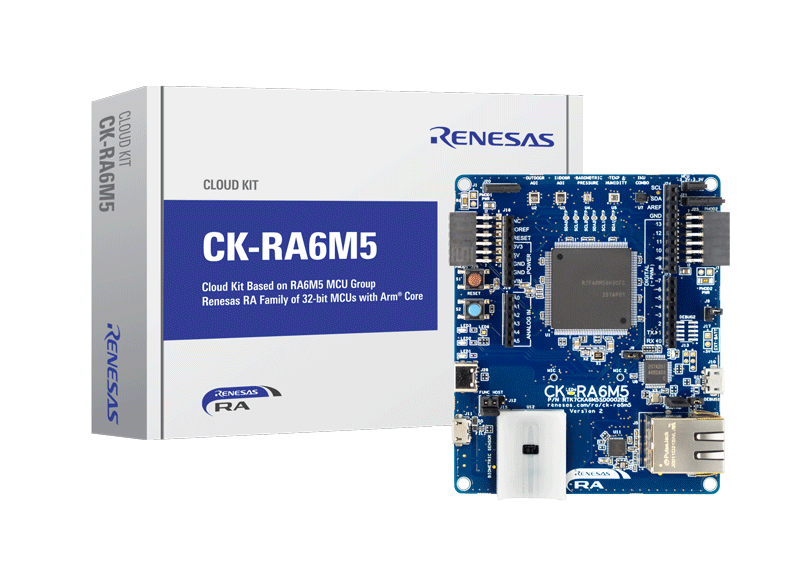
The CK-RA6M5 Cloud Kit enables users to securely connect to the cloud and explore the features of the Cortex®-M33 based RA6M5 group of MCUs and cloud services. With multiple network connectivity options, the kit provides a seamless cloud connectivity experience to most of the global cloud service providers. The kit is equipped with an on-board ethernet PHY for ethernet connectivity and includes the DA16600MOD for wireless connectivity. With the Renesas Flexible Software Package (FSP), the kit has complete software stack support using FreeRTOS, Azure RTOS, and other middleware stacks, thereby making it an ideal platform for efficiently developing cloud solutions and greatly reducing the time-to-market.
Visit Renesas Cloud Solutions for a complete cloud solution package.
Features
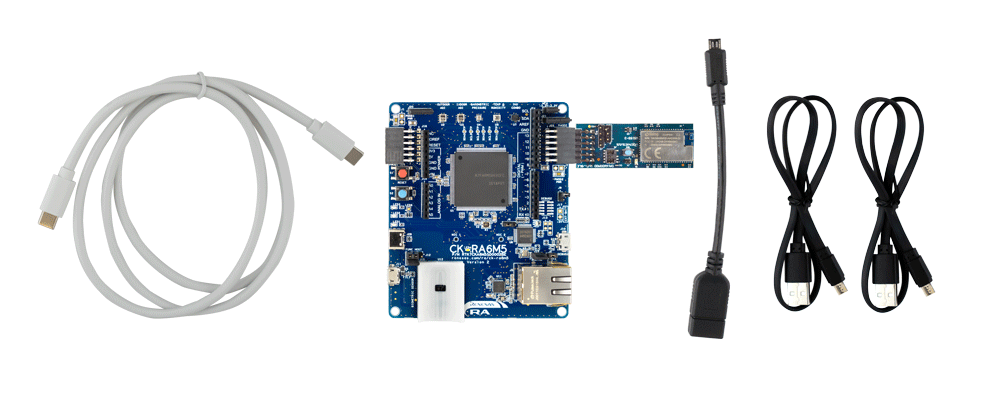
- CK-RA6M5 v2 baseboard
- Wi-Fi with US159-DA16600EVZ Pmod
- Ethernet
- USB Full-Speed host and device
- Sensors:
- Humidity and temperature
- Indoor air quality index
- Outdoor air quality index
- Heart rate, blood oxygen saturation (SpO2), respiration rate
- Barometric pressure
- 6 axis motion tracking
- 2 MEMS microphones
- Battery connector for portability
- Arduino™ (Uno R3) connector
- USB Type-C power connector
- On-board MCU:
- RF7A6M5BH3CFC microcontroller
- 200MHz, Arm® Cortex®-M33 core
- 2MB Code Flash, 512KB SRAM
- 176 pins, LQFP package
- Ecosystem:
- MCU and Pmod current measurement points
- 5V input through USB or external power supply
- USB serial converter
- Debug onboard (SEGGER J-Link)
- 4 user LEDs
- One user button
- 2 Digilent Pmod (SPI/UART/I2C: Type-6A and Type-2A) connectors
Applications
Documentation
|
|
|
|
|---|---|---|
| Type | Title | Date |
| Quick Start Guide | PDF 2.92 MB | |
| Quick Start Guide |
PDF
2.70 MB
Provides the fundamental knowledge needed to port example projects from one RA kit to another. It then demonstrates these principles by explaining how to port three example projects of varying levels of complexity from the MCK-RA4T1 to the FPB-RA4T1.
|
|
| Tool News - Release | PDF 182 KB 日本語 | |
| Application Note |
PDF
402 KB
AI-generated Summary:
The document explains the two operational modes, highlighting their advantages and disadvantages, and provides practical guidance for selecting and using each mode. It also includes reference links to Renesas RA Family Application Projects that demonstrate these modes with detailed examples of the related FSP module usage.
|
|
| Tool News - Notification | PDF 170 KB 日本語 | |
| Application Note |
PDF
2.35 MB
AI-generated Summary:
This guide details the implementation of AWS IoT Core connectivity and OTA firmware updates on Renesas RA MCUs using the CK-RA6M5 v2 kit with Ethernet. It covers bootloader creation with MCUboot, MQTT/TLS setup, integration of AWS IoT Device SDK components, and secure authentication with X.509 certificates leveraging RA MCU hardware security. It also includes prerequisites, tools, and step-by-step instructions for building secure, cloud-connected applications with OTA updates.
|
|
| Application Note |
PDF
8.33 MB
This guide details the objectives, architecture, and scope of OTA updates using AWS IoT OTA, and provides step-by-step instructions for preparing, executing, and validating firmware updates on the CK-RA6M5 v2 board. The project integrates three core components: a secure bootloader, a cloud connectivity application with downloader functionality, and AWS OTA cloud-side configurations for image storage and update initiation.
|
|
| Application Note |
PDF
1.25 MB
Learn how to effectively use the FSP MQTT/TLS modules in end-product design. By following this guide, developers can add the “AWS Core MQTT,” “Mbed TLS,” and “AWS DA16xxx Wi-Fi sockets wrapper” using the Wi-Fi interface, configure them for the target application, and write code using the included example as a reference for a quick and efficient start.
|
|
| Quick Start Guide |
PDF
4.27 MB
Learn to run the AWS cloud connectivity application project on CK-RA6M5 v2 via the Wi-Fi DA16600 interface, and develop MQTT/TLS applications using Wi-Fi DA16600 modules on the Renesas RA6 MCU Series.
|
|
| Application Note |
PDF
3.78 MB
Learn how to run the AWS Cloud Connectivity Application Project on the CK-RA6M5 v2 using an Ethernet interface. This guide is intended for users developing applications with MQTT/TLS modules over Ethernet on the Renesas RA6 MCU Series.
|
|
| Application Note |
PDF
1.20 MB
Learn how to effectively use the FSP MQTT/TLS modules for end-product design. By completing this guide, developers will add the “AWS Core MQTT,” “Mbed TLS,” and “AWS TCP Sockets Wrapper” using the Ethernet interface, configure them for the target application, and write code based on the included application example code as a reference, providing an efficient starting point.
|
|
| Application Note |
PDF
2.55 MB
Users can follow the provided steps in this application note to recreate the bootloader and link the application projects to work with the bootloader by using the FSP Solution. This application note also includes procedures for mastering an application to work with the bootloader, and for downloading and updating a new application.
|
|
| Tool News - Release | PDF 284 KB 日本語 | |
| Application Note |
PDF
4.36 MB
Learn how to use the RA FSP modules in your own design with the FSP-integrated Azure IoT SDK. Upon completing this guide, you will be able to add the FSP modules to your own design, configure them correctly with the Azure IoT SDK for the target application, and write code using the included application example code as a reference and efficient starting point.
|
|
| Quick Start Guide |
PDF
4.35 MB
Learn to run the AWS cloud connectivity application project on CK-RA6M5 v2 via the cellular interface and develop MQTT/TLS applications using cellular modules on the Renesas RA6 MCU Series.
|
|
| Application Note | RA AWS MQTT/TLS Cloud Connectivity Solution - Cellular GM02S
Learn how to effectively use the FSP MQTT/TLS modules for end-product design. By completing this guide, developers will add the “AWS Core MQTT,” “Mbed TLS,” and “AWS Cellular Sockets Wrapper” using the cellular interface, configure them for the target application, and write code based on the included application example, providing an efficient starting point.
|
|
| Tool News - Release | PDF 170 KB 日本語 | |
| Application Note |
PDF
1.19 MB
日本語
AI-generated Summary:
The document explains how to connect Renesas RA MCUs to AWS IoT Core using MQTT over TLS via cellular networks. It covers configuring AWS IoT Core, using MQTT/TLS modules, and integrating AWS Core MQTT, Mbed TLS, and cellular socket wrappers. The guide includes hardware and software requirements, cloud dashboard monitoring, device management, and security features like X.509 certificates and encryption. It targets developers building secure IoT applications with cellular connectivity on RA6M5 MCUs.
|
|
| Application Note |
PDF
4.03 MB
AI-generated Summary:
The document explains how to connect Renesas RA family MCUs to Microsoft Azure IoT services using MQTT over TLS with cellular connectivity. It covers the integration of RA Flexible Software Package (FSP) MQTT/TLS modules and Azure IoT SDK for Embedded C, enabling secure device provisioning, registration, and data exchange via Azure IoT Hub and Device Provisioning Service. The guide details hardware and software requirements, including development tools, cellular modules, and cloud setup. It provides step-by-step instructions for creating, building, and running a sample application on the CK-RA6M5v2 kit, focusing on secure communication and device management in IoT cloud environments.
|
|
| Tool News - Notification | PDF 158 KB 日本語 | |
| PCB Design Files | ZIP 77.80 MB | |
| Flyer | PDF 412 KB | |
| Application Note |
PDF
5.76 MB
AI-generated Summary:
Instructions guide users to run an AWS cloud connectivity project on the CK-RA6M5 board using a Cellular interface. It covers importing, building, and loading the MQTT/TLS application with the Renesas e2 studio IDE and Flexible Software Package v5.0.0. Detailed steps include hardware setup, SIM activation, serial console connection, and AWS IoT configuration. The document emphasizes prerequisites like familiarity with MQTT/TLS, cellular modems, and Renesas development tools. It also explains programming methods, connection settings, and debugging tips to enable seamless cloud communication via LTE Cat-M1 cellular modules.
|
|
| Flyer | PDF 614 KB 日本語 | |
| Quick Start Guide | PDF 2.90 MB | |
| Manual - Development Tools | PDF 4.59 MB | |
| Quick Start Guide | PDF 2.55 MB | |
| Manual - Development Tools | PDF 1.86 MB | |
| Release Note | PDF 189 KB | |
| PCB Design Files | ZIP 60.57 MB | |
30 items
|
||
Design & Development
Software & Tools
Software & Tools
| Software title
|
Software type
|
Company
|
|---|---|---|
| RA Flexible Software Package (FSP) FSP is an enhanced software package designed to provide easy-to-use, scalable, high-quality software for embedded system designs using Renesas RA Family of Arm Microcontrollers.
Note: FSP with e² studio Installer (Platform Installer) will install the e² studio tool, FSP packs, GCC toolchain, and Segger J-Link drivers required to use this software. No additional installations are required.
|
Software Package | Renesas |
| QuickConnect Platform QuickConnect platform enables fast prototyping by providing compatible hardware and software building blocks.
|
Software and Hardware Development Tools | Renesas |
| Reality AI Utilities Round-trip workflow for AI development and performance validation allowing to collect data, optimize models, and deploy directly to Renesas hardware
|
Solution Toolkit | Renesas |
3 items
|
||
Sample Code
Sample Code
Filters
|
||
|---|---|---|
| Type | Title | Date Date |
| Sample Code | RA FSP Example Project Porting Guide
Provides the fundamental knowledge needed to port example projects from one RA kit to another. It then demonstrates these principles by explaining how to port three example projects of varying levels of complexity from the MCK-RA4T1 to the FPB-RA4T1.
|
|
| Sample Code | RA AWS Cloud Connectivity and Firmware Update OTA on CK-RA6M5 v2 with Ethernet - Sample Code
|
|
| Sample Code | RA AWS MQTT/TLS Cloud Connectivity Solution - Wi-Fi DA16600
Use this application example to add and configure the “AWS Core MQTT,” “Mbed TLS,” and “AWS DA16xxx Wi-Fi sockets wrapper” using the Wi-Fi interface in the target application.
|
|
| Sample Code | RA AWS MQTT/TLS Cloud Connectivity Solution – Ethernet
[Software=RA FSP|v5.0.0]
ZIP
4.96 MB
Compiler:
GNUARM-None
IDE:
e2 studio
Learn how to effectively use the FSP MQTT/TLS modules in end-product design. This sample code allows developers to add and configure the “AWS Core MQTT”, “Mbed TLS”, and “AWS TCP Sockets Wrapper” using the Ethernet interface for the target application.
|
|
| Sample Code | RA6 Secure Bootloader Using MCUboot with Protected mode and Internal Code Flash
Learn how to create an application project using the MCUboot Module in Protected Mode on the Renesas EK-RA6M4 board with FSP v6.1.0. The intended audience includes product developers, product manufacturers, product support, and end users who are involved in designing application systems involving the use of a secure bootloader.
|
|
| Sample Code | RA MQTT/TLS Azure Cloud Connectivity Solution - Ethernet
[Software=FSP | v4.2.0],[Toolchain: GCC ARM Embedded Toolchain version 10.3.1.20210824]
ZIP
4.65 MB
Compiler:
GNUARM-None
IDE:
e2 studio
Learn how to use the RA FSP modules in your own design with the FSP-integrated Azure IoT SDK. This sample code demonstrates how to correctly add and configure the FSP modules for your target application using the Azure IoT SDK.
|
|
| Sample Code | RA AWS MQTT/TLS Cloud Connectivity Solution - Cellular GM02S
Use this application example to add and configure the “AWS Core MQTT,” “Mbed TLS,” and “AWS Cellular Sockets Wrapper” using the cellular interface in the target application.
|
|
| Sample Code | Security Design with Arm® TrustZone® using Cortex-M33
|
|
| Sample Code | RA AWS MQTT/TLS Cloud Connectivity Solution – Cellular Application Project
[Software=RA FSP|v4.2.0]
ZIP
7.74 MB
Compiler:
GNUARM-None
IDE:
e2 studio
|
|
| Sample Code | RA MQTT/TLS Azure Cloud Connectivity Solution - Cellular Application Project
[Software=FSP | v4.2.0],[Toolchain: GCC ARM Embedded Toolchain version 10.3.1.20210824]
ZIP
12.71 MB
Compiler:
GNUARM-None
IDE:
e2 studio
|
|
| Sample Code | CK-RA6M5 v2 Example Project Bundle
|
|
11 items
|
||
Related Boards & Kits
Boards & Kits

Evaluation Kit for RA6M5 MCU Group
The EK-RA6M5 evaluation kit enables users to effortlessly evaluate the features of the RA6M5 MCU Group and develop embedded systems applications using the Flexible Software Package (FSP) and e2 studio IDE. Utilize rich on-board features along with your choice of popular ecosystem add-ons to... Read More
Ultra-Low-Power Wi-Fi and Bluetooth Low Energy Combo Pmod Board
The US159-DA16600EVZ is a highly integrated ultra-low-power Wi-Fi and Bluetooth® Low Energy (LE) combo Pmod™ module that provides a convenient way to add both low-power Wi-Fi and low-power Bluetooth LE functionality to your device. The DA16600MOD integrates with the low-power Wi-Fi DA16200... Read More
Product Options
| Part Number | Status | Stock | Budgetary Price (USD) | Remarks |
|---|---|---|---|---|
| RTK7CKA6M5S08002BE | Active | In Stock | 1u | $60 | CK-RA6M5 v2 (Wi-Fi, Ethernet) |
| RTK7CKA6M5S04001BE | Obsolete | In Stock | CK-RA6M5 v1 (Cellular LTE CAT-M1, Ethernet) |
Videos & Training
Watch a short overview of the Renesas CK-RA6M5 and CK-RX-65N certified cellular-to-cloud IoT development kits to see how they can simplify solution prototyping for your next IoT design.
Additional Videos
News & Blog Posts
Support
Support Communities
- ck-ra6m5 v2 quick start example project issue
... /../../arm-none-eabi/bin/ld.exe: ./src/net_thread_entry.o: in function `net_thread_entry': C:\r20qs0059eg0100-ck-ra6m5-v2- exampleprojects\ck_ra6m5-v2\_quickstart\quickstart_ck_ra6m5_v2_ep\e2studio\Debug/../src/net_thread_entry.c:317: undefined ...
Jul 3, 2024 - CK-RA6M5-v1 Application didn't work after bootloader program jump to application address at power on
Hi everyone, I'm developing a bootloader for kit CK-RA6M5-v1 and use example led blink as an application. I use UART to load binary firmware to application area in flash with readback to make sure firmware is writen to application area. After it finish, bootlader jump to application ...
Jun 7, 2024 - How to add audio interface to ck-ra6m5
Hi All, Board : CK-RA6M5FSP : 4.1.0 I have two question about CK-RA6M5. I want to record and play audio on CK-RA6M5. Is it possible? 1. It has 2 MEMS Microphones, how can I find example code for audio recording? 2. Can I add an external ...
Dec 12, 2022
Knowledge Base
- RA Family: CK-RA6M5/CK-RX65N is used. I can only read 00h data from the outdoor sensor (ZMOD4510) installed in the same kit. Is it malfunctioning?
The ZMOD4510 (outdoor sensor) in the CK-RA6M5 and CK-RX65N requires a warm-up time. This time varies depending on the operating mode of the sensor.It is 60 minutes when operated in Gen1 mode and 42 hours in Gen2 mode.Also, since this warm-up time is required ...
Jun 9, 2022 - RX Family: CK-RA6M5/CK-RX65N is used. I can only read 00h data from the outdoor sensor (ZMOD4510) installed in the same kit. Is it malfunctioning?
The ZMOD4510 (outdoor sensor) in the CK-RA6M5 and CK-RX65N requires a warm-up time. This time varies depending on the operating mode of the sensor.It is 60 minutes when operated in Gen1 mode and 42 hours in Gen2 mode.Also, since this warm-up time is required ...
Jun 9, 2022

Support Communities


