
Overview
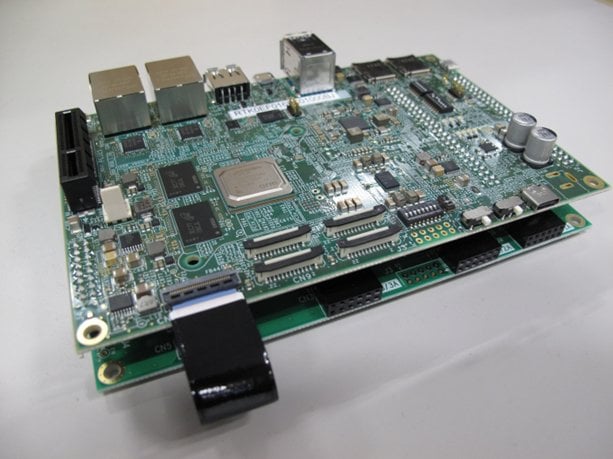
The RZ/V2H AI MPU evaluation kit (RTK0EF0168C04000BJ) is used to evaluate Renesas' RZ/V2H quad-core vision AI MPU. The kit includes a CPU board and an expansion (EXP) board. It supports RZ/V2H standard software packages and enables easy implementation of software development tasks such as low power consumption AI inference and video streaming. Additionally, this evaluation kit supports optional functions like the image signal processor (ISP), 3D graphics engine (GE3D), and Trusted Secure IP.
Features
- Device: RZ/V2H R9A09G057H48GBG
- Arm® Cortex®-A55 x4, Arm Cortex-M33 x1, Arm Cortex-R8 x2
- AI Accelerator DRP-AI3
- Dynamically reconfigurable processor (DRP)
- BGA, 19mm x 19mm, 1368-pin, 0.5mm pitch
- RZ/V2H Secure Evaluation Board (CPU Board):
- PMIC: RAA215300
- Clock generator: 5L35023B
- Main memory: LPDDR4X 8GB × 2
- xSPI Flash memory: 64MB
- External memory: Micro SD × 2
- High-speed interface:
- Gigabit Ethernet × 2 ports
- USB 3.2 Gen2 × 2ch (Host only)
- USB 2.0 × 2ch (On-the-Go (OTG) x 1ch, Host x 1ch)
- PCIe® Gen3 × 1ch (4 lanes max)
- MIPI® CSI-2® × 4ch
- MIPI DSI® × 1ch
- GPIO: 86 pins
- RZ/V2H-EVK Expansion Board (EXP Board):
- HDMI® Tx × 1
- Audio AUX connector × 1ch
- Audio MIC connector × 1ch
- Audio HP connector × 1ch
- Pmod™ × 4
- Box Content:
- RZ/V2H Secure Evaluation Board
- RZ/V2H-EVK Expansion Board
- FFC
- Heat sink with fan
- USB cable (type micro B – type A)
Note: AC adapter is not included. A standard USB Power Delivery adapter and a cable supporting a 100W power supply should be used with the platform.
Products in the Design
| 5L35023 | VersaClock 3S Programmable Clock Generator |
| DA7212 | Ultra-Low Power Stereo Codec with 650µW Always-On Power Mode |
| DA9141 | High-Efficiency, High Current, Quad-Phase, Step-Down DC/DC Converter (Buck) PMIC |
| ISL6185XXC | Dual USB Port Power Supply Controller - Covering the Commercial Temperature Range of 0C to +70C |
| ISL80015 | Compact Synchronous Buck Converter |
| ISL80031A | 3A Synchronous Buck Converter in 2x2 DFN Package |
| ISL97701 | Boost Regulator with Integrated Schottky and Input Disconnect Switch |
| RAA211250 | Integrated FET 30V, 5A Synchronous Buck Regulator with Internal Compensation and Programmable Frequency |
| RAA215300 | High-Performance 9-Channel PMIC Supporting DDR Memory, with Built-In Charger and RTC |
| SLG46620 | GreenPAK Programmable Mixed-Signal IC, VDD Range: 1.71-5.5V, 17 GPIOs, 6 ACMPs, ADC (8-bit, SAR), SPI |
| SLG59M1603V | 5.5V, 16mΩ, 4.5A Dual Channel Load Switch with Discharge and Reverse Current Blocking |
| SLG59M1717V | 5.5V, 4mΩ, 5A Load Switch with Protection Features and Power Good Output |
Getting Started
Test this Board Remotely with Lab on the Cloud
Sample & Buy
RZ/V2H Evaluation Board Kit (Secure Type) version 1.0
| Description: | RZ/V2H Evaluation Board Kit (Secure Type) version 1.0 |
| Remarks: | Device: R9A09G057H48GBG |
| Security: | Supported |
Application Block Diagrams
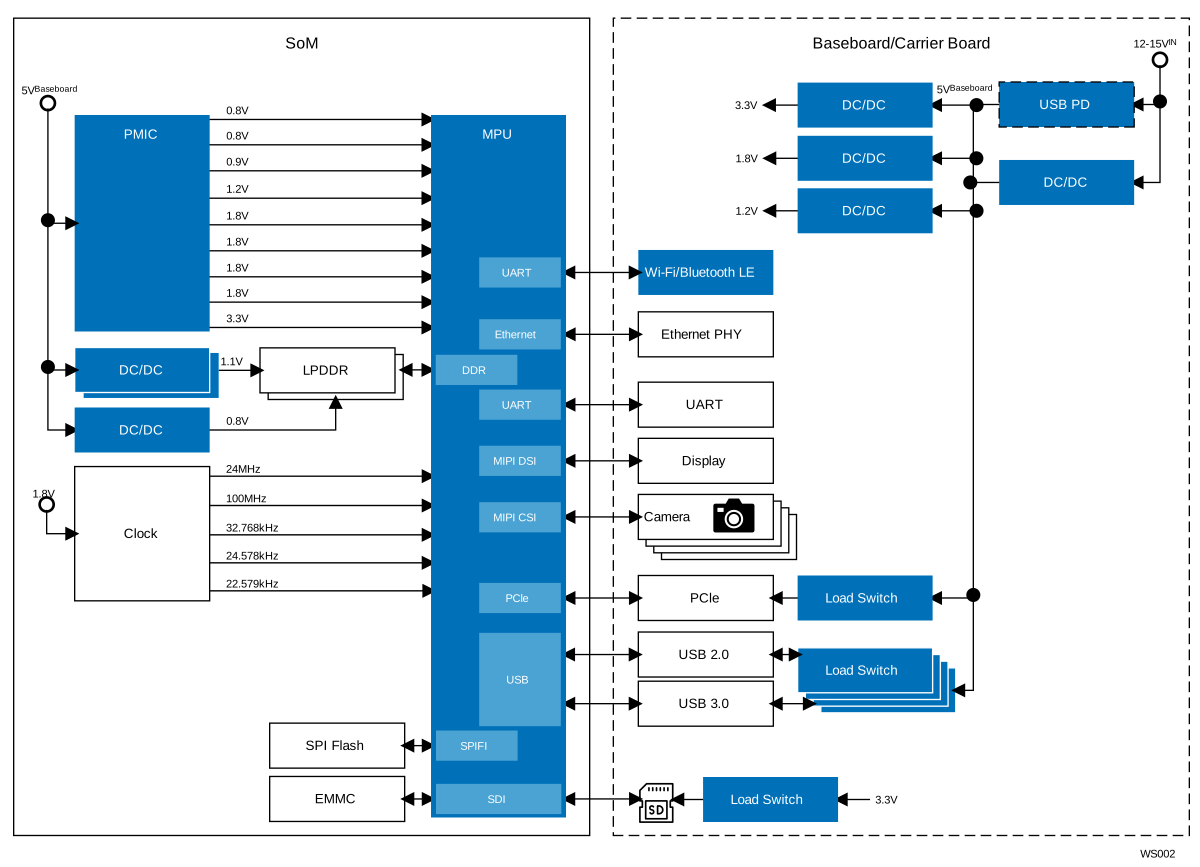 | High-Performance Vision AI System High-performance quad-camera vision AI platform for real-time, power-efficient edge processing. |
Videos & Training
Explore the RZ/V2H evaluation kit and its key hardware components. We walk through what is included in the kit and how the CPU board connects to the expansion board. We demonstrate the main interfaces, including power, UART, Ethernet, camera connectors, and GPIO headers, to help you quickly understand the hardware layout. This overview helps you confirm your setup and prepare for development with the RZ/V2H platform.
Additional Videos
News & Blog Posts
Blog Post Dec 8, 2025 |
Support
Support Communities
- Something is confused about microSD card preparation for Setup RZ/V2L EVK and Setup RZ/V2H EVK
... eSDbootloader. I see that for RZ/V2L EVK we have details step1 about microSD card formating. But I do not see this step for RZ/V2H EVK.It means that for RZ/V2H EVK, we do not need step of microSD card formating? Is that right? If ...
Jan 10, 2025 - RZ/V2H EVK Ver 1 SDHI0 Power Cycle
Hi all, Platform: Renesas RZ/V2H EVK Ver.1 Cards: UHS-I (switches to 1.8 V in Linux). Background / symptom After booting Linux, the SD card negotiates 1.8 V. On a soft reset back to U-Boot, the host reverts to 3.3 V while the ...
Sep 22, 2025 - Inquiry Regarding Booting RZ/V2H EVK from Macronix SPI-NAND Flash (MX35UF4GE4AD)
Dear Renesas Technical Support, Hello, I am currently developing a project based on the RZ/V2H Evaluation Kit (EVK). By default, this board comes with a Micron SPI-NOR Flash, but I intend to replace it with a Macronix SPI-NAND Flash (Part number: MX35UF4GE4AD, 1.8V, 4G-bit ...
Jul 25, 2025
Knowledge Base
- RZ Family: Precautions for using the RTC Function with the RZ/V2H EVK
Last Updated: 11/14/2025 The user is trying to use the RTC function with the RZ/V2H EVK.Question When executing command: hwclock --show Following error occurs: select() to /dev/rtc0 to wait for clock tick timed out What is the proper method for ...
Nov 14, 2025 - RZ Family: How to Boot from xSPI on the RZ/V2H EVK
... article explains the steps to set up and boot the RZ/V2H EVK in xSPI mode. Question How to Boot from xSPI on the RZ/V2H EVK? Answer This section explains how to boot from xSPI on RZ/V2H EVK.Following instructions assumes that you have completed ...
Nov 26, 2025 - RZ/V2H EVK - How to boot up from eMMC
Last Updated: 12/20/2024 Question:RZ/V2H EVK - How to boot up from eMMC ? Answer: Hardware : RZ/V2H EVKSoftware : AI SDK ver 5.00 (Release note) Steps to boot up from eMMC : Adjust the DIP switch on the CPU board to SCI download mode ...
Dec 20, 2024

Support Communities

