
Overview
Description
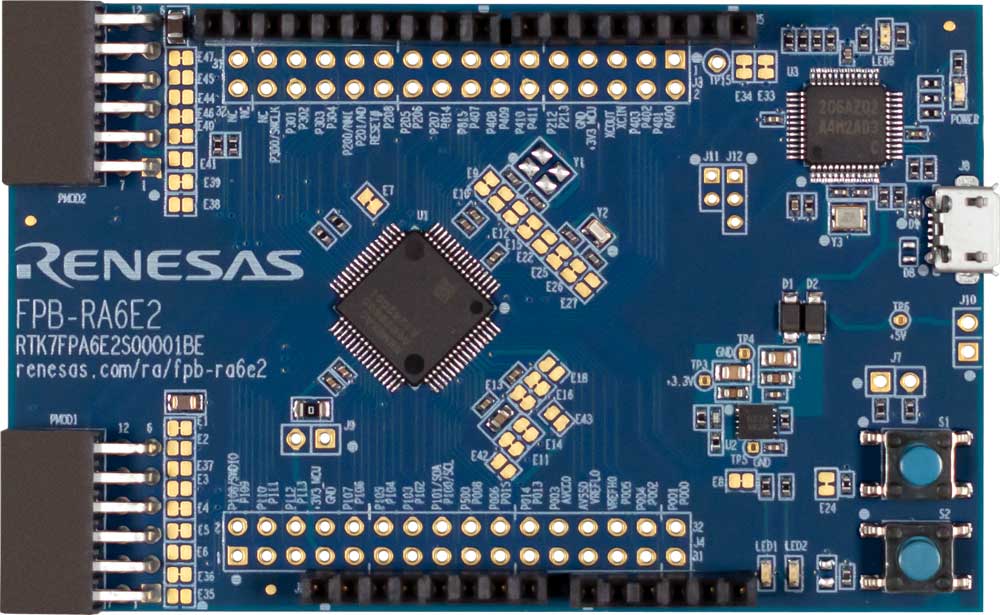
The RA6E2 Fast Prototyping Board comes equipped with an R7FA6E2BB3CFM microcontroller and is an evaluation board specialized for prototype development for a variety of applications. It has a built-in SEGGER J-Link™ emulator circuit so you can write/debug programs without additional tools. In addition, with Arduino® UNO and Pmod™ interfaces included standard and through-hole access to all pins of the microcontroller, and so on, it has high expandability.
Sample software is available to demonstrate the functionality of the RA6E2 MCU and for connecting between the RA6E2 Fast Prototyping Board and various wireless modules or various sensor modules.
Please use Bluetooth®, LoRa® and Wi-Fi according to the radio regulations of each country during use.
Features
- Equipped with an RA6E2 32-bit microcontroller 64-pin, 10mm x 10mm x 1.70mm, 0.5mm pitch, ROM: 256KB, RAM: 40KB
- No additional tools are required for program debugging/writing with the built-in SEGGER J-Link emulator circuit
- Through-holes with access to all of the pins of the microcontroller
- Arduino UNO and Pmod interfaces come standard
- Support for various RA6E2 software and tools
Applications
Documentation
|
|
|
|
|---|---|---|
| Type | Title | Date |
| Quick Start Guide | PDF 1.12 MB 日本語 | |
| Manual - Development Tools | PDF 1.70 MB 日本語 | |
| PCB Design Files | FPB-RA6E2 v1 - Design Package
|
|
| Quick Start Guide |
PDF
2.70 MB
Provides the fundamental knowledge needed to port example projects from one RA kit to another. It then demonstrates these principles by explaining how to port three example projects of varying levels of complexity from the MCK-RA4T1 to the FPB-RA4T1.
|
|
| Flyer | PDF 412 KB | |
| Flyer | PDF 463 KB 日本語 | |
| Report | PDF 187 KB 日本語 | |
7 items
|
||
Design & Development
Software & Tools
Software & Tools
| Software title
|
Software type
|
Company
|
|---|---|---|
| RA Flexible Software Package (FSP) FSP is an enhanced software package designed to provide easy-to-use, scalable, high-quality software for embedded system designs using Renesas RA Family of Arm Microcontrollers.
Note: FSP with e² studio Installer (Platform Installer) will install the e² studio tool, FSP packs, GCC toolchain, and Segger J-Link drivers required to use this software. No additional installations are required.
|
Software Package | Renesas |
| QuickConnect Platform QuickConnect platform enables fast prototyping by providing compatible hardware and software building blocks.
|
Software and Hardware Development Tools | Renesas |
2 items
|
||
Sample Code
Sample Code
Filters
|
||
|---|---|---|
| Type | Title | Date Date |
| Sample Code | RA FSP Example Project Porting Guide
Provides the fundamental knowledge needed to port example projects from one RA kit to another. It then demonstrates these principles by explaining how to port three example projects of varying levels of complexity from the MCK-RA4T1 to the FPB-RA4T1.
|
|
| Sample Code | Quick-Start Example Project for FPB-RA6E2
|
|
2 items
|
||
Related Boards & Kits
Boards & Kits

Evaluation Kit for RA6E2 MCU Group
The EK-RA6E2 evaluation kit enables users to effortlessly evaluate the features of the RA6E2 MCU Group and develop embedded systems applications using Renesas' Flexible Software Package (FSP) and e2studio IDE. Utilize rich on-board features along with your choice of popular ecosystem add-ons to... Read More

Evaluation Kit for RA6M5 MCU Group
The EK-RA6M5 evaluation kit enables users to effortlessly evaluate the features of the RA6M5 MCU Group and develop embedded systems applications using the Flexible Software Package (FSP) and e2 studio IDE. Utilize rich on-board features along with your choice of popular ecosystem add-ons to... Read More

Evaluation Kit for RA6M4 MCU Group
The EK-RA6M4 evaluation kit enables users to effortlessly evaluate the features of the RA6M4 MCU Group and develop embedded systems applications using the Flexible Software Package (FSP) and e2 studio IDE. Utilize rich on-board features along with your choice of popular ecosystem add-ons to... Read More
Test This Board Remotely

Evaluation Kit for RA6M3 MCU Group
The EK-RA6M3 evaluation kit enables users to seamlessly evaluate the features of the RA6M3 MCU Group and develop embedded systems applications using the Flexible Software Package (FSP) and e2studio IDE. Utilize rich on-board features along with your choice of popular ecosystem add-ons to bring... Read More

Evaluation Kit for RA6M2 MCU Group
The EK-RA6M2 evaluation kit enables users to effortlessly evaluate the features of the RA6M2 MCU Group and develop embedded systems applications using the Flexible Software Package (FSP) and various IDEs.
Getting Started
Running the Quick Start Example Project
- The EK-RA6M2 board comes... Read More

Evaluation Kit for RA6M1 MCU Group
The EK-RA6M1 evaluation kit enables users to effortlessly evaluate the features of the RA6M1 MCU Group and develop embedded systems applications using Renesas' Flexible Software Package (FSP) and various IDEs.
Getting Started
Running the Quick Start Example Project
- The EK-RA6M1 board comes... Read More
Fast Prototyping Board for RA6E1 MCU Group
The RA6E1 Fast Prototyping Board comes equipped with an R7FA6E10F2CFP microcontroller and is an evaluation board specialized for prototype development for a variety of applications. It has a built-in SEGGER J-Link™ emulator circuit so you can write/debug programs without additional tools. In... Read More
Product Options
| Part Number | Status | Stock | Budgetary Price (USD) | Sampleable |
|---|---|---|---|---|
| RTK7FPA6E2S00001BE | Active | In Stock | 1u | $15.48 | Available |
Videos & Training
Additional Videos
News & Blog Posts
Blog Post Jan 28, 2022 |
Blog Post Jan 28, 2022 |
Blog Post Jan 28, 2022 |
Blog Post Nov 18, 2021 |
Blog Post Nov 11, 2021 |
Partners

Zephyr Project
The Zephyr Project is an open-source, scalable real‑time operating system (RTOS) designed for resource-constrained embedded systems and supports a wide range of hardware architectures and development boards. For the Renesas RA6E2 Fast Prototyping Board, Zephyr provides focused documentation covering board features, supported peripherals, and basic build, flashing, and debugging workflows to help developers quickly get started.
See the Zephyr Project RA6E2 Fast Prototyping Board Documentation
Support
Support Communities
- RA6E2 TRNG
Hello,I am working with the RA6E2 and using the examples from the TinyCrypt documentation. I am able to generate random numbers but I am not sure if this behavior is expected. Calls to tc_ctr_prng_init() would fail (TC_CRYPTO_FAIL) but tc_ctr_prng_generate() still generated ...
Feb 29, 2024 - RA4E1 - RTC time not retained after pressing Reset button on FPB-RA4E1
Hi,Everytime I press the Reset button on FPB-RA4E1, the current RTC calendar time is lost.Here is my application logic:1.At startup, Call R_RTC_Open(&g_rtc0_ctrl, &g_rtc0_cfg) to open the RTC (with RTC_CFG_OPEN_SET_CLOCK_SOURCE=1). 2 ...
Jun 18, 2026 - GPIO speed
Hello, I am testing how fast I can toggle an IO pin on the FPB-RA8E1 board, in order to determine whether I can use GPIO to drive an 8-bit parallel LCD screen at an acceptable frame rate.I tested two operation methods: one using register operations, and the ...
Jan 30, 2026
Knowledge Base
- RA Family: Handling of I²C Pull-Up Resistors on Arduino-Compatible Pins J1 (10/9) of RA Family FPB Boards
... 10/9) on RA Family FPB boards for I²C communication. How should I connect the pull-up resistors? Target boards: FPB-RA4E2 FPB-RA4T1FPB-RA6E2FPB-RA6T3 Answer: For target RA FPB boards, pull-up resistors are pre-installed on the Arduino-compatible pins J1 Pin 10 (SCL ...
Dec 5, 2025

Support Communities


