
Overview
Description
The EK-RA2A2 evaluation kit enables users to effortlessly evaluate the features of the RA2A2 MCU group and develop embedded system applications using Renesas' Flexible Software Package (FSP) and e2 studio IDE. Utilize rich on-board features along with your choice of popular ecosystem add-ons to bring your big ideas to life. The kit includes the EK‑RA2A2 v1 board and a micro USB device cable (Type‑A male to micro‑B male).
Getting Started
Running the Quick Start Example Project
- The EK-RA2A2 board comes pre-programmed with a quick start example project (source code provided in the EK-RA2A2 example project bundle).
- Power up the EK-RA2A2 board through the USB debug port (J10) using the micro USB device cable connected to a 5V power source. The white power LED will light up.
- The Quick Start example project will begin to execute by blinking the blue user LED.
- Refer to the EK-RA2A2 – Quick Start Guide to explore additional functionality of the quick start example project.
Developing Embedded Applications
- Modifying the quick start example project – refer to the EK-RA2A2 Quick Start Guide for instructions on importing, modifying, and building the quick start example project.
- Start with one of the many other example projects (provided in the EK-RA2A2 example project's bundle) – choose from many example projects to learn about different peripherals of the RA2A2 MCU group. These example projects can be excellent starting points for developing your custom applications.
Building Custom Hardware
- Start by building a functional prototype - utilize the EK-RA2A2 board with your choice of ecosystem add-ons.
- Build custom hardware – develop custom hardware by referring to the design and manufacturing information provided in the EK-RA2A2 design package.
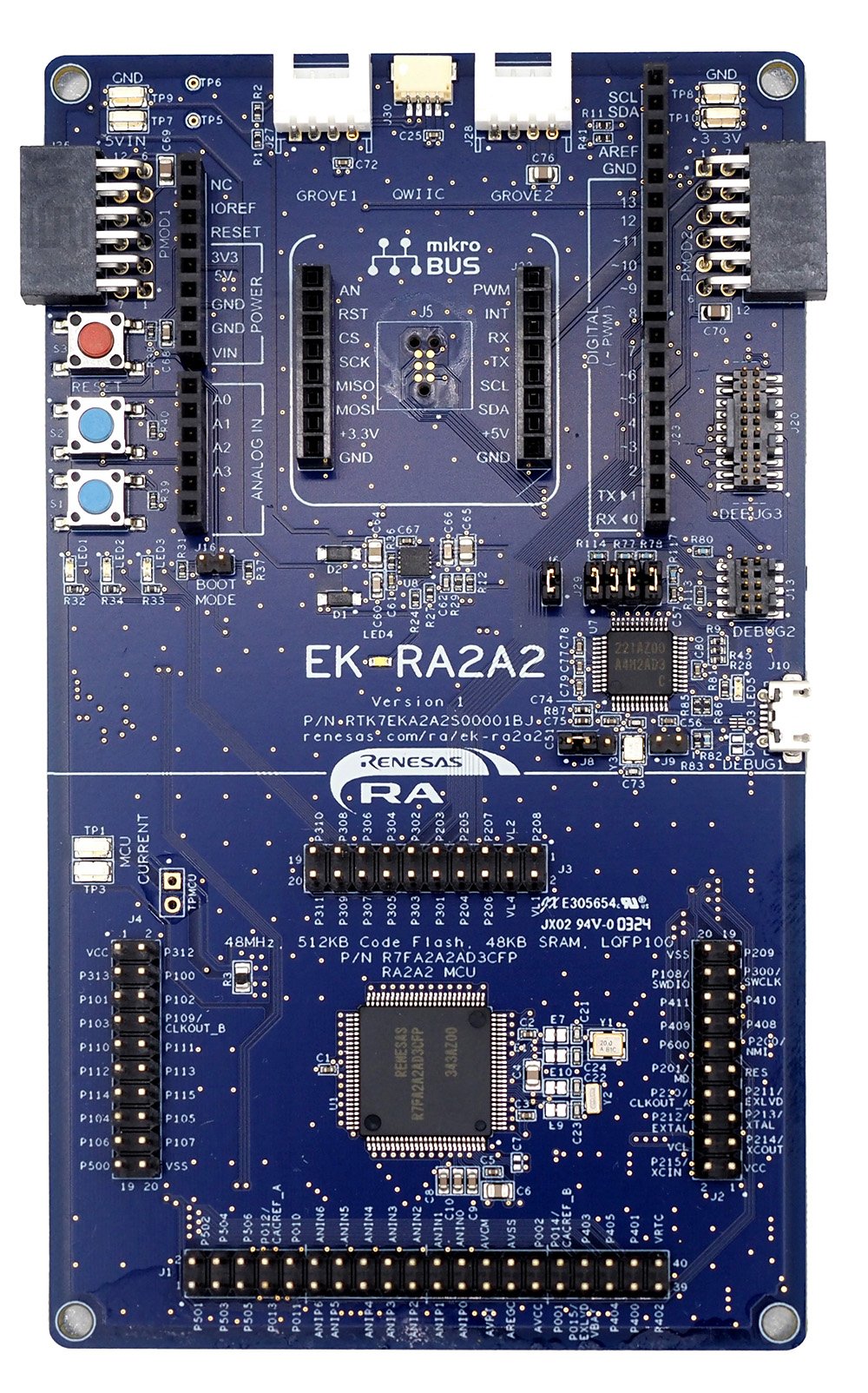
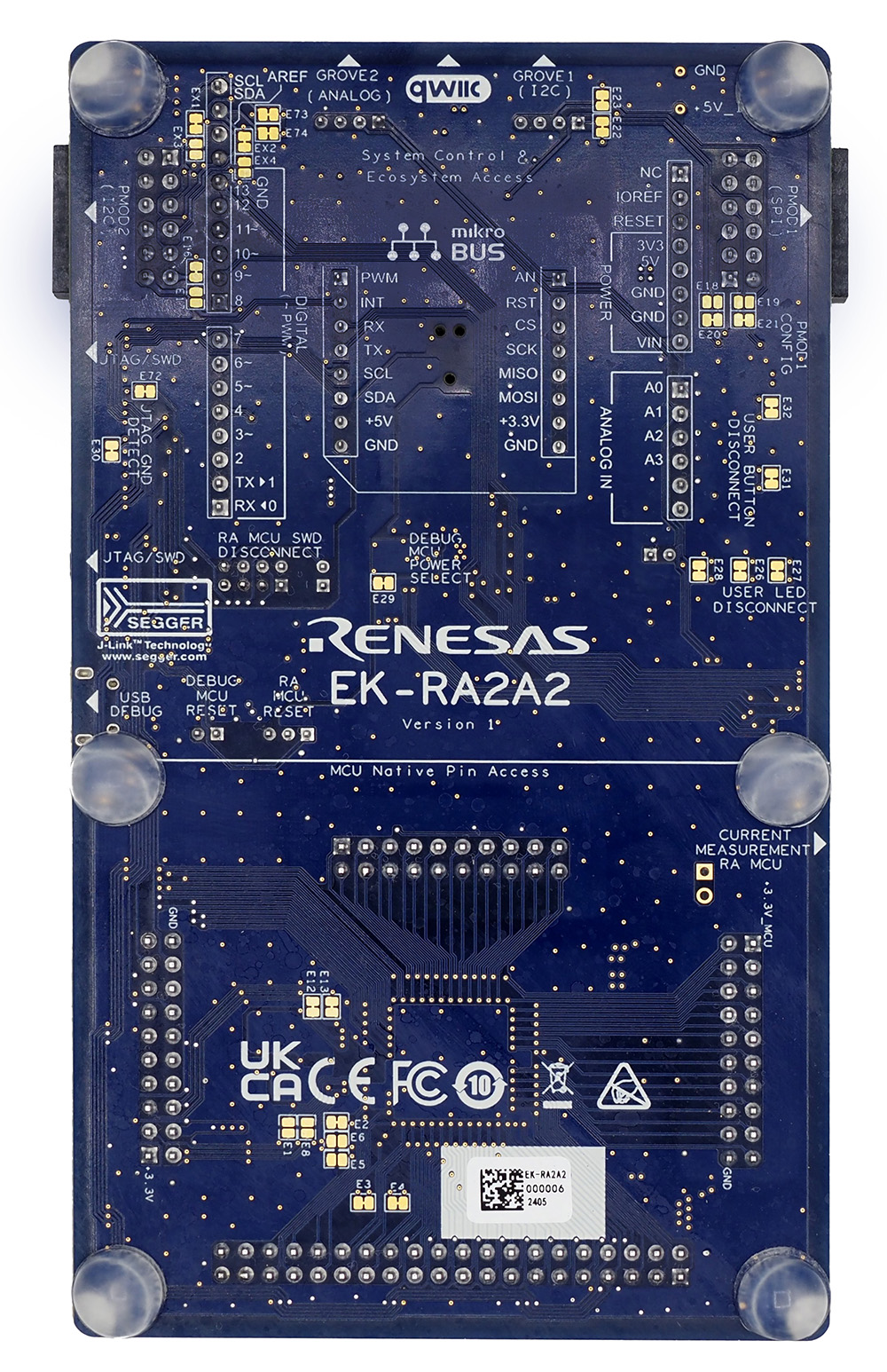
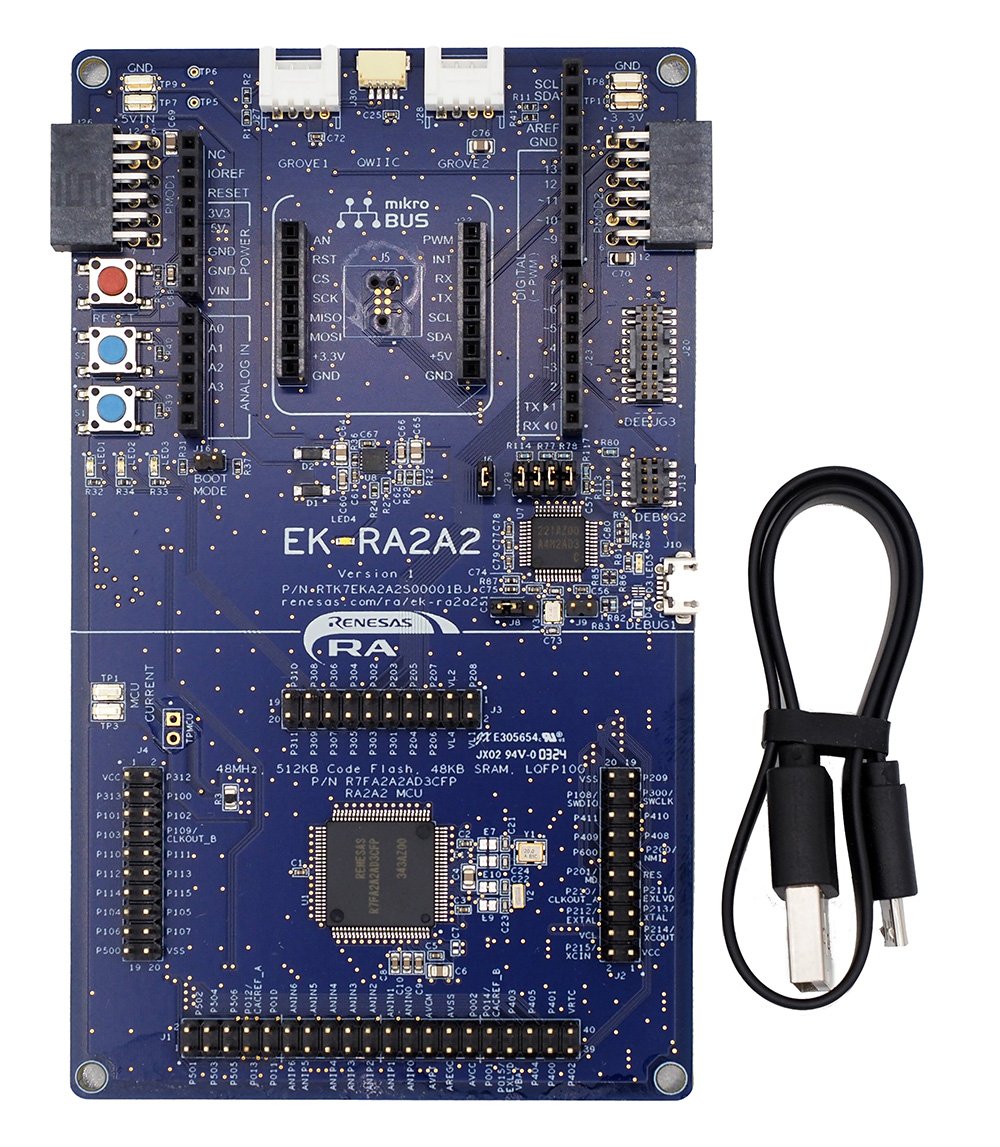
Features
- MCU Native Pin Access:
- R7FA2A2AD3CFP MCU
- 48MHz, Arm® Cortex®-M23 core
- 512KB Code Flash (Dual Bank), 48KB SRAM
- 100-pin LQFP (14mm x 14mm x 1.7mm, 0.5mm pitch)
- Native pin access through 3 x 20-pin and 1 x 40-pin male headers
- MCU current measurement points for precision current consumption measurement
- Multiple clock sources - RA MCU oscillator and sub-clock oscillator crystals, providing precision 32.768kHz reference clock
- Additional low-precision clocks (48MHz, 8MHz, 32.768kHz) are available internal to the RA MCU
- Ecosystem & System Control Access:
- Two 5V input sources:
- USB (debug)
- External power supply (using surface mount clamp test points and power input vias)
- SEGGER J-Link™ on-board programmer and debugger
- Three Debug modes:
- Debug on-board (SWD) – via J-Link
- Debug in (SWD) – via J-Link, Arm® Keil® ULINK™, IAR I-jet™, Renesas E2/E2 Lite, etc.
- Debug out (SWD, JTAG) – via J-Link
- User LEDs and buttons:
- Three User LEDs (red, blue, green)
- Power LED (white) indicating the availability of regulated power
- Debug LED (yellow) indicating the debug connection
- Two user buttons
- One reset button
- Five most popular ecosystem expansions:
- 2 Seed Grove® system (I2C/Analog) connectors
- SparkFun® Qwiic® connector
- 2 Digilent Pmod™ (SPI and I2C) connectors
- Arduino® (UNO R3) connector
- MikroElektronika™ mikroBUS™ connector
- MCU boot configuration jumper
- Two 5V input sources:
Applications
Documentation
|
|
|
|
|---|---|---|
| Type | Title | Date |
| Quick Start Guide | PDF 1.10 MB 日本語 | |
| Manual - Development Tools | PDF 1.88 MB 日本語 | |
| PCB Design Files | ZIP 80.16 MB | |
| Application Note |
PDF
611 KB
The EK-RA2A2 example project shows how to write code for various Renesas Flexible Software Package (FSP) modules supported by the EK-RA2A2 kit. The Flexible Software Package provides an optimized, easy-to-use, scalable, and high-quality software solution for embedded system design.
|
|
| Application Note |
PDF
2.98 MB
MCUboot is a secure bootloader for 32-bit MCUs. It defines a common infrastructure for the bootloader, defines system flash layout on microcontroller systems, and provides a secure bootloader that enables easy software update. MCUboot is operating system and hardware independent and relies on hardware porting layers from the operating system it works with. This application note demonstrates secure bootloader design using this dual-bank feature for a non-TrustZone environment based on RA2A2.
|
|
| Tool News - Release | PDF 533 KB 日本語 | |
| Release Note | PDF 1.34 MB 日本語 | |
| Application Note | PDF 3.84 MB | |
| Tool News - Release | PDF 318 KB 日本語 | |
| Application Note |
PDF
1.50 MB
日本語
AI-generated Summary:
The control program operates on the RA2A2 microcontroller within the EK-RA2A2 evaluation kit and interfaces with the QE for AFE development tool to configure registers and acquire A/D conversion data from 24-bit Sigma-Delta and 12-bit A/D converters. It supports high-speed continuous sampling via USB-UART adapters at bitrates of 3 Mbps or higher. Various HEX files and e2 studio projects enable flexible connection methods and clock frequencies to suit different measurement and communication requirements. The program facilitates continuous and one-shot A/D measurements with configurable sampling rates and supports UART communication with flow control options. Detailed instructions cover firmware writing, project setup, pin configurations, and troubleshooting.
|
|
| Release Note | PDF 1.45 MB 日本語 | |
| Tool News - Release | PDF 180 KB 日本語 | |
| Flyer | PDF 353 KB 日本語 | |
| Report | PDF 187 KB 日本語 | |
14 items
|
||
Design & Development
Software & Tools
Software & Tools
| Software title
|
Software type
|
Company
|
|---|---|---|
| QE for AFE: Development Assistance Tool for Analog Front End This development assistance tool supports the development of embedded systems to perform high-precision sensing for microcontrollers with built-in analog front-end (AFE). [Plugin for Renesas IDE "e2 studio"] [Standalone Version] [Support MCU/MPU:RA, RX]
|
Solution Toolkit | Renesas |
| RA Flexible Software Package (FSP) FSP is an enhanced software package designed to provide easy-to-use, scalable, high-quality software for embedded system designs using Renesas RA Family of Arm Microcontrollers.
Note: FSP with e² studio Installer (Platform Installer) will install the e² studio tool, FSP packs, GCC toolchain, and Segger J-Link drivers required to use this software. No additional installations are required.
|
Software Package | Renesas |
| e² studio Eclipse-based Renesas integrated development environment (IDE).
[Support MCU/MPU: RA, RE, RX, RL78, RH850, Renesas Synergy, RZ]
|
IDE and Coding Tool | Renesas |
| QuickConnect Platform QuickConnect platform enables fast prototyping by providing compatible hardware and software building blocks.
|
Software and Hardware Development Tools | Renesas |
4 items
|
||
Sample Code
Sample Code
Filters
|
||
|---|---|---|
| Type | Title | Date Date |
| Sample Code | EK-RA2A2 Example Project Bundle
The EK-RA2A2 example project shows how to write code for various Renesas Flexible Software Package (FSP) modules supported by the EK-RA2A2 kit. The Flexible Software Package provides an optimized, easy-to-use, scalable, and high-quality software solution for embedded system design.
|
|
| Sample Code | RA2 Secure Firmware Update using MCUboot and Flash Dual Bank
MCUboot is a secure bootloader for 32-bit MCUs. It defines a common infrastructure for the bootloader, defines system flash layout on microcontroller systems, and provides a secure bootloader that enables easy software update. MCUboot is operating system and hardware independent and relies on hardware porting layers from the operating system it works with.
|
|
| Sample Code | RA2 MCU Advanced Secure Bootloader Design using MCUboot Internal Code Flash and Memory Mirror Function
|
|
| Sample Code | RA2A2 Group Board Control Program for 'QE for AFE' - Sample Code
[Software=RA Flexible Software Package|v5.6.0],[Toolchains=GNU Arm Embedded|13.2.1.arm-13-7]
ZIP
10.06 MB
日本語
Application:
Medical & Healthcare, Wearables
Compiler:
GNU ARM Embedded
Function:
Analog, Communication Interface
IDE:
e2 studio
|
|
4 items
|
||
Related Boards & Kits
Boards & Kits

Evaluation Kit for RA2A1 MCU Group
The EK-RA2A1 evaluation kit enables users to effortlessly evaluate the features of the RA2A1 MCU Group and develop embedded systems applications using Renesas' Flexible Software Package (FSP) and various IDEs.
Getting Started
Running the Quick Start Example Project
- The EK-RA2A1 board comes... Read More

Evaluation Kit for RA2L1 MCU Group
The EK-RA2L1 evaluation kit enables users to effortlessly evaluate the features of the RA2L1 MCU Group and develop embedded systems applications using Renesas' Flexible Software Package (FSP) and e2 studio IDE. Utilize rich on-board features along with your choice of popular ecosystem add-ons to... Read More

Evaluation Kit for RA2E1 MCU Group
The EK-RA2E1 evaluation kit enables users to effortlessly evaluate the features of the RA2E1 MCU Group and develop embedded systems applications using Renesas' Flexible Software Package (FSP) and e2studio IDE. Utilize rich on-board features along with your choice of popular ecosystem add-ons to... Read More

Evaluation Kit for RA2E2 MCU Group
The EK-RA2E2 evaluation kit enables users to effortlessly evaluate the features of the RA2E2 MCU Group and develop embedded systems applications using Renesas' Flexible Software Package (FSP) and e2 studio IDE. Utilize rich on-board features along with your choice of popular ecosystem add-ons to... Read More
RA2E1 Fast Prototyping Board
The RA2E1 Fast Prototyping Board comes equipped with an RA2E1 MCU and is an evaluation board specialized for prototype development for a variety of applications. It has a built-in emulator circuit equivalent to an E2 emulator Lite so you can write/debug programs without additional tools. In... Read More
Test This Board Remotely
RA2E2 Fast Prototyping Board
The RA2E2 Fast Prototyping Board comes equipped with an RA2E2 MCU and is an evaluation board specialized for prototype development for a variety of applications. It has a built-in emulator circuit equivalent to an E2 Emulator Lite so you can write/debug programs without additional tools. In... Read More
RA2E3 Fast Prototyping Board
The RA2E3 Fast Prototyping Board comes equipped with an RA2E3 MCU and is an evaluation board specialized for prototype development for a variety of applications. It has a built-in SEGGER J-Link™ emulator circuit so you can write/debug programs without additional tools. In addition, it includes... Read More
Product Options
| Part Number | Status | Stock | Budgetary Price (USD) | Sampleable |
|---|---|---|---|---|
| RTK7EKA2A2S00001BJ | Active | In Stock | 1u | $54.12 | Available |
Videos & Training
An overview of the ultra-low power, feature-rich MCUs ideal for global energy management and a variety of industrial applications. Get all the details on the RA2A2 page.
Additional Videos
News & Blog Posts
News Mar 21, 2024 |
Blog Post Mar 20, 2024 |
Blog Post Jan 28, 2022 |
Blog Post Jan 28, 2022 |
Blog Post Nov 18, 2021 |
Blog Post Nov 11, 2021 |
Certifications
The EK-RA2A2 kit meets the following certifications/standards. Refer to the EK-RA2A2 user manual for the disclaimer, precautions and more details on the certifications.
EMC/EMI Standards
- FCC Notice (Class A) – Part 15
- Innovation, Science and Economic Development Canada ICES-003 Compliance: CAN ICES-3 (A)/NMB-3(A)
- CE Class A (EMC Directive 2004/108/EEC)
- Taiwan Chinese National Standard 13438, C6357 compliance, Class A limits
- Australia/New Zealand AS/NZS CISPR 32:2015, Class A
Material Selection, Waste, Recycling, and Disposal Standards
- EU RoHS
- China SJ/T 113642014, 10-year environmental protection use period
Safety Standards
- UL 94V-0
Support
Support Communities
- Code Flash read, write, erase on R7FA2A1AB3CFM
Hi community, I'm working on code flash read, write, erase operation on the RA2A1 able understand sample code provided at https://github.com/renesas/ra-fsp-examples/blob/master/example_projects/ek_ra2a2/flash_lp/flash_lp_ek_ra2a2 ...
Dec 15, 2025

Support Communities


