
Overview
Description
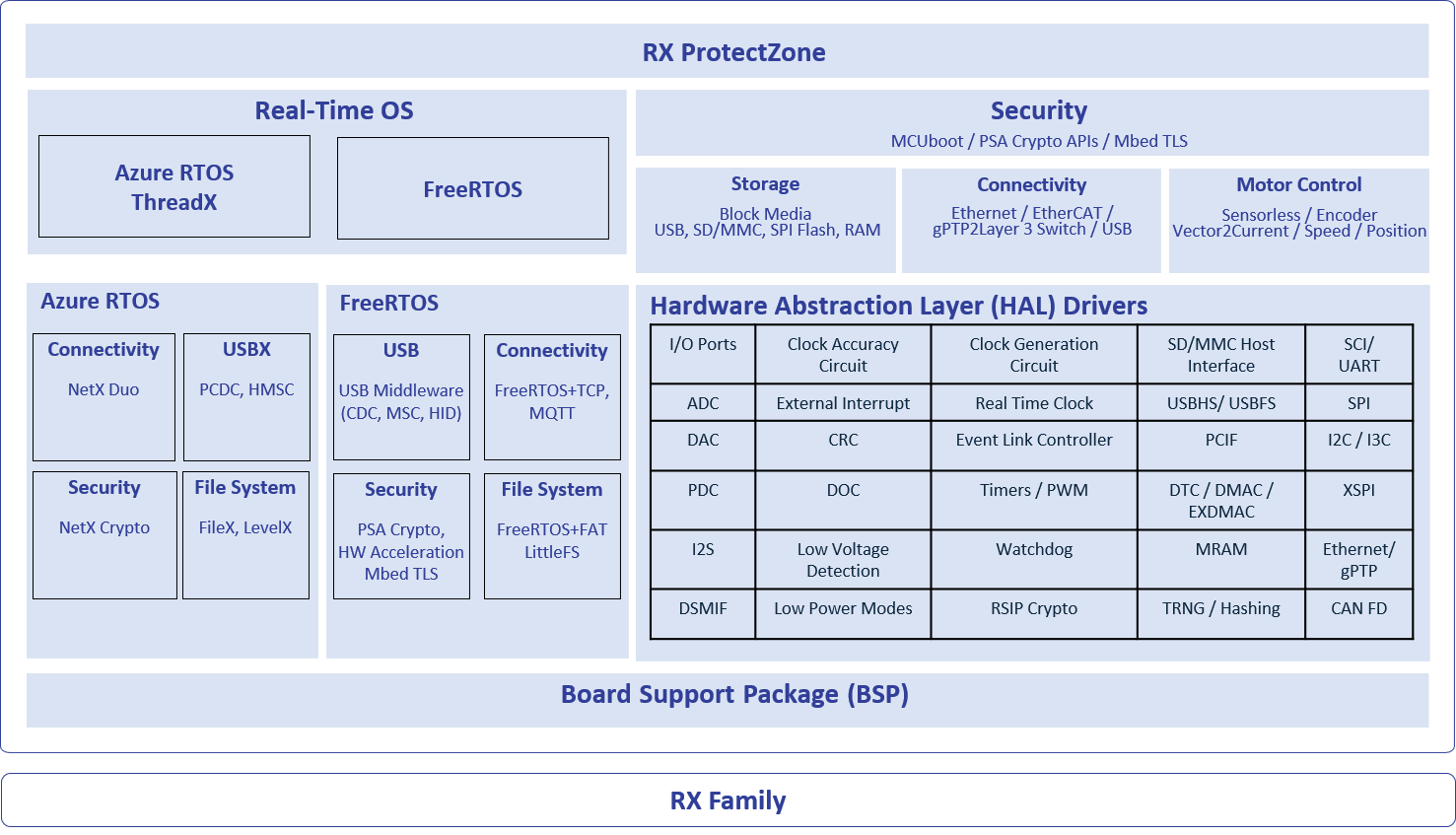
The Renesas RX Flexible Software Package (FSP) is an enhanced software package designed to deliver user-friendly, scalable, high-quality software for embedded system designs using the Renesas RX family microcontrollers. The RX FSP provides a quick and versatile way to build secure, connected IoT devices using production-ready drivers, FreeRTOS™, Azure® RTOS, and other middleware stacks.
Features
- Small memory footprint HAL drivers
- Intuitive configurator and code generator
- Static and dynamic analysis using industry-standard tools
- Application support using RTOS and non-RTOS environments
- Azure RTOS and its middleware stacks with Flexible Software Package
- Azure RTOS ThreadX, NetX Duo & Add-ons, USBX, NetX Duo Secure & NetX Crypto (hardware acceleration)
- FreeRTOS support – Includes kernel and set of software libraries
- FreeRTOS Kernel, FreeRTOS-Plus-TCP, Core MQTT, Core HTTP/HTTPS
- Tool configurable RTOS resources (threads, mutexes, etc.)
- Middleware stacks from Renesas and third parties
- TCP/IP and other connectivity protocol stacks including MQTT
- USB middleware support for CDC, HID, and MSC
- File system support with FreeRTOS+FAT and LittleFS
- Storage (block media) support for SDMMC, SPI, and USB
- Virtual EEPROM on flash
- Motor control algorithms
- Secure bootloader through MCUboot
- ProtectZone support
- ProtectZone-enabled drivers and middleware
- Easy-to-use tool support for ProtectZone configuration
- Easy connectivity options to major cloud providers
- Secure connections through NetX Duo Secure and Mbed TLS
- Cryptographic APIs and integrated hardware acceleration support
- Secure debugging capabilities
- Extensive tool support from Renesas and leading third-party solutions
- Integrated package with all required components for easy setup and starting development (single installer with e2 studio, CMSIS packs, toolchain, and SEGGER J-Link drivers)
- Complete source code available through GitHub
Release Information
For additional information and links, go to GitHub.
v1.0.0
Release Notes
Flexible Software Package (FSP) for Renesas RX MCU Series, version 1.0.0.
Download the FSP with e2 studio Installer for this release, setup_rxfsp_v1_0_0_e2s_v2026-07.exe, from here.
If using IAR Embedded Workbench for RX, download the RX Smart Configurator for this release, setup_rxfsp_v1_0_0_sc_v2026-07.exe, from here.
All installers are available in the Assets section of this release.
Refer to the README.md in the FSP root folder for setup instructions, hardware details, and related links.
New Features
- Added support for the RX74M and RX74N MCU groups.
- Includes support for the EK-RX74M, EK-RX74N, MCK-RX74M, and MCK-RX74N boards.
- Key features:
- Comprehensive set of drivers, middleware, industrial networking, motor control, security, storage, and RTOS components.
- Industrial networking support including EtherCAT, lwIP TCP/IP, gPTP, and Ethernet connectivity.
- Motor control middleware support including vector, current, speed, and position control.
- Security support including Protect Zone, MCUboot, secure key injection, and PSA Crypto.
- FreeRTOS support including kernel integration and middleware ecosystem support for embedded applications.
- Azure RTOS support including ThreadX, NetX Duo, NetX Duo Crypto, and USBX.
- Little/Big-endian and SBOM support for platform compatibility and software transparency.
- Refer to the SUPPORTED_SOFTWARE.md for the complete list of supported modules and features.
Planned Support
- J-Link will be supported in e2 studio 2026-10 version.
- Visual Studio Code extension support for RX FSP projects will be available in 2026-10.
- IAR Embedded Workbench support for RX74M/N will be available in 2026-10.
Unsupported Configurations or Features
- CC-RX C++ projects are not supported.
- Big-endian is not supported for Azure RTOS, FreeRTOS+FAT, rm_block_media_usb and ProtectZone.
- Ethernet:
- r_layer3_switch doesn't support C++.
- MCUboot:
- When MCUboot is configured with MbedTLS as the crypto stack, the following signature types are not supported: ECDSA-P384, RSA3072, ML-DSA44, and ML-DSA65.
- MCUboot does not support operation when MCUboot Custom Crypto is selected as the crypto stack.
- MCUboot does not support the booting images from external flash memory, Measured Boot, Data Sharing, or Boot Record.
- MCUboot does not support multiple images.
- MCUboot is not supported in IAR projects.
- NetX Duo:
- rm_netxduo_ether is not supported in IAR projects.
- Multiple NetX Duo IP instances not supported by rm_netxduo_ether.
- When repeatedly establishing connections using rm_netxduo_ether, support is currently limited to a single Azure RTOS NetX Duo IP instance.
- TFU:
- The IAR compiler does not support TFU intrinsic functions for RX74M and RX74N. Therefore, the TFU feature is not available when using the IAR compiler.
Configuration Notes
- Callback function must be created manually.
- Ensure the Main Clock Source in the debugger Connection Settings matches the clock configuration in FSP.
- In FreeRTOS projects:
- The default FreeRTOS blinky speed is too fast for visual observation; adjust the timer period (e.g., to 1 ms) after adding the timer driver.
Known Issues
- In CC-RX projects:
- Build errors related to anonymous structs/unions may occur when using CC-RX V3.08.00. Please refer to the Tool News for details and the recommended workaround.
- In GCC projects:
- Removing a motor module that uses a library, for example rm_motor_estimate, after a successful build may leave its linker archive settings in the project.
- This may cause the build error “cannot find -lrm_motor_estimate: No such file or directory.”
- To resolve this issue, manually remove rm_motor_estimate from C/C++ Build > Settings > Tool Settings > Linker > Archives > User defined archive, and remove its path from User defined archive search directories, then rebuild the project.
- When using IAR Embedded Workbench for RX:
- Third-party codes warnings are not suppressed. E.g., Variable xx was set but never used.
- By default, enum types are packed as uint8_t. For interrupt vectors greater than 127, set "enum_is_int" option (Project>Options>C/C++ Compiler>Extra Options) to enforce a minimum enum size of 4 bytes.
- Builds may hang when a high optimization level is selected.
Target Devices
Downloads
| Type | Title | Date |
|---|---|---|
| Software & Tools - Software | RUN 1,316.68 MB Includes e² studio integrated development environment, toolchain, and FSP packs. | |
| Software & Tools - Software | RUN 1,134.98 MB RX FSP and RX Smart Configurator (RXSC) installer package to use with third-party integrated development environments. | |
| Software & Tools - Software | EXE 1,245.11 MB RX FSP and RX Smart Configurator (RXSC) installer package to use with third-party integrated development environments. | |
| Software & Tools - Software | EXE 1,605.34 MB Includes e² studio integrated development environment, toolchain, and FSP packs. | |
4 items | ||
Documentation
| Type | Title | Date |
|---|---|---|
| Manual - Software | PDF 38.19 MB The Renesas RX Flexible Software Package (FSP) is an optimized software package designed to provide easy-to-use, scalable, high-quality software for embedded system design. The package includes lightweight peripheral drivers, middleware, RTOS integration, industrial networking, motor control, and security solutions for RX microcontrollers. This manual describes how to use the RX FSP for developing applications for RX microcontrollers. | |
| Manual - Software | ||
| Application Note | PDF 279 KB Shows how to write code using various RX Renesas Flexible Software Package (FSP) modules supported by the EK-RX74M kit. The Flexible Software Package is an optimized software package designed to provide easy-to-use, scalable, high-quality software for embedded system design. | |
| Application Note | PDF 276 KB Shows how to write code using various RX Renesas Flexible Software Package (FSP) modules supported by the EK-RX74M kit. The Flexible Software Package is an optimized software package designed to provide easy-to-use, scalable, high-quality software for embedded system design. | |
| Application Note | PDF 8.31 MB 日本語 This application note gives an overview of the RX Flexible Software Package (RX FSP) from Renesas and describes how to port a project that was created by using FIT modules and the code generation feature of the Smart Configurator, both of which are software tools provided by Renesas, to a project generated by using the newer RX FSP. | |
5 items | ||
Design & Development
Sample Code
Sample Code
Filters | ||
|---|---|---|
| Type | Title | Date Date |
| Sample Code | EK-RX74M Example Project Bundle The EK-RX74M example project shows how to write code using various RX Renesas Flexible Software Package (FSP) modules supported by the EK-RX74M kit. The Flexible Software Package is an optimized software package designed to provide easy-to-use, scalable, high-quality software for embedded system design. | |
| Sample Code | EK-RX74N Example Project Bundle The EK-RX74N example project shows how to write code using various RX Renesas Flexible Software Package (FSP) modules supported by the EK-RX74M kit. The Flexible Software Package is an optimized software package designed to provide easy-to-use, scalable, high-quality software for embedded system design. | |
| Sample Code | Quick-Start Example Project for EK-RX74M Demonstrates some of the capabilities of the EK and FSP by using multiple peripherals. The project initializes the OSPI, UART various timers and GPIO modules along with various supporting stacks to create an interactive user demo. | |
| Sample Code | Quick-Start Example Project for EK-RX74N Demonstrates some of the capabilities of the EK and FSP by using multiple peripherals. The project initializes the OSPI, UART various timers and GPIO modules along with various supporting stacks to create an interactive user demo. | |
4 items | ||
Related Boards & Kits
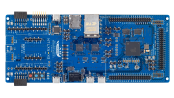
Evaluation Kit for RX74M MCU Group
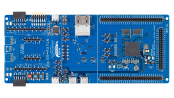
Evaluation Kit for RX74N MCU Group
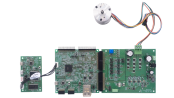
Renesas Flexible Motor Control Kit for RX74M MCU Group
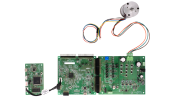
Renesas Flexible Motor Control Kit for RX74N MCU Group
Videos & Training
This video gives an overview of the Flexible Software Package (FSP). The FSP is an enhanced software package designed to deliver software for embedded system designs using the Renesas RA and RZ Family of Arm® microcontrollers.
Additional Details
Components
- CMSIS compliant pack files for e2 studio integrated development environment
- BSPs for RX MCUs and boards
- HAL drivers to access peripherals
- Real-Time Operating Systems (RTOS)
- Middleware stacks and protocols
- Module configurators and code generators
- Source files to integrate with any development environment and third-party tools
Supported Toolchains
Software components in the FSP support the following toolchains:
- e2 studio integrated development environment, with toolchain supports of C/C++ Compiler Package for RX Family [CC-RX] and GCC for Renesas RX
- IAR Embedded Workbench
Software Installation Instructions
Refer to the FSP GitHub page for installation and usage instructions: FSP GitHub Instructions
e2 studio Integrated Development Environment
The FSP provides a host of efficiency-enhancing tools for developing projects targeting the Renesas RX family of MCU devices. The e2 studio integrated development environment (IDE) provides a familiar development cockpit from which the key steps of project creation, module selection and configuration, code development, code generation, and debugging are all managed. The FSP uses a Graphical User Interface (GUI) to simplify the selection, configuration, code generation, and code development of high-level modules and their associated Application Program Interfaces (APIs) to dramatically accelerate the development process.
e2 studio is equipped with set of options to configure various aspects of your application project. Some of these options include:
BSP Configuration
Configure or change MCU and board-specific parameters from the initial project selection.
Clock Configuration
Configure the MCU clock settings for your project. The Clock Configuration presents a graphical view of the MCU's clock tree, allowing the various clock dividers and sources to be modified.
Pin Configuration
The Pin Configuration provides flexible configuration of the MCU's pins. This configures the electrical characteristics and functions of each port pin. As many pins are able to provide multiple functions, the pin configurator makes it easy to configure the pins on a peripheral basis. The Pin Configuration tool simplifies the configuration of large packages with highly multiplexed pins by highlighting errors and presenting the options for each pin or for each peripheral.
Module Configuration
The Module Configuration provides options to add FSP modules (HAL drivers, middleware stacks and RTOS) for RTOS and non-RTOS-based applications and configure various parameters of the modules. For each module selected, the Properties window provides access to the configuration parameters, interrupt priorities, pin selections, etc.
Interrupt Configuration
Interrupt Configuration allows to add new user interrupts or events and set interrupt priorities. This will also allow the user to bypass a peripheral interrupt and have user-defined ISRs for the peripheral interrupts.
Components Configuration
The Components Configuration enables the individual modules required by the application to be included or excluded. All modules that are necessary for the modules added to the application are included automatically. You can easily include or exclude additional modules by ticking the box next to the required component.
Other Tool Features
- Context-sensitive Autocomplete feature that provides intelligent options for completing a programming element
- Developer Assistance tool for selection of and drag-and-drop placement of API functions directly in application code
- Smart Manual that provides driver and device documentation in the form of tooltips right in the code
- Edit Hover feature to show detailed descriptions of code elements while editing
- Welcome Window with links to example projects, application notes, and a variety of other self-help support resources
- Information Icon for each module is provided in the graphic configuration viewer that links to specific design resources for that module in the user manual.
Third-Party Tool Support
In addition to the Renesas e2 studio IDE, FSP supports third-party tools and IDEs as well. This support is provided through the RX Smart Configurator (RXSC) application. The Renesas RX Smart Configurator is a desktop application that allows you to configure the software system (BSP, drivers, RTOS, and middleware) for a Renesas RX microcontroller when using a third-party IDE and toolchain. The RX Smart Configurator can currently be used with IAR Embedded Workbench.
Support
Support Communities
- RX72N FSP - Flash Configuration Set command
... a RX72N. I saw that in the r_flash_fcu.h there is already FLASH_FACI_CMD_CONFIG_SET_1 and FLASH_FACI_CMD_CONFIG_SET_2 but it seems not used. I would just to be sure, there is already no FSP implementation for setting the option memory ? BR
Sep 17, 2025 - UART transmit problem after Deep Software Standby wakeup
... /** UART extended configuration for UARTonSCI HAL driver */ const sci_uart_extended_cfg_t g_uart_cm_cfg_extend = { .clock = SCI_UART_CLOCK_INT, .rx_edge_start = SCI_UART_START_BIT_FALLING_EDGE, .noise_cancel = SCI_UART_NOISE_CANCELLATION_DISABLE, .rx_fifo_trigger = SCI_UART_RX_FIFO_TRIGGER_MAX ...
Sep 27, 2022 - RA6M1 clock issue
I have my clock configured in the FSP configuration as XTAL 12MHz, PLL Src: XTAL, PLL Div /1, PLL Mul x20.0, PLL 240MHz, Clock Src: PLL, PCLKA Div/2, PCLKA 120MHz. But I have a uart running off PCLKA and I set the baud to 19200. When ...
Jan 29, 2024
Knowledge Base
- RA Family: Correct ID Code Format for Different Tools
... 1. e2 studio On e2 studio, the ID code of a device can be set in the BSP configuration in either the Smart Configurator (for RX) or the FSP Configurator (for RA devices) 1.1 Setting ID code for RA devices using FSP configurator The ID Code setting can be ...
Mar 17, 2026 - Importing Projects to e² studio
... /C++ Project into Workspace" mentioned below or rename the existing project before importing another project.Note 2: Regarding a sample project created with the FSP (Flexible Software Package) Configurator or Smart Configurator, you need to generate code before building it. This is because a sample project does not contain ...
Dec 5, 2024 - How can I install and update compilers for e² studio?
... /ARM-software/LLVM-embedded-toolchain-for-Arm/releases Note: Newer versions may not always appropriate to use. Compatibility with device architecture and software such as sample projects and FSP (Flexible Software Package) should be concerned. GCC for Renesas RX/RL78, LLVM for Renesas RL78: ・ Download from ...
May 21, 2026

Support Communities


