
Overview
Description
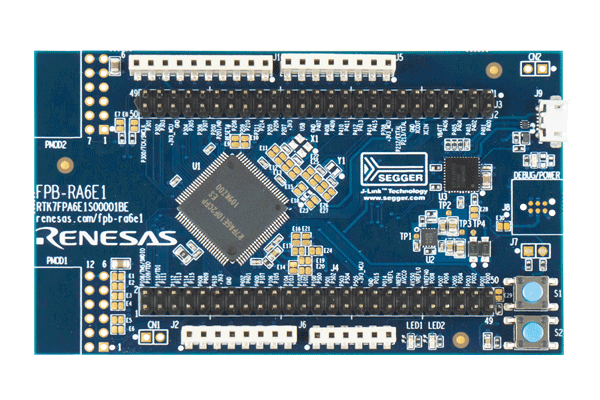
The RA6E1 Fast Prototyping Board comes equipped with an R7FA6E10F2CFP microcontroller and is an evaluation board specialized for prototype development for a variety of applications. It has a built-in SEGGER J-Link™ emulator circuit so you can write/debug programs without additional tools. In addition, with Arduino® UNO™ and Pmod™ interfaces included standard and through-hole access to all pins of the microcontroller, and so on, it has high expandability.
Sample software is available to demonstrate the functionality of the RA6E1 MCU and for connecting between the RA6E1 Fast Prototyping Board and various wireless modules or various sensor modules.
Please use Bluetooth®, LoRa® and Wi-Fi according to the radio regulations of each country during use.
Features
- Equipped with an RA6E1 32-bit microcontroller
- 100-pin
- 14mm x 14mm x 1.70mm, 0.5mm pitch
- ROM: 1MB, RAM: 256KB
- No additional tools are required for program debugging/writing with the built-in SEGGER J-Link™ emulator circuit
- Through-holes with access to all of the pins of the microcontroller
- Arduino UNO and Pmod interfaces come standard
- Support for various RA6E1 software and tools
Applications
Documentation
|
|
|
|
|---|---|---|
| Type | Title | Date |
| Quick Start Guide | PDF 599 KB 日本語 | |
| Manual - Development Tools | PDF 1.82 MB 日本語 | |
| PCB Design Files | FPB-RA6E1 v1 - Design Package
|
|
| Application Note |
PDF
670 KB
The FPB-RA6E1 example project shows how to write code for various Renesas Flexible Software Package (FSP) modules supported by the FPB-RA6E1 kit. The Flexible Software Package provides an optimized, easy-to-use, scalable, and high-quality software solution for embedded system design.
|
|
| Application Note |
PDF
2.87 MB
AI-generated Summary:
Low Power Modes (LPM) reduce the effective power consumption of RA microcontrollers by stopping the CPU and selectively operating peripherals and oscillators. Four LPM types are supported: Sleep, Software Standby, Snooze, and Deep Software Standby modes, each offering different power savings and peripheral availability. The document details configuring LPMs, clock source changes at run-time, peripheral operations during LPM, and transitioning between modes. It includes example projects demonstrating LPM usage, FSP configuration steps, and debugging methods across various RA kits, enabling efficient low power application development.
|
|
| Application Note |
PDF
189 KB
AI-generated Summary:
The Low Power Applications Package provides multiple application projects for Renesas RA family microcontrollers, including EK-RA2L1, EK-RA6M3, FPB-RA6E1, and FPB-RA4E1. It includes code and documentation for clock switching and operable long timer functions in low power modes. Users can access detailed application notes and example projects organized by device group. The package supports efficient low power management and offers links to product information, support forums, and software packages. It emphasizes reading included documents before use and outlines revision history and legal disclaimers related to product use and intellectual property.
|
|
| Application Note |
PDF
3.44 MB
AI-generated Summary:
Low-power data logging systems operate by intermittently acquiring sensor data using RA4E1 or RA6E1 MCUs in Snooze mode during Software Standby mode. The system triggers A/D conversions every 30 minutes via timers, stores results using the Data Transfer Controller, and evaluates data levels with the Data Operation Circuit. If data exceeds thresholds, the MCU exits low-power mode to transmit data via UART. The system also supports user-initiated data transmission and periodic data output every 24 hours. Key peripherals include ADC, DTC, AGT timers, RTC, ELC, DOC, and low-power modes, all managed via Renesas e2 studio IDE and Flexible Software Package.
|
|
| Flyer | PDF 412 KB | |
| Presentation | PDF 7.02 MB | |
| Flyer | PDF 402 KB 日本語 | |
| Report | PDF 187 KB 日本語 | |
11 items
|
||
Design & Development
Software & Tools
Software & Tools
| Software title
|
Software type
|
Company
|
|---|---|---|
| RA Flexible Software Package (FSP) FSP is an enhanced software package designed to provide easy-to-use, scalable, high-quality software for embedded system designs using Renesas RA Family of Arm Microcontrollers.
Note: FSP with e² studio Installer (Platform Installer) will install the e² studio tool, FSP packs, GCC toolchain, and Segger J-Link drivers required to use this software. No additional installations are required.
|
Software Package | Renesas |
| QuickConnect Platform QuickConnect platform enables fast prototyping by providing compatible hardware and software building blocks.
|
Software and Hardware Development Tools | Renesas |
2 items
|
||
Sample Code
Sample Code
Filters
|
||
|---|---|---|
| Type | Title | Date Date |
| Sample Code | FPB-RA6E1 Example Project Bundle
[Software=RA FSP],[Board=FPB-RA6E1]
ZIP
13.50 MB
IDE:
e2 studio/GCC/AC6, IAR, Keil MDK
The FPB-RA6E1 example project shows how to write code for various Renesas Flexible Software Package (FSP) modules supported by the FPB-RA6E1 kit. The Flexible Software Package provides an optimized, easy-to-use, scalable, and high-quality software solution for embedded system design.
|
|
| Sample Code | LPM Application Package
|
|
| Sample Code | Low Power Application for FPB-RA4E1 or FPB-RA6E1
[Toolchain: GCC ARM Embedded Toolchain version 10.3.1.20210428][Software=RA FSP|v4.1.0]
ZIP
3.35 MB
Compiler:
GNUARM-None
IDE:
e2 studio
|
|
3 items
|
||
Related Boards & Kits
Boards & Kits

Evaluation Kit for RA6M1 MCU Group
The EK-RA6M1 evaluation kit enables users to effortlessly evaluate the features of the RA6M1 MCU Group and develop embedded systems applications using Renesas' Flexible Software Package (FSP) and various IDEs.
Getting Started
Running the Quick Start Example Project
- The EK-RA6M1 board comes... Read More

Evaluation Kit for RA6M2 MCU Group
The EK-RA6M2 evaluation kit enables users to effortlessly evaluate the features of the RA6M2 MCU Group and develop embedded systems applications using the Flexible Software Package (FSP) and various IDEs.
Getting Started
Running the Quick Start Example Project
- The EK-RA6M2 board comes... Read More

Evaluation Kit for RA6M3 MCU Group
The EK-RA6M3 evaluation kit enables users to seamlessly evaluate the features of the RA6M3 MCU Group and develop embedded systems applications using the Flexible Software Package (FSP) and e2studio IDE. Utilize rich on-board features along with your choice of popular ecosystem add-ons to bring... Read More

Evaluation Kit for RA6M4 MCU Group
The EK-RA6M4 evaluation kit enables users to effortlessly evaluate the features of the RA6M4 MCU Group and develop embedded systems applications using the Flexible Software Package (FSP) and e2 studio IDE. Utilize rich on-board features along with your choice of popular ecosystem add-ons to... Read More
Test This Board Remotely

Evaluation Kit for RA6M5 MCU Group
The EK-RA6M5 evaluation kit enables users to effortlessly evaluate the features of the RA6M5 MCU Group and develop embedded systems applications using the Flexible Software Package (FSP) and e2 studio IDE. Utilize rich on-board features along with your choice of popular ecosystem add-ons to... Read More
Product Options
| Part Number | Status | Stock | Budgetary Price (USD) | Sampleable |
|---|---|---|---|---|
| RTK7FPA6E1S00001BE | Active | In Stock | 1u | $23.76 | Available |
Videos & Training
Additional Videos
News & Blog Posts
Blog Post Jan 28, 2022 |
Blog Post Jan 28, 2022 |
Blog Post Nov 18, 2021 |
Blog Post Nov 11, 2021 |
Partners

Zephyr Project
The Zephyr Project is an open-source, scalable real‑time operating system (RTOS) designed for resource-constrained embedded systems and supports a wide range of hardware architectures and development boards. For the Renesas RA6E1 Fast Prototyping Board, Zephyr provides focused documentation covering board features, supported peripherals, and basic build, flashing, and debugging workflows to help developers quickly get started.
See the Zephyr Project RA6E1 Fast Prototyping Board Documentation
Support
Support Communities
- Problem when bringing up the "gpt_input_capture_fpb_ra6e1_ep" example project.
Hi RA group, I started to experience the fpb_ra6e1 eval board and trying to bringing up the example project "gpt_input_capture_fpb_ra6e1_ep", but encounter a problem. In the readme.txt file, it stated the following" 1. Project Overview: The EP demonstrates the functionality of GPT Input ...
Apr 5, 2023 - Problem when bringing up the "gpt_input_capture_fpb_ra6e1_ep" example project.
Hi RA group, I started to experience the fpb_ra6e1 eval board and trying to bringing up the example project "gpt_input_capture_fpb_ra6e1_ep", but encounter a problem. In the readme.txt file, it stated the following" 1. Project Overview: The EP demonstrates the functionality of GPT Input ...
Apr 5, 2023 - Not able to erase full memory or program FPB RA6E1 board
... when I select only program flash and give erase it was erasing(which was not even happening yesterday also): When I tried to initialise my FPB RA6E1 Board on E2Studio sometimes it is being successful and sometimes it is getting failed. This initialisation is for the entire flash right? However ...
Apr 9, 2025

Support Communities


