
Overview
Description
The EK-RA4L1 evaluation kit enables users to seamlessly evaluate the features of the RA4L1 MCU group and develop embedded systems applications using Renesas' Flexible Software Package (FSP) and e2 studio IDE. The users can use rich onboard features along with their choice of popular ecosystem add-ons to bring their big ideas to life.
Getting Started
Running the Quick Start Example Project
- The EK-RA4L1 board comes pre-programmed with a quick start example project (source code provided in the EK-RA4L1 example project bundle).
- Power up the EK-RA4L1 board through the USB debug port (J10) using the micro USB device cable connected to a 5V power source. The white power LED will light up.
- The quick start example project will begin to execute blinking the blue user LED.
- Refer to the EK-RA4L1 v1 Quick Start Guide (PDF | English, 日本語) to explore additional functionality of the quick start example project.
Developing Embedded Applications
- Modifying the quick start example project – refer to the EK-RA4L1 Quick Start Guide for instructions on importing, modifying, and building the quick start example project.
- Start with one of the many other example projects (provided in the EK-RA4L1 example project's bundle) – choose from many example projects to learn about different peripherals of the RA4L1 MCU group. These example projects can serve as excellent starting points for you to develop your custom applications.
Building Custom Hardware
- Start by building a functional prototype - utilize the EK-RA4L1 board with your choice of ecosystem add-ons.
- Build custom hardware – develop custom hardware by referring to the design and manufacturing information provided in the EK-RA4L1 Design Package.
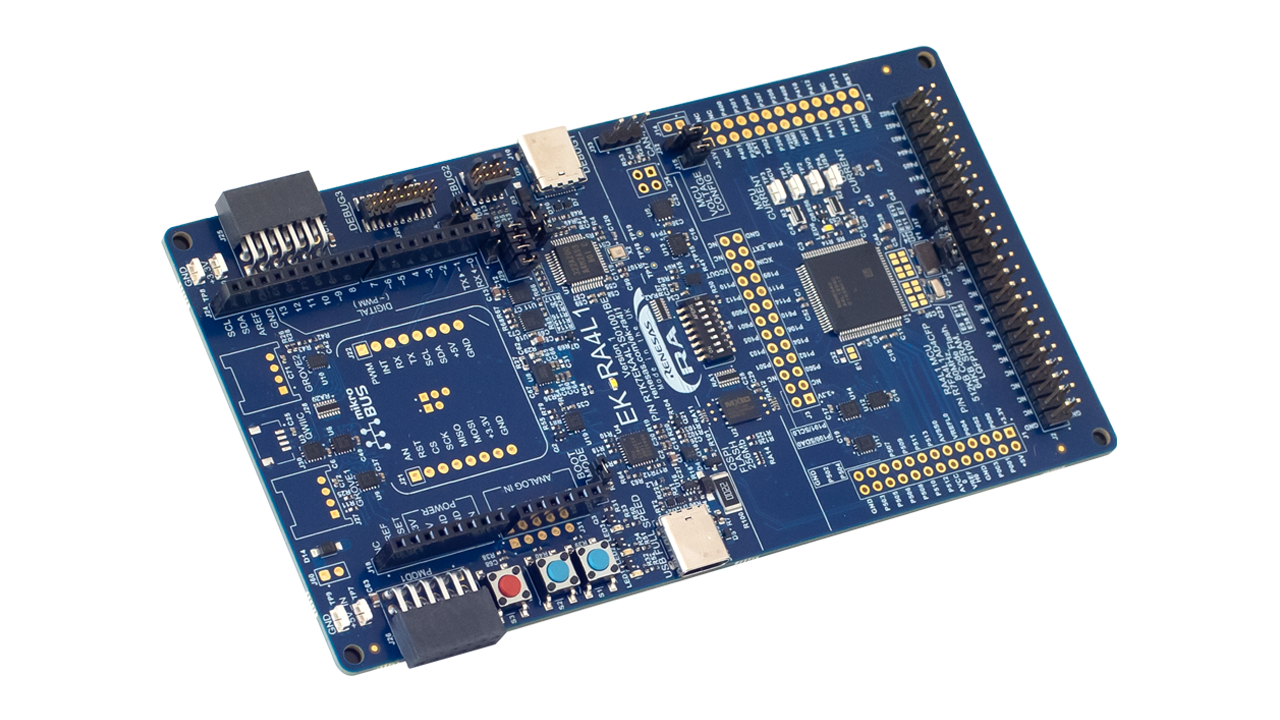
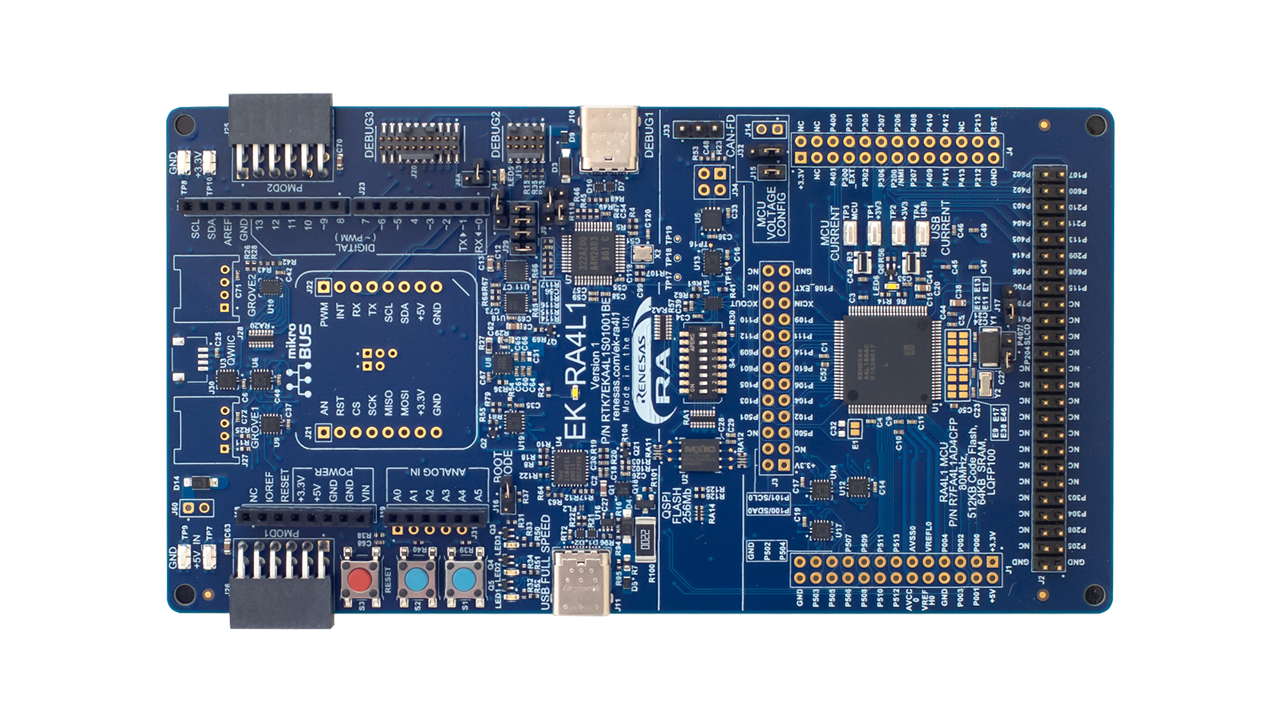
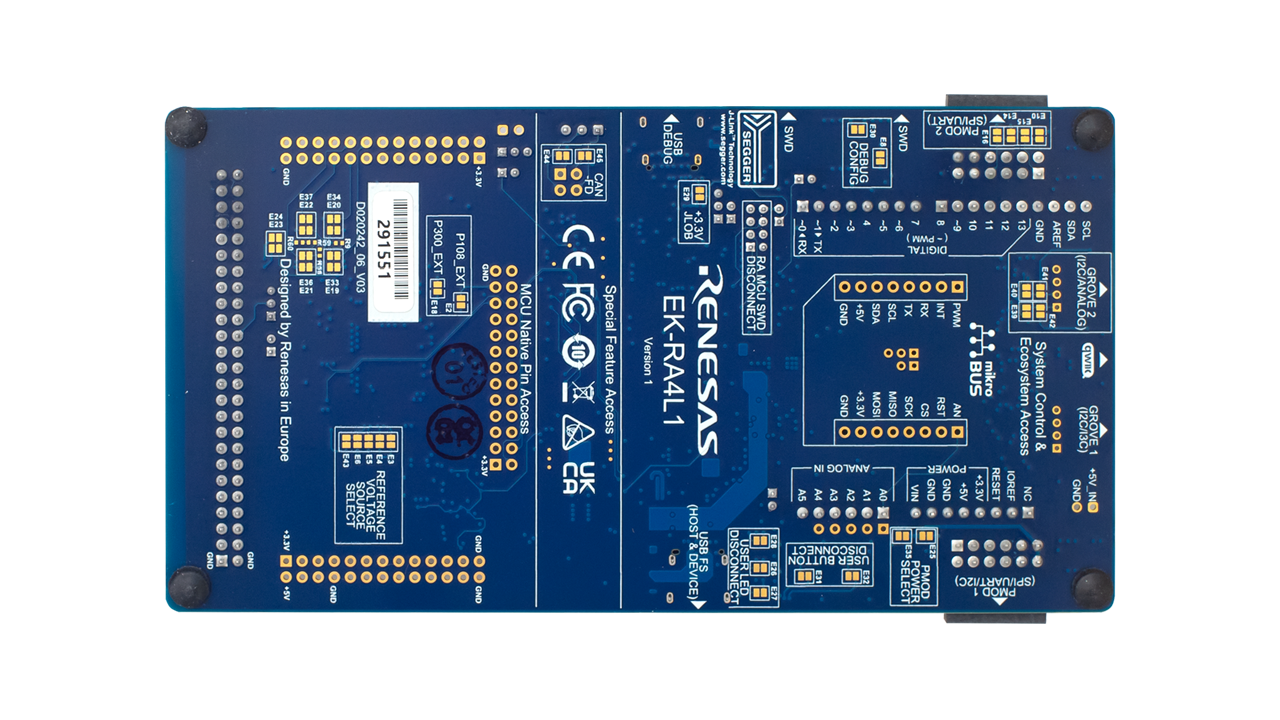
Features
- Special Feature Access:
- 32MB (256Mb) External Quad-SPI Flash
- CAN FD (3-pin header)
- Configuration switches
- MCU Native Pin Access:
- R7FA4L1BD4CFP MCU (referred to as RA MCU)
- 80MHz, Arm® Cortex®-M33 core
- 512KB Code Flash, 64KB SRAM
- 100 pins, LQFP package, 14mm x 14mm x 1.70mm, 0.5mm pitch
- Native pin access through 3 x 26-pin headers (not populated)
- Low power mode voltage input and operation
- Segment LCD board interface
- MCU current measurement points for precision current consumption measurement
- Multiple clock sources – RA MCU oscillator and sub-clock oscillator crystals, providing precision 8.000MHz and 32,768Hz reference clocks. Additional low-precision clocks are available internal to the RA MCU.
- System Control and Ecosystem Access:
- USB Full-Speed Host and Device (USB-C connector)
- Three 5V input sources:
- USB (debug, full-speed)
- External power supply (using surface mount clamp test points and power input vias)
- Three Debug modes:
- Debug onboard (SWD)
- Debug in (SWD)
- Debug out (SWD, SWO, and JTAG)
- User LEDs and buttons:
- Three user LEDs (red, blue, green)
- Power LED (white) indicating the availability of regulated power
- Debug LED (yellow) indicating the debug connection
- Two user buttons
- One reset button
- Five most popular ecosystem expansions:
- Two Seeed Grove® system (I2C/I3C/analog) connectors (not populated)
- SparkFun Qwiic® connector (not populated)
- Two Digilent Pmod™ (SPI, UART and I2C) connectors
- Arduino® (UNO R3) connector
- MikroElektronika mikroBUS™ connector (not populated)
- MCU boot configuration jumper
Applications
Documentation
|
|
|
|
|---|---|---|
| Type | Title | Date |
| Quick Start Guide | PDF 1.90 MB 日本語 | |
| Manual - Development Tools | PDF 2.89 MB 日本語 | |
| PCB Design Files | EK-RA4L1 v1 - Design Package
|
|
| Application Note |
PDF
671 KB
The EK-RA4L1 example project bundle demonstrates how to write code for various Renesas Flexible Software Package (FSP) modules supported by the EK-RA4L1 kit. It includes multiple example projects that highlight peripheral usage and system functionality, while leveraging the optimized, scalable, and high‑quality FSP for embedded system design.
|
|
| Application Note |
PDF
3.85 MB
Learn how Renesas MCU security is built around integrated security engines. The RA family includes various types, which can be identified in each MCU’s hardware manual. These engines operate in two modes: Compatibility and Protected. This application note defines both and outlines their use cases.
|
|
| Application Note |
PDF
2.21 MB
Learn how to use MCU boot firmware features and supporting tools to implement SFP on RA4 MCUs. By following this guide, developers will apply the provided guidelines and procedures, and gain an understanding of key SFP operations, including firmware image encryption and device lifecycle management (DLM), enabling a secure and structured starting point for development.
|
|
| Manual - Development Tools | PDF 380 KB 日本語 | |
| Tool News - Release |
PDF
194 KB
日本語
The EK-RA4L1 is an Evaluation Kit for the RA4L1 MCU. A quantity of the EK-RA4L1 kits were built with MCU devices that cannot support Secure Factory programming. There is no work-around for this problem but later builds of the kit use an MCU which does support Secure Factory programming. This Tool News document identifies the affacted serial numbers.
|
|
| Application Note |
PDF
402 KB
AI-generated Summary:
The document explains the two operational modes, highlighting their advantages and disadvantages, and provides practical guidance for selecting and using each mode. It also includes reference links to Renesas RA Family Application Projects that demonstrate these modes with detailed examples of the related FSP module usage.
|
|
| Application Note |
PDF
2.55 MB
Users can follow the provided steps in this application note to recreate the bootloader and link the application projects to work with the bootloader by using the FSP Solution. This application note also includes procedures for mastering an application to work with the bootloader, and for downloading and updating a new application.
|
|
| Application Note |
PDF
1.45 MB
AI-generated Summary:
The segment LCD controller on the RA4L1 MCU enables efficient control of segmented LCD displays by providing configurable voltage driving methods, contrast adjustment, and multiplexing capabilities. It supports up to 384 segments with flexible bias modes and time slices for multiplexing. The controller interfaces with LCD modules through dedicated segment, common, and voltage pins. Users learn to map MCU pins to LCD segments, configure hardware and software settings using Renesas Flexible Software Package (FSP) and e2 studio IDE, and develop applications with debugging support. The document guides through hardware exploration, pin mapping, driver usage, and example applications to build robust segment LCD solutions with the EK-RA4L1 board.
|
|
| Flyer | PDF 444 KB | |
| Manual - Development Tools | PDF 419 KB 日本語 | |
| PCB Design Files | Segment LCD Expansion Board 1 v1 for EK-RA4xx - Design Package
|
|
| Report | PDF 187 KB 日本語 | |
15 items
|
||
Design & Development
Software & Tools
Software & Tools
| Software title
|
Software type
|
Company
|
|---|---|---|
| RA Flexible Software Package (FSP) FSP is an enhanced software package designed to provide easy-to-use, scalable, high-quality software for embedded system designs using Renesas RA Family of Arm Microcontrollers.
Note: FSP with e² studio Installer (Platform Installer) will install the e² studio tool, FSP packs, GCC toolchain, and Segger J-Link drivers required to use this software. No additional installations are required.
|
Software Package | Renesas |
| Renesas Flash Programmer (Programming GUI) Flash memory programming software [Support MCU/MPU and devices: RA, RE, RX, RL78, RH850, RISC-V MCU, Renesas Synergy, DA1453x, DA1459x, DA1469x, DA1470x, DA148xx, Power Management, Renesas USB Power Delivery Family, ICs for Motor Driver/Actuator Driver, V850, 78K0R, 78K0]
|
Programmer (Unit/SW) | Renesas |
| e² studio - information for RA Family Eclipse-based Renesas integrated development environment (IDE).
|
IDE and Coding Tool | Renesas |
3 items
|
||
Sample Code
Sample Code
Filters
|
||
|---|---|---|
| Type | Title | Date Date |
| Sample Code | EK-RA4L1 Example Project Bundle
The EK-RA4L1 example project bundle demonstrates how to write code for various Renesas Flexible Software Package (FSP) modules supported by the EK-RA4L1 kit. The sample code provides ready‑to‑build reference implementations that illustrate peripheral operation and system behavior, enabling developers to quickly evaluate FSP features and accelerate embedded application development.
|
|
| Sample Code | Quick-Start Example Project for EK-RA4L1
Demonstrates some of the capabilities of the EK-RA4L1 kit and Flexible Software Package (FSP) by using multiple peripherals. The example project initializes the QSPI, LPM, SLCD, and GPIO modules to create an interactive user demo.
|
|
| Sample Code | Injecting and Updating Secure User Keys - Sample Code
Learn how Renesas MCU security revolves around integrated security engines. There are different types of security engines across the RA MCU. Users can find the specific engine used in a particular MCU from its hardware user’s manual. The security engines can operate in two different modes, called Compatibility Mode and Protected Mode. The application note “Renesas Security Engine Operational Modes” explains the definition of the two modes and their use cases.
|
|
| Sample Code | RA6 Secure Bootloader Using MCUboot with Protected mode and Internal Code Flash
Learn how to create an application project using the MCUboot Module in Protected Mode on the Renesas EK-RA6M4 board with FSP v6.1.0. The intended audience includes product developers, product manufacturers, product support, and end users who are involved in designing application systems involving the use of a secure bootloader.
|
|
| Sample Code | Segment LCD Application with RA4L1
|
|
5 items
|
||
Related Boards & Kits
Boards & Kits

Evaluation Kit for RA4M1 MCU Group
The EK-RA4M1 evaluation kit enables users to effortlessly evaluate the features of the RA4M1 MCU Group and develop embedded systems applications using Renesas' Flexible Software Package (FSP) and various IDEs.
Getting Started
Running the Quick Start Example Project
- The EK-RA4M1 board comes... Read More

Evaluation Kit for RA4M2 MCU Group
The EK-RA4M2 evaluation kit enables users to effortlessly evaluate the features of the RA4M2 MCU Group and develop embedded systems applications using Renesas' Flexible Software Package (FSP) and e2 studio IDE. Utilize rich on-board features along with your choice of popular ecosystem add-ons to... Read More

Evaluation Kit for RA4M3 MCU Group
The EK-RA4M3 evaluation kit enables users to effortlessly evaluate the features of the RA4M3 MCU Group and develop embedded systems applications using Renesas' Flexible Software Package (FSP) and e2 studio IDE. Utilize rich on-board features along with your choice of popular ecosystem add-ons to... Read More
Product Options
| Part Number | Status | Stock | Budgetary Price (USD) | Sampleable |
|---|---|---|---|---|
| RTK7EKA4L1S01001BE | Active | In Stock | 1u | $60.35 | Available |
Videos & Training
The Renesas RA4L1 MCU group offers 80MHz, 32-bit microcontrollers powered by the Arm® Cortex®-M33 core with TrustZone®. These low-power, general-purpose MCUs are designed to meet the needs of applications requiring efficient energy usage, high performance, and advanced security features.
Additional Videos
News & Blog Posts
News Feb 19, 2025 |
Blog Post Feb 18, 2025 |
Blog Post Mar 30, 2022 |
Blog Post Jan 28, 2022 |
Blog Post Jan 28, 2022 |
Blog Post Nov 18, 2021 |
Blog Post Nov 11, 2021 |
Partners

Zephyr Project
The Zephyr Project is an open-source, scalable real‑time operating system (RTOS) designed for resource-constrained embedded systems and supports a wide range of hardware architectures and development boards. For the Renesas RA4L1 Evaluation Kit, Zephyr provides focused documentation covering board features, supported peripherals, and basic build, flashing, and debugging workflows to help developers quickly get started.
Support
Support Communities
- RA8M1 I3C HDR-DDR MODE
... renesas/ra-fsp-examples/tree/1be7d72c9e208c4fc8a47628f6d591d818e6227d/example_projects/ek_ra8m2/i3c_slave Check action items - EK-RA8M1, EK-RA8D1, EK-RA4L1, EK-RA2L2: Use a 1 kΩ resistor. For EK-RA8M1: Master Board Slave Board ------------- ------------ I3C_SDA0 (J27:2) ----> I3C_SDA0 (J27:2) I3C ...
Mar 10, 2026

Support Communities


