
Overview
Description
e² studio is an Eclipse-based integrated development environment (IDE) for Renesas MCUs. In addition to Eclipse’s own powerful code editor, e² studio offers a rich range of extended functions. e² studio covers all development processes, from the downloading of sample code to debugging. For the latest information, select your device family below and see the e² studio information page for each device:
RA Family* RZ Family RL78 Family RX Family RH850 Family RISC-V MCU
*The FSP installer is available at the RA family and RZ family information page.
Features
- The e² studio IDE covers all aspects of development.
- Easily Create Projects and Code Especially for Renesas MCUs.
- Easy-to-Use Eclipse C/C++ Development Tooling (CDT) Editor
- Simple Settings for Building through a GUI; Select a Compiler from Renesas or Our Partner Vendors.
- High-Spec. Debugging Functions in Combination with the Standard GNU Debugger (GDB)
- High Expandability as an Eclipse-Based IDE
- QE: Tools for Assisting in Application Development in the e² studio
- Reuse Existing Resources by Importing Projects from Other IDEs.
- Additional_Details
Target Devices
Target Families
See the information page for each family for details of Target Devices.
*Please contact Renesas sales division for RE Family.
*For Renesas Synergy users, please refer to e² studio for Renesas Synergy™.
*RE family and Renesas Synergy™ are not supported by e² studio Linux Host version.
*SH family is only compatible with projects for SH family devices prior to V5.4.0.
Design & Development
Explore
Videos & Training
This video demonstrates how to show or hide toolbar buttons for each perspective in e² studio.
Additional Details
The e² studio IDE covers all aspects of development.
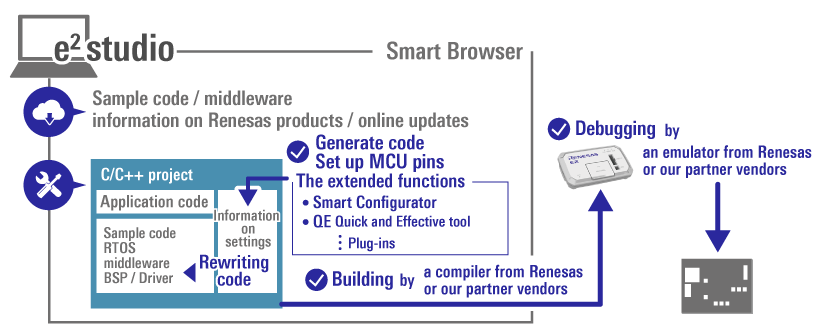
- You can view sample code for Renesas MCUs, middleware, and information on products from the Renesas Web site via the Smart Browser in the e² studio.
- The GUI environment makes complex MCU settings easy. The extended functions (such as the Smart Configurator and various QE (Quick and Effective tool solution)) support efficiency in development.
- Eclipse’s handy native editor provides powerful assistance in coding.
- You can choose a compiler from Renesas or our partner vendors for use in building from code.
- You can connect an emulator from Renesas (such as the E2 or E2 Lite) or from our partner vendors for debugging.
For details on the functions and tools supported for a family, refer to the information page for family
Easily Create Projects and Code Especially for Renesas MCUs.
You can generate projects for Renesas MCUs through simple operations of the e² studio. Select the MCU and the compiler to be used in the wizard function to generate a project which includes basic sample code. This allows you to immediately start building or debugging a project.
Adjusting the source code of a generated project to suit the specifications of a development board can be complicated. However, the e² studio’s code generators can help you resolve this. For example, you can easily set clocks, pins, and interrupts of the MCU with the Smart Configurator. Also, you can then automatically generate code which includes those settings. Downloading or importing middleware and making the various settings required for code generation are also possible.
See here for details of the Smart Configurator. >>
For detailed information on generating code for a family, refer to the information pages for the family.
Easy-to-Use Eclipse C/C++ Development Tooling (CDT) Editor
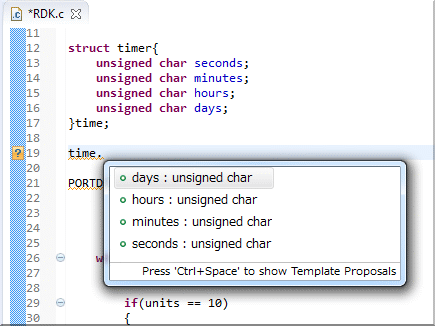
The Eclipse CDT (C/C++ Development Tooling) editor built into e² studio offers extremely powerful functionality specifically designed for C/C++ developers. These features include:
- Automatic code complementation (variable names, function names, structure and union members, #define symbols, correction of code format, spell-checking, etc.)
- Keyword color coding of source code for easy recognition of special strings, syntax, condition statements
- Powerful code navigation (Project browser, functions or variables by including #include, functions, hierarchical types, Jump to definition of functions or macros)
- Comment and code folding options
- Automated code constructs (if, while, do..while etc.)
- Pre-processor checking in edit (#ifdef code low-lighted if not true)
- Code refactoring (Changing name of variable at once, Simplifying function codes)
For detailed information on compilers supported for a family, refer to the information pages for the family
.
Simple Settings for Building through a GUI; Select a Compiler from Renesas or Our Partner Vendors.
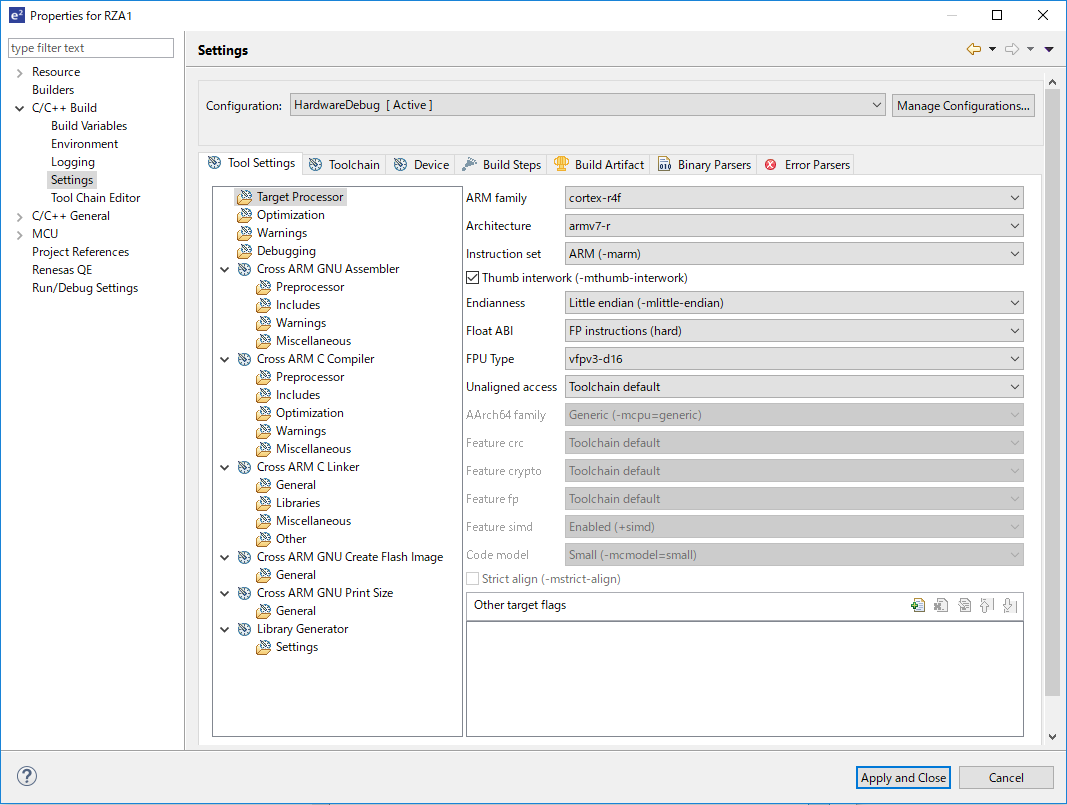
The compilers from Renesas and our partner vendors can be used in combination for building. Note that each compiler must be separately installed, since a compiler is not included as part of the e² studio product. Installing several compilers gives you a choice of which one to use.
A GUI allows you to set up the whole toolchain and automatically generates a 'makefile' for use in building.
Please refer to the information page for each family for information on support for each family.
High-Spec. Debugging Functions in Combination with the Standard GNU Debugger (GDB)
The standard GDB debugger of the Eclipse CDT provides basic functions such as displaying register values, operations on memory, setting of breakpoints, and control of execution. In addition to those general debugging functions, high-performance functions such as real-time memory display, real-time tracing, peripheral register display, and breaks by events in the hardware of Renesas MCUs are available. You can also use various emulators (the E2, E2 emulator Lite, E20, or J-Link from Segger) in combination with the e² studio.
Please refer to the information page for each family for information on support for each family.
High Expandability as an Eclipse-Based IDE
The e² studio consists of the open-source Eclipse integrated environment framework, CDT plug-in, and various plug-ins from Renesas and our partner vendors. This structure makes it easy to add or update compilers and plug-ins, making the e² studio a highly multi-functional and expandable IDE.
In addition to the tool plug-ins from Renesas and our partner vendors related to building, coding, and debugging, many open-source plug-ins, some of which you may find handy, are available for use in development.
For details, refer to the documents for the Eclipse platform and CDT plug-in on the Eclipse Web site (https://www.eclipse.org/).
Renesas is also making an expanding range of tools, such as QE (Quick and Effective Tool Solutions), available for installation as plug-ins.
QE: Tools for Assisting in Application Development in the e² studio
Installing QE tools for assisting in application development expands the functionality of the e² studio and easily starts applications. A QE provides a GUI that will guide you in setting up the various functions you require and incorporates knowhow for the development of the given functions.
For example, the QE for Capacitive Touch provides you with a GUI for setting touch buttons and adjusting tuning parameters. The QE for Display provides GUI sliders that allow you to adjust image quality while checking the results on the actual display.
QE(Quick and Effective tool solution)
Reuse Existing Resources by Importing Projects from Other IDEs.
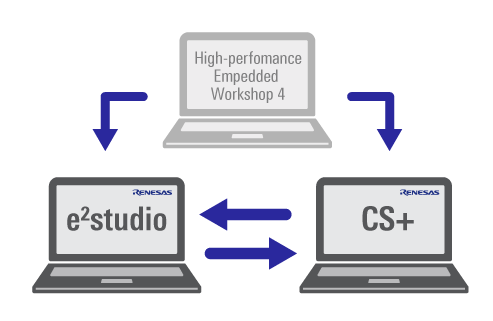
With the project importing function, you can immediately transfer projects from the CS+ Integrated Development Environment (IDE) or High-performance Embedded Workshop from Renesas to the e² studio. The e² studio is also capable of exporting projects for use with CS+.
These functions are supported for V2.1 and later versions of the e² studio, V3.00.00 and later versions of CS+, and V2.00.00 and later versions of CubeSuite+.
See here for details. >>
Support
Support Communities
- Debug Problem e2 Studio IDE
Hello I have SK S7G2 Starter Kit and want to run NetX™ HTTP Server Module Guide example. I am not familiar with Renesas MCU's and e2 studio IDE and I have a problem when I try to import and run project on the IDE.I reference r11an0023eu0118-synergy ...
Oct 23, 2018 - Place breakpoint on memory address in e2 Studio
... this hardfault can then be found in the "pc" register: in my case it is on address 0x195920.How do I debug this further using e2 Studio? I'd like to somehow figure out which C function makes this hardfault occur. I am using the lvgl library which calls many ...
Apr 4, 2023 - E2 Studio on Apple Silicon M3 - Build & Debug Support for Dialog
Hello everyone, I'm trying to set up E2 Studio on my new MacBook Pro with Apple Silicon M3. I managed to launch the application following the instructions found in this forum post: https://community.renesas.com/tools/e2studio/f/e2studio-forum/33183 ...
May 15, 2024
Knowledge Base
- Firewall warning dialog appears after a while launched e² studio
... please visit Windows Firewall settings dialog of Windows Management tools, then create a new rule of Firewall.Configuration should be done for both "eclipse/e2studio.exe" and "DebugComp/e2-server-gdb.exe".Access permissions are not required for e² studio to do build, debug operations, nor accessing Help ...
May 10, 2019 - Standard library headers not found in imported project from HEW to e² studio
HEW implicitly defines the path to standard library header while e² studio does not. Therefore, you need to add the configuration in the compiler option settings as follows: 1. Open "Project" → "Properties" menu, then find "Compiler" → "Source" category in the "Tool Settings" tab. 2. Press the "+" (Add directory path) button ...
Apr 14, 2020 - Meaning of outlined font icons for source files (e² studio)
Regular font icons, such as ".C" and ".H", indicate files which are recognized as build target source code or headers located in the include path of a project. Conversely, files shown as outlined font icons are excluded from build target, or out of the include path. For example, if only ...
Aug 9, 2017

Support Communities

