
Overview
Description
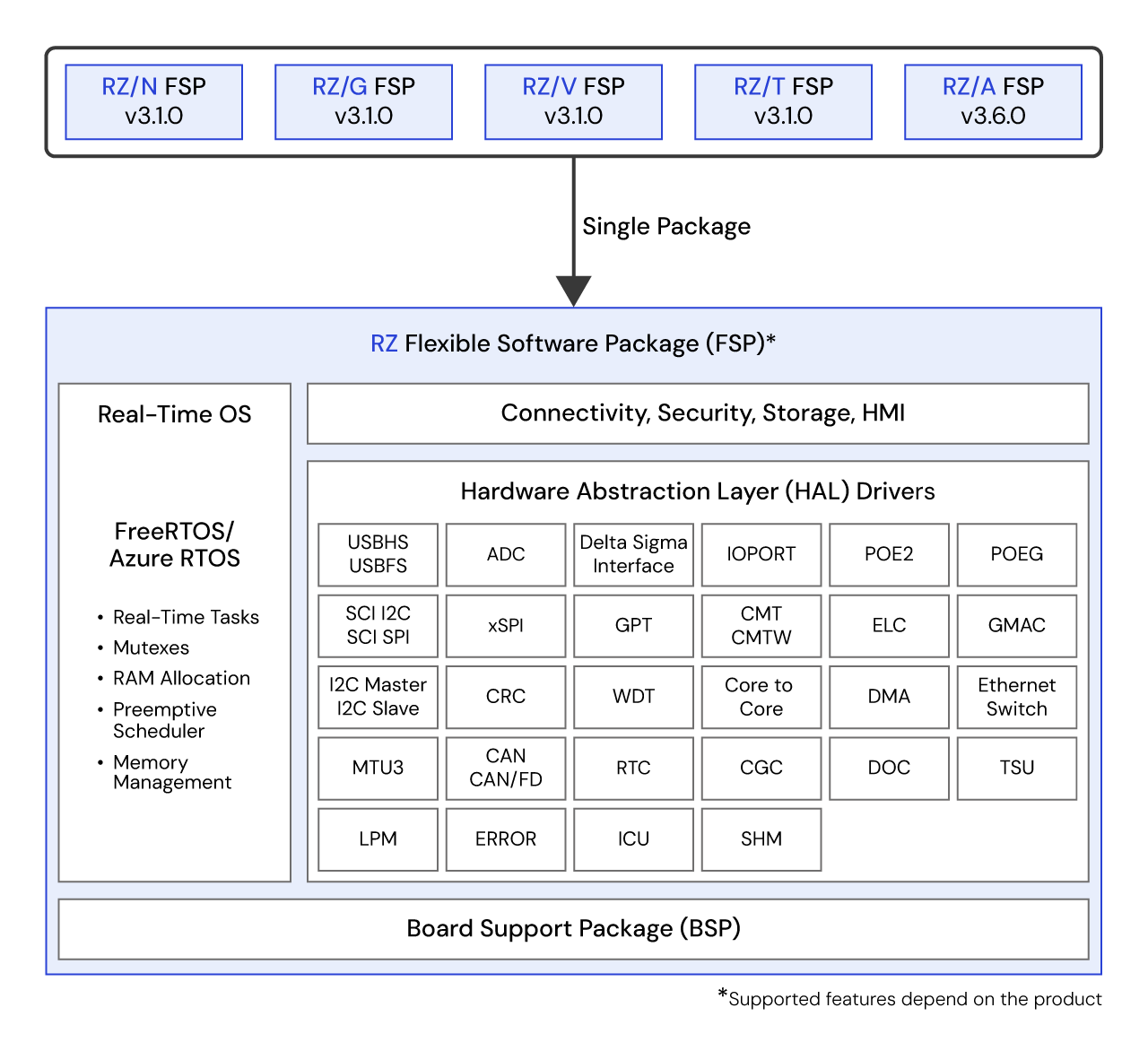
The Renesas RZ Flexible Software Package (FSP) is an enhanced software package designed to deliver user-friendly, scalable, high-quality software for embedded system designs using the Renesas RZ family of Arm® microprocessors. FSP provides a quick and versatile way to build secure, connected IoT devices using production-ready drivers, FreeRTOS™, Azure® RTOS, and other middleware stacks.
Important Notice
We have released RZ FSP v4.0.0, which integrates the existing RZ/A FSP, RZ/G FSP, RZ/N FSP, RZ/T FSP, and RZ/V FSP into a single package. By consolidating these packages, the previously different user experiences across product series have been unified, improving development and maintenance efficiency for our customers. The existing RZ/A, G, N, T, and V FSPs will continue to be supported until the end of 2026; however, new features and bug fixes will only be provided in the successor RZ FSP.
We strongly recommend migrating projects created with the existing RZ/A, G, N, T, and V FSPs to RZ FSP v4.0.0. For migration instructions, please refer to the migration guide.
Download Latest FSP (v4.0.0):
FSP Platform Installer (Includes e2 studio IDE, toolchain, and FSP packs):
RZ Smart Configurator (RZSC) Installer (FSP packages to use with 3rd party IDEs with IAR Embedded):
*As of RZ FSP v4.0.0, only the RZ/T and RZ/N series are supported.
FSP Standalone Installer (FSP packs for users who are only updating the FSP and not updating e2 studio):
- Download from the Assets section of GitHub
Installation instructions. All the FSP Releases and Patches can be found on GitHub.
Migration Guide for Building Project RZ/FSP v4.0.0 Using Existing FSP (RZ/A FSP, RZ/G FSP, RZ/V FSP, RZ/T FSP, RZ/N FSP):
Features
- By linking with the intuitive configurator of e2 studio, which is a software-integrated development environment, and the code generation function, it is possible to proceed with real-time system development efficiently and quickly.
- Supports both RTOS applications and bare-metal applications.
Target Devices
Design & Development
Videos & Training
This video introduces how to create an Azure RTOS project using the RZ/A Flexible Software Package. And, as an example of Azure RTOS settings, it introduces how to change the project configuration and control LED with button operations.
Related software and tools:
News & Blog Posts
Additional Details
Components
- CMSIS compliant pack files for e2 studio integrated development environment
- BSPs for RZ MPUs and boards
- HAL drivers to access peripherals
- Real Time Operating Systems (RTOS)
- Middleware stacks and protocols
- Module configurators and code generators
- Source files to integrate with any development environment and third-party tools
Supported Toolchains
Software components in the FSP support following toolchains:
- e2 studio Integrated Development Environment, with toolchain support of GCC Arm Embedded
- IAR Embedded Workbench
Software Installation Instructions
Refer to the FSP GitHub page for installation and usage instructions: FSP GitHub Instructions
e2 studio Integrated Development Environment
The FSP provides a host of efficiency-enhancing tools for developing projects targeting the Renesas RZ series of MPU devices. The e2 studio Integrated Development Environment provides a familiar development cockpit from which the key steps of project creation, module selection and configuration, code development, code generation, and debugging are all managed. FSP uses a Graphical User Interface (GUI) to simplify the selection, configuration, code generation and code development of high level modules and their associated Application Program Interfaces (APIs) to dramatically accelerate the development process.
e2 studio is equipped with set of options to configure various aspects of your application project. Some of these options include:
BSP Configuration
Configure or change MPU and board-specific parameters from the initial project selection.
Clock Configuration
Configure the MPU clock settings for your project. The Clock Configuration presents a graphical view of the MPU's clock tree, allowing the various clock dividers and sources to be modified.
Pin Configuration
The Pin Configuration provides flexible configuration of the MPU's pins. This configures the electrical characteristics and functions of each port pin. As many pins are able to provide multiple functions, the pin configurator makes it easy to configure the pins on a peripheral basis. The Pin Configuration tool simplifies the configuration of large packages with highly multiplexed pins by highlighting errors and presenting the options for each pin or for each peripheral.
Module Configuration
The Module Configuration provides options to add FSP modules (HAL drivers, Middleware stacks and RTOS) for RTOS and non-RTOS based applications and configure various parameters of the modules. For each module selected, the Properties window provides access to the configuration parameters, interrupt priorities, pin selections etc.
Interrupt Configuration
Interrupt Configuration allows to add new user interrupts or events and set interrupt priorities. This will also allow the user to bypass a peripheral interrupt and have user-defined ISRs for the peripheral interrupts.
Components Configuration
The Components configuration enables the individual modules required by the application to be included or excluded. All modules that are necessary for the modules added to the application are included automatically. You can easily include or exclude additional modules by ticking the box next to the required component.
Old Versions
Old versions of the FSP can be downloaded at the following GitHub links.
Support
Support Communities
- RZ/V2H Registers do not exist
... not directly apply. I don't think I'm using these just yet with my goal. For Step 8, there are registers mentioned in the RZ/V2H Group User’s Manual: Hardware are not used. Specifically, in the manual in section 5.7.5 (A/D Converter Request ...
Jul 22, 2025 - rm_motor api in rz-fsp
What is the timeline for adding Motor API to rz/t2m as found on the fsp-ra, such as motor current, driver, encoder, position, hall, sensorless & speed. Will they be optimised for Trigonometric Function Unit (TFU) hardware?
Jan 22, 2023 - RZ/V2L CM33 – r_canfd FSP Example Fails with CAN Transmission Timeout on Multiple FSP Versions
I am working with the Renesas RZ/V2L board on the Cortex-M33 (CM33) core and testing CAN communication using the FSP r_canfd example project. I am experiencing a CAN transmission timeout error while running the FSP CAN FD example code, even though the example code is used ...
Dec 15, 2025
Knowledge Base
- RZ/A3 Group: FSP support
RZ/A FSP supports both Free RTOS and Azure RTOS. https://www.renesas.com/en/software-tool/rza-flexible-software-package-fsp
May 27, 2025 - RZ Family: The portmacro.h file is not generated in RZT-FSP v3.0.0
... rm_freertos_port” directory. However, it is not generated when updating the FSP version from v2.2.0 to v3.0.0. The workaround is to add “FreeRTOS Port” manually. Click “New Stack” > ”RTOS” > ”FreeRTOS Port (rm_freertos_port)”. Please refer to the screenshot below. Suitable ProductsRZ/T2M
Nov 14, 2025 - RZ/T2H, RZ/N2H: Sample software (driver software generation)
Driver software that controls internal hardware can be automatically generated by the Flexible Software Package (FSP). FSP can be obtained from GitHub:RZ/T2H: https://github.com/renesas/rzt-fspRZ/N2H: https://github.com/renesas/rzn-fsp
Feb 7, 2025

Support Communities

