
Overview
Description
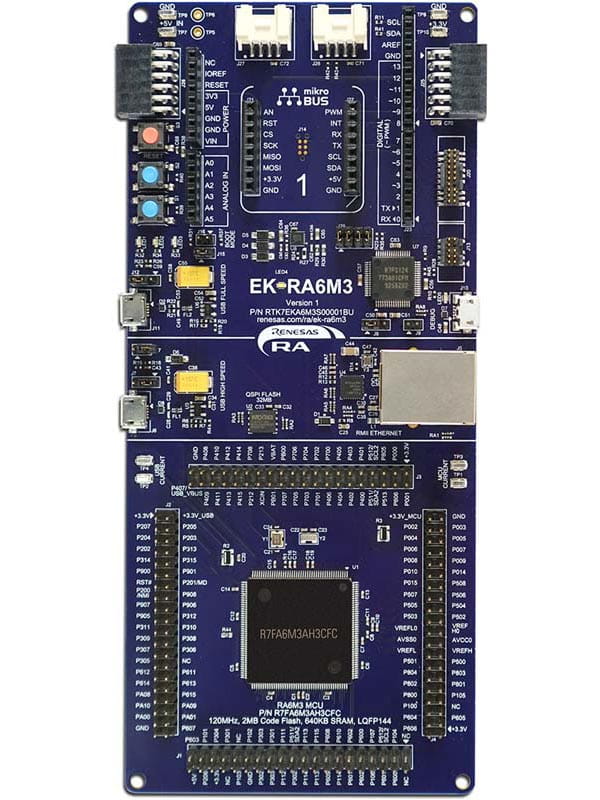
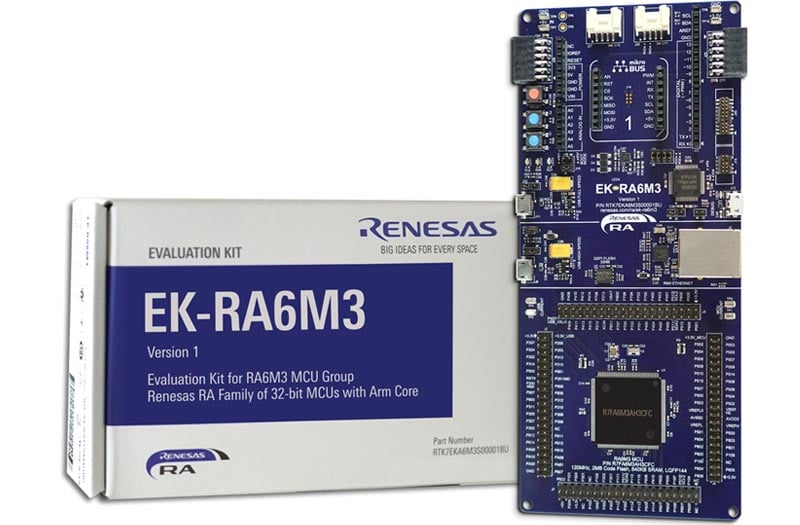
The EK-RA6M3 evaluation kit enables users to seamlessly evaluate the features of the RA6M3 MCU Group and develop embedded systems applications using the Flexible Software Package (FSP) and e2studio IDE. Utilize rich on-board features along with your choice of popular ecosystem add-ons to bring your big ideas to life.
Getting Started
Running the Quick Start Example Project
- The EK-RA6M3 comes pre-programmed with a quick start example project (provided with the example projects bundle).
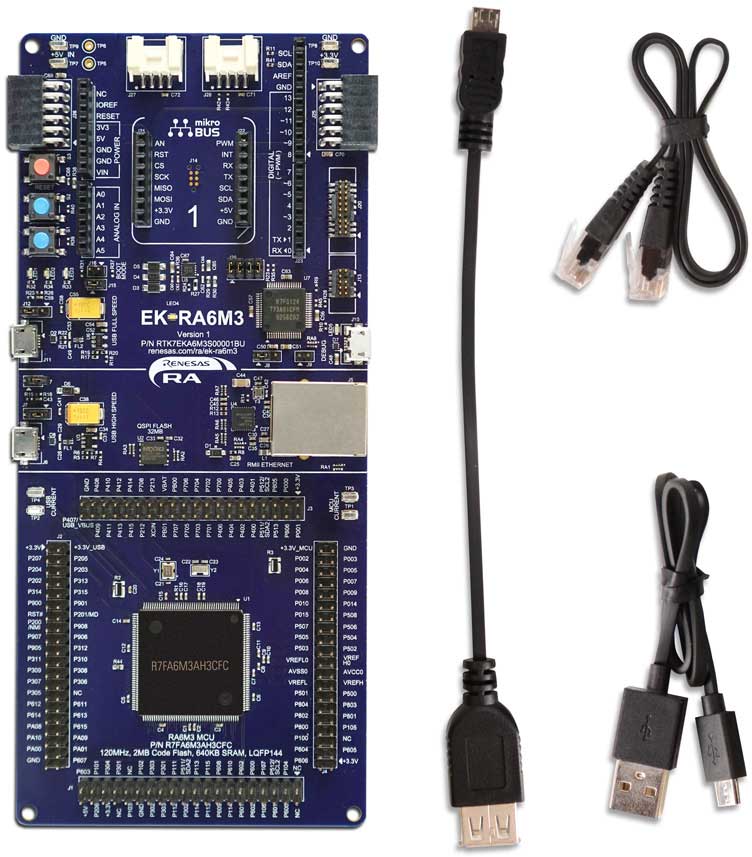
- Power up the EK-RA6M3 board through the debug USB port (J10) using the micro USB device cable connected to a 5V power source. The white power LED will light up.
- The quick start example project will begin to execute blinking the red, green and blue user LEDs.
- Refer to the EK-RA6M3 – Quick Start Guide (PDF) to explore additional functionality of the quick start example project.
Developing Embedded Applications
- Modifying the quick start example project – refer to the EK-RA6M3 Quick Start Guide for instructions on importing, modifying, and building the quick start example project
- Start with one of the many other example projects (provided in the example projects bundle) – choose from many example projects to learn about different peripherals of the RA6M3 MCU Group. These example projects can serve as excellent starting points for you to develop your custom applications.
Building a Custom Hardware
- Start by building a functional prototype – utilize the EK-RA6M3 board with your choice of hundreds of popular ecosystem add-ons.
- Build custom hardware – develop custom hardware by referring to the design and manufacturing information provided in the EK-RA6M3 v1 - Design Package (ZIP | English, 日本語)
Features
- Special Feature Access
- Ethernet (RMII and PHY)
- USB High Speed host and device
- 32MB External QSPI Flash
- MCU Native Pin Access
- R7FA6M3AH3CFC MCU
- 120MHz, Arm Cortex®-M4 core
- 2MB Code Flash, 640kB SRAM
- 176 pins, LQFP package, 24mm x 24mm x 1.70mm, 0.5mm pitch
- Native pin access through 4x 40-pin male headers
- MCU and USB current measurement points
- Ecosystem & System Control Access
- USB Full Speed host and device
- Multiple 5V input sources
- USB (Debug, Full Speed, High Speed)
- External power supply
- SEGGER J-LinkTM on-board programmer and debugger
- Debug modes
- Debug On-board (SWD) – via J-Link
- Debug Out (SWD) – via J-Link
- Debug In (ETM, SWD & JTAG) – via J-Link, Arm® Keil® ULINKTM, IAR I-jetTM, Renesas E2/E2 Lite, etc.
- User LEDs and buttons
- Three user LEDs (red, blue, green)
- Power LED (white) indicating availability of regulated power
- Debug LED (yellow) indicating the debug connection
- Two user buttons
- One reset button
- Four most popular ecosystem expansions
- MikroElektronikaTM mikroBUSTM connector
- Two SeeedGrove® system (I2C) connectors
- Two Digilent PmodTM (SPI and UART) connectors
- ArduinoTM (Uno R3) connector
- MCU boot configuration jumper
Applications
Documentation
|
|
|
|
|---|---|---|
| Type | Title | Date |
| Quick Start Guide | PDF 822 KB | |
| Manual - Development Tools | PDF 1.46 MB 日本語 | |
| PCB Design Files | EK-RA6M3 v1 - Design Package
|
|
| Application Note |
PDF
795 KB
The EK-RA6M3 example project shows how to write code for various Renesas Flexible Software Package (FSP) modules supported by the EK-RA6M3 kit. The Flexible Software Package provides an optimized, easy-to-use, scalable, and high-quality software solution for embedded system design.
|
|
| Application Note |
PDF
3.85 MB
Learn how Renesas MCU security is built around integrated security engines. The RA family includes various types, which can be identified in each MCU’s hardware manual. These engines operate in two modes: Compatibility and Protected. This application note defines both and outlines their use cases.
|
|
| Quick Start Guide |
PDF
5.58 MB
日本語
The Modbus protocol stack operates on RA evaluation boards to enable efficient development of Modbus TCP applications. This quick start guide provides an overview of the protocol stack features and introduces a Modbus sample application to assist with the development and implementation of applications using the stack.
|
|
| Application Note |
PDF
725 KB
Guides you in integrating the RA Family SCE7 module with the FSP Mbed Crypto middleware in your design. Explains how to add, configure, and use these components effectively, providing example code as a practical reference and starting point for secure application development.
|
|
| Application Note |
PDF
2.35 MB
Learn how to inject plaintext keys into RA MCUs using various security engines operating in Compatibility Mode. This application note details the protection of the Root of Trust, emphasizing secure key storage through hardware unique keys (HUK) and isolated cryptographic operations within the security engine. The security engines support multiple cryptographic algorithms and key handling methods, enabling secure and efficient key management.
|
|
| Application Note |
PDF
402 KB
AI-generated Summary:
The document explains the two operational modes, highlighting their advantages and disadvantages, and provides practical guidance for selecting and using each mode. It also includes reference links to Renesas RA Family Application Projects that demonstrate these modes with detailed examples of the related FSP module usage.
|
|
| Application Note |
PDF
2.87 MB
AI-generated Summary:
Low Power Modes (LPM) reduce the effective power consumption of RA microcontrollers by stopping the CPU and selectively operating peripherals and oscillators. Four LPM types are supported: Sleep, Software Standby, Snooze, and Deep Software Standby modes, each offering different power savings and peripheral availability. The document details configuring LPMs, clock source changes at run-time, peripheral operations during LPM, and transitioning between modes. It includes example projects demonstrating LPM usage, FSP configuration steps, and debugging methods across various RA kits, enabling efficient low power application development.
|
|
| Application Note |
PDF
189 KB
AI-generated Summary:
The Low Power Applications Package provides multiple application projects for Renesas RA family microcontrollers, including EK-RA2L1, EK-RA6M3, FPB-RA6E1, and FPB-RA4E1. It includes code and documentation for clock switching and operable long timer functions in low power modes. Users can access detailed application notes and example projects organized by device group. The package supports efficient low power management and offers links to product information, support forums, and software packages. It emphasizes reading included documents before use and outlines revision history and legal disclaimers related to product use and intellectual property.
|
|
| Application Note |
PDF
976 KB
AI-generated Summary:
The document explains how to generate and precisely adjust PWM outputs with sub-nanosecond delay using the General PWM Timer Enhanced High-Resolution channels on RA6M3 MCUs. It details configuring the GPT timers, setting up the PWM Output Delay circuit to achieve timing accuracy of 260 picoseconds, and controlling rising and falling edges of PWM signals. The guide covers hardware setup with the EK-RA6M3 kit, software configuration via Renesas Flexible Software Package, and user interaction through push-button interrupts. Typical applications include power supply, motor control, and digital lighting.
|
|
| Application Note |
PDF
2.85 MB
AI-generated Summary:
MCUboot provides a secure bootloader infrastructure for 32-bit MCUs, enabling secure booting and fail-safe application updates. It supports multiple update strategies—Overwrite, Swap, and Direct Execute-In-Place (DXIP)—each with distinct advantages and memory requirements. The bootloader authenticates firmware images using RSA or ECDSA signatures and SHA-256 hashing. Integration with Renesas Flexible Software Package (FSP) allows easy MCUboot deployment across RA Family MCUs, supporting TrustZone-based security. Example projects demonstrate multi-image and single-image configurations on EK-RA6M4 and EK-RA6M3 kits. The document guides hardware setup, software configuration, project creation, signing, and debugging to implement secure bootloader solutions.
|
|
| Application Note |
PDF
2.49 MB
AI-generated Summary:
Steps to add support for new UART-based Wi-Fi modules on Renesas RA MCUs using the Flexible Software Package (FSP) are detailed. It covers Wi-Fi driver architecture, APIs for TCP/IP communication, UART drivers, and FreeRTOS stream buffers. The document explains FSP components including Board Support Package, HAL drivers, libraries, RTOS, and middleware. It guides creating custom FSP user packs and modifying XML files for new modules. Development and testing procedures use Sierra Wireless BX310x and EK-RA6M3 kits as references.
|
|
| Application Note |
PDF
2.88 MB
AI-generated Summary:
The document explains how to implement a low-power data logger using RA2L1 and RA2E1 MCUs. It details the use of peripherals such as a 12-bit ADC, Data Transfer Controller, Asynchronous General-Purpose Timer, Real-Time Clock, and Event Link Controller to minimize power consumption. The system operates mainly in Software Standby and Snooze modes, performing periodic A/D conversions, level judgments, and data processing with minimal CPU activity. Data transmission occurs upon wakeup requests. The project uses Renesas e2 studio IDE and Flexible Software Package, supporting sensor inputs and analog signals. It targets applications like fitness and fleet trackers, demonstrating efficient low-power operation and data handling.
|
|
| Application Note |
PDF
2.54 MB
AI-generated Summary:
Secure Data at Rest protection focuses on safeguarding inactive data stored within embedded systems using RA MCUs. It employs Data Encryption and Data Access Control to protect sensitive information in volatile and non-volatile memory, including internal flash and SRAM. The Security MPU and Flash Access Window (FAW) features enable read, write, read/write, write-once, and combined write-once/read protections. These mechanisms reduce attack surfaces by controlling access permissions and preventing unauthorized modifications. The document details configuration methods, operational flows, and example projects to implement these protections effectively in embedded applications.
|
|
| Flyer | PDF 412 KB | |
| Application Note | PDF 5.24 MB | |
| Presentation | PDF 7.02 MB | |
| Presentation | PPS 18.12 MB | |
| Application Note |
PDF
1.82 MB
AI-generated Summary:
The document explains how to connect Renesas RA MCUs to AWS IoT Core using MQTT and TLS protocols for secure cloud communication. It covers configuring the Flexible Software Package (FSP) modules, including Core MQTT, Mbed TLS, and secure sockets, to enable encrypted data exchange over Ethernet. The guide details setting up AWS IoT Core, generating device certificates, and running an example application on the EK-RA6M3 development kit. It emphasizes MQTT’s lightweight publish/subscribe model and TLS’s role in ensuring data privacy and integrity. Developers learn to integrate secure cloud connectivity into IoT devices using RA MCUs and AWS services.
|
|
| Application Note |
PDF
1.72 MB
日本語
AI-generated Summary:
Procedures guide developers through installing FSP and Tracealyzer®, creating projects in e2 studio for RA6M3 MCU, and configuring FreeRTOS debugging via UART or J-Link RTT. It details copying Tracealyzer® source files, setting UART drivers, editing code for Tracealyzer® integration, and using the RTOS Resource View. The document also covers launching debugging sessions and recording traces to visualize FreeRTOS thread and resource states, enhancing embedded software development efficiency.
|
|
| Application Note |
PDF
757 KB
日本語
AI-generated Summary:
Procedures guide developers to install and configure Azure RTOS TraceX and Azure RTOS ThreadX within Renesas e2 studio for RA6M3 MCU. It covers project creation, FSP configuration, debugging setup, and using RTOS Resource View for real-time system analysis. The document details steps to build and debug applications on the EK-RA6M3 board using GNU Arm Embedded Toolchain and J-Link ARM debugger, enabling visualization of thread and object states to improve embedded system development.
|
|
| Application Note |
PDF
830 KB
AI-generated Summary:
The document explains how to create and debug FreeRTOS projects using e2 studio for Renesas RA microcontrollers. It details steps to set up a FreeRTOS project, configure debugging options to output necessary debug information, and utilize the RTOS Resources view to monitor real-time OS resources such as tasks, queues, timers, and stacks. The RTOS Resources view provides a detailed interface during debugging to analyze system and task-level resource usage, enhancing real-time OS application development and troubleshooting.
|
|
| Application Note |
PDF
1.78 MB
AI-generated Summary:
The solution demonstrates how to connect Renesas RA MCUs to Microsoft Azure IoT Central using MQTT/TLS over Wi-Fi or Ethernet. It reads on-chip temperature sensor data and publishes it to Azure IoT Core, while also subscribing to LED control commands to toggle LEDs remotely. The project uses Renesas Flexible Software Package (FSP) with embedded Azure C SDK, supporting secure device provisioning and communication. Hardware includes EK-RA6M3 evaluation kit, Wi-Fi PMOD or Ethernet, and a Windows PC. Software requirements cover e2 studio IDE, FSP, GCC toolchain, SEGGER J-Link, and terminal software. Users should have basic knowledge of MQTT/TLS and Renesas development tools.
|
|
| Manual - Development Tools | PDF 789 KB 日本語 | |
| Flyer | PDF 332 KB 日本語 | |
| Report | PDF 187 KB 日本語 | |
|
28 items
|
||
Design & Development
Software & Tools
Software & Tools
| Software title
|
Software type
|
Company
|
|---|---|---|
| Embedded File System: Cente FileSystem Series Provides a Windows-compatible FAT environment for embedded systems through the Cente FileSystem. Includes metadata protection and robust redundancy that prevents critical file corruption during unexpected power loss or media removal. With the addition of the Cente exFAT FileSystem, supports formats from FAT12/16/32 to exFAT. Also supports NAND, NOR, eMMC, SD cards, and USB memory, helping maintain reliable data integrity in embedded development.
|
Connectivity | NXTech Co., Ltd. |
| Embedded Network Security: Cente Compact SSL Series Provides a TLS1.3–compliant library optimized for MCUs. Supports both TLS server and client, and works with Cente TCP/IPv4, Cente HTTPd/c, and Cente MQTTc to enable HTTPS and MQTTS communication. Also supports SSH server connections when combined with the Cente Compact Crypto extended cryptographic library, supporting secure internet communication and remote access.
|
Security & Safety | NXTech Co., Ltd. |
| PALMiCE4 PALMiCE4 is a professional JTAG emulator designed for microprocessors (MPUs) and microcontrollers (MCUs) based on Arm® Cortex®‑A, Cortex‑R, and Cortex‑M cores. It supports Arm CoreSight™ and Serial Wire Debug (SWD) interfaces, enabling multi‑core debugging, on‑board flash programming, and debugging in Arm TrustZone® environments. Broad device support includes the RZ MPU and RA MCU families, providing efficient software development from MCUs to SoC and multi‑core MPU platforms.
|
Development Tool | Computex Co., Ltd. |
| QuickConnect Platform QuickConnect platform enables fast prototyping by providing compatible hardware and software building blocks.
|
Software and Hardware Development Tools | Renesas |
| RA Flexible Software Package (FSP) FSP is an enhanced software package designed to provide easy-to-use, scalable, high-quality software for embedded system designs using Renesas RA Family of Arm Microcontrollers.
Note: FSP with e² studio Installer (Platform Installer) will install the e² studio tool, FSP packs, GCC toolchain, and Segger J-Link drivers required to use this software. No additional installations are required.
|
Software Package | Renesas |
| Renesas Flash Programmer (Programming GUI) Flash memory programming software [Support MCU/MPU and devices: RA, RE, RX, RL78, RH850, RISC-V MCU, Renesas Synergy, DA1453x, DA1459x, DA1469x, DA1470x, DA148xx, Power Management, Renesas USB Power Delivery Family, ICs for Motor Driver/Actuator Driver, V850, 78K0R, 78K0]
|
Programmer (Unit/SW) | Renesas |
6 items
|
||
Sample Code
Sample Code
Filters
|
||
|---|---|---|
| Type | Title | Date Date |
| Sample Code | EK-RA6M3 Example Project Bundle
[Software=RA FSP],[Board=EK-RA6M3]
ZIP
53.99 MB
IDE:
e2 studio/GCC/AC6, IAR, Keil MDK
The EK-RA6M3 example project shows how to write code for various Renesas Flexible Software Package (FSP) modules supported by the EK-RA6M3 kit. The Flexible Software Package provides an optimized, easy-to-use, scalable, and high-quality software solution for embedded system design.
|
|
| Sample Code | Injecting and Updating Secure User Keys - Sample Code
Learn how Renesas MCU security revolves around integrated security engines. There are different types of security engines across the RA MCU. Users can find the specific engine used in a particular MCU from its hardware user’s manual. The security engines can operate in two different modes, called Compatibility Mode and Protected Mode. The application note “Renesas Security Engine Operational Modes” explains the definition of the two modes and their use cases.
|
|
| Sample Code | RA Family Modbus Sample Program Package
Use the following sample program to operate on the RA evaluation board. This sample program package supports the Ethernet-based Modbus TCP protocol.
|
|
| Sample Code | Renesas RA Family Establishing and Protecting Device Identity using SCE7 and FAW
The application example provided in this package uses the Secure Crypto Engine (SCE) module based on RA6M3 to generate a device identity unique to each device which is securely stored in the internal flash using the Security Memory Protection Unit (MPU) and the Flash Access Window (FAW) hardware features of the MCU.
ZIP
8.62 MB
Compiler:
ARMCC
IDE:
e2 studio
Guides you in integrating the RA Family SCE7 module with the FSP Mbed Crypto middleware in your design. Explains how to add, configure, and use these components effectively, providing example code as a practical reference and starting point for secure application development.
|
|
| Sample Code | Injecting Plaintext User Keys
Learn how to inject plaintext keys into RA MCUs using security engines operating in Compatibility Mode. Example projects for various MCUs and security engines demonstrate plaintext key injection with Renesas Flexible Software Package (FSP) APIs and PSA Certified Crypto APIs.
|
|
| Sample Code | LPM Application Package
|
|
| Sample Code |
Some typical applications for PWM with nanosecond delays are power supply control, motor control, inverter
control, battery charging, digital lightning control, and power factor correction (PFC).
ZIP
924 KB
IDE:
e2 studio
|
|
| Sample Code | RA6 Basic Secure Bootloader Using MCUboot and Internal Code Flash
MCUboot is a secure bootloader for 32-bit MCUs. It defines a common infrastructure for the bootloader, defines system flash layout on microcontroller systems, and provides a secure bootloader that enables easy software update.
ZIP
4.13 MB
Compiler:
GNU Arm Embedded
IDE:
e2 studio
|
|
| Sample Code | Getting Started with Wi-Fi Modules on FSP
The driver for the new module is developed while referencing the existing Wi-Fi driver provided by FSP as a starting point.
ZIP
2.55 MB
IDE:
e2 studio
|
|
| Sample Code | RA2L1/RA2E1 Group Example of Low Power Application (Data Logger) Rev.1.10 - Sample Code
|
|
| Sample Code | Securing Data at Rest Utilizing the Renesas Security MPU
This application project discusses the considerations for securing Data at Rest in an embedded system and provides guidelines on how to use the Security MPU hardware feature of the RA Family MCUs to implement a secure Data at Rest solution.
ZIP
2.66 MB
Compiler:
ARMCC
IDE:
e2 studio
|
|
| Sample Code | Renesas RA Family Exception Handling
The application project uses the Flexible Software Package (FSP) of
the RA family|| the GNU GCC compiler|| and the integrated development environment e2 studio IDE to
demonstrate an exception handling flow for multiple possible faults.
ZIP
5.66 MB
Compiler:
GNU ARM Embedded
IDE:
e2 studio, Keil
|
|
| Sample Code | RA AWS MQTT/TLS Cloud Connectivity Solution Application Project - Sample Code
The application example provided in the package uses AWS IoT Core. The detailed steps in this
document show first-time AWS IoT Core users how to configure the AWS IoT Core platform to run this
application example.
ZIP
4.89 MB
IDE:
e2 studio
|
|
| Sample Code | RA Azure IoT Cloud Connectivity Solution Rev.1.00 - Sample Code
|
|
14 items
|
||
Related Boards & Kits
Boards & Kits

Evaluation Kit for RA6M5 MCU Group
The EK-RA6M5 evaluation kit enables users to effortlessly evaluate the features of the RA6M5 MCU Group and develop embedded systems applications using the Flexible Software Package (FSP) and e2 studio IDE. Utilize rich on-board features along with your choice of popular ecosystem add-ons to... Read More

Evaluation Kit for RA6M4 MCU Group
The EK-RA6M4 evaluation kit enables users to effortlessly evaluate the features of the RA6M4 MCU Group and develop embedded systems applications using the Flexible Software Package (FSP) and e2 studio IDE. Utilize rich on-board features along with your choice of popular ecosystem add-ons to... Read More
Test This Board Remotely

Evaluation Kit for RA6M2 MCU Group
The EK-RA6M2 evaluation kit enables users to effortlessly evaluate the features of the RA6M2 MCU Group and develop embedded systems applications using the Flexible Software Package (FSP) and various IDEs.
Getting Started
Running the Quick Start Example Project
- The EK-RA6M2 board comes... Read More

Evaluation Kit for RA6M1 MCU Group
The EK-RA6M1 evaluation kit enables users to effortlessly evaluate the features of the RA6M1 MCU Group and develop embedded systems applications using Renesas' Flexible Software Package (FSP) and various IDEs.
Getting Started
Running the Quick Start Example Project
- The EK-RA6M1 board comes... Read More
Product Options
| Part Number | Status | Stock | Budgetary Price (USD) | Sampleable |
|---|---|---|---|---|
| RTK7EKA6M3S00001BU | Active | In Stock | 1u | $72.47 | Available |
Videos & Training
Kickstart IoT and embedded systems development using Renesas EK-RA6M3, Evaluation Kit for RA6M3 MCU Group. Familiarize yourself with the kit architecture, key features, quick start example project and many useful resources to begin innovating quickly.
Additional Videos
News & Blog Posts
Blog Post Apr 5, 2022 |
Blog Post Jan 28, 2022 |
Blog Post Jan 28, 2022 |
Blog Post Nov 18, 2021 |
Blog Post Nov 11, 2021 |
Certifications
The EK-RA6M3 meets the following certifications/standards. Refer to the EK-RA6M3 user manual for the disclaimer, precautions and more details on the certifications.
EMC/EMI Standards
- FCC Notice (Class A) – Part 15
- Innovation, Science and Economic Development Canada ICES-003 Compliance: CAN ICES-3 (A)/NMB-3(A)
- CE Class A (EMC Directive 2004/108/EEC)
- Taiwan Chinese National Standard 13438, C6357 compliance, Class A limits
- Australia/New Zealand AS/NZS CISPR 32:2015, Class A
Material Selection, Waste, Recycling, and Disposal Standards
- EU RoHS
- China SJ/T 113642014, 10-year environmental protection use period.
Safety Standards
- UL 94V-0
Partners

Zephyr Project
The Zephyr Project is an open-source, scalable real‑time operating system (RTOS) designed for resource-constrained embedded systems and supports a wide range of hardware architectures and development boards. For the Renesas RA6M3 Evaluation Kit, Zephyr provides focused documentation covering board features, supported peripherals, and basic build, flashing, and debugging workflows to help developers quickly get started.
Support
Support Communities
- EK-RA6M3 Innovation Kit for RA MCU
Kickstart IoT and embedded systems development using Renesas EK-RA6M3, Evaluation Kit for RA6M4 MCU Group. Familiarize yourself with the kit architecture, key features, quick start example project and many useful resources to begin innovating quickly.
- EK-RA6M3: Exiting QPI Mode on the MX25L25645G (Returning to the default SPI Mode)
Hello. I'm working with the EK-RA6M3 development board. I took a look at the QSPI example code provided by Renesas and attempted to run the code on my board. After sending the command (0x35) to enter QPI mode on flash (MX25L25645G), it seems like the flash will then ...
Sep 1, 2022 - RA6M3 USB File Write Fails sample code usb_hmsc_ek_ra6m3_ep
Dear Team, I am facing USB write error while trying sample code. Board: RA6M3 Code: usb_hmsc_ek_ra6m3_ep for RA6M3 from r20an0560eu0144-ek-ra6m3-exampleprojects. I have confirmed that PEN drive connected to USB is having plenty of free space (free space in GBs). Tried with formatted PEN ...
Dec 28, 2023
Knowledge Base
- Simple Bootloader and Application Project Using MCUBoot for EK-RA6M3 in FSP 3.1.0
... Build the bootloader project, then the application project.2) Download the application project.3) Before execution in the debugger select Download Ancillary File" and select \EK_RA6M3_MCUBoot_App_Test\Debug\EK_RA6M3_MCUBoot_App_Test_signed.bin4) Download to address 0x108000 which is the update image start address. Refer ...
Jul 14, 2021 - RA Family: How to use the Debug Out function of J-Link OB on EK (Evaluation Kit)
... this on-board debugger is officially provided by Renesas, and the firmware can be updated with the update of the SEGGER tool. In this article, EK-RA6M3 is used as an example to describe the specific implementation method. Refer to the schematic diagram of EK-RA6M3: J29 can be used ...
Dec 14, 2023 - Quick FSP 0.8 Labs: Available Labs
... Lab is an EK-RA6M3 Evaluation Kit, along with e2 studio and FSP installed on your PC. You can find instructions for obtaining these here:EK-RA6M3 Kit Page: Here.EK-RA6M3 Ordering Information: Here. FSP and e2 studio Installation: Can be found on the GitHub FSP site. Current Quick ...

Support Communities


