
Overview
Description
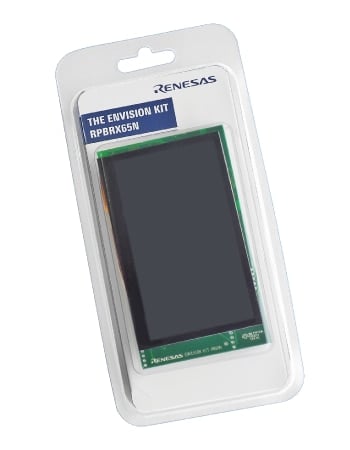
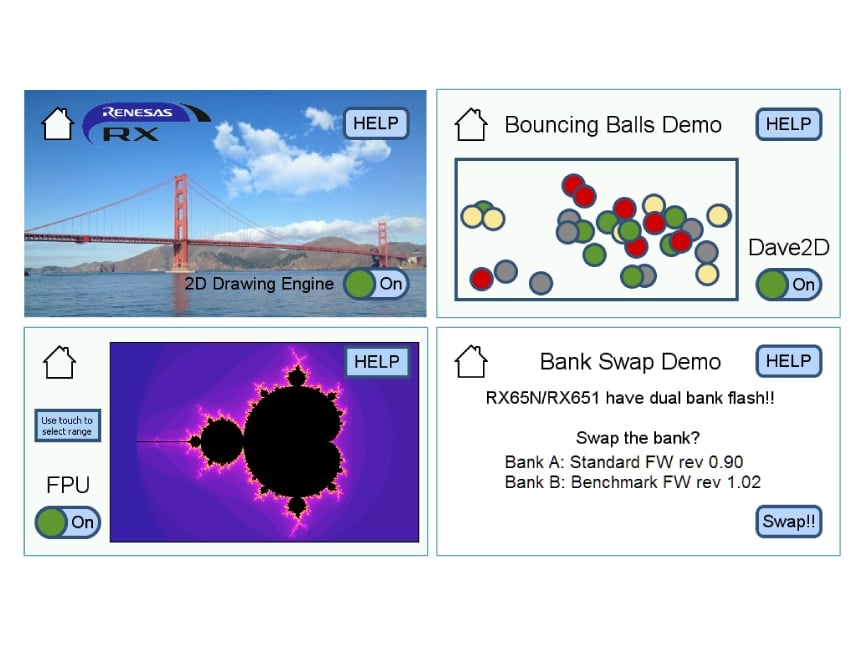
The Envision Kit allows quick and easy evaluation of the RX65N microcontrollers group, which is an excellent choice for your next low cost HMI (Human Machine Interface) project. Moreover the RX65N Envision Kit allows you to experience, through pre-installed demos, firmware updating using the new dual-bank flash function of the RX65N microcontroller, graphics performance using LCDC and a 2D drawing engine, and many more.
Renesas offers everything you need for your own board and demo development, such as a board circuit diagram and demo source code, so the kit can be used as a sample for developing your set. The provided on-board emulator allows you to design your own application without the need for an external E1/E2 Lite. By writing firmware downloaded from this webpage to a USB memory stick, you can rewrite the firmware on the board during a demo.
The latest RX65N Group of microcontrollers incorporates an embedded TFT controller and an integrated 2D drawing engine provides advanced graphics features and high performance in the application. If the chosen display size is up to WQVGA, the large on-chip RAM of 640KB could be used as display frame buffer, which ensures a cost optimized design, by saving an external RAM. In addition, customers using the RX651/RX65N MCU can enjoy the powerful SEGGER emWin GUI software as well as supporting tools in their designs free of charge!
Features
- 32-bit RX65N MCU with 2MB code flash and 640KB RAM
- Segger emWin GUI software package can be used by RX651/RX65N customers
- Graphic expansion board
- 4.3-inch TFT color LCD
- 480 x 272 resolution
- Capacitive touch overlay controller
- Backlight controller
Applications
Documentation
|
|
|
|
|---|---|---|
| Type | Title | Date |
| Manual - Development Tools | PDF 1.56 MB | |
| Quick Start Guide | PDF 421 KB | |
| Other | PDF 89 KB | |
| Application Note |
PDF
2.17 MB
日本語
AI-generated Summary:
The document provides a comprehensive guide for developing embedded systems with graphical displays using QE for Display [RX] and Renesas RX microcontrollers. It details initializing and configuring the graphics LCD controller (GLCDC) through a sample program, enabling quick setup without deep GLCDC specification knowledge. The workflow includes project creation, Smart Configurator settings, program development, real-time display adjustment, and header file generation. It supports RX65N, RX651, RX72N, RX72M, and RX66N groups and covers hardware configuration, software settings, and integration with the Smart Configurator and Firmware Integration Technology (FIT). The document also explains adapting the sample program to different environments and provides step-by-step procedures for execution and adjustment.
|
|
| Schematic | RX65N Envision Kit Schematic
|
|
| Other | RX65N Envision Kit BOM LIST
|
|
|
6 items
|
||
Design & Development
Software & Tools
Software & Tools
| Software title
|
Software type
|
Company
|
|---|---|---|
| QE for Display: Development Assistance Tool for Display Applications This development assistance tool supports the development of embedded systems which use the LCD display functions of display controllers from Renesas. [Plugin for Renesas IDE "e² studio"] [Standalone Version] [Support MCU/MPU:RZ, RX, RA]
|
Solution Toolkit | Renesas |
| e² studio - Information for the RX Family Eclipse-based Renesas integrated development environment (IDE).
|
IDE and Coding Tool | Renesas |
| C/C++ Compiler Package for RX Family [CC-RX] C/C++ Compiler Package for RX Family [IDE: CS+, e² studio, High-performance Embedded Workshop]
|
Compiler/Assembler | Renesas |
| Trusted Secure IP Driver Trusted Secure IP driver software: this software supports AES with 128- and 256-bit keys), AES-GCM, AES-CMAC, and random number generation. Safely executes AES key management, secure updating of firmware, and secure booting at high speeds.
|
Security / Crypto | Renesas |
4 items
|
||
Software Downloads
|
|
|
|
|---|---|---|
| Type | Title | Date |
| Board Description File | ZIP 1 KB | |
| Software & Tools - Other | RX DRW2D Driver
|
|
| Software & Tools - Other | Firmware for on-board emulator
Download the latest version of on-board emulator firmware installed in the RX65N Envision Kit.
|
|
| Software & Tools - Other | USB/Serial Driver for Windows 7
|
|
| Software & Tools - Other | RX65N Envision Kit Benchmark Firmware
Download demo firmware for benchmarking (dual bank rewriting image, storage benchmark, and system log).
|
|
| Software & Tools - Other | RX65N Envision Kit Standard Firmware
Download the latest versions of four types of demo firmware (2D Drawing Engine, Bouncing Balls, Mandelbrot Calculation, and Firmware Bank Swap Demo).
|
|
6 items
|
||
Sample Code
Sample Code
Filters
|
||
|---|---|---|
| Type | Title | Date Date |
| Sample Code | RX Family QE for Display [RX] V1.1.0 Sample Program - Sample Code
|
|
| Sample Code | RX65N Envision Kit Demo Firmware with Source Code
Download the latest versions of four types of demo software (2D Drawing Engine, Bouncing Balls, Mandelbrot Calculation, and Firmware Bank Swap Demo).
|
|
|
2 items
|
||
Product Options
| Part Number | Status | Stock | Budgetary Price (USD) | Sampleable |
|---|---|---|---|---|
| RTK5RX65N2C00000BR | Active | In Stock | 1u | $43.53 | N/A |
Videos & Training
Additional Videos
Support
Support Communities
- RX65N envision Kit and AppWizard
Hi, I'm working with rx65n envision kit and appwizard, everything works well, except for the getText function, this is how i'm using the function error=APPW_GetText(ID_SCREEN_02,ID_TEXT_01,text1,5), but the 'text1' variable, wich is a char * variable, never changes its value ...
Jun 7, 2022 - Mass storage USB for data on RX65N envision kit?
Hello everyone, I have a question regarding the envision kit, can the USB type A on board be used to plug a mass storage device like an USB stick to store some data? is there a document about it?, any help will do :D
Jan 6, 2022 - RX65N Envision Kit debugging
Hi, I have an issue with downloading code to RX65N. Here is the log from e2 studio Connecting to E2LITE, RX Target GDBServer endian : little Target power : off Starting target connectionFirmware up to date at version '1.04.00.002' Target endian (MDE pin) : littleFinished target connectionFailed to create socket ...
Sep 11, 2018
Knowledge Base
- Replacement of on-board TFT LCD Panel of Renesas Starter Kit+ for RX65N-2M
Use of a third party TFT LCD panel may result in malfunction or damage of the kit. The connector, pin assignment, touch, and backlight specifications of the board are specifically designed for the on-board TFT LCD panel. Do not replace the panel with any third party product.
Jul 10, 2020

Support Communities


