

With the growing demand for improved user experiences across various devices like home appliances, medical equipment, and industrial machinery, we‘ve seen a significant shift from traditional segment-style LCDs to vibrant, interactive touchscreen LCD displays. This not only enhances user experience but also greatly increases the flexibility of display and control of display devices.
Aligning with this trend, the RX Family offers two GUI solutions.
- Rich graphics solution utilizing on-chip Graphic LCD Controller (GLCDC) and 2D Drawing Engine
- Efficient solution for compact displays by controlling external LCD controller via SPI interface
Furthermore, the RX Family provides comprehensive development support tools to enable users to easily develop smooth and attractive GUI applications.
Rich GUI Solution Using GLCDC Controller
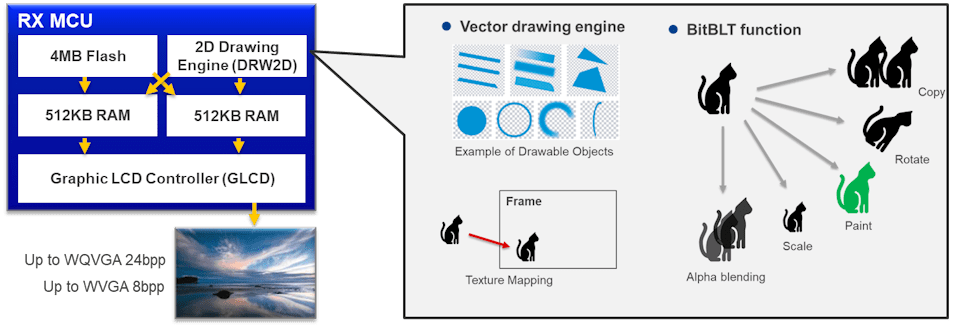
To achieve high-quality displays, the RX offers devices equipped with a Graphic LCD Controller (GLCDC).
Key Features:
- LCD display can be realized with a single chip
- Eliminating the need for external LCD controllers or memory, simplifying the system configuration, and reducing BOM.
- Support color depth up to 24bpp with the LCD controller (GLCDC)
- Recommended resolution: WQVGA with 24bpp、or WVGA with 8bpp
- Large internal memory: up to 4MB flash memory and 1MB RAM
- Sufficient storage for image data and frame buffers
- Accelerate drawing processing using 2D Drawing Engine
- Improving the frame rate and reducing the CPU workload
RX Family Lineup with Built-in GLCDC
| Target Devices | CPU Core | Max. Frequency | On-chip ROM | On-chip RAM | LCD Interface | 2D Drawing Engine | Recommended Display |
|---|---|---|---|---|---|---|---|
| RX72M/RX72N | RXv3 | 240 MHz | 4 MB | 1 MB | Parallel RGB | Yes | Up to WQVGA 24bpp Up to WVGA 8bpp |
| RX66N | RXv3 | 120 MHz | 4 MB | 1 MB | Parallel RGB | Yes | |
| RX65N/RX651 | RXv2 | 120 MHz | 2 MB | 640 KB | Parallel RGB | Yes | Up to WQVGA 16bpp |
Recommend Kit: Envision Kit
To enable a quick start to graphics evaluation, the RX Family offers affordable Envision Kits for RX65N and RX72N. These kits come pre-loaded with demos using the WQVGA LCD mounted on the kit, allowing users to experience the graphics performance right out of the box.
| RX65N Envision Kit | RX72N Envision Kit |
|---|---|
|
|
GUI Solution Using External LCD Controller via SPI Control
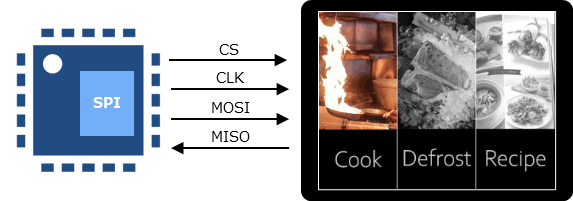
For RX devices that do not come equipped with GLCDC, it's possible to control an external LCD controller via the SPI interface for LCD display.
Key Features:
- Optimal for cost-effective applications and displays with low resolution.
- LCD displays can be controlled with just four pins for the SPI interface.
- All RX devices support the SPI interface.
- Sample programs that allow simultaneous evaluations of an external LCD display and touch button control
- The sample programs, using QVGA (320x240) LCD and on-board touch buttons, are available on RX-RSK boards.
- A Proof-of-Concept of RX140/RX671 based on operation of a microwave allows real experience of system capabilities.
- The sample programs include programs for the capacitive touch sensor unit integrated on RX140/RX671.
GUI Development Support Tool: QE for Display
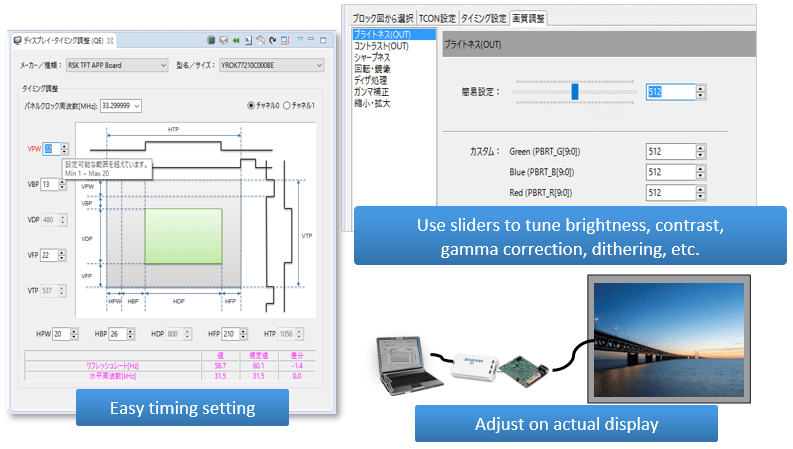
QE enables intuitive adjustment of LCD settings from the GUI screen. Particularly, it simplifies the complex setting of LCD timing. Additionally, by integrating with our partner's GUI development tools, it significantly enhances the efficiency of GUI development.
Key Features:
- Easy LCD Adjustment:
- Easily adjust timing and image quality.
- Write parameters to registers with a single button, enabling adjustment while viewing the actual display
- Collaboration with Partner's GUI Tools:
- Download, install, and start partner GUI tools directly from QE for Display.
- Integrate the generated source of GUI into the project, enabling immediate building and execution.
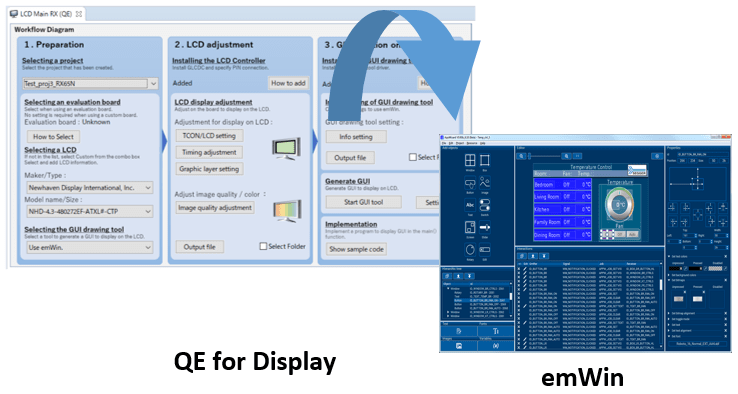
*QE for Display is a solution tool kit that runs on the e2 studio Integrated Development Environment. It is available from Renesas free of charge.
Partner GUI Tools
| Tool | Overview | Partner |
|---|---|---|
| AppWizard | GUI tool for lightweight, free-of-charge emWin library for RX devices. For Japanese domestic customers, contact EmbITeK for support. | Segger Microcontroller Systems |
| CRI Aeropoint GUI | Enable quick GUI creation in PowerPoint, excellent color reduction technology, and audio/video playback. | CRI Middleware Co., Ltd. |
| Embedded Wizard (*QE for Display not supported) | A GUI tool designed to provide a smooth workflow for embedded systems. | TARA Systems GmbH |
Documentation
|
|
|
|
|---|---|---|
| Type | Title | Date |
| Application Note |
PDF
687 KB
日本語
This application note describes the emWin v.6.52 module which uses Firmware Integration Technology (FIT). This module is hereinafter referred to as “the emWin FIT module”. The emWin FIT module is the modularized emWin by SEGGER by using FIT. When the emWin FIT module is used with the RX family (products supported by the FIT modules), mass production is possible with no license required.
|
|
| Application Note |
PDF
2.77 MB
日本語
AI-generated Summary:
QE for Display [RX,RA] enables graphical interface development for embedded systems using Renesas RX microcontrollers with serially connected LCDs, supporting emWin and Aeropoint GUI middleware. It integrates with e2 studio, Smart Configurator, and Firmware Integration Technology (FIT) modules to simplify GUI creation, display control, and system development flow. The tool supports various RX family starter kits and target boards, facilitating efficient GUI design with AppWizard and PowerPoint-based Aeropoint GUI. It covers from initial display setup to project building, debugging, and execution, enabling high-performance, memory-efficient GUI solutions on microcontrollers without graphic LCD controllers.
|
|
| Application Note |
PDF
7.22 MB
日本語
AI-generated Summary:
QE for Display [RX] provides a graphical interface for display control supporting Renesas RX microcontrollers, enabling efficient embedded system development with display devices. It supports emWin and Aeropoint GUI middleware for flexible GUI creation. The tool simplifies display adjustment, timing control, and GUI design using AppWizard or PowerPoint, reducing development time. It integrates with Smart Configurator and Firmware Integration Technology (FIT) modules for GLCDC, emWin, and Aeropoint GUI, facilitating seamless system development and display control on RX65N, RX651, RX72N, RX72M, and RX66N groups.
|
|
| Application Note |
PDF
725 KB
日本語
AI-generated Summary:
The sample program demonstrates how to use on-chip memory with emWin middleware, the graphic LCD controller (GLCDC), and FIT modules to display images on a WVGA (800×480) display. It supports six screen modes including 2D drawing, bouncing balls, Mandelbrot set, stopwatch, and help dialog, with FPS displayed for performance monitoring. The program runs on RX65N and RX72N groups, requiring a separate WVGA display and recommends allocating the frame buffer in on-chip memory for optimal speed. Operation conditions, hardware setup, and software tools such as QE for Display and various FIT modules are detailed to assist development and evaluation.
|
|
| Application Note |
PDF
2.17 MB
日本語
AI-generated Summary:
The document provides a comprehensive guide for developing embedded systems with graphical displays using QE for Display [RX] and Renesas RX microcontrollers. It details initializing and configuring the graphics LCD controller (GLCDC) through a sample program, enabling quick setup without deep GLCDC specification knowledge. The workflow includes project creation, Smart Configurator settings, program development, real-time display adjustment, and header file generation. It supports RX65N, RX651, RX72N, RX72M, and RX66N groups and covers hardware configuration, software settings, and integration with the Smart Configurator and Firmware Integration Technology (FIT). The document also explains adapting the sample program to different environments and provides step-by-step procedures for execution and adjustment.
|
|
| Application Note |
PDF
2.95 MB
日本語
AI-generated Summary:
The sample program enables image display on a TFT-LCD panel using the Graphic LCD Controller (GLCDC). It supports switching images, adjusting alpha blending for transparency, and modifying brightness, contrast, and gamma settings. The panel includes touch input for user interaction, allowing navigation through image view, blending view, and setting modes. Peripheral modules like GLCDC, RSPI, SCI, and CMT manage display, communication with SerialFlash and touch controller, and timing for touch detection.
|
|
6 items
|
||
Related Boards & Kits

RX65N Envision Kit
The Envision Kit allows quick and easy evaluation of the RX65N microcontrollers group, which is an excellent choice for your next low cost HMI (Human Machine Interface) project. Moreover the RX65N Envision Kit allows you to experience, through pre-installed demos, firmware updating using the new... Read More

RX72N Envision Kit
Equipped with the flagship RX72N microcontroller from the 32-bit RX family, the RX72N Envision Kit supports GUI creation using an LCD, HMI development such as voice input/output, and IoT device development using Wi-Fi, Bluetooth® Low Energy (LE), Ethernet, and more. With a pre-installed demo and... Read More
Test This Board Remotely
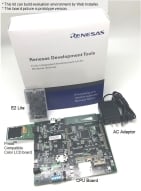
Renesas Starter Kit+ for RX671
The Renesas Starter Kit+ for RX671 is the perfect starter kit for developers who are new to the RX671 (Code Flash 2MB, Pin Count 144-pin). The kit includes an LCD display module and an on-chip debugging emulator. Download the integrated development environment (CS+ version and e² studio version)... Read More

Renesas Starter Kit for RX140
The Renesas Starter Kit for RX140 is the perfect starter kit for developers who are new to the RX140 (Code Flash 256KB, Pin Count 80-pin). The kit includes an LCD display module and an on-chip debugging emulator. Download the integrated development environment installer for Renesas Starter Kit... Read More
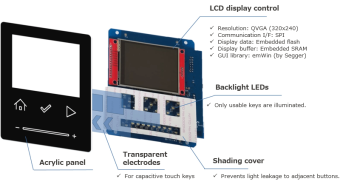
Capacitive Touch Plus Serial LCD Reference Design
The capacitive touch plus serial LCD reference design can display a microwave-style operation screen on a QVGA LCD module connected via SPI to an RX Family MCU. The capacitive-touch button and slider are made of transparent electrodes, which emerge white from the black housing when illuminated... Read More
Videos
This video introduces the reference design for serial TFT-LCD QVGA display and capacitive touch functions controlled by a single-chip RX MCU.
For more information, please refer to Serial LCD + Touch Reference Design.