
Overview
Description
The RA8E1 Fast Prototyping Board comes equipped with an R7FA8E1AFDCFB microcontroller and is an evaluation board specialized for prototype development for a variety of applications. It has a built-in SEGGER J-Link™ emulator circuit so you can write and debug programs without additional tools. In addition, with Arduino® UNO and Pmod™ interfaces included standard and through-hole access to all pins of the microcontroller, and so on, it has high expandability.
Sample software is available to demonstrate the functionality of the RA8E1 MCU and for connecting the RA8E1 Fast Prototyping Board with various wireless or sensor modules.
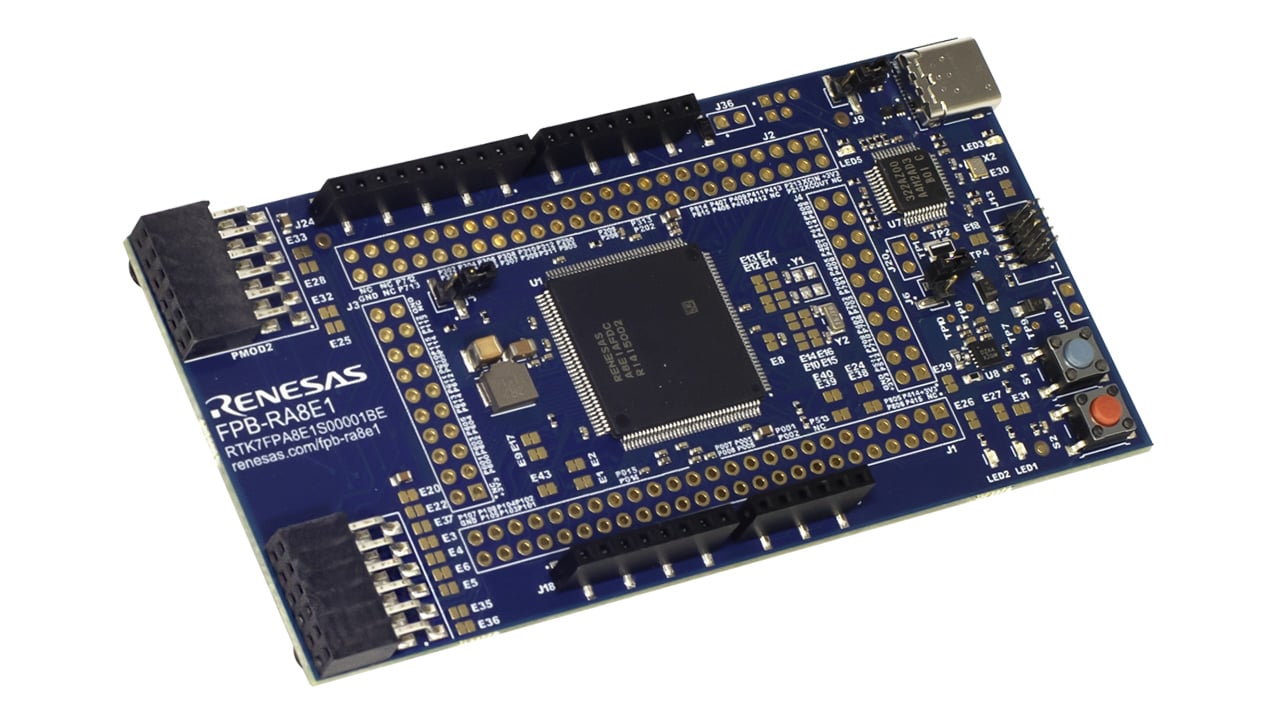
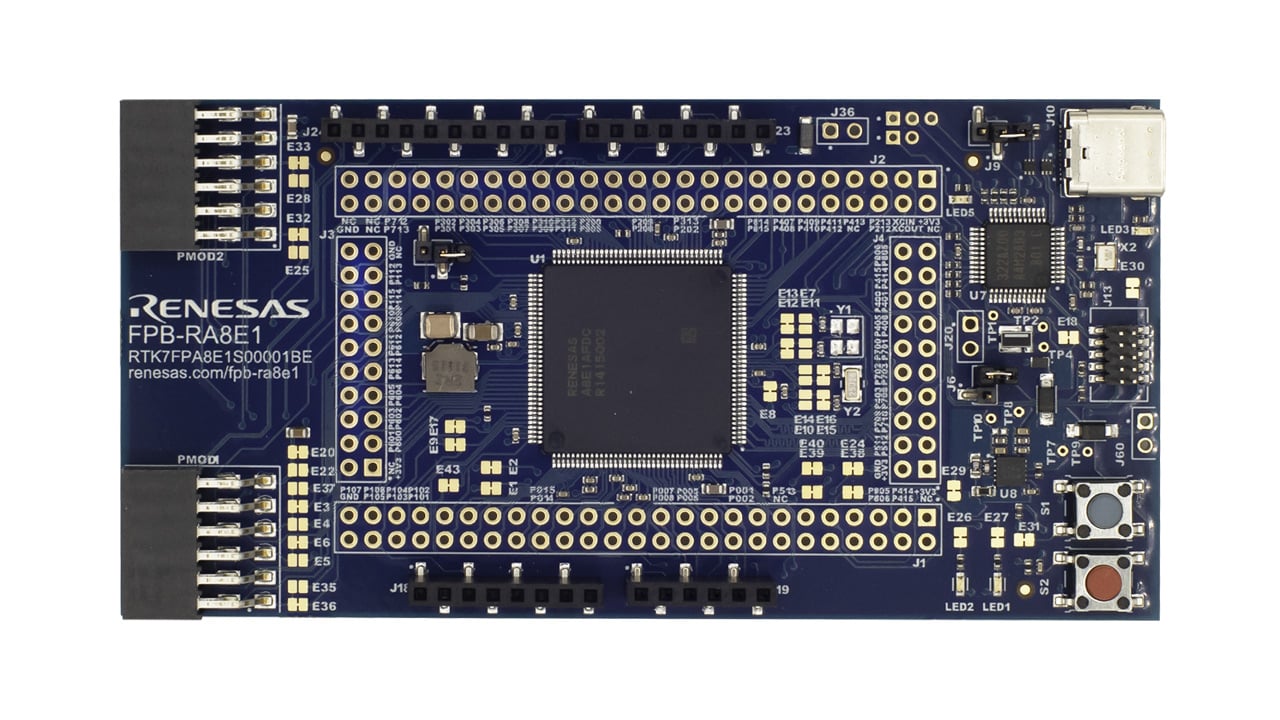
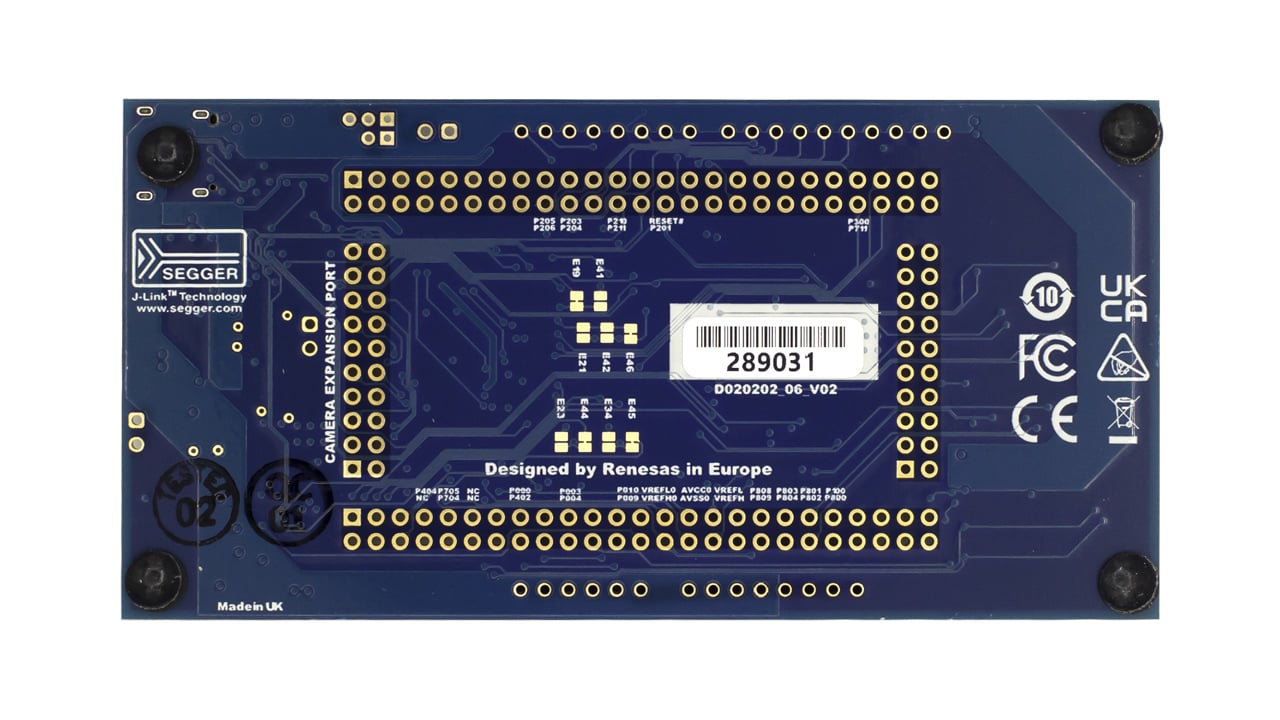
Features
- MCU Native Pin Access:
- R7FA8E1AFDCFB MCU (referred to as RA MCU)
- 360MHz, Arm® Cortex®-M85 core
- 1MB Code Flash, 12KB Data Flash, 544KB SRAM including 32KB of TCM
- 144-pin, LFQFP package, 20mm x 20mm x 1.70mm, 0.5mm pitch
- Native pin access through 1 x 20 and 2 x 50 male pin headers
- 20-pin camera interface connector
- MCU current measurement point for precision current consumption measurement
- Multiple clock sources, including low‑precision (~1%) internal RA MCU clocks and optional on‑board crystals providing precise 20.000MHz and 32.768Hz reference clocks
- Ecosystem and System Control Access:
- Two 5V input sources:
- USB debug
- External power supply
- Real-time clock backup supply connector (not populated)
- Two Debug modes:
- Debug on-board (SWD)
- Debug in (SWD, SWO and JTAG)
- User LEDs and buttons:
- Two User LEDs (green)
- Power LED (green) indicating availability of regulated power
- Debug LED (yellow) indicating the debug connection
- One user button
- One reset button
- Two popular ecosystem expansions:
- Two Digilent Pmod™ (SPI, UART, I2C) connectors
- Arduino (UNO R3) connector
- MCU boot configuration jumper
- Two 5V input sources:
Applications
Documentation
|
|
|
|
|---|---|---|
| Type | Title | Date |
| Quick Start Guide | PDF 1.15 MB 日本語 | |
| Manual - Development Tools | PDF 3.72 MB 日本語 | |
| PCB Design Files | FPB-RA8E1 v1 - Design Package
|
|
| Application Note |
PDF
632 KB
The FPB-RA8E1 example project bundle demonstrates how to write code for various Renesas Flexible Software Package (FSP) modules supported by the FPB-RA8E1 kit. It includes multiple example projects that highlight peripheral usage and system functionality, while leveraging the optimized, scalable, and high‑quality FSP for embedded system design.
|
|
| Application Note |
PDF
3.27 MB
Introduces the MCU boot firmware features and tool support to utilize Secure Factory Programming (SFP) for RA8 MCUs. Guidelines and procedures for utilizing these features and tools are provided. This application note also provides the key operations during SFP, Firmware Image Encryption and Device Lifecycle Management (DLM). This application note provides usage notes on how to use SFP with solutions such as the First Stage Bootloader (FSBL), TrustZone, and Decryption On The Fly (DOTF).
|
|
| Application Note |
PDF
5.29 MB
日本語
Outlines best practices for getting started with development using the FPB-RA8E1 board featuring the Renesas RA8E1 group MCU. This application note guides users through the complete workflow in the e² studio integrated development environment—from creating a new project and writing code to building and debugging the program.
|
|
| Application Note |
PDF
2.58 MB
AI-generated Summary:
The RA8 MCU Quick Design Guide details essential design considerations for Renesas RA8 microcontrollers, covering power supply configurations, emulator interfaces, operating modes, memory architecture, clock circuits, reset mechanisms, security features, and I/O port configurations. It highlights dual power domains, switching regulator connections, USB and MIPI interface power pins, and capacitor placement for stable operation. The guide also explains emulator support via SWD and JTAG, clock frequency requirements for peripherals, reset source determination, TrustZone security implementation, memory protection, and low power consumption strategies. It serves as a practical reference to accelerate development and ensure robust hardware design.
|
|
| Flyer | PDF 413 KB 日本語 | |
| Report | PDF 187 KB 日本語 | |
9 items
|
||
Design & Development
Software & Tools
Software & Tools
| Software title
|
Software type
|
Company
|
|---|---|---|
| Renesas Flash Programmer (Programming GUI) Flash memory programming software [Support MCU/MPU and devices: RA, RE, RX, RL78, RH850, RISC-V MCU, Renesas Synergy, DA1453x, DA1459x, DA1469x, DA1470x, DA148xx, Power Management, Renesas USB Power Delivery Family, ICs for Motor Driver/Actuator Driver, V850, 78K0R, 78K0]
|
Programmer (Unit/SW) | Renesas |
| RA Flexible Software Package (FSP) FSP is an enhanced software package designed to provide easy-to-use, scalable, high-quality software for embedded system designs using Renesas RA Family of Arm Microcontrollers.
Note: FSP with e² studio Installer (Platform Installer) will install the e² studio tool, FSP packs, GCC toolchain, and Segger J-Link drivers required to use this software. No additional installations are required.
|
Software Package | Renesas |
2 items
|
||
Sample Code
Sample Code
Filters
|
||
|---|---|---|
| Type | Title | Date Date |
| Sample Code | FPB-RA8E1 Example Project Bundle
The FPB-RA8E1 example project bundle demonstrates how to write code for various Renesas Flexible Software Package (FSP) modules supported by the FPB-RA8E1 kit. The sample code provides ready‑to‑build reference implementations that illustrate peripheral operation and system behavior, enabling developers to quickly evaluate FSP features and accelerate embedded application development.
|
|
1 item
|
||
Related Boards & Kits
Boards & Kits

Evaluation Kit for RA8D1 MCU Group
The EK-RA8D1 evaluation kit enables users to effortlessly evaluate the features of the RA8D1 MCU Group and develop embedded systems applications using Renesas' Flexible Software Package (FSP) and e2 studio IDE. Utilize rich onboard features along with your choice of popular ecosystem add-ons to... Read More

Evaluation Kit for RA8M1 MCU Group
The EK-RA8M1 evaluation kit enables users to effortlessly evaluate the features of the RA8M1 MCU Group and develop embedded systems applications using Renesas' Flexible Software Package (FSP) and e2 studio IDE. Utilize rich onboard features along with your choice of popular ecosystem add-ons to... Read More
Product Options
| Part Number | Status | Stock | Budgetary Price (USD) | Sampleable |
|---|---|---|---|---|
| RTK7FPA8E1S00001BE | Active | In Stock | 1u | $27.06 | Available |
Videos & Training
Configure and use the Watchdog Timer (WDT) and Independent Watchdog Timer (IWDT) on RA devices with the RA8E1 fast prototyping board. Project setup using the Flexible Software Package in e² studio is included, along with separate implementations for WDT and IWDT. Countdown behavior is displayed using SEGGER RTT to indicate timing before reset. Normal operation with watchdog expiration and system restart is shown for WDT. Fault-triggered reset behavior is demonstrated using IWDT to illustrate its role in system recovery.
Additional Videos
News & Blog Posts
Blog Post Nov 6, 2024 |
Support
Support Communities
- FPB-RA8E1 Data Flash return FSP_ERR_CMD_LOCKED
Hi, All~ I am using the ra-fsp flash_hp example, but the R_FLASH_HP_Erase API does not work as FSP_ERR_CMD_LOCKED is returned during the operation. I also tested it on EK-RA8M1, but the same error is returned and it does not work. Please ...
May 13, 2025 - RA8E1 Capture GPT
Hi, I want use the GPT1 only with GTIOC1A for Capture. GTIOC1B is not used. What must I selcet for the Capture A source in the GTICASR. In the datashhet for GTIOCA is always combined with GTIOCB on selcting. I want GTCCRA input capture enabled on the falling edge. In ...
Feb 3, 2026 - RA4E1 - RTC time not retained after pressing Reset button on FPB-RA4E1
Hi,Everytime I press the Reset button on FPB-RA4E1, the current RTC calendar time is lost.Here is my application logic:1.At startup, Call R_RTC_Open(&g_rtc0_ctrl, &g_rtc0_cfg) to open the RTC (with RTC_CFG_OPEN_SET_CLOCK_SOURCE=1). 2 ...
Jun 18, 2026
Knowledge Base
- How to use RTC to get the current time on FPB-RA8E1
Last updated on 2nd June 2026 Summary of the video This video demonstrates how to configure and use the Real-Time Clock on the FPB-RA8E1 board to detect a user switch press and control LEDs. Flexible Software Package (FSP) supports RTC calendar operations with the r_rtc FSP module ...
- How to generate a Pulse-width modulation (PWM) output with FPB-RA8E1
Last updated on 2nd June 2026 Summary of the video This video demonstrates how to generate a PWM signal on the FPB-RA8E1 board using the General PWM Timer. Flexible Software Package (FSP) supports PWM generation with the r_gpt FSP module. This example demonstrates opening and starting the GPT ...
- How to setup an external interrupt using FPB-RA8E1
Last updated on 2nd June 2026 Summary of the video This video demonstrates how to configure and use an external interrupt on the FPB-RA8E1 board to detect a user switch press and control LEDs. Flexible Software Package (FSP) supports external interrupt detection with the r_icu FSP module and ...

Support Communities


