
概要
説明
Integrated Software Development Environment
Innovative and Open Development Environment
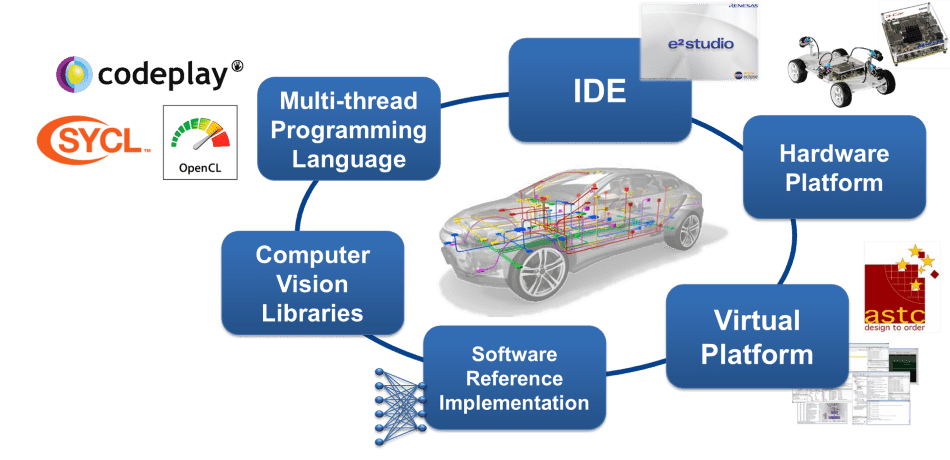
The e² studio is a development environment based on Eclipse. Eclipse is a popular and extensible open-source development environment used by many semiconductor companies.
For the R-Car V-series, a special version of e² studio is available which focuses on the creation of high-performance Computer Vision applications for ADAS solutions. R-Car SoCs have an advanced HW architecture: the high-performance multi-core CPU is accelerated by dedicated accelerator cores for image processing. The accelerators are connected to the CPU via a high-speed communication bus.
Ease SW Development for Computer Vision and Deep Learning Algorithms
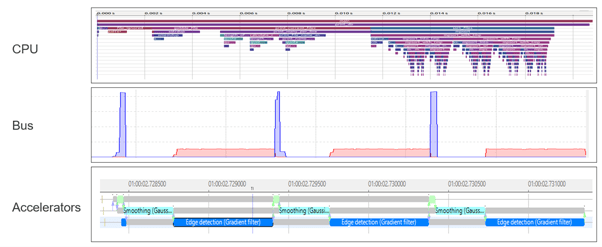
To debug and optimize the application, the state of each of these resources (CPU, bus, accelerator IPs) and their interaction need to be visualized. R-Car SoC utilizes Arm's technology for tracing and debugging called CoreSight. Dedicated CoreSight HW elements allow analysis of the application run-time at a low overhead.
Renesas's IDE e² studio connects to the CoreSight HW on the development board, retrieves (and stores) the trace data, and gives various options for viewing the results. For visualization, the open-source tracing framework called Trace Compass is used. This allows simple integration of available OS-specific profiling features (e.g. LTTng for Linux) and Renesas-specific features for bus and accelerator monitoring. Depending on the use case, an inexpensive Ethernet cable, connection to JTAG via Lauterbach’s in-circuit emulator, or a high-speed trace connection can be utilized.
The input from the camera and the intermediate steps of image processing can also be displayed so that the developer can easily spot possible issues in the algorithm.
Ease to Access: Download the complete development suite for an evaluation
New developers can download an evaluation license for e² studio free of charge. For a commercial license, please contact a Renesas representative.

特長
- Supported devices: R-Car V3H, R-Car V3M, and R-Car S4
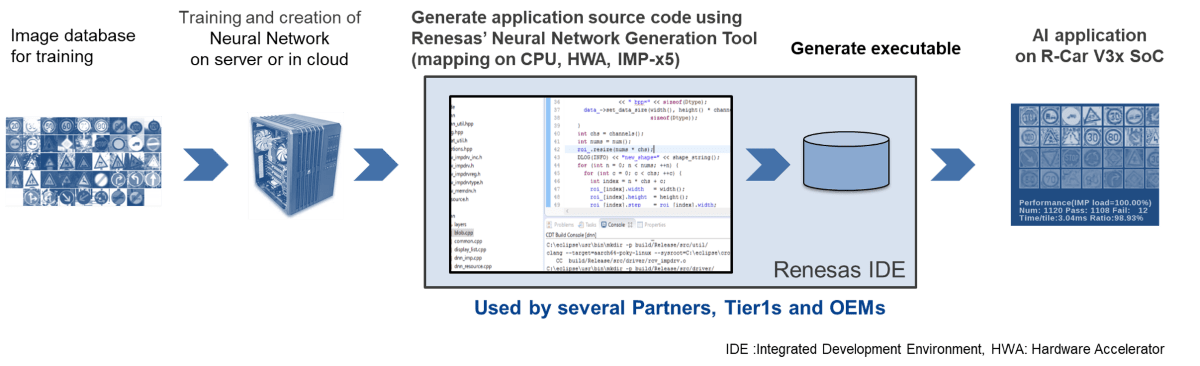
- Multithreaded programming environment: The e² studio includes a unified GUI provided by Eclipse that supports programming for the IMP-X5’s built-in 64-thread processor. The e² studio for R-Car V3M incorporates the newly developed IMP-X 5-dedicated ccimp C compiler which enables development in C programming language. It also provides a feature that debugs the operation of threads on a step-by-step basis from the GUI, which contributes to reducing the man-hours required for program development to approximately one-tenth.
- Image viewer: The IDE with a simple UI configuration enables system developers to check the image generated by IMP-X5 directly from the GUI. This eliminates the need to store the image for image verification, making it easier to check images.
- IP tracer: The e² studio visualizes the interaction between subcomponents in IMP-X5, which enables software developers to solve complex software errors linked to a specific IP at an early stage. This contributes to a shorter software development period.
- Bus Traffic Monitor: The IDE monitors the amount of data being transferred through the complex bus structure in the SoC. In the past, data transfer delays were identified by trial and error. With the e² studio, developers can pinpoint the bottleneck, reducing the time required for software tuning by half.
- Multi-Core Debug and Trace: Multiple heterogeneous processor cores (Arm core/ RH850 core) integrated in R-Car S4 can be debugged and traced simultaneously. This allows for a shorter time to identify the cause and analyze problems in systems where multiple cores work together to achieve a function.
- Debug and Trace Tools for Multi-Devices: Multiple devices such as R-Car S4 and RH850/U2A can be simultaneously synchronized for debugging and tracing. This reduces the time required to locate and determine the cause of problems in the software that operates in cooperation on multiple devices.
Feature Support Matrix
| Feature | V Series | S Series |
|---|---|---|
| Multithreaded Programming Environment | check | - |
| Image Viewer | check | - |
| IP Tracer | check | - |
| Bus Traffic Monitor | check | check |
| Multi-Core Debug and Trace | - | check |
ターゲットデバイス
ドキュメント
|
|
|
|
|---|---|---|
| 分類 | タイトル | 日時 |
| アプリケーションノート |
PDF
1.69 MB
English
AI生成コンテンツ:
マルチデバイスの同期デバッグは、リソースを共有する複数のターゲットデバイスを同時に制御・解析し、各デバイス間のソフトウェア問題の特定を容易にします。E2エミュレータ、IE850A、e2studio統合開発環境を組み合わせ、同期実行、同期ブレーク、同期トレース機能を提供します。複雑な組み込みシステム開発においてデバッグ効率と精度を向上させます。用語説明、ハードウェア要件、セットアップ方法、使用手順、関連マニュアルの案内も含まれています。
|
|
| アプリケーションノート |
PDF
2.06 MB
English
AI生成コンテンツ:
複数デバイスの同期デバッグをE2エミュレータとIE850Aを用いてe2studio環境で行うためのハードウェア要件と設定方法を説明する。同期アダプタの機能や接続方法、エミュレータの仕様、R-Car S4、R-Car V4H、RH850などのユーザシステムとの接続例を示す。関連マニュアルも紹介し、多デバイス同期デバッグの実践を支援する。
|
|
| アプリケーションノート |
PDF
2.18 MB
English
AI生成コンテンツ:
LinuxアプリをR-Car V4H上でデバッグするために、統合開発環境e2 studioとETMトレース解析ツールの使用方法を解説する。R-Car V4HリファレンスボードでのLinux環境セットアップ、ホストPCとリファレンスボードの接続設定、トレースデータ取得用ファイルの準備手順を示す。Linux起動、バージョン確認、スタブファイルの転送と実行権限付与により、トレースデータの取得と表示を可能にする。
|
|
| アプリケーションノート |
PDF
1.57 MB
English
AI生成コンテンツ:
LinuxアプリをR-Car V4H上で動作させ、e2studioのBus Monitorトレースウィンドウを用いてデバッグする手法を解説する。Linuxの起動、トレースデータ取得用ファイルの準備、モジュールのロード、R-CarリファレンスボードとホストPCの接続設定、トレースデータのインポート・表示方法を詳細に説明。バスの動作解析やQoSメッセージの取得を可能にする手順を示す。
|
|
| アプリケーションノート |
PDF
1.52 MB
English
AI生成コンテンツ:
LinuxアプリケーションをR-Car V4H上でデバッグするために、e2studioのDTA解析ツールを使用する手順を説明する。Linux環境のセットアップ、トレースデータ取得用ファイルの準備と実行、DTAトレースウィンドウでのデータ表示と解析方法を詳細に解説する。ホストPCとR-Carの接続設定や必要なモジュールのロード、サンプルアプリの動作方法も含む。
|
|
| アプリケーションノート |
PDF
1.15 MB
English
AI生成コンテンツ:
R-Carプラットフォーム上で動作するLinuxアプリをe2studioでデバッグするためのデバッガとターゲットボードの接続手順を解説する。使用環境としてR-Car S4およびV4Hリファレンスボード、ホストPCの仕様、SDKバージョンを示す。ホストPCとリファレンスボード間の接続図を掲載し、Renesas Debug Only Projectの作成方法とLinuxアプリ用デバッガ接続設定の手順を詳述している。
|
|
6件
|
||
設計・開発
ビデオ&トレーニング
e² studioでR-Car S4デバイスをデバッグする際に、GUIではなくコマンドベースの操作を使用してレジスタやメモリの書き込みと読み出しを行う方法を学びましょう。このアプローチはローレベルデバッグを効率化し、開発中によりダイレクトなコントロールを可能にします。
ニュース&ブログ
ニュース 2017年10月19日 |
ニュース 2017年9月13日 |
サポート
サポートコミュニティ
- E1/E2/E2liteエミュレーターはSynergyに対応予定あります?
E1/E2/E2liteエミュレーターはSynergyに対応予定はありますか? ちょっと気になって。
2017年5月26日 - V850E2とRH850のOSS(オープンソースソフトウェア)なInstruction set simulator (athrill2)だそうです
... らっしゃいました。athrill(アスリル)開発プロジェクト - GitHubgithub.com/tmori/athrillTOPPERS/ATK2カーネル向け実機レス環境(athrill2) - Qiitaqiita.com/kanetugu2018/items/75dadc340f3db2a344ab
2018年9月26日
ナレッジベース
- エミュレータ導入時に購入すべきユーザインタフェースケーブルは? (E2 Lite/E2)
... ーザインタフェースケーブルを購入する必要があります。 E2 Lite 向け導入用インタフェースケーブル・セレクション・リ ...
- 評価パッケージのダウンロード先2か所の違いは何ですか?
... r-car-h3-m3-h2-m2-e2-documents-software [1]- https://www.renesas.com/us/en/application/automotive/r-car-h3-m3-documents-software [2] [1] eLinuxで公開しているYocto BSP向けの評価パッ ...
2021年11月9日


