
Overview
Description
Integrated Software Development Environment
Innovative and Open Development Environment
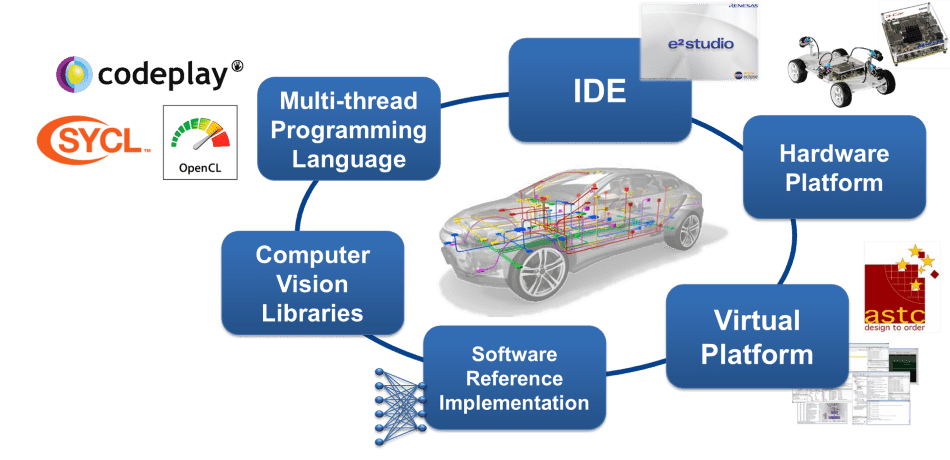
The e² studio is a development environment based on Eclipse. Eclipse is a popular and extensible open-source development environment used by many semiconductor companies.
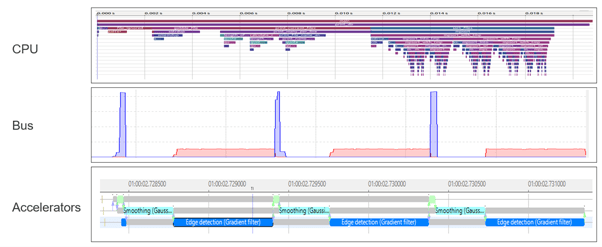
For R-Car V-series, a special version of e² studio is available which focuses on the creation of high-performance Computer Vision applications for ADAS solutions. R-Car SoCs have an advanced HW architecture: the high-performance multi-core CPU is accelerated by dedicated accelerator cores for image processing. The accelerators are connected to the CPU via a high-speed communication bus.
Ease Software Development for Computer Vision and Deep Learning Algorithms
To debug and optimize the application, the state of each of these resources (CPU, bus, accelerator IPs) and their interaction need to be visualized. R-Car SoC utilizes Arm's technology for tracing and debugging called CoreSight. Dedicated CoreSight hardware (HW) elements allow analysis of the application run-time at a low overhead.
Renesas' e² studio IDE connects to the CoreSight HW on the development board, retrieves (and stores) the trace data, and gives various options for viewing the results. For visualization, the open-source tracing framework called Trace Compass is used. This allows simple integration of available OS-specific profiling features (e.g., LTTng for Linux) and Renesas-specific features for bus and accelerator monitoring. Depending on the use case, an inexpensive Ethernet cable, connection to JTAG via Lauterbach’s in-circuit emulator, or a high-speed trace connection can be utilized.
The input from the camera and the intermediate steps of image processing can also be displayed so that the developer can easily spot possible issues in the algorithm.
Ease to Access: Download the complete development suite for an evaluation
New developers can download an evaluation license for e² studio free of charge. For a commercial license, please contact a Renesas representative.

Features
- Supported devices: R-Car V3H, R-Car V3M, and R-Car S4
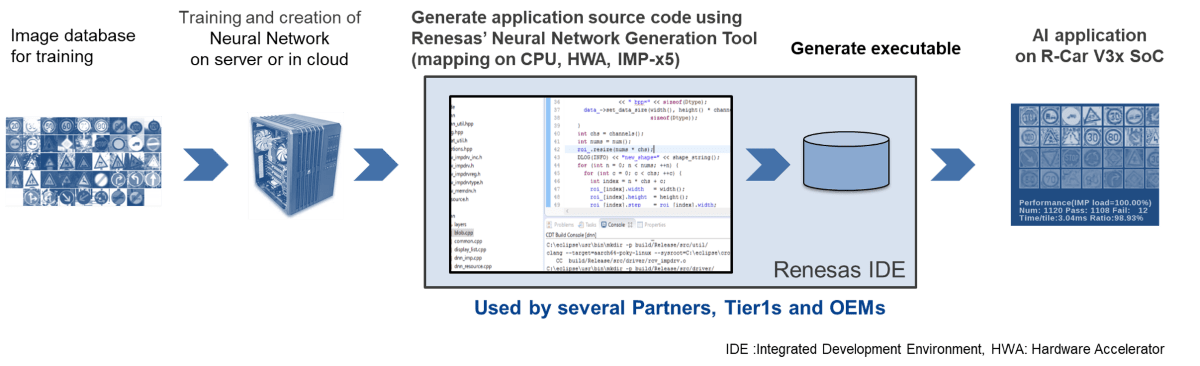
- Multithreaded programming environment: The e² studio includes a unified GUI provided by Eclipse that supports programming for the IMP-X5’s built-in 64-thread processor. The e² studio for R-Car V3M incorporates the newly developed IMP-X 5-dedicated ccimp C compiler which enables development in C programming language. It also provides a feature that debugs the operation of threads on a step-by-step basis from the GUI, which contributes to reducing the man-hours required for program development to approximately one-tenth.
- Image viewer: The IDE with a simple UI configuration enables system developers to check the image generated by IMP-X5 directly from the GUI. This eliminates the need to store the image for image verification, making it easier to check images.
- IP tracer: The e² studio visualizes the interaction between subcomponents in IMP-X5, which enables software developers to solve complex software errors linked to a specific IP at an early stage. This contributes to a shorter software development period.
- Bus Traffic Monitor: The IDE monitors the amount of data being transferred through the complex bus structure in the SoC. In the past, data transfer delays were identified by trial and error. With the e² studio, developers can pinpoint the bottleneck, reducing the time required for software tuning by half.
- Multi-Core Debug and Trace: Multiple heterogeneous processor cores (Arm core/ RH850 core) integrated in R-Car S4 can be debugged and traced simultaneously. This allows for a shorter time to identify the cause and analyze problems in systems where multiple cores work together to achieve a function.
- Debug and Trace Tools for Multi-Devices: Multiple devices such as R-Car S4 and RH850/U2A can be simultaneously synchronized for debugging and tracing. This reduces the time required to locate and determine the cause of problems in the software that operates in cooperation on multiple devices.
Feature Support Matrix
| Feature | V Series | S Series |
|---|---|---|
| Multithreaded Programming Environment | check | - |
| Image Viewer | check | - |
| IP Tracer | check | - |
| Bus Traffic Monitor | check | check |
| Multi-Core Debug and Trace | - | check |
Target Devices
Documentation
|
|
|
|
|---|---|---|
| Type | Title | Date |
| Application Note |
PDF
1.68 MB
日本語
AI-generated Summary:
Synchronous debugging enables simultaneous control and evaluation of multiple Renesas devices using E2 Emulator, IE850A, and e2 studio. It supports system development for RH850-family MCUs and R-Car automotive SoCs by providing hardware configurations, synchronous adapters, and connection methods. The document details synchronous adapter types, setup procedures, and user system connections, alongside references to related manuals for comprehensive debugging support. It emphasizes correct usage, safety precautions, and responsibilities during development and disposal.
|
|
| Application Note |
PDF
1.57 MB
日本語
AI-generated Summary:
Synchronous debugging enables simultaneous control and analysis of multiple devices operating cooperatively within a system, addressing challenges in identifying software malfunctions across interconnected SoCs and MCUs. It supports tracing, synchronous execution, breaks, and tracing functions using the E2 emulator, IE850A, and e2 studio IDE. This approach simplifies debugging in complex electronic control units by providing a unified environment to pinpoint issues efficiently. The document also outlines the required hardware and software environments, terminology, and related manuals necessary for implementing synchronous debugging.
|
|
| Application Note |
PDF
2.16 MB
日本語
AI-generated Summary:
The document explains how to acquire and display trace data from Linux applications running on the R-Car V4H using e2 studio and the ETM analysis tool. It details setting up the environment, connecting the R-Car reference board to a host PC, starting Linux, and preparing executable files for trace data acquisition. The guide includes steps for configuring the Linux environment, loading necessary modules, and using e2 studio to capture and visualize trace data effectively.
|
|
| Application Note |
PDF
1.54 MB
日本語
AI-generated Summary:
The document explains how to acquire and analyze trace data from the R-Car V4H running Linux using the e2 studio IDE. It details setting up the environment, connecting the host PC to the reference board, and preparing executable files for trace data acquisition. The guide covers starting Linux on the R-Car, loading necessary modules, and operating ELF files for bus monitoring. It also describes creating tracing projects, setting profiling, importing, and displaying trace data using the bus monitor trace window for debugging purposes.
|
|
| Application Note |
PDF
1.49 MB
日本語
AI-generated Summary:
The document explains how to acquire and display trace data from Linux applications running on the R-Car V4H using the command-line interface and the Debug Trace Agent (DTA) within e2 studio. It covers environment setup, connection between the host PC and R-Car board, preparation of executable files for trace data acquisition, and debugging operations including project creation, trace profiling, and data visualization. Key files like perfmodule.ko and saperfmon.elf are used for trace data collection and analysis.
|
|
| Application Note |
PDF
1.02 MB
日本語
AI-generated Summary:
The document explains how to connect a debugger and target board to debug Linux applications running on R-Car S4 and V4H using e2 studio. It details the environment setup, including reference boards and host PC specifications, connection diagrams with IP configurations, project creation steps within e2 studio, and debugger connection procedures. Users learn to create a Renesas Debug Only Project, configure debug settings, and specify executable files for debugging. The guide supports efficient debugging of Linux applications on R-Car platforms.
|
|
6 items
|
||
Design & Development
Videos & Training
Learn how to write and read registers and memory using command‑based operations instead of the GUI when debugging R‑Car S4 devices in e² studio. This approach helps streamline low‑level debugging and gives you more direct control during development.
News & Blog Posts
Support
Support Communities
- e2 studio support R-Car H3? How to use IMP-X5 for deeplearning?
Hello everyone, Do e2studio support R-Car H3? And how can I run my deeplearning model on IMP-X5? Thank you, hope your response Minh
Jan 5, 2021 - e² studio for R-Car
... studio. I need e² studio for R-Car series (V3x). Unfortunately there is no information found on the HP.Do I need 1. the typical e² studio IDE and import packages to support R-Car series or 2. is there a "special" e² studio IDE for this series?Thanks! Thilo
Dec 8, 2021 - Question about e2 Studio
Hey, I've been tinkering with the e2 studio for a bit, but I've ran into some issues. I've built the ADT along with the image, and everything seems to be running alright. However, when I tried debugging the helloworld sample application, I've ran into a file ...
May 26, 2023
Knowledge Base
- Connect Directly to Target Board with E2 Emulator’s 20-pin Cable (RH850, RX, RL78/E2 Emulator)
... 20-pin cable. The E2 emulator does not support 20-pin connection to the RH850, RX, RL78 target board. The 20-pin configuration of the E2 emulator was adopted to support Arm core-based products (e.g., R-Car).and does not support 20-pin connection to RH850, RX, RL78 ...
Feb 18, 2025 - Which user-system interface cable should be purchased when introducing an emulator? (E2 Lite/E2)
... Sold separatelyMust buy Select one according to the pin connector to be connected. User-system Interface Cable for the E2 Emulator(20-10 pins)RTE0T00020KCAC1000J E2 emulator : Selection list of user-system interface cables for installation category Product name RA Family RL78 Family RX Family RH850 FamilyR-Car Family ...
Feb 12, 2025 - How do connect E2 Emulator to Debug0(CN10) physically?
Last Updated: 11/14/2023 Question: How do connect E2 Emulator to Debug0(CN10) physically? Answer: The following parts are required in order to connect E2 Emulator to Debug0(CN10) of the R-Car S4 Starter Kit. - [1] RTE0T00020KCA10000R https://www.renesas.com/jp/ ...
Nov 14, 2023

Support Communities


