
Overview
Description
Smart Configurator automatically generates initial-setting programs for MCUs.
It provides a quick and smart way of combining and configuring software to meet your needs, such as by configuring peripheral pins and importing middleware and drivers.
For RX Family users, platform installers are available that include both the Smart Configurator functionality described above and the Flexible Software Package (FSP). Please download the appropriate installer from the RX FSP page below.
RX Flexible Software Package (FSP)
Note. Refer to the RX Smart Configurator if you are using RX devices that are unsupported by FSP. (Refer to 'Target Devices')
Features
- Importing Middleware/Drivers
- Generating Driver Code
- Pin Settings
- Learn More
Release Information
| Supported IDEs | Delivery Format | Naming format of platform installer |
|---|---|---|
| e² studio | As plug-in of e² studio (Note1) | setup_rxfsp_v<version of RX FSP>_e2s_v<version of e² studio>.exe ex) setup_rxfsp_v1_0_0_e2s_v2026-07.exe |
| IDE of Partners (IAR, Visual Studio Code, etc..) | As standalone application (Note2) | setup_rxfsp_v<version of RX FSP>_sc_v<version of RX FSP Smart Configurator>.exe ex) setup_rxfsp_v1_0_0_sc_v2026-07.exe |
For detailed release information and how to get platform installers, go to RX Flexible Software Package (FSP) and refer 'Release Information' tab of Overview section.
Note
- The package of the e² studio includes this plug-in.
- This is delivered as platform installer included RX FSP.
Target Devices
Downloads
| Type | Title | Date |
|---|---|---|
| Software & Tools - Software | EXE 1,245.11 MB RX FSP and RX Smart Configurator (RXSC) installer package to use with third-party integrated development environments. | |
| Software & Tools - Software | EXE 1,605.34 MB Includes e² studio integrated development environment, toolchain, and FSP packs. | |
2 items | ||
Documentation
| Type | Title | Date |
|---|---|---|
| Flyer | PDF 977 KB 日本語 , 简体中文 This is a flyer for the Smart Configurator, which can automatically generate initial setup programs for microcontrollers. It details the features and information about the Smart Configurator. Supported microcontrollers include RL78, RX, RH850, RISC-V, RA, and RZ. | |
1 item | ||
Videos & Training
This video gives an overview of the Flexible Software Package (FSP). The FSP is an enhanced software package designed to deliver software for embedded system designs using the Renesas RA and RZ Family of Arm® microcontrollers.
Additional details
Importing Middleware/Drivers
Flexible Software Package(FSP)
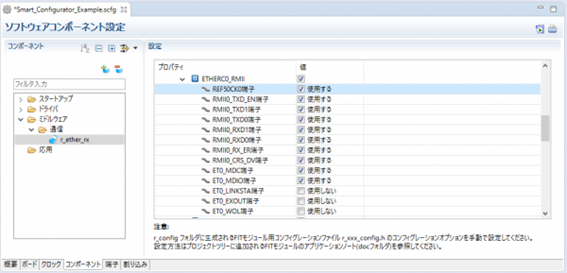
You can change the settings of FSP pins and components by using the Smart Configurator GUI.
Generating Driver Code
The Smart Configurator provides you with a GUI environment for generating driver code that handles the details of the settings of peripheral modules.
Clock settings
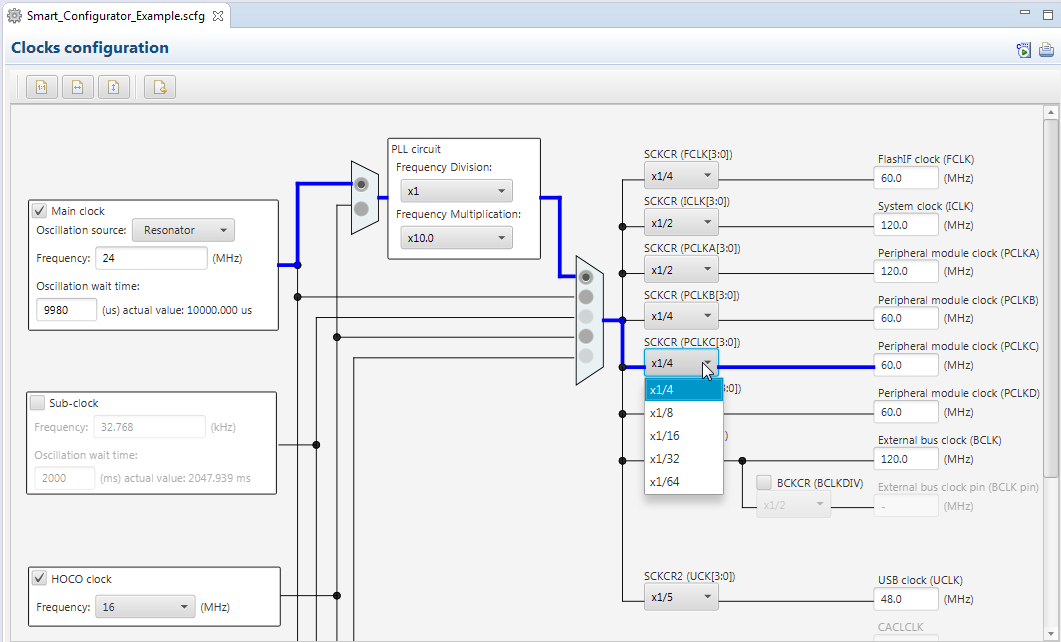
You can make clock settings by selecting a clock source and making connections in the block diagram in the [Clocks configuration] window.
Component settings
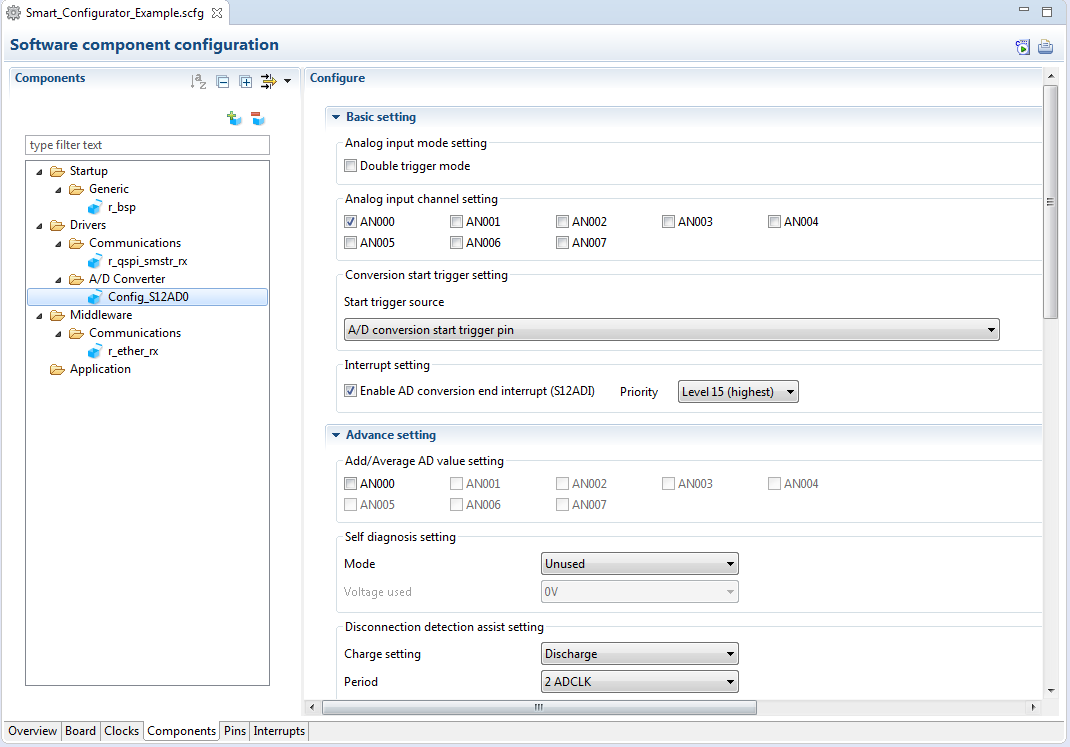
In the [Software component configuration] window, you can embed sample code and make settings for peripheral modules. After selecting the module you wish to set up for use, you can check for errors in settings (with some types indicated on the display) or switch the channels for use by drivers of multi-channel modules.
Pin Settings
The assignments of pins can be set up through a GUI, which also checks and offers solutions for cases of contention for the same pin by multiplexed functions.
The [Pins Configuration] window (displayed per peripheral module)
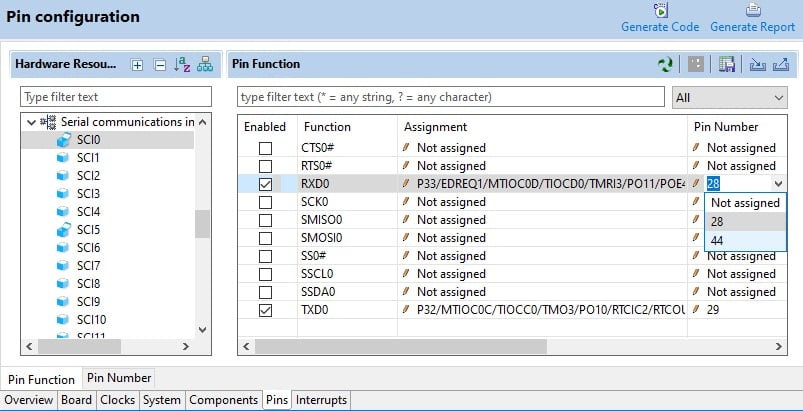
Specifying a peripheral module in the [Pins Configuration] window displays the pin functions for use by the module and allows you to set the assignment of the functions to pins.
[MCU Package] window
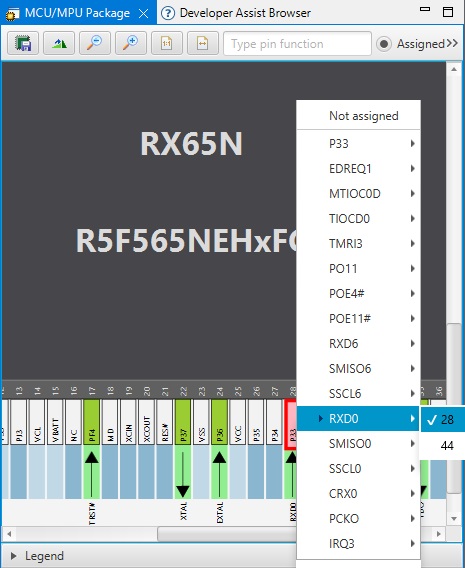
The [MCU Package] window displays a symbolic view of the pins, indicating by colors which pins are and are not in use, which have been assigned contending multiplexed functions, and so on. This makes it easy to check the overall situation.
Automatic resolution of contention between pin functions
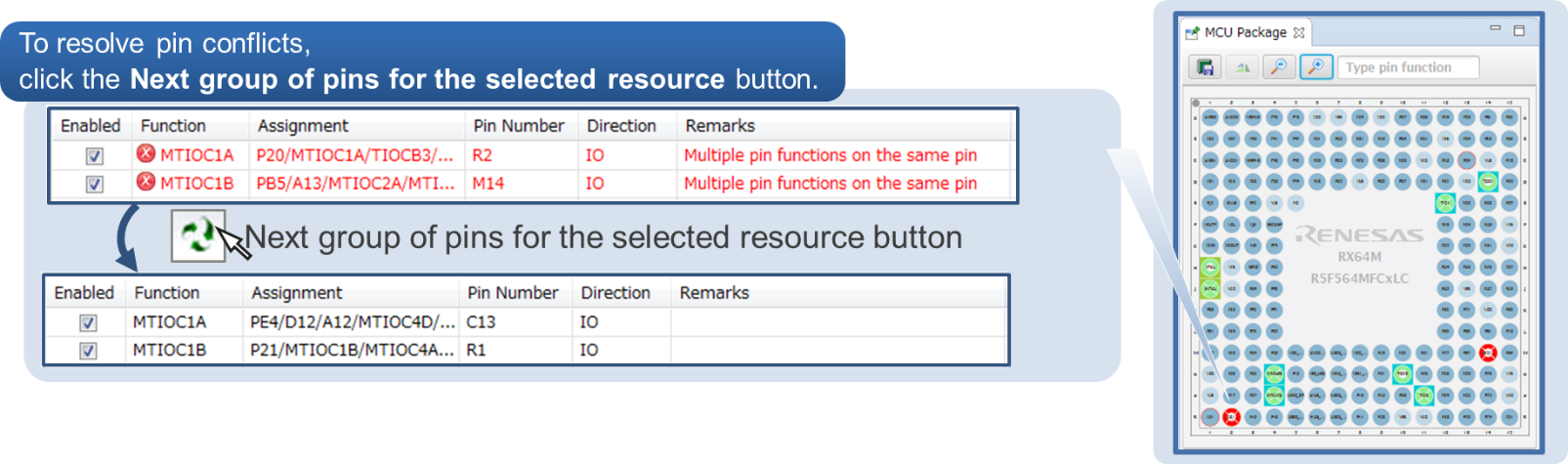
In cases of contention for a pin, clicking on the pin brings up a list allowing automatic changing of the assignment of the pin to resolve the contention.
Support
Support Communities
- RX66T RIIC
Hello, expert, I use e2studio FSP to configure RIIC module and generate code. May I ask how to use library functions to read and write eeprom? The sample code introduced by RX series about RIIC does not have the code used by RX66T sample? eeprom datasheet: The device address is ...
Aug 23, 2024 - EK-RA2L1 Evaluation Kit Flash Programming Problem.
Hi, I have EK-RA2L1 Evaluation Kit and I want to implement blinky project on this. But there's a problem about programming issue. I couldn't program the MCU on this kit.1- I've created Bare Metal Blink Project from RA Smart Configurator for IAR Toolchain. I've ...
Apr 23, 2021 - E2studio r_bsp old version download
Hi everybody, I had to reinstall E2studio and I'm currently using version 2025-07. When I open Smart Configurator the "r_bsp" icon on "components tab" is grey because expected version is 7.20 but the available versions are 7.52, 7.53 and 7.54. I would like ...
Nov 4, 2025
Knowledge Base
- RA Family: Correct ID Code Format for Different Tools
... configuration in either the Smart Configurator (for RX) or the FSP Configurator (for RA devices) 1.1 Setting ID code for RA devices using FSP configuratorThe ID Code setting can be found under BSP>RA6M3 Device Options>OFS Registers>OSIS (see Figure 1) Figure 1: Setting ID code for ...
Mar 17, 2026 - Network connection error in e² studio installer
... as is. Please refer to the following FAQ for the distribution website.[FAQ] Installation of e² studio[FAQ] How can I install and update compilers for e² studioFor FSP projects working with RA and/or RZ devices:[FAQ] How to Install FSP in e² studioFor Smart Configurator for RX ...
- Handling of workspaces and projects in e² studio
... Enter a project name, and then select a toolchain, OS (if necessary and available), board or target device, and a debugger type.(Project Wizard dialog for RX)A coding assistant feature (such as Smart Configurator) can be used if the device is supported.(Project Wizard dialog for RA) Depending on ...
Nov 17, 2025

Support Communities


