
Overview
Description
RISC-V Smart Configurator supports the device RISC-V MCU R9A02G021, Ultra-low Power 48MHz MCU with Renesas RISC-V CPU Core.
RISC-V Smart Configurator can automatically generate control programs for peripheral modules (device driver programs). By generating needed source code in accordance with user settings, the plug-in shortens development terms and dramatically reduces costs.
Features
- Importing Middleware/Drivers
- Pin Settings
- Learn More
Release Information
| Supported IDEs and user guides (Note1) | Related documents | Latest Ver. Released | Operating Environment | ||
|---|---|---|---|---|---|
| e² studio | IAR | Segger | |||
| e² studio plug-in (Note2) RISC-V MCU Smart Configurator User's Guide: e² studio (PDF) | Download RISC-V MCU Smart Configurator User's Guide: IAREW, SEGGER Embedded Studio (PDF) | Download RISC-V MCU Smart Configurator User's Guide: IAREW, SEGGER Embedded Studio (PDF) | Smart Configurator User's Manual: RISC-V MCU API Reference (PDF) | V1.6.0 Dec 20, 2025 | Operating Environment |
Note
- These user guides cover everything from installation to the setting of peripheral functions and the generation of code. Statements in each user guide are specific to the stated target integrated development environment.
- The package of the e² studio includes this plug-in.
Smart Configurator released after Dec. 2021 will support the 64-bit versions of Windows® only.
Microsoft® Windows® has shifted to the 64-bit environment. Therefore, Renesas will focus on supporting Smart Configurator for the 64-bit environment.
(Microsoft®, Windows® are registered trademarks of Microsoft Corporation in the United States and/or other countries. https://www.microsoft.com/legal/intellectualproperty/trademarks.aspx)
Target Devices
Design & Development
Videos & Training
This video introduces the Smart Configurator for the RISC-V family. RISC-V Smart Configurator is a coding assistant tool that supports the generation of source codes and the integration of software packages for development.
Additional Details
Generating Driver Code
The Smart Configurator provides you with a GUI environment for generating driver code that handles the details of the settings of peripheral modules.
Clock settings
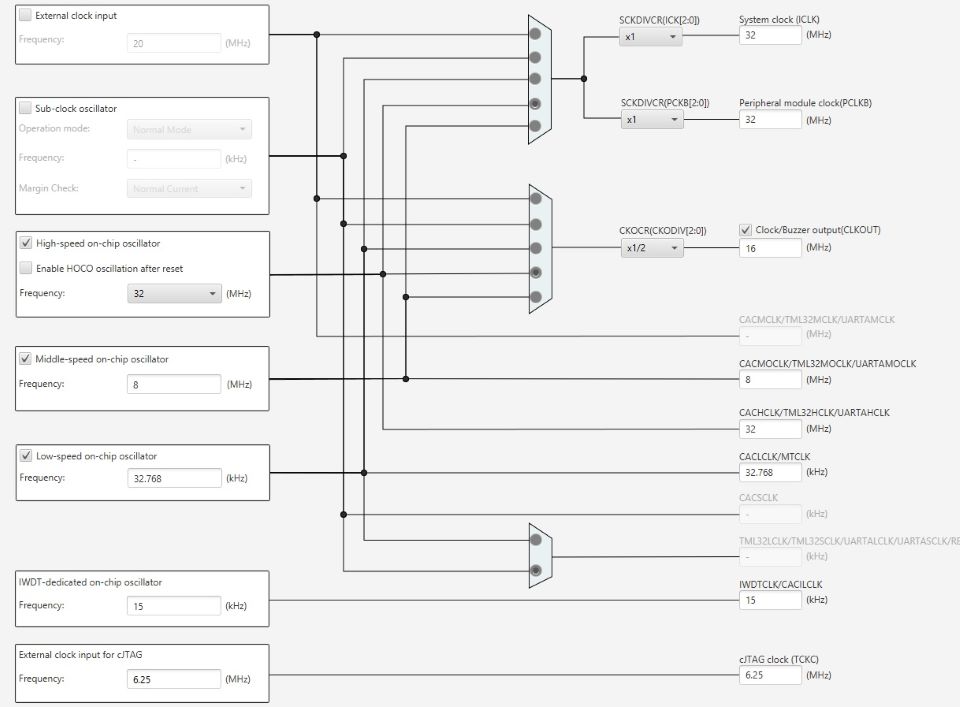
You can make clock settings by selecting a clock source and making connections in the block diagram in the [Clocks configuration] window.
Component settings
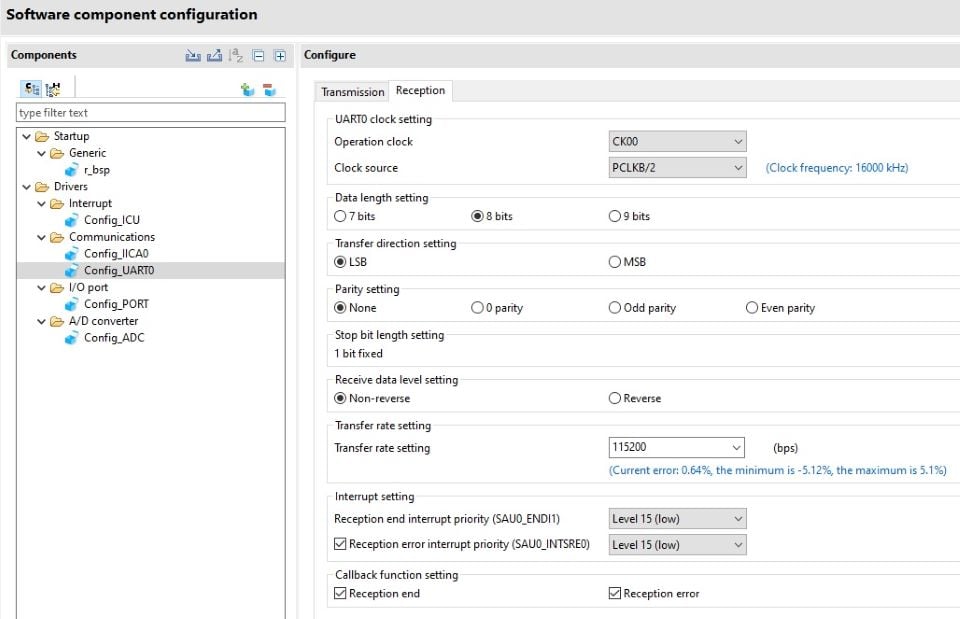
In the [Software component configuration] window, you can make settings for peripheral modules. After selecting the module you wish to set up for use, you can check for errors in settings (with some types indicated on the display) or switch the channels for use by drivers of multi-channel modules.
Pin Settings
The assignments of pins can be set up through a GUI, which also checks and offers solutions for cases of contention for the same pin by multiplexed functions.
The [Pins Configuration] window (displayed per peripheral module)
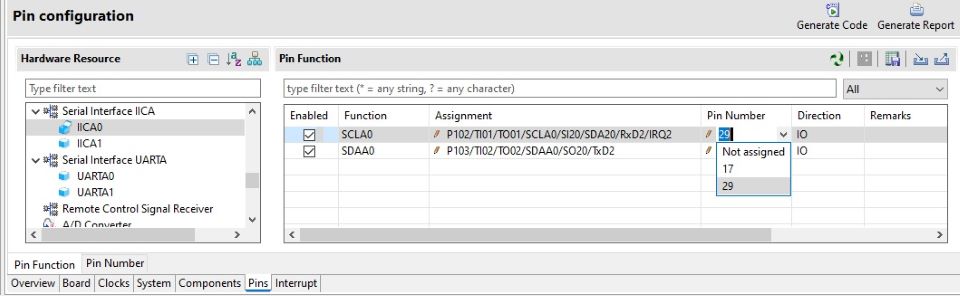
Specifying a peripheral module in the [Pins Configuration] window displays the pin functions for use by the module and allows you to set the assignment of the functions to pins.
[MCU Package] window
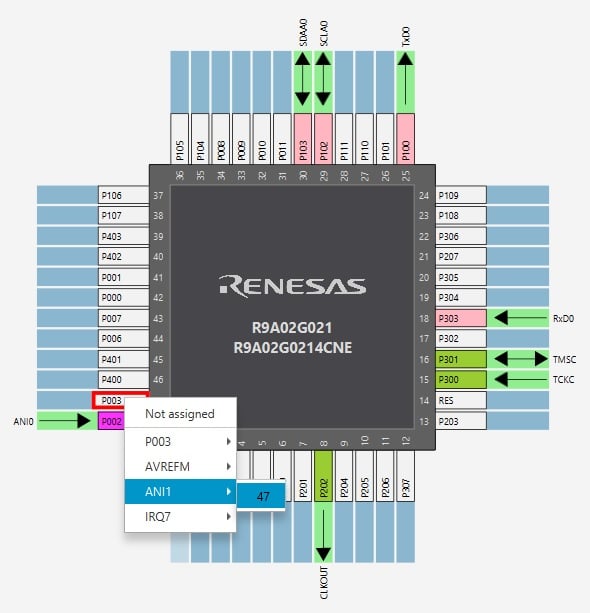
The [MCU Package] window displays a symbolic view of the pins, indicating by colors which pins are and are not in use, which have been assigned contending multiplexed functions, and so on. This makes it easy to check the overall situation.
Automatic resolution of contention between pin functions
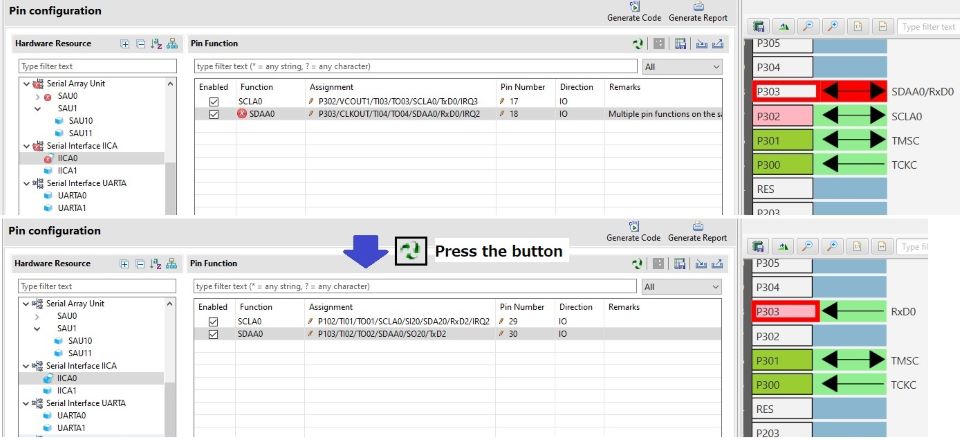
In cases of contention for a pin, clicking on the pin brings up a list allowing automatic changing of the assignment of the pin to resolve the contention.
Support
Support Communities
- Hello World Example
Hi all, I'd like to ask if a simple Hello World example is available.I am interested to understand how to configure the FPB-R9A02G021 board to print a message to my console. I cannot understand how to configure the UART to print via the usb cable. thanks in ...
Feb 17, 2026

Support Communities

