
Overview
Description
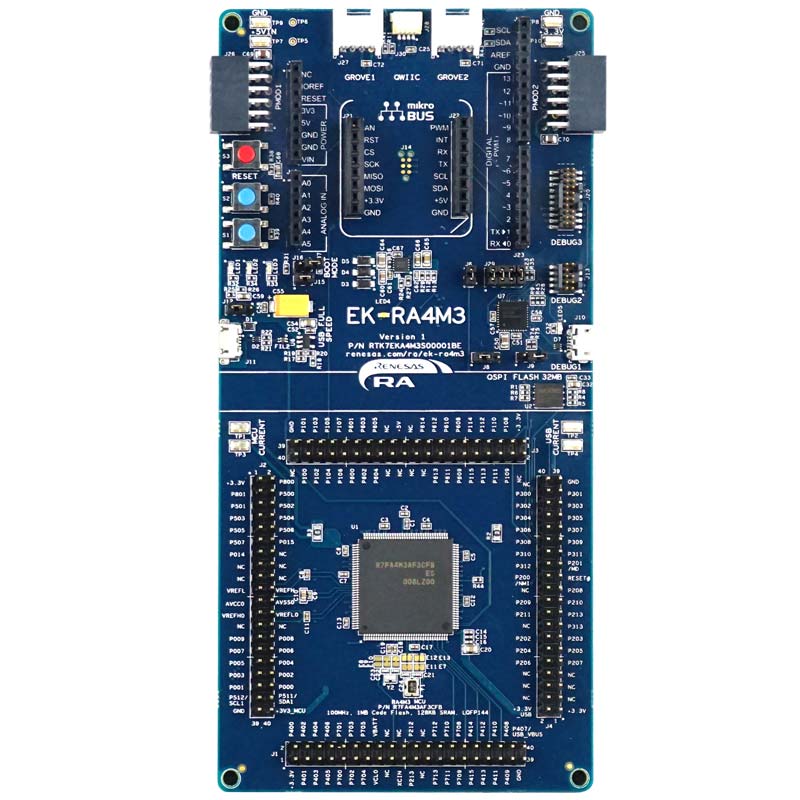
The EK-RA4M3 evaluation kit enables users to effortlessly evaluate the features of the RA4M3 MCU Group and develop embedded systems applications using Renesas' Flexible Software Package (FSP) and e2 studio IDE. Utilize rich on-board features along with your choice of popular ecosystem add-ons to bring your big ideas to life.
Getting Started
Running the Quick Start Example Project
- The EK-RA4M3 board comes pre-programmed with a quick start example project (source code provided in the EK-RA4M3 example project bundle).
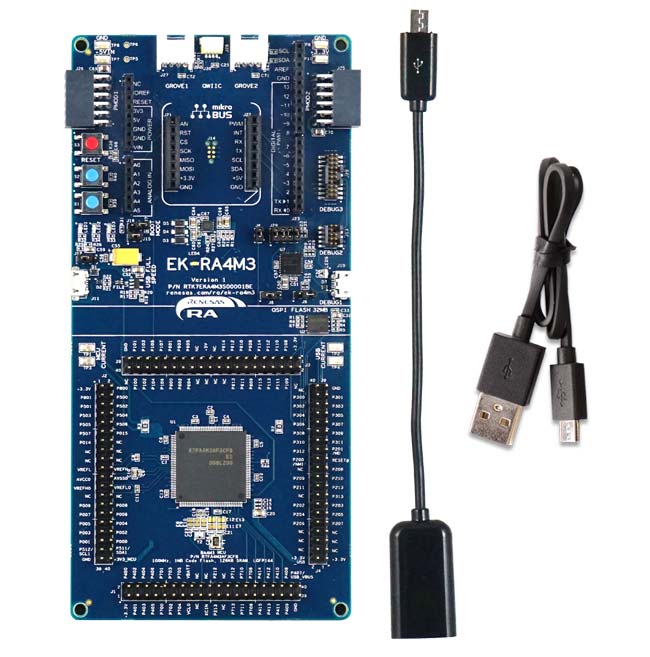
- Power up the EK-RA4M3 board through the USB debug port (J10) using the micro USB device cable connected to a 5V power source. The white power LED will light up.
- The quick start example project will begin to execute blinking the blue user LED.
- Refer to the EK-RA4M3 Quick Start Guide to explore additional functionality of the quick start example project.
Developing Embedded Applications
- Modifying the quick start example project – refer to the EK-RA4M3 Quick Start Guide for instructions on importing, modifying, and building the quick start example project.
- Start with one of the many other example projects (provided in the EK-RA4M3 example project's bundle) – choose from many example projects to learn about different peripherals of the RA4M3 MCU group. These example projects can serve as excellent starting points for you to develop your custom applications.
Building Custom Hardware
- Start by building a functional prototype - utilize the EK-RA4M3 board with your choice of ecosystem add-ons.
- Build custom hardware – develop custom hardware by referring to the design and manufacturing information provided in the EK-RA4M3 design package.
Features
- Special Feature Access
- 32MB external Quad-SPI Flash
- MCU Native Pin Access
- R7FA4M3AF3CFB MCU
- 100MHz, Arm Cortex®-M33 core
- 1MB Code Flash, 128KB SRAM
- 144 pins, LQFP package, 20mm x 20mm x 1.70mm, 0.5mm pitch
- Native pin access through prototype friendly male headers
- MCU and USB current measurement points
- Ecosystem & System Control Access
- USB full speed host and device
- Multiple 5V input sources
- USB (debug, full speed)
- External power supply
- SEGGER J-LinkTM on-board programmer and debugger
- Debug modes
- Debug on-board (SWD) – via J-Link
- Debug out (SWD) – via J-Link
- Debug in (ETM, SWD & JTAG) – via J-Link, Arm® Keil® ULINKTM, IAR I-jetTM, Renesas E2/E2 Lite, etc.
- User LEDs and buttons
- Three user LEDs (red, blue, green)
- Power LED (white) indicating availability of regulated power
- Debug LED (yellow) indicating the debug connection
- Two user buttons
- One reset button
- Five most popular ecosystem expansions
- MikroElektronika™ mikroBUS connector
- SparkFun® Qwiic® connector
- Two SeeedGrove® system (I2C and analog) connectors
- Two Digilent Pmod™ (SPI and UART) connectors
- Arduino™ (UNO R3) connector
- MCU boot configuration
Applications
Documentation
|
|
|
|
|---|---|---|
| Type | Title | Date |
| Quick Start Guide | PDF 2.60 MB 日本語 | |
| Manual - Development Tools | PDF 4.07 MB 日本語 | |
| PCB Design Files | EK-RA4M3 v1 Design Package
|
|
| Application Note |
PDF
736 KB
The EK-RA4M3 example project shows how to write code for various Renesas Flexible Software Package (FSP) modules supported by the EK-RA4M3 kit. The Flexible Software Package provides an optimized, easy-to-use, scalable, and high-quality software solution for embedded system design.
|
|
| Application Note |
PDF
3.85 MB
Learn how Renesas MCU security is built around integrated security engines. The RA family includes various types, which can be identified in each MCU’s hardware manual. These engines operate in two modes: Compatibility and Protected. This application note defines both and outlines their use cases.
|
|
| Application Note |
PDF
3.23 MB
This application note walks the user through application project creation using the MCUboot module on Renesas EK-RA4M3 with external QSPI flash as the secondary image storage area. The application examples implemented image downloading to the QSPI secondary slot over USB PCDC. MCUboot with encryption also supports internal flash encryption.
|
|
| Application Note |
PDF
2.35 MB
Learn how to inject plaintext keys into RA MCUs using various security engines operating in Compatibility Mode. This application note details the protection of the Root of Trust, emphasizing secure key storage through hardware unique keys (HUK) and isolated cryptographic operations within the security engine. The security engines support multiple cryptographic algorithms and key handling methods, enabling secure and efficient key management.
|
|
| Application Note |
PDF
402 KB
AI-generated Summary:
The document explains the two operational modes, highlighting their advantages and disadvantages, and provides practical guidance for selecting and using each mode. It also includes reference links to Renesas RA Family Application Projects that demonstrate these modes with detailed examples of the related FSP module usage.
|
|
| Application Note |
PDF
2.55 MB
Users can follow the provided steps in this application note to recreate the bootloader and link the application projects to work with the bootloader by using the FSP Solution. This application note also includes procedures for mastering an application to work with the bootloader, and for downloading and updating a new application.
|
|
| Application Note |
PDF
1.51 MB
AI-generated Summary:
The document explains how to establish and protect unique device identities in IoT environments using RA Family MCUs with Arm TrustZone and Secure Crypto Engine 9 (SCE9). It details generating ECC key pairs, storing private keys securely, and creating device certificates to enable trusted authentication. The RA Family MCUs provide hardware security features such as TrustZone memory protection, flash block locking, and cryptographic support. The example implementation uses the EK-RA6M4 board and software tools like e2 studio IDE, RA Flexible Software Package, and SEGGER J-Link. The guide targets developers familiar with Renesas tools and cryptography, enabling secure device identity management in IoT applications.
|
|
| Flyer | PDF 534 KB 日本語 | |
| Application Note |
PDF
3.90 MB
AI-generated Summary:
MCUboot provides a secure bootloader framework for 32-bit MCUs, enabling secure booting and fail-safe firmware updates using internal code flash. It supports multiple update strategies including Overwrite, Swap, and Direct Execute-in-Place (DXIP), each with distinct advantages and trade-offs. The bootloader authenticates firmware images using RSA or ECDSA signatures and SHA-256 hashing. Integration with Renesas Flexible Software Package (FSP) simplifies creating a Root of Trust and supports TrustZone-based designs. Example projects demonstrate usage on EK-RA4M3 kits with FSP v5.2.0, covering multi-image and single-image configurations. Development requires e2 studio IDE, FSP, SEGGER J-Link, and Python. The document guides through project setup, bootloader creation, application signing, and update modes, providing a comprehensive framework for secure firmware management on Renesas RA MCUs.
|
|
| Flyer | PDF 412 KB | |
| Presentation | PDF 7.02 MB | |
| Presentation | PPS 34.19 MB | |
| Flyer | PDF 449 KB 日本語 | |
| Manual - Development Tools | PDF 627 KB 日本語 | |
| Report | PDF 187 KB 日本語 | |
18 items
|
||
Design & Development
Software & Tools
Software & Tools
| Software title
|
Software type
|
Company
|
|---|---|---|
| PALMiCE4 PALMiCE4 is a professional JTAG emulator designed for microprocessors (MPUs) and microcontrollers (MCUs) based on Arm® Cortex®‑A, Cortex‑R, and Cortex‑M cores. It supports Arm CoreSight™ and Serial Wire Debug (SWD) interfaces, enabling multi‑core debugging, on‑board flash programming, and debugging in Arm TrustZone® environments. Broad device support includes the RZ MPU and RA MCU families, providing efficient software development from MCUs to SoC and multi‑core MPU platforms.
|
Development Tool | Computex Co., Ltd. |
| QuickConnect Platform QuickConnect platform enables fast prototyping by providing compatible hardware and software building blocks.
|
Software and Hardware Development Tools | Renesas |
| RA Flexible Software Package (FSP) FSP is an enhanced software package designed to provide easy-to-use, scalable, high-quality software for embedded system designs using Renesas RA Family of Arm Microcontrollers.
Note: FSP with e² studio Installer (Platform Installer) will install the e² studio tool, FSP packs, GCC toolchain, and Segger J-Link drivers required to use this software. No additional installations are required.
|
Software Package | Renesas |
| Renesas Flash Programmer (Programming GUI) Flash memory programming software [Support MCU/MPU and devices: RA, RE, RX, RL78, RH850, RISC-V MCU, Renesas Synergy, DA1453x, DA1459x, DA1469x, DA1470x, DA148xx, Power Management, Renesas USB Power Delivery Family, ICs for Motor Driver/Actuator Driver, V850, 78K0R, 78K0]
|
Programmer (Unit/SW) | Renesas |
4 items
|
||
Sample Code
Sample Code
Filters
|
||
|---|---|---|
| Type | Title | Date Date |
| Sample Code | EK-RA4M3 Example Project Bundle
[Software=RA FSP],[Board=EK-RA4M3]
ZIP
33.04 MB
IDE:
e2 studio/GCC/AC6, IAR, Keil MDK
The EK-RA4M3 example project shows how to write code for various Renesas Flexible Software Package (FSP) modules supported by the EK-RA4M3 kit. The Flexible Software Package provides an optimized, easy-to-use, scalable, and high-quality software solution for embedded system design.
|
|
| Sample Code | Injecting and Updating Secure User Keys - Sample Code
Learn how Renesas MCU security revolves around integrated security engines. There are different types of security engines across the RA MCU. Users can find the specific engine used in a particular MCU from its hardware user’s manual. The security engines can operate in two different modes, called Compatibility Mode and Protected Mode. The application note “Renesas Security Engine Operational Modes” explains the definition of the two modes and their use cases.
|
|
| Sample Code | Booting Encrypted Image on RA4 using MCUboot and QSPI
This application note walks the user through application project creation using the MCUboot module on Renesas EK-RA4M3 with external QSPI flash as the secondary image storage area. The application examples implemented image downloading to the QSPI secondary slot over USB PCDC. MCUboot with encryption also supports internal flash encryption.
|
|
| Sample Code | Injecting Plaintext User Keys
Learn how to inject plaintext keys into RA MCUs using security engines operating in Compatibility Mode. Example projects for various MCUs and security engines demonstrate plaintext key injection with Renesas Flexible Software Package (FSP) APIs and PSA Certified Crypto APIs.
|
|
| Sample Code | RA6 Secure Bootloader Using MCUboot with Protected mode and Internal Code Flash
Learn how to create an application project using the MCUboot Module in Protected Mode on the Renesas EK-RA6M4 board with FSP v6.1.0. The intended audience includes product developers, product manufacturers, product support, and end users who are involved in designing application systems involving the use of a secure bootloader.
|
|
| Sample Code | Establishing and Protecting Device Identity using SCE9 and Arm® TrustZone® - Sample Code
The application example provided in this package uses the Secure Crypto Engine 9 (SCE9) module based on RA6M4 to generate a pair of ECC keys and uses a local CA to generate the device certificate based on the ECC public key.
ZIP
9.17 MB
|
|
| Sample Code | Security Design with Arm® TrustZone® using Cortex-M33
|
|
| Sample Code | RA4 Secure Bootloader Using MCUboot and Internal Code Flash - Sample Code
|
|
8 items
|
||
Related Boards & Kits
Boards & Kits

Evaluation Kit for RA4M2 MCU Group
The EK-RA4M2 evaluation kit enables users to effortlessly evaluate the features of the RA4M2 MCU Group and develop embedded systems applications using Renesas' Flexible Software Package (FSP) and e2 studio IDE. Utilize rich on-board features along with your choice of popular ecosystem add-ons to... Read More

Evaluation Kit for RA4M1 MCU Group
The EK-RA4M1 evaluation kit enables users to effortlessly evaluate the features of the RA4M1 MCU Group and develop embedded systems applications using Renesas' Flexible Software Package (FSP) and various IDEs.
Getting Started
Running the Quick Start Example Project
- The EK-RA4M1 board comes... Read More
Product Options
| Part Number | Status | Stock | Budgetary Price (USD) | Sampleable |
|---|---|---|---|---|
| RTK7EKA4M3S00001BE | Active | In Stock | 1u | $60.42 | Available |
Videos & Training
Kickstart IoT and embedded systems development using Renesas EK-RA4M2 and EK-RA4M3, Evaluation Kits for RA4M2 and RA4M3 MCU Groups. Familiarize yourself with the kit architecture, key features, quick start example project, and many useful resources to begin innovating quickly.
Additional Videos
News & Blog Posts
Blog Post Mar 30, 2022 |
Blog Post Jan 28, 2022 |
Blog Post Jan 28, 2022 |
Blog Post Nov 18, 2021 |
Blog Post Nov 11, 2021 |
Certifications
The EK-RA4M3 kit meets the following certifications/standards. Refer to the EK-RA4M3 user manual for the disclaimer, precautions and more details on the certifications.
EMC/EMI Standards
- FCC Notice (Class A) – Part 15
- Innovation, Science and Economic Development Canada ICES-003 Compliance: CAN ICES-3 (A)/NMB-3(A)
- CE Class A (EMC Directive 2004/108/EEC)
- Taiwan Chinese National Standard 13438, C6357 compliance, Class A limits
- Australia/New Zealand AS/NZS CISPR 32:2015, Class A
Material Selection, Waste, Recycling, and Disposal Standards
- EU RoHS
- China SJ/T 113642014, 10-year environmental protection use period
Safety Standards
- UL 94V-0
Partners

Zephyr Project
The Zephyr Project is an open-source, scalable real‑time operating system (RTOS) designed for resource-constrained embedded systems and supports a wide range of hardware architectures and development boards. For the Renesas RA4M3 Evaluation Kit, Zephyr provides focused documentation covering board features, supported peripherals, and basic build, flashing, and debugging workflows to help developers quickly get started.
Support
Support Communities
- about FLASH_NS_IMAGE_START between rtc_ns_ek_ra4m3_ep and rtc_s_ek_ra4m3_ep
hi there, in rtc_s_ek_ra4m3_ep, FLASH_NS_IMAGE_START is used. does FLASH_NS_IMAGE_START define where rtc_ss_ek_ra4m3_ep Reset_Handler should be located? all the best! Sky This thread was automatically locked due to age.
Jun 1, 2021 - EK-RA4M3 getting I2C_MASTER_EVENT_ABORTED when trying to perform I2C operations
Hi! I'm trying to read an I2C EEPROM, namely the Microchip 24LC32AISN, using an EK-RA4M3 development kit. Before trying with the Renesas kit, I tried connecting the EEPROM to an Arduino for dumping its content, and it worked flawlessly. The I2C has been configured to use channel 0 ...
Oct 28, 2023 - EK-RA4M3 J-Link RTT Viewer
When I use the ek-ra4m3 development board to run routines, I find that I can't print messages with j-link rttviewer, but I can print messages when I use the ek-ra2e1 development board to run routines. Why can't ra4m3 routines print messages? [locked by: JB (SWF ...
May 19, 2022
Knowledge Base
- Secure Key Installation limitation on RA4M2, RA4M3, RA6M4 and RA6M5 in FSP 300
Secure Key installation via the factory bootloader in FSP 3.0.0 is not supported for RSA 3K, RSA 4K, and ECC secp256k1 on the following devices:Certain EK-RA6M4 and EK-RA4M3 Evaluation Kits may contain the affected silicon. If your application requires secure key installation of RSA 3K ...
Apr 29, 2021 - RA Family: How to use the Debug Out function of J-Link OB on EK (Evaluation Kit)
Last Updated: 12/14/2023 Question: How to use the Debug Out function of J-Link OB on EK (Evaluation Kit) Answer: Renesas has equipped each EK (Evaluation Kit) for RA MCUs, such as EK-RA2E1, EK-RA2E2, EK-RA2L1, EK-RA2A1, etcEK-RA4M1、EK-RA4M2、EK-RA4M3 ...
Dec 14, 2023 - RA Family: 16-Bit boundary byte swap in Macronix OSPI Memory DTR (DDR) Mode
... MX25LM51245G (OSPI)(EK-RA6M4, EK-RA6M5) 0x12345678 N/A N/A 0x12345678 0x34127856 MX25L25645G (QSPI)(EK-RA6M3, EK-RA6M4, EK-RA6M5, EK-RA4M2, EK-RA4M3) 0x12345678 0x12345678 0x12345678 N/A N/A MX25LW51245G (OSPI)(EK-RA8P1) 0x12345678 N/A N/A N/A ...
Sep 5, 2025

Support Communities


