
Overview
Description
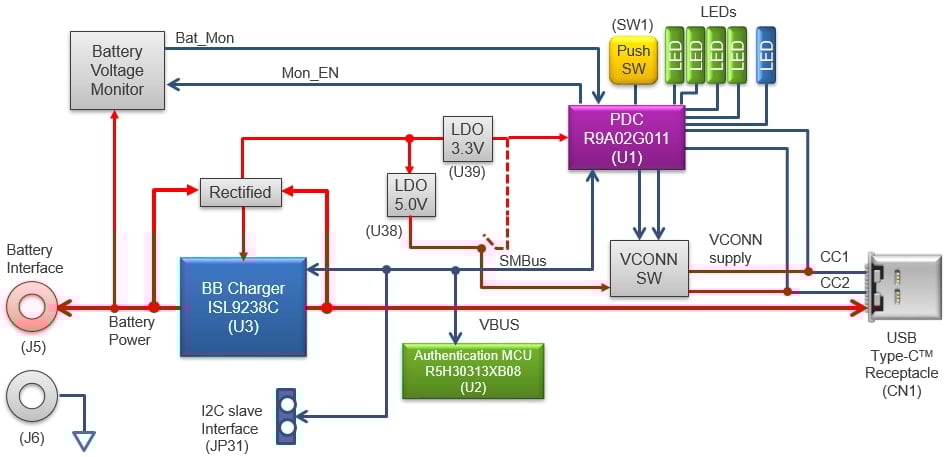
This is a USB-certified single-port power bank reference design that can connect 2 to 4 cells (default is 3 cells) in series and includes a battery monitoring function on the board. When combined with a lithium-ion battery, this reference design can be used to implement a power bank.
The USB Type-C® port supports Dual Role Power (DRP), enabling both sink mode to charge the battery and source mode to support programmable power supply. The standard firmware is designed to support 2-cell and 4-cell configurations, in addition to the default 3-cell configuration, through board setting adjustments.
USB certification includes TID 1090007 for RTK-251-1PowerBank3 with 100W (sink)/45W (source) and TID 1090008 for RTK-251-1PowerBank3 with 100W (sink)/15W programmable power supply (source).
For firmware customization, the Firmware Generation Support Tool (PDC Image Generator, PDC-IMGGEN) is provided. This is a GUI tool that allows modification of USB Power Delivery (PD) protocol parameters.
Features
- USB Power Delivery and USB-Type-C
- One USB-Type-C port
- Power Role: Dual Role (Supports Try.SRC mode)
- Power source voltage (without PPS): 5V, 9V, 12V, 15V, 20V, and up to two additional voltages
- Power source voltage (with PPS): 5V and 5VProg
- Power Sink: 5V to 20V (supports variable input)
- Supports USB-Type-C® Authentication Responder feature (RTK0EUG011D06010BJ only)
- Supports USB Power Delivery Firmware Update feature (PDFU) (RTK0EUG011D06010BJ only)
- Battery Charger
- Battery type: Li-ion battery
- Number of cells: 2, 3, or 4 series cells (Normal function: Default setting = 3 series cells)
- Trickle charging
- 5 LED indicators
- USB-Type-C port status indicator (1 LED)
- Battery remaining capacity indicator (4 LEDs)
- Protections
- Over Temperature Protection (USB-Type-C Receptacle)
- Overvoltage Protection (VBUS voltage)
- Overcurrent Protection (VBUS current)
Applications

|
Multi-Cell USB PD Power Bank with Quick Charge 2.0/3.0
60W+ USB PD power bank offers efficient charging with multi-cell setup and Bluetooth LE monitoring.
|
Documentation
|
|
|
|
|---|---|---|
| Type | Title | Date |
| PCB Design Files | RTK-251-1PowerBank3 Design Kit (USB Type-C™ 1 Port Power Bank) [Kit Rev. A1.7]
|
|
| Manual - Development Tools | RTK-251-1PowerBank3 Instruction Manual
AI-generated Summary:
The RTK-251-1PowerBank3 supports USB Power Delivery 3.0 with a single USB Type-C port and dual power roles, allowing variable voltages for power source and sink. It features Li-ion battery charging for 2 to 4 series cells, with default 3 cells, and includes trickle charging. The board has 5 LED indicators for port status and battery capacity, and built-in protections against over temperature, over voltage, and over current. Component layout and block diagrams illustrate the board’s design and interfaces.
|
|
2 items
|
||
Design & Development
Product Options
| Part Number | Status | Stock | Budgetary Price (USD) | Description |
|---|---|---|---|---|
| RTK0EUG011D06000BJ | Active | In Stock | 1u | $136.47 | RTK-251-1PowerBank3 |
| RTK0EUG011D06010BJ | Active | Out of Stock | 1u | $204.45 | RTK-251-1PowerBank3 with USB Type-C Authentication |
Support

Support Communities


