
Overview
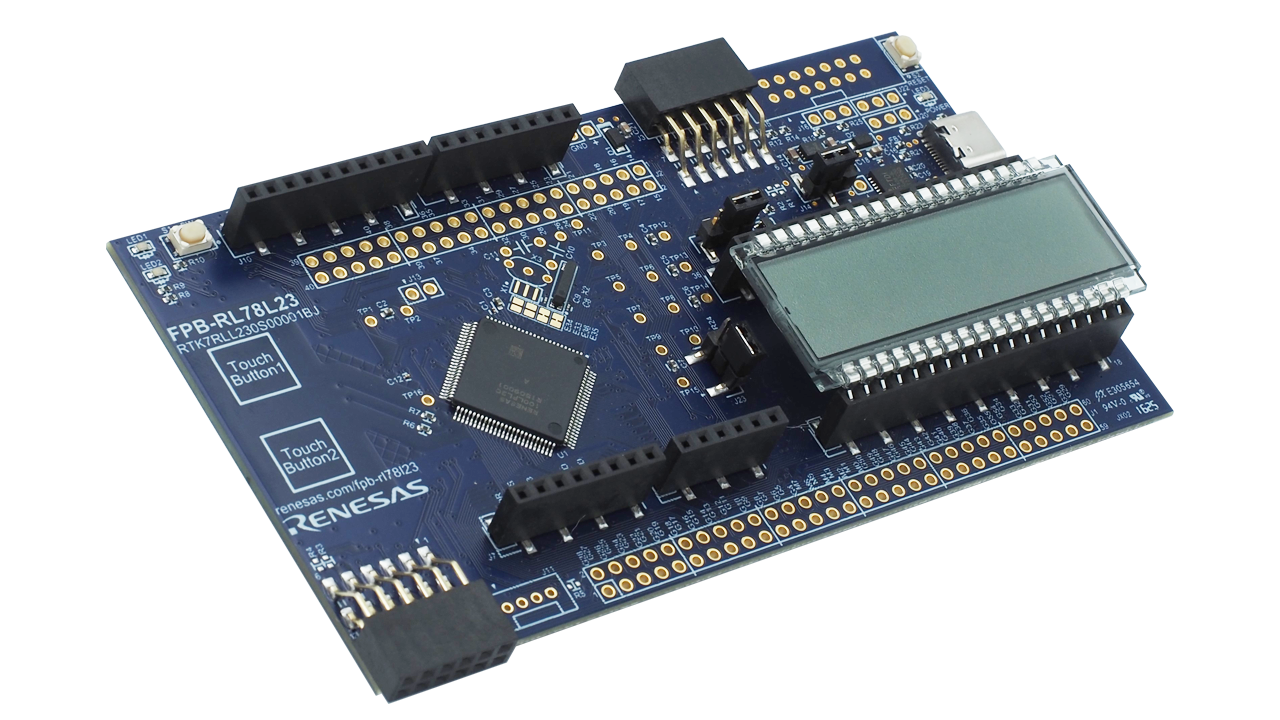
The RL78/L23 Fast Prototyping Board, featuring the RL78/L23 MCU, is ideal for various prototype development. This board has a USB-UART converter for COM port debug function, enabling programming and debugging without extra tools. It includes an LCD panel (8 digits x 16 segments) and two touch buttons, thus you can start evaluation of the LCD and capacitive touch immediately. In addition, it has high flexibility and expandability by supporting Arduino Uno, Pmod™, Grove interfaces, and through-holes with access to all MCU pins. It supports firmware updating, Wi-Fi, LoRa, and LoRaWAN-based wireless communication by sample code. Renesas also provides an Arduino library that supports creating various programs (sketches) on the Arduino IDE.
Note: This board comes with two touch buttons using a capacitive sensor unit for simple evaluation, but when designing an actual board, please check the Capacitive Sensor Microcontrollers CTSU Capacitive Touch Electrode Design Guide (R30AN0389) and use the Capacitive Touch Evaluation System for RL78/L23 (RSSK-RL78L23) for evaluation.
Features
- Equipped with an RL78/L23 16-bit microcontroller (R7F100LPL3CFB)
- 32MHz, RL78-S3 Core
- ROM: 256KB x 2 banks, RAM: 32KB, Data Flash 8KB
- 100-pin LFQFP, 14mm x 14mm x 1.7mm, 0.5mm pitch
- Programs can be written and debugged via the COM port communication by connecting it to a PC with a USB cable
- Able to access all the microcontroller pins
- Comes standard with Arduino Uno and Pmod™
- Arduino library available
- Equipped with LCD panel and capacitive touch sensor buttons
- Support for various RL78 software and tools


Sample & Buy
RTK7RLL230S00001BJ
ActiveApplication Block Diagrams
 | Smart Touch Panel Smart touch panel with low-power MCU enables real-time air quality, temperature, and touch control. |
 | Toaster Kettle Grill with Digital Controls This system enables faster, precise cooking with intuitive touch controls and display. |
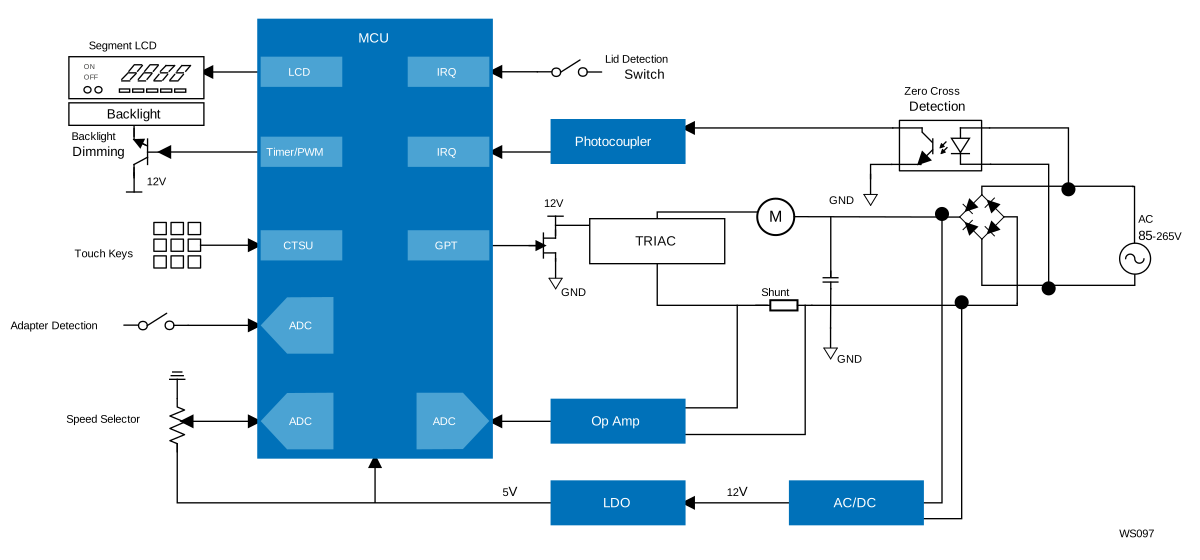 | Corded Stand Blender with Digital Controls Smart blender system with an intuitive UI and efficient motor control powered by an integrated MCU. |
 | LoRaWAN Gas Meter LoRaWAN network enables automatic, efficient gas meter shutdown with low power and long-range benefits. |
Videos & Training
This video guides you through the development process using the FPB for RL78, covering three key steps: installing the IDE, generating a project with sample code, and verifying its operation. The video uses the FPB-RL78L23 as an example, but the process applies to FPBs for all RL78 products.
Related Resources
Additional Videos
News & Blog Posts
Support
Support Communities
- FPB-RL78L23: LED on P6.2 (pin 8) not blinking after flashing code
Hello, I have an FPB-RL78L23 Renesas development kit. I connected an external LED to the board: one leg of the LED goes to GND and the other leg is connected to pin 8. My goal is simply to make the LED blink. I wrote the following code and attempted ...
Nov 18, 2025 - FPB-RL78L23: LED on P6.2 (pin 8) not blinking after flashing code
Hello, I have an FPB-RL78L23 Renesas development kit. I connected an external LED to the board: one leg of the LED goes to GND and the other leg is connected to pin 8. My goal is simply to make the LED blink. I wrote the following code and attempted ...
Nov 18, 2025 - FPB-RL78L23: LED on P6.2 (pin 8) not blinking after flashing code
Hello, I have an FPB-RL78L23 Renesas development kit. I connected an external LED to the board: one leg of the LED goes to GND and the other leg is connected to pin 8. My goal is simply to make the LED blink. I wrote the following code and attempted ...
Nov 18, 2025

Support Communities

Knowledge Base

