
Overview
Description
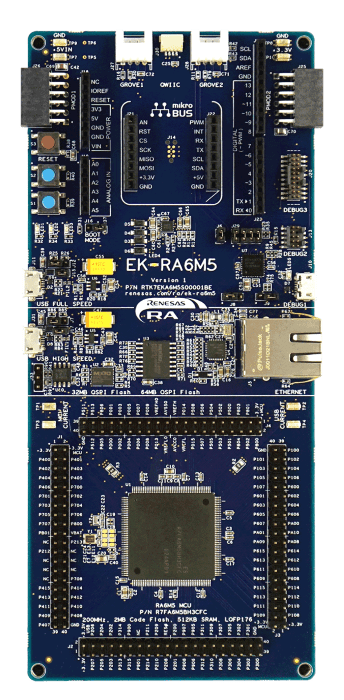
The EK-RA6M5 evaluation kit enables users to effortlessly evaluate the features of the RA6M5 MCU Group and develop embedded systems applications using the Flexible Software Package (FSP) and e2 studio IDE. Utilize rich on-board features along with your choice of popular ecosystem add-ons to bring your big ideas to life.
Getting Started
Running the Quick Start Example Project
- The EK-RA6M5 comes pre-programmed with a quick start example project (source code provided in the EK-RA6M5 Example Project Bundle).
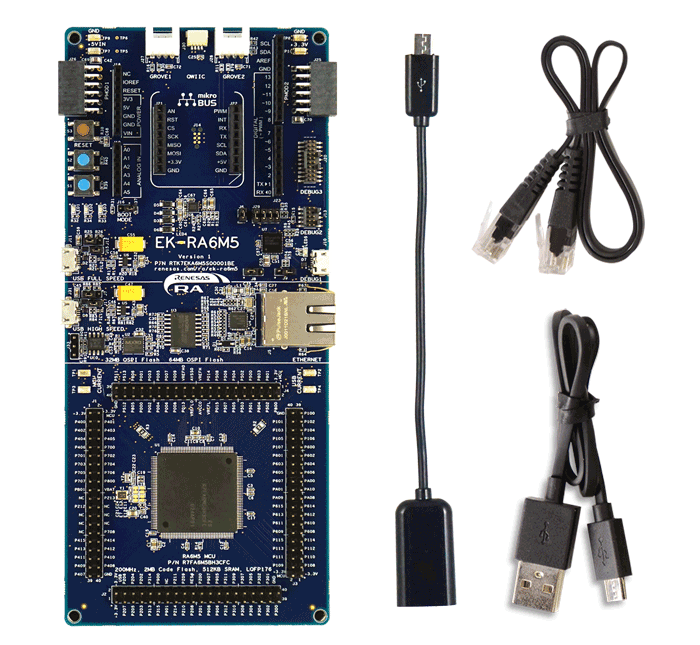
- Power up the EK-RA6M5 board through the debug USB port (J10) using the micro USB device cable connected to a 5V power source. The white power LED will light up.
- The quick start example project will begin to execute blinking the blue user LED.
- Refer to the EK-RA6M5 Quick Start Guide to explore additional functionality of the quick start example project.
Developing Embedded Applications
- Modifying the quick start example project – refer to the EK-RA6M5 Quick Start Guide for instructions on importing, modifying, and building the quick start example project
- Start with one of the many other example projects – choose from many example projects provided in the EK-RA6M5 Example Project Bundle to learn about different peripherals of the RA6M5 MCU Group. These example projects can serve as excellent starting points for you to develop your custom applications.
Building a Custom Hardware
- Start by building a functional prototype – utilize the EK-RA6M5 board with your choice of hundreds of popular ecosystem add-ons.
- Build custom hardware – develop custom hardware by referring to the design and manufacturing information provided in the EK-RA6M5 Design Package.
Features
- Ecosystem & System Control Access
- USB full speed host and device
- Multiple 5V input sources
- USB (debug, high speed, full speed)
- External power supply
- SEGGER J-LinkTM on-board programmer and debugger
- Debug modes
- Debug on-board (SWD) – via J-Link
- Debug out (SWD) – via J-Link
- Debug in (ETM, SWD & JTAG) – via J-Link, Arm® Keil® ULINKTM, IAR I-jetTM, Renesas E2/E2 Lite, etc.
- User LEDs and buttons
- Three user LEDs (red, blue, green)
- Power LED (white) indicating availability of regulated power
- Debug LED (yellow) indicating the debug connection
- Two user buttons
- One reset button
- Five most popular ecosystem expansions
- MikroElektronikaTM mikroBUSconnector
- SparkFun®Qwiic®connector
- Two SeeedGrove®system(I2C and Analog) connectors
- TwoDigilent PmodTM(SPI and UART) connectors
- ArduinoTM(UNO R3) connector
- MCU boot configuration jumper
- Special Feature Access
- Ethernet (RMII and PHY)
- 64MB External Octo-SPI Flash
- 32MB External Quad-SPI Flash
- CAN FD
- USB High Speed host and device
- MCU Native Pin Access
- R7FA6M5BH3CFC MCU
- 200MHz, Arm Cortex®-M33 core
- 2MB Code Flash, 512kB SRAM
- 176 pins, LQFP package, 24mm x 24mm x 1.70mm, 0.5mm pitch
- Native pin access through 4x 40-pin male headers
- MCU and USB current measurement points
Applications
Documentation
|
|
|
|
|---|---|---|
| Type | Title | Date |
| Quick Start Guide | PDF 1.63 MB 日本語 | |
| Manual - Development Tools | PDF 5.10 MB 日本語 | |
| PCB Design Files | EK-RA6M5 v1 - Design Package
|
|
| Application Note |
PDF
778 KB
The EK-RA6M5 example project shows how to write code for various Renesas Flexible Software Package (FSP) modules supported by the EK-RA6M5 kit. The Flexible Software Package provides an optimized, easy-to-use, scalable, and high-quality software solution for embedded system design.
|
|
| Application Note |
PDF
3.01 MB
简体中文
Learn how to define the RA Family MCU debug capability and serial programming capability by the device lifecycle states. Device Lifecycle Management (DLM) is the management of the process by which a product goes from inception to development to production and then eventually end-of-life.
|
|
| Application Note |
PDF
834 KB
The S Cache on the system bus can significantly improve data access performance in Renesas RA Family Arm Cortex‑M33 MCUs when CPU speed exceeds SRAM performance. This application note explains S Cache architecture, configuration, coherency handling, and performance considerations, with example projects demonstrating cache control and optimization using the Renesas Flexible Software Package (FSP).
|
|
| Application Note |
PDF
3.85 MB
Learn how Renesas MCU security is built around integrated security engines. The RA family includes various types, which can be identified in each MCU’s hardware manual. These engines operate in two modes: Compatibility and Protected. This application note defines both and outlines their use cases.
|
|
| Quick Start Guide |
PDF
5.58 MB
日本語
The Modbus protocol stack operates on RA evaluation boards to enable efficient development of Modbus TCP applications. This quick start guide provides an overview of the protocol stack features and introduces a Modbus sample application to assist with the development and implementation of applications using the stack.
|
|
| Quick Start Guide |
PDF
2.70 MB
Provides the fundamental knowledge needed to port example projects from one RA kit to another. It then demonstrates these principles by explaining how to port three example projects of varying levels of complexity from the MCK-RA4T1 to the FPB-RA4T1.
|
|
| Tool News - Release | PDF 182 KB 日本語 | |
| Application Note |
PDF
2.35 MB
Learn how to inject plaintext keys into RA MCUs using various security engines operating in Compatibility Mode. This application note details the protection of the Root of Trust, emphasizing secure key storage through hardware unique keys (HUK) and isolated cryptographic operations within the security engine. The security engines support multiple cryptographic algorithms and key handling methods, enabling secure and efficient key management.
|
|
| Manual - Development Tools | PDF 812 KB 日本語 | |
| Application Note |
PDF
402 KB
AI-generated Summary:
The document explains the two operational modes, highlighting their advantages and disadvantages, and provides practical guidance for selecting and using each mode. It also includes reference links to Renesas RA Family Application Projects that demonstrate these modes with detailed examples of the related FSP module usage.
|
|
| Application Note |
PDF
2.55 MB
Users can follow the provided steps in this application note to recreate the bootloader and link the application projects to work with the bootloader by using the FSP Solution. This application note also includes procedures for mastering an application to work with the bootloader, and for downloading and updating a new application.
|
|
| Application Note |
PDF
1.51 MB
AI-generated Summary:
The document explains how to establish and protect unique device identities in IoT environments using RA Family MCUs with Arm TrustZone and Secure Crypto Engine 9 (SCE9). It details generating ECC key pairs, storing private keys securely, and creating device certificates to enable trusted authentication. The RA Family MCUs provide hardware security features such as TrustZone memory protection, flash block locking, and cryptographic support. The example implementation uses the EK-RA6M4 board and software tools like e2 studio IDE, RA Flexible Software Package, and SEGGER J-Link. The guide targets developers familiar with Renesas tools and cryptography, enabling secure device identity management in IoT applications.
|
|
| Application Note |
PDF
1.38 MB
AI-generated Summary:
ADC interleaved mode doubles the data sampling rate by alternating conversions between two ADC units on the same input pin, synchronized via a General-Purpose Timer (GPT). Precise 180° phase alignment between ADC cores is critical to avoid spurious signals. Gain and offset mismatches between ADC cores can introduce errors but can be compensated digitally. The method enhances signal processing speed by combining outputs from two ADCs using DMA for efficient data transfer. The setup involves configuring ADC, GPT, and DMAC modules on Renesas RA MCUs, demonstrated with the EK-RA6M5 evaluation kit.
|
|
| Tool News - Release | PDF 170 KB 日本語 | |
| Application Note |
PDF
2.85 MB
AI-generated Summary:
MCUboot provides a secure bootloader infrastructure for 32-bit MCUs, enabling secure booting and fail-safe application updates. It supports multiple update strategies—Overwrite, Swap, and Direct Execute-In-Place (DXIP)—each with distinct advantages and memory requirements. The bootloader authenticates firmware images using RSA or ECDSA signatures and SHA-256 hashing. Integration with Renesas Flexible Software Package (FSP) allows easy MCUboot deployment across RA Family MCUs, supporting TrustZone-based security. Example projects demonstrate multi-image and single-image configurations on EK-RA6M4 and EK-RA6M3 kits. The document guides hardware setup, software configuration, project creation, signing, and debugging to implement secure bootloader solutions.
|
|
| Application Note |
PDF
2.87 MB
简体中文
AI-generated Summary:
CoreMark benchmarking measures the performance of Renesas RA MCUs using standardized, real-world algorithms such as linked lists, matrix multiplication, and state machines. It uses ANSI C-compliant code to prevent compiler optimizations from skewing results. The benchmarking process involves creating a bare-metal project in e2 studio, integrating CoreMark source files, adding a 32-bit timer, adjusting stack size, and configuring compilers like IAR and Arm. Results produce a single score for easy processor comparison and can be certified on the CoreMark website. The document details step-by-step integration and execution procedures for accurate benchmarking.
|
|
| Application Note | PDF 797 KB | |
| Flyer | PDF 412 KB | |
| Application Note | PDF 5.24 MB | |
| Quick Start Guide | PDF 3.06 MB | |
| Presentation | PDF 7.02 MB | |
| Application Note |
PDF
5.22 MB
日本語
AI-generated Summary:
The document explains how to control LTE Cat M1 communication using the RYZ024A cellular module connected to an RA MCU via UART and AT commands. It details implementing MQTT communication and power-saving features like eDRX and PSM. The software includes baremetal and FreeRTOS programs with an AT command management framework to facilitate various communication protocols. Special handling for the PMOD-RYZ024A expansion board is included, addressing deep sleep mode signal issues. The document also outlines software structure, API functions, and low power operation management.
|
|
| Presentation | PPS 13.99 MB | |
| Application Note |
PDF
1.86 MB
日本語
AI-generated Summary:
Firmware upgrade for the RYZ024A module occurs via a host MCU using the RA6M5 on the EK-RA6M5 board. The RYZ024A connects through a PMOD Expansion Board, and firmware files reside on a USB flash drive linked to the EK-RA6M5's USB FS connector. The host MCU transfers the firmware from the USB drive to the RYZ024A, enabling upgrade. The process involves UART communication, USB file access, and specific microcontroller peripherals and FSP modules. The document details hardware/software requirements, peripheral functions, FSP module usage, directory structure, and API commands for executing the upgrade.
|
|
| Application Note |
PDF
1.06 MB
日本語
AI-generated Summary:
The RYZ014A module enables LTE Cat M1 communication controlled via AT commands sent over UART by the RA MCU. The sample application demonstrates sending telemetry data to an MQTT server triggered by a pushbutton. It includes an AT Command Management Framework facilitating communication and development of various LTE Cat M1 applications. The hardware setup involves connecting the RYZ014A module to the EK-RA6M5 board using a PMOD connector, with software tools such as e2 studio, FSP drivers, and SEGGER RTT Viewer supporting development and debugging.
|
|
| Application Note |
PDF
698 KB
日本語
AI-generated Summary:
The document explains how to upgrade the RYZ014A firmware using a host MCU, specifically the RA6M5 on the EK-RA6M5 board. It details a method where the firmware file is stored on a USB flash drive connected to the EK-RA6M5 board, which then transfers the firmware to the RYZ014A module via a PMOD Expansion Board. It covers hardware and software requirements, microcontroller peripheral functions, and the necessary FSP modules to perform the upgrade. The document also outlines three upgrade methods: over-the-air, PC-based, and host MCU-based, focusing on the latter.
|
|
| Application Note |
PDF
1.64 MB
AI-generated Summary:
The document explains how to connect Renesas RA MCUs (RA6M3/RA6M4/RA6M5) to Microsoft Azure IoT Cloud using MQTT over TLS. It details the integration of RA Flexible Software Package (FSP) MQTT/TLS modules with the Azure IoT SDK for Embedded C, enabling secure device provisioning, registration, and data exchange via Azure IoT Hub and Device Provisioning Service (DPS). It outlines required development tools, hardware, and prerequisites, and provides step-by-step guidance for building, running, and validating the application on the EK-RA6M5 kit. The document also covers IoT Cloud architecture, MQTT/TLS protocols, and security considerations, serving as a practical reference for embedded developers targeting Azure IoT connectivity.
|
|
| Application Note |
PDF
1.11 MB
AI-generated Summary:
Arm® TrustZone® technology divides RA Family microcontrollers into Secure and Non-Secure partitions, enabling secure application development by isolating memory and resources. Secure code accesses both partitions, while Non-Secure code accesses Secure resources only through Non-Secure Callable (NSC) gateways. Development involves creating separate Secure and Non-Secure projects or a Flat project without TrustZone. The RA Project Generator simplifies project setup, managing security attributes, peripheral access, and debugging configurations. Secure code initializes critical functions and controls access, while Non-Secure code interacts via guarded NSC drivers. The document details workflows, memory partitioning, calling conventions, and tooling support for efficient TrustZone implementation.
|
|
| Report | PDF 187 KB 日本語 | |
32 items
|
||
Design & Development
Software & Tools
Software & Tools
| Software title
|
Software type
|
Company
|
|---|---|---|
| PALMiCE4 PALMiCE4 is a professional JTAG emulator designed for microprocessors and microcontrollers based on Arm® Cortex®‑A, Cortex‑R, and Cortex‑M cores. It supports Arm CoreSight and Serial Wire Debug (SWD) interfaces, enabling multi‑core debugging, on‑board flash programming, and debugging in Arm TrustZone environments. Broad device support includes the RZ and RA families, providing efficient software development from microcontrollers to SoC and multi‑core MPU platforms.
|
Development Tool | Computex Co., Ltd. |
| QuickConnect Platform QuickConnect platform enables fast prototyping by providing compatible hardware and software building blocks.
|
Software and Hardware Development Tools | Renesas |
| RA Flexible Software Package (FSP) FSP is an enhanced software package designed to provide easy-to-use, scalable, high-quality software for embedded system designs using Renesas RA Family of Arm Microcontrollers.
Note: FSP with e² studio Installer (Platform Installer) will install the e² studio tool, FSP packs, GCC toolchain, and Segger J-Link drivers required to use this software. No additional installations are required.
|
Software Package | Renesas |
| Renesas Flash Programmer (Programming GUI) Flash memory programming software [Support MCU/MPU and devices: RA, RE, RX, RL78, RH850, RISC-V MCU, Renesas Synergy, DA1453x, DA1459x, DA1469x, DA1470x, DA148xx, Power Management, Renesas USB Power Delivery Family, ICs for Motor Driver/Actuator Driver, V850, 78K0R, 78K0]
|
Programmer (Unit/SW) | Renesas |
4 items
|
||
Sample Code
Sample Code
Filters
|
||
|---|---|---|
| Type | Title | Date Date |
| Sample Code | EK-RA6M5 Example Project Bundle
[Software=RA FSP],[Board=EK-RA6M5]
ZIP
62.19 MB
IDE:
e2 studio/GCC/AC6, IAR, Keil MDK
Demonstrates the typical use of the ADC HAL module APIs. The example project initializes the ADC in single scan or continuous scan mode based on the user selection in the RA configurator. Once initialized, the user can initiate the ADC scan and also stop the scan (in the case of continuous scan mode) using JLinkRTTViewer by sending commands.
|
|
| Sample Code | Renesas RA Family Device Lifecycle Management for Cortex-M33
Learn how to define the RA Family MCU debug capability and serial programming capability by the device lifecycle states. Device Lifecycle Management (DLM) is the management of the process by which a product goes from inception to development to production and then eventually end-of-life.
|
|
| Sample Code | RA Family Guidelines for Using the S Cache on the System Bus - Sample Code
The S Cache on the system bus can significantly improve data access performance in MCUs when CPU speed exceeds SRAM performance. This sample project demonstrates how to enable, disable, and flush the S Cache on Renesas RA Family Arm Cortex‑M33 MCUs, and how to maintain data coherency when memory is shared with DMA. The example uses the Renesas Flexible Software Package (FSP) to illustrate cache control, coherency handling, and performance measurement.
|
|
| Sample Code | Injecting and Updating Secure User Keys - Sample Code
Learn how Renesas MCU security revolves around integrated security engines. There are different types of security engines across the RA MCU. Users can find the specific engine used in a particular MCU from its hardware user’s manual. The security engines can operate in two different modes, called Compatibility Mode and Protected Mode. The application note “Renesas Security Engine Operational Modes” explains the definition of the two modes and their use cases.
|
|
| Sample Code | RA Family Modbus Sample Program Package
Use the following sample program to operate on the RA evaluation board. This sample program package supports the Ethernet-based Modbus TCP protocol.
|
|
| Sample Code | RA FSP Example Project Porting Guide
Provides the fundamental knowledge needed to port example projects from one RA kit to another. It then demonstrates these principles by explaining how to port three example projects of varying levels of complexity from the MCK-RA4T1 to the FPB-RA4T1.
|
|
| Sample Code | Injecting Plaintext User Keys
Learn how to inject plaintext keys into RA MCUs using security engines operating in Compatibility Mode. Example projects for various MCUs and security engines demonstrate plaintext key injection with Renesas Flexible Software Package (FSP) APIs and PSA Certified Crypto APIs.
|
|
| Sample Code | RA6 Secure Bootloader Using MCUboot with Protected mode and Internal Code Flash
Learn how to create an application project using the MCUboot Module in Protected Mode on the Renesas EK-RA6M4 board with FSP v6.1.0. The intended audience includes product developers, product manufacturers, product support, and end users who are involved in designing application systems involving the use of a secure bootloader.
|
|
| Sample Code | Establishing and Protecting Device Identity using SCE9 and Arm® TrustZone® - Sample Code
The application example provided in this package uses the Secure Crypto Engine 9 (SCE9) module based on RA6M4 to generate a pair of ECC keys and uses a local CA to generate the device certificate based on the ECC public key.
ZIP
9.17 MB
|
|
| Sample Code | Getting Started with ADC Interleaved Mode Application
|
|
| Sample Code | RA6 Basic Secure Bootloader Using MCUboot and Internal Code Flash
MCUboot is a secure bootloader for 32-bit MCUs. It defines a common infrastructure for the bootloader, defines system flash layout on microcontroller systems, and provides a secure bootloader that enables easy software update.
ZIP
4.13 MB
Compiler:
GNU Arm Embedded
IDE:
e2 studio
|
|
| Sample Code | Security Design with Arm® TrustZone® using Cortex-M33
|
|
| Sample Code | Getting Started with CoreMark Benchmarking
[Software=FSP | v4.3.0],[Toolchain: IAR compiler v9.32.1, ARM compiler v6.15]
ZIP
3.04 MB
IDE:
e2 studio
|
|
| Sample Code | Renesas RA Securing Data at Rest Using the Arm® TrustZone® - Sample Code
|
|
| Sample Code | Renesas RA Family Exception Handling
The application project uses the Flexible Software Package (FSP) of
the RA family|| the GNU GCC compiler|| and the integrated development environment e2 studio IDE to
demonstrate an exception handling flow for multiple possible faults.
ZIP
5.66 MB
Compiler:
GNU ARM Embedded
IDE:
e2 studio, Keil
|
|
| Sample Code | RYZ024A PMOD LTE Connectivity with RA6M5 MCU Quick Start Guide
|
|
| Sample Code | ZIP 10.39 MB 日本語 | |
| Sample Code | RYZ024A and RA MCU Firmware Upgrade from Host MCU - Sample Code
|
|
| Sample Code | RYZ014A LTE Communication Sample Application
|
|
| Sample Code | RYZ014A and RA MCU Firmware Upgrade from Host MCU
|
|
| Sample Code | RA FSP MQTT/TLS Azure Cloud Connectivity Solution Application Note - Sample Code
This application project is built with the integrated “Azure IoT SDK for Embedded C” package which allows
small embedded (IoT) devices like Renesas RA family of MCUs RA6M3, RA6M4, and RA6M5 to
communicate with Azure services.
ZIP
9.71 MB
IDE:
e2 studio
|
|
21 items
|
||
Related Boards & Kits
Boards & Kits

Evaluation Kit for RA6M3 MCU Group
The EK-RA6M3 evaluation kit enables users to seamlessly evaluate the features of the RA6M3 MCU Group and develop embedded systems applications using the Flexible Software Package (FSP) and e2studio IDE. Utilize rich on-board features along with your choice of popular ecosystem add-ons to bring... Read More
Evaluation Kit for RA6M4 MCU Group
The EK-RA6M4 evaluation kit enables users to effortlessly evaluate the features of the RA6M4 MCU Group and develop embedded systems applications using the Flexible Software Package (FSP) and e2 studio IDE. Utilize rich on-board features along with your choice of popular ecosystem add-ons to... Read More
Test This Board Remotely

Evaluation Kit for RA6M2 MCU Group
The EK-RA6M2 evaluation kit enables users to effortlessly evaluate the features of the RA6M2 MCU Group and develop embedded systems applications using the Flexible Software Package (FSP) and various IDEs.
Getting Started
Running the Quick Start Example Project
- The EK-RA6M2 board comes... Read More

Evaluation Kit for RA6M1 MCU Group
The EK-RA6M1 evaluation kit enables users to effortlessly evaluate the features of the RA6M1 MCU Group and develop embedded systems applications using Renesas' Flexible Software Package (FSP) and various IDEs.
Getting Started
Running the Quick Start Example Project
- The EK-RA6M1 board comes... Read More
Product Options
| Part Number | Status | Stock | Budgetary Price (USD) | Sampleable |
|---|---|---|---|---|
| RTK7EKA6M5S00001BE | Active | In Stock | 1u | $54.38 | Available |
Videos & Training
Learn how we access Octal SPI flash on the RA6M5 Evaluation Kit to perform data operations in multiple modes. We will outline how the Octal SPI peripheral communicates with external OctaFlash and OctaRAM devices, and demonstrate erase, write, and read operations in both SPI mode and Single OPI mode.
Additional Videos
News & Blog Posts
Blog Post Apr 5, 2022 |
Blog Post Jan 28, 2022 |
Blog Post Jan 28, 2022 |
Blog Post Nov 18, 2021 |
Blog Post Nov 11, 2021 |
Certifications
The EK-RA6M5 meets the following certifications/standards. Refer to the EK-RA6M5 user manual for the disclaimer, precautions, and more details on the certifications.
EMC/EMI Standards
- FCC Notice (Class A) – Part 15
- Innovation, Science and Economic Development Canada ICES-003 Compliance: CAN ICES-3 (A)/NMB-3(A)
- CE Class A (EMC Directive 2004/108/EEC)
- Taiwan Chinese National Standard 13438, C6357 compliance, Class A limits
- Australia/New Zealand AS/NZS CISPR 32:2015, Class A
Material Selection, Waste, Recycling, and Disposal Standards
- EU RoHS
- China SJ/T 113642014, 10-year environmental protection use period.
Safety Standards
- UL 94V-0
Partners

Zephyr Project
The Zephyr Project is an open-source, scalable real‑time operating system (RTOS) designed for resource-constrained embedded systems and supports a wide range of hardware architectures and development boards. For the Renesas RA6M5 Evaluation Kit, Zephyr provides focused documentation covering board features, supported peripherals, and basic build, flashing, and debugging workflows to help developers quickly get started.
Support
Support Communities
- EK-RA6M5 QSPI example non-blocking write
Hi, QSPI example in Renesas FSP Examples Github is blocking, and i want it to be non-blocking since i will be using it in my RTOS project. What would be the best way to achive that, since there is no interrupt in QSPI driver? err = R_QSPI_DirectWrite(& ...
Nov 3, 2023 - Do you have sample sources for the EK-RA6M5 HTTP Server?
www.renesas.com/.../ek-ra6m5-example-project-bundleThe above URL has sample sources for HTTP clients, but no sample sources for HTTP servers.Is there a sample source somewhere? This thread was automatically locked due to age.
Aug 17, 2023 - EK-RA6M5 multiple definition fault when using 2 CAN channels
Hello everyone, When I try to use both CAN channel 0 and channel 1, I faced with the following problem. g_canfd_global_cfg is defined different thread header so I take "multiple definition" fault as expected. How can I handle this. Your help would be much appreciated. This thread ...
Aug 26, 2023
Knowledge Base
- How to Use Event Link Controller to Link Peripherals on RA6M5 Evaluation Kit
Last updated on 2nd June 2026 Summary of the video This video demonstrates how to use the Event Link Controller (ELC) to link the General PWM Timer (GPT) with the Analog-to-Digital Converter (ADC) on the EK-RA6M5 board. Flexible Software Package (FSP) supports event linking with the r ...
- RA6M4, RA6M5: CPU Performance Difference when C-/S-caches are on/off
... if C-cache is hit. For the C-Cache is missed while C-Cache operation is enabled, or C-cache is disabled, the read access is three cycles. Reference Attachments: Example project on EK-RA6M4 for above benchmark testing (below) Example project on EK-RA6M5 for above benchmark testing (below)
Dec 18, 2023 - RA Family: How to use the Debug Out function of J-Link OB on EK (Evaluation Kit)
... as EK-RA2E1, EK-RA2E2, EK-RA2L1, EK-RA2A1, etcEK-RA4M1、EK-RA4M2、EK-RA4M3、EK-RA4W1、EK-RA6M1、EK-RA6M2, EK-RA6M3, EK-RA6M4, EK-RA6M5, etc., all EKs come with J-Link OB (On-Board Debugger), which means that the user can evaluate, debug, and test the MCU ...
Dec 14, 2023

Support Communities


