
Overview
Additional Details
Successor
| Item | Description |
|---|---|
| For RX or RL78 Family MCU Users | E2 emulator or E2 emulator Lite |
| For RH850 Family MCU Users | E2 emulator |
Note:
- No successors to E1 for V850、78K0R、78K0 or R8C* Family MCU Users.
*E8a emulator supports R8C/3x or R8C/Lx Series MCU.
Programming software
| MCUs you use | Programming software |
|---|---|
| For using RX, RL78, or RH850 Learn More >> | Renesas Flash Programmer V3 |
| For using V850, 78K0R, or 78K0 Learn More (E1/E20 emulator (with programming function): for using V850, 78K0R, 78K0, or R8C MCU) >> | Renesas Flash Programmer V2 |
| For using R8C Learn More (E1/E20 emulator (with programming function): for using V850, 78K0R, 78K0, or R8C MCU) >> | Flash Development Toolkit |
[For using RX, RL78, or RH850]
System configuration (Programming with Renesas Flash Programmer V3)
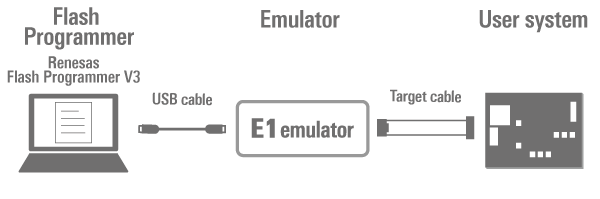
Note: When using with the on-chip debugging emulators, conversion adapter is required depending on the number of pins on the target board.
E1 emulator
Product information
Documentation & Downloads
Renesas Flash Programmer V3 (Programming GUI)
Product information
Documentation & Downloads
Renesas Flash Programmer V2 (Programming GUI)
Product information
Documentation & Downloads
Note: Regarding the "Downloads" or "Documents", refer to the info related to the V2.
Flash Development Toolkit (Programming GUI)
Product information
Documentation & Downloads
Target Devices
List of MCUs supported by Renesas Flash Programmer V3 (PDF | English, 日本語)
List of MCUs supported by Renesas Flash Programmer V2 (PDF | English, 日本語)
Available MCUs' for Flash Development Toolkit (PDF | English, 日本語)
Information on the discontinuation of E1 emulator production and on its successor products
We have already discontinued production of the E1 emulator due to components of the product having reached their EOL (end of life, i.e. end of production). Please click on the following link to confirm the details and our successor products.
>> [Notification] End of Life (EOL) Notice for E1 Emulator (PDF | English, 日本語)
Support
Support Communities
- DAC Supported MCU
... count Renesas MCU that supports mainly DAC, CAN, and timer peripherals. Please suggest suitable MCU options. Note: To reduce the BOM cost, we are looking for a Renesas MCU that supports the E1 emulator for debugging and flash programming. Thanks, and Regards, This thread was automatically locked due to age.
Aug 25, 2026 - An “A timeout error has occurred in emulator firmware processing (E1815001)” error occurs when programming an RX72M (100-pin) using FINE.
When using an RX72M (100-pin) and programming the microcontroller via FINE, the error “A timeout error has occurred in emulator firmware processing. (E1815001)” occurs. Current microcontroller schematic connections: 1.Pull-up (pulling high) pins: MD/FINED, RESn 2.Pull-down (pulling low) pins: XCIN, EMLE, NMI
Dec 21, 2025
Knowledge Base
- List of know-how when using E1/E20 emulator in CS+ environment (CS+, E2, E2 Lite, E1, E20)
Helpful information for using the E1/E20 emulator in the CS+ environment is listed below.If you are facing any trouble, the FAQ portal sites for troubleshooting or error message are available. Category Suitable MCU Description FAQ NO. Target board Design/Connections RX About wiring connection during debugging ...
Apr 16, 2024 - In debugging RX MCU, do the RxD1 and TxD1 pins have to be connected? (E2, E2 Lite, E1, E20) [RX]
... E1 or E20 emulator does control the RxD1 and TxD1 pins, a switch should be attached so that the output from the E1 or E20 emulator does not collide with the output from the user system.Product sites:- Flash Development Toolkit- Renesas Flash Programmer Since the RxD1 and TxD1 functions ...
Mar 3, 2021 - Is it possible to use E1/E20 emulator to download into flash memory? (E2 Lite, E1, E20) [RX]
... user system so that the microcontroller can write data to external flash memory. However, this method is limited to debugging and cannot be used for programming at mass production.Outline of procedure for downloading programs and data to the flash memory connected to the external bus Design a user system ...
Aug 31, 2026

Support Communities

