Features
- Four Video Decoders
- Four built-in analog anti-aliasing filters
- Accepts all NTSC/PAL standard formats with auto detection
- Integrated four anti-aliasing filters and 10-bit CMOS ADCs
- High performance adaptive comb filters for all NTSC/PAL standards
- IF compensation filter for improvement of color demodulation
- PAL delay lines for correcting PAL phase errors
- Programmable hue, saturation, contrast, brightness and sharpness
- Dual high performance horizontal and vertical scaler for each channel Dual Video Encoders
- 2 path digital outputs with ITU-R BT.656 standards
- 2 path analog outputs with all analog NTSC/PAL standards
- Supports CVBS or S-Video for each path
- Programmable bandwidth for luminance and chrominance path Dual Video Controllers
- Full Live/Strobe/Switch function
- Various channel attribute control
- Non-realtime application such as Pseudo 8 Channel or Dual page
- Horizontal / Vertical Mirroring for each channel
- Last image capture when video-loss detected
- Auto sequence switch with 128 queues and/or manual switch by interrupt for Y Path
- Channel skip in Auto sequence switch for Y Path when video-loss detected
- Image enhancement for zoomed or still image in X Path
- High performance 2X zoom to horizontal and vertical direction for X Path
- Supports save and recall function for X Path
- Extendable up to 8/16 channel video controller using cascade connection
- Quad MUX switch with 32 queues and/or manual control by interrupt for Y Path
Description
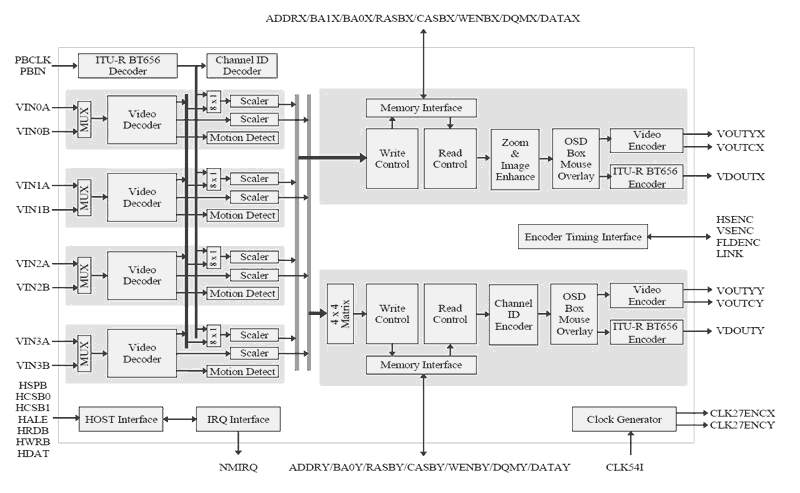
The TW2834 has four high quality NTSC/PAL video decoders, dual color display controllers and dual video encoders. The TW2834 contains four built-in analog anti-aliasing filters, four 10-bit Analog-to-Digital converters, proprietary digital gain/clamp controller, high quality Y/C separator to reduce cross-noise and high performance dual scaler. Four built-in motion and blind detectors can increase the feature of a security system. The TW2834 has a flexible video display controller including basic QUAD and MUX functions. The TW2834 also has excellent graphic overlay function that displays character/bitmap for OSD, single box, 2D array box, and mouse pointer. The built-in channel ID CODEC allows auto decoding and displaying during playback and the additional scaler on the playback supports multi-cropping function of the same field or frame image. The TW2834 contains two video encoders with four 10-bit Digital-to-Analog converters for providing 2 composite or S-video outputs. The TW2834 also can be extended up to 8/16 channel video controller using chip-to-chip cascade connection.
Applications
- Security
- Analog Quad\Mux Security System
- 4/8/16 Ch Digital Video Recorder (DVR)
- Car Rear Vision System
| Part Number | Status | Samples | Stock | Package | Carrier Type |
|---|---|---|---|---|---|
| TW2834-PA3-GE | Obsolete | N/A | Out of Stock | PQFP-HS | Tray |
- Product AdvisoryPDF 259 KB Nov 03, 2021
- Product Change NoticePDF 106 KB PCN21002 Jan 08, 2021
Recommended Documents (1)
Datasheets (1)
No Results Found.
Make sure all keywords are spelled correctly.
Try fewer, different, or more general terms to vary your search.
If you have filters applied, consider deselecting some to broaden your results.
- Search our extensive knowledgebase, designed to help customers with their FAQs.
- Get help from our expert Renesas technical staff and community on our support forums.
No Results Found.
Make sure all keywords are spelled correctly.
Try fewer, different, or more general terms to vary your search.
If you have filters applied, consider deselecting some to broaden your results.
- Search our extensive knowledgebase, designed to help customers with their FAQs.
- Get help from our expert Renesas technical staff and community on our support forums.
- Product AdvisoryPDF 259 KB Nov 03, 2021
- Product Change NoticePDF 106 KB PCN21002 Jan 08, 2021
Product Notices (PCN, EOL, etc) (4)
No Results Found.
Make sure all keywords are spelled correctly.
Try fewer, different, or more general terms to vary your search.
If you have filters applied, consider deselecting some to broaden your results.
- Search our extensive knowledgebase, designed to help customers with their FAQs.
- Get help from our expert Renesas technical staff and community on our support forums.
No Results Found.
Make sure all keywords are spelled correctly.
Try fewer, different, or more general terms to vary your search.
If you have filters applied, consider deselecting some to broaden your results.
- Search our extensive knowledgebase, designed to help customers with their FAQs.
- Get help from our expert Renesas technical staff and community on our support forums.
No Results Found.
Make sure all keywords are spelled correctly.
Try fewer, different, or more general terms to vary your search.
If you have filters applied, consider deselecting some to broaden your results.
- Search our extensive knowledgebase, designed to help customers with their FAQs.
- Get help from our expert Renesas technical staff and community on our support forums.
No Results Found.
Make sure all keywords are spelled correctly.
Try fewer, different, or more general terms to vary your search.
If you have filters applied, consider deselecting some to broaden your results.
- Search our extensive knowledgebase, designed to help customers with their FAQs.
- Get help from our expert Renesas technical staff and community on our support forums.
No Results Found.
Make sure all keywords are spelled correctly.
Try fewer, different, or more general terms to vary your search.
If you have filters applied, consider deselecting some to broaden your results.
- Search our extensive knowledgebase, designed to help customers with their FAQs.
- Get help from our expert Renesas technical staff and community on our support forums.
No Results Found.
Make sure all keywords are spelled correctly.
Try fewer, different, or more general terms to vary your search.
If you have filters applied, consider deselecting some to broaden your results.
- Search our extensive knowledgebase, designed to help customers with their FAQs.
- Get help from our expert Renesas technical staff and community on our support forums.
No Results Found.
Make sure all keywords are spelled correctly.
Try fewer, different, or more general terms to vary your search.
If you have filters applied, consider deselecting some to broaden your results.
- Search our extensive knowledgebase, designed to help customers with their FAQs.
- Get help from our expert Renesas technical staff and community on our support forums.
No Results Found.
Make sure all keywords are spelled correctly.
Try fewer, different, or more general terms to vary your search.
If you have filters applied, consider deselecting some to broaden your results.
- Search our extensive knowledgebase, designed to help customers with their FAQs.
- Get help from our expert Renesas technical staff and community on our support forums.
No Results Found.
Make sure all keywords are spelled correctly.
Try fewer, different, or more general terms to vary your search.
If you have filters applied, consider deselecting some to broaden your results.
- Search our extensive knowledgebase, designed to help customers with their FAQs.
- Get help from our expert Renesas technical staff and community on our support forums.