Features
- Logic and Mixed-Signal Circuits
- Highly Versatile Macrocells
- Read Back Protection (Read Lock)
- 1.8V (±5%) to 5V (±10%) Supply
- Operating Temperature Range: -40°C to 85°C
- RoHS-Compliant/Halogen-Free
- Macrocells Overview
- Fifteen Combinatorial Look-Up Tables (LUTs)
- Five 2-bit LUTs
- Nine 3-bit LUTs
- One 4-bit LUT
- Two Combination Function Macrocell
- One Selectable DFF/Latch or 2-bit LUT
- One Selectable Pipe Delay or 3-bit LUT
- Pipe Delay - 16 Stage/3 Output
- Eight Counter/Delay Generators (CNT/DLY)
- Two 14-bit Delay/Counter
- One 14-bit Delay/Counter with External Clock/Reset
- Three 8-bit Delay/Counters
- Two 8-bit Delay/Counters with External Clock/Reset
- Six D Flip-Flop/Latches (DFF)
- Pipe Delay - 16 Stage/3 Output (Part of Combination Function Macrocell)
- Programmable Delay
- Additional Logic Functions - 2 Deglitch Filters
- RC Oscillator (RC OSC)
- Fifteen Combinatorial Look-Up Tables (LUTs)

Description
The SLG46170 provides a small, low-power component for commonly used mixed-signal functions. The user creates their circuit design by programming the one-time programmable (OTP) non-volatile memory (NVM) to configure the interconnect logic, the I/O pins, and the macrocells of the SLG46170. This highly versatile device allows for a wide variety of mixed-signal functions to be designed within a very small, low-power single integrated circuit.
Parameters
| Attributes | Value |
|---|---|
| GPIOs (#) | 12 |
| Nominal VDD | 1.71 - 5.5 |
| CNT/DLY (Max) (#) | 8 |
| LUTs (Max) (#) | 17 |
| D Flip-flops (DFFs) (#) | 6 |
| Pipe Delay | 16-stage |
| # of Programable Delays (#) | 1 |
| Oscillator Type | RC OSC |
| Memory Type | OTP |
| Temp. Range (°C) | -40 to +85°C |
Package Options
| Pkg. Type | Pkg. Dimensions (mm) | Lead Count (#) | Pitch (mm) |
|---|---|---|---|
| TQFN | 2.0 x 2.2 | 14 | 0.4 |
Applications
- Personal Computers and Servers
- PC Peripherals
- Consumer Electronics
- Data Communications Equipment
- Handheld and Portable Electronics
| Part Number | Status | Samples | Stock | Package | Budgetary Price (USD) | Lead Count (#) | Carrier Type | Moisture Sensitivity Level (MSL) | Pb (Lead) Free | Temp. Range (°C) | Country of Assembly | Country of Wafer Fabrication |
|---|---|---|---|---|---|---|---|---|---|---|---|---|
| SLG46170V | Active | Available | In Stock | TQFN | 1ku | $0.308 | 14# | Tape & Reel | 1 | Yes | -40 to +85°C | CHINA, TAIWAN | TAIWAN |
Filters
Applied Filters
- PCB Design FilesZIP 10.09 MB Nov 06, 2025The GreenPAK Altium Library is a collection of schematic symbols and physical PCB footprints for Renesas' GreenPAK and Power GreenPAK programmable mixed-signal ICs that are available for use within the Altium Designer software environment. The library allows engineers to easily incorporate these devices into their PCB designs using industry-standard CAD tools.
- Application NotePDF 1.65 MB Jun 03, 2020AI-generated Summary: An alternative single-wire data transmission method uses GreenPAK ICs by combining parallel-to-serial and serial-to-parallel converters connected via a single wire. The method leverages an integrating RC element to separate data and clock signals on one line, reducing conductor count, size, cost, and increasing reliability. The RC element charges and discharges based on pulse width, allowing broad data pulses and narrow clock pulses to coexist on a single wire. This approach eliminates the need for an internal oscillator in the receiver, lowering power consumption. Design files including schematics, PCB layouts, BOM, and Gerber files accompany the method for practical implementation.Related Files:
Recommended Documents (1)
Datasheets (1)
No Results Found.
Make sure all keywords are spelled correctly.
Try fewer, different, or more general terms to vary your search.
If you have filters applied, consider deselecting some to broaden your results.
- Search our extensive knowledgebase, designed to help customers with their FAQs.
- Get help from our expert Renesas technical staff and community on our support forums.
- Application NotePDF 1.65 MB Jun 03, 2020AI-generated Summary: An alternative single-wire data transmission method uses GreenPAK ICs by combining parallel-to-serial and serial-to-parallel converters connected via a single wire. The method leverages an integrating RC element to separate data and clock signals on one line, reducing conductor count, size, cost, and increasing reliability. The RC element charges and discharges based on pulse width, allowing broad data pulses and narrow clock pulses to coexist on a single wire. This approach eliminates the need for an internal oscillator in the receiver, lowering power consumption. Design files including schematics, PCB layouts, BOM, and Gerber files accompany the method for practical implementation.Related Files:
Application Notes & White Papers (1)
No Results Found.
Make sure all keywords are spelled correctly.
Try fewer, different, or more general terms to vary your search.
If you have filters applied, consider deselecting some to broaden your results.
- Search our extensive knowledgebase, designed to help customers with their FAQs.
- Get help from our expert Renesas technical staff and community on our support forums.
Errata & Technical Updates (1)
No Results Found.
Make sure all keywords are spelled correctly.
Try fewer, different, or more general terms to vary your search.
If you have filters applied, consider deselecting some to broaden your results.
- Search our extensive knowledgebase, designed to help customers with their FAQs.
- Get help from our expert Renesas technical staff and community on our support forums.
- PCB Design FilesZIP 10.09 MB Nov 06, 2025The GreenPAK Altium Library is a collection of schematic symbols and physical PCB footprints for Renesas' GreenPAK and Power GreenPAK programmable mixed-signal ICs that are available for use within the Altium Designer software environment. The library allows engineers to easily incorporate these devices into their PCB designs using industry-standard CAD tools.
Schematics & Design Files (1)
No Results Found.
Make sure all keywords are spelled correctly.
Try fewer, different, or more general terms to vary your search.
If you have filters applied, consider deselecting some to broaden your results.
- Search our extensive knowledgebase, designed to help customers with their FAQs.
- Get help from our expert Renesas technical staff and community on our support forums.
No Results Found.
Make sure all keywords are spelled correctly.
Try fewer, different, or more general terms to vary your search.
If you have filters applied, consider deselecting some to broaden your results.
- Search our extensive knowledgebase, designed to help customers with their FAQs.
- Get help from our expert Renesas technical staff and community on our support forums.
No Results Found.
Make sure all keywords are spelled correctly.
Try fewer, different, or more general terms to vary your search.
If you have filters applied, consider deselecting some to broaden your results.
- Search our extensive knowledgebase, designed to help customers with their FAQs.
- Get help from our expert Renesas technical staff and community on our support forums.
No Results Found.
Make sure all keywords are spelled correctly.
Try fewer, different, or more general terms to vary your search.
If you have filters applied, consider deselecting some to broaden your results.
- Search our extensive knowledgebase, designed to help customers with their FAQs.
- Get help from our expert Renesas technical staff and community on our support forums.
No Results Found.
Make sure all keywords are spelled correctly.
Try fewer, different, or more general terms to vary your search.
If you have filters applied, consider deselecting some to broaden your results.
- Search our extensive knowledgebase, designed to help customers with their FAQs.
- Get help from our expert Renesas technical staff and community on our support forums.
No Results Found.
Make sure all keywords are spelled correctly.
Try fewer, different, or more general terms to vary your search.
If you have filters applied, consider deselecting some to broaden your results.
- Search our extensive knowledgebase, designed to help customers with their FAQs.
- Get help from our expert Renesas technical staff and community on our support forums.
No Results Found.
Make sure all keywords are spelled correctly.
Try fewer, different, or more general terms to vary your search.
If you have filters applied, consider deselecting some to broaden your results.
- Search our extensive knowledgebase, designed to help customers with their FAQs.
- Get help from our expert Renesas technical staff and community on our support forums.
Renesas Boards & Kits
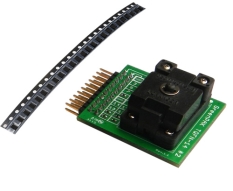
GreenPAK SLG46170 Development Kit with Socket Adapter
The SLG46170V-SKT is a socket adapter kit for use with the SLG4DVKADV GreenPAK™ Advanced Development Board or SLG4DVKLITE GreenPAK Lite Development Board. The SLG46170V-SKT includes the SLG4SA14-20x22 socket adapter and 50 SLG46170V (TQFN-14) GreenPAK programmable mixed-signal matrix IC... Read More
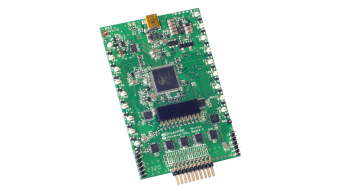
GreenPAK Advanced Development Board
The GreenPAK™ Advanced Development Board provides full programming, emulation, and testing functions for the GreenPAK programmable mixed-signal devices - for use with SLG46xxxX-SKT/SLG47xxxV-SKT socket kits.
The board works in tandem with the GreenPAK Designer software (built into the Go... Read More
Test This Board Remotely
GreenPAK Lite Development Board
The GreenPAK™ Lite Development Board provides full programming, emulation, and testing functions for GreenPAK devices, working in conjunction with the Go Configure™ Software Hub. Board functionality is provided by the RX66T MCU from Renesas.
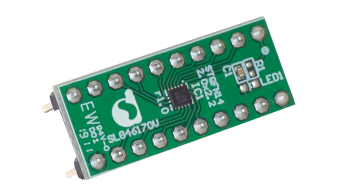
GreenPAK SLG46170V 20-Pin DIP Prototyping Board
The SLG46170V-DIP 20-pin DIP prototyping board is perfect for breadboarding and fast prototypes. The board requires the DIP Adapter (SLG4SA-DIP) to use it with the Advanced Development Board.
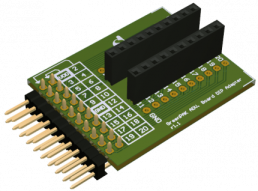
GreenPAK DIP Adapter for GreenPAK Advanced Development Board
The GreenPAK™ DIP Adapter for the GreenPAK Advanced Development Board allows for using the SLG46xxxV-DIP and SLG47xxxV-DIP prototyping boards with the GreenPAK Advanced Development Board. It acts as the bridge between the advanced and DIP development platforms.
Filters
Applied Filters
Software & Tools
Filter by Type
Filter by Provider
Sample Code
Filter by Application
Filter by Function
Filter by Compiler
Filter by IDE
Simulation Models
Partner Solutions
- Software PackageGo Configure Software Hub provides development support for a variety of products, including GreenPAK configurable mixed signal matrix and ForgeFPGA™ devices.
- PCB Design FilesZIP 10.09 MB Nov 06, 2025The GreenPAK Altium Library is a collection of schematic symbols and physical PCB footprints for Renesas' GreenPAK and Power GreenPAK programmable mixed-signal ICs that are available for use within the Altium Designer software environment. The library allows engineers to easily incorporate these devices into their PCB designs using industry-standard CAD tools.
No Results Found.
Make sure all keywords are spelled correctly.
Try fewer, different, or more general terms to vary your search.
If you have filters applied, consider deselecting some to broaden your results.
- Search our extensive knowledgebase, designed to help customers with their FAQs.
- Get help from our expert Renesas technical staff and community on our support forums.
- Software PackageGo Configure Software Hub provides development support for a variety of products, including GreenPAK configurable mixed signal matrix and ForgeFPGA™ devices.
- PCB Design FilesZIP 10.09 MB Nov 06, 2025The GreenPAK Altium Library is a collection of schematic symbols and physical PCB footprints for Renesas' GreenPAK and Power GreenPAK programmable mixed-signal ICs that are available for use within the Altium Designer software environment. The library allows engineers to easily incorporate these devices into their PCB designs using industry-standard CAD tools.
Software & Tools (2)
No Results Found.
Make sure all keywords are spelled correctly.
Try fewer, different, or more general terms to vary your search.
If you have filters applied, consider deselecting some to broaden your results.
- Search our extensive knowledgebase, designed to help customers with their FAQs.
- Get help from our expert Renesas technical staff and community on our support forums.
No Results Found.
Make sure all keywords are spelled correctly.
Try fewer, different, or more general terms to vary your search.
If you have filters applied, consider deselecting some to broaden your results.
- Search our extensive knowledgebase, designed to help customers with their FAQs.
- Get help from our expert Renesas technical staff and community on our support forums.
No Results Found.
Make sure all keywords are spelled correctly.
Try fewer, different, or more general terms to vary your search.
If you have filters applied, consider deselecting some to broaden your results.
- Search our extensive knowledgebase, designed to help customers with their FAQs.
- Get help from our expert Renesas technical staff and community on our support forums.
Discover GreenPAK™, a configurable mixed‑signal IC platform that replaces discrete logic and streamlines system design. By combining analog, digital, and power functions in a compact, low‑power device, GreenPAK enables fast customization through an intuitive GUI without added complexity. Engineers can reduce BOM cost, lower power consumption, simplify PCB routing, accelerate time‑to‑market, and take advantage of in‑system configurability, making GreenPAK a strong fit for building smarter and more efficient designs across a wide range of applications.
Go Configure™ Software Hub is Renesas’ unified design environment for configuring, simulating, and programming GreenPAK™ and other configurable devices. This video introduces the tool’s intuitive workflow and shows how engineers can quickly prototype and validate their designs.
The video introduces how GreenPAK™ enables engineers to create custom mixed‑signal IC designs quickly and easily. It highlights how GreenPAK simplifies development, helping teams turn ideas into flexible, working solutions without complex hardware redesigns.
Additional Videos
Support Communities
-
SLG46170 Nomenclature definition
On Sheet 11 Table 2 of the SLG46170 Data Sheet it references typical delays, the first row references a tpd for Digital input to PP 1X. How is this defined ? Is this input (pad) to single output (Push-Pull) pad ? Also, what's the difference between "Digital input" and "Low ...
Apr 25, 2020 -
SLG46170 Nomenclature definition
On Sheet 11 Table 2 of the SLG46170 Data Sheet it references typical delays, the first row references a tpd for Digital input to PP 1X. How is this defined ? Is this input (pad) to single output (Push-Pull) pad ? Also, what's the difference between "Digital input" and "Low ...
Apr 25, 2020 -
PAK SPICE - Which GreenPAK Part Numbers?
was hoping to run a SPICE simulation on a circuit I threw together using part number SLG46108, but the SPICE buttons are not available in the GreenPAK3 Designer tool version v.6.11. The PAK SPICE Introduction video on YouTube page https://www.youtube.com/watch?v ...
May 16, 2018