Features
- One Audio Development Platform (ADP) for both Bluetooth and USB product family
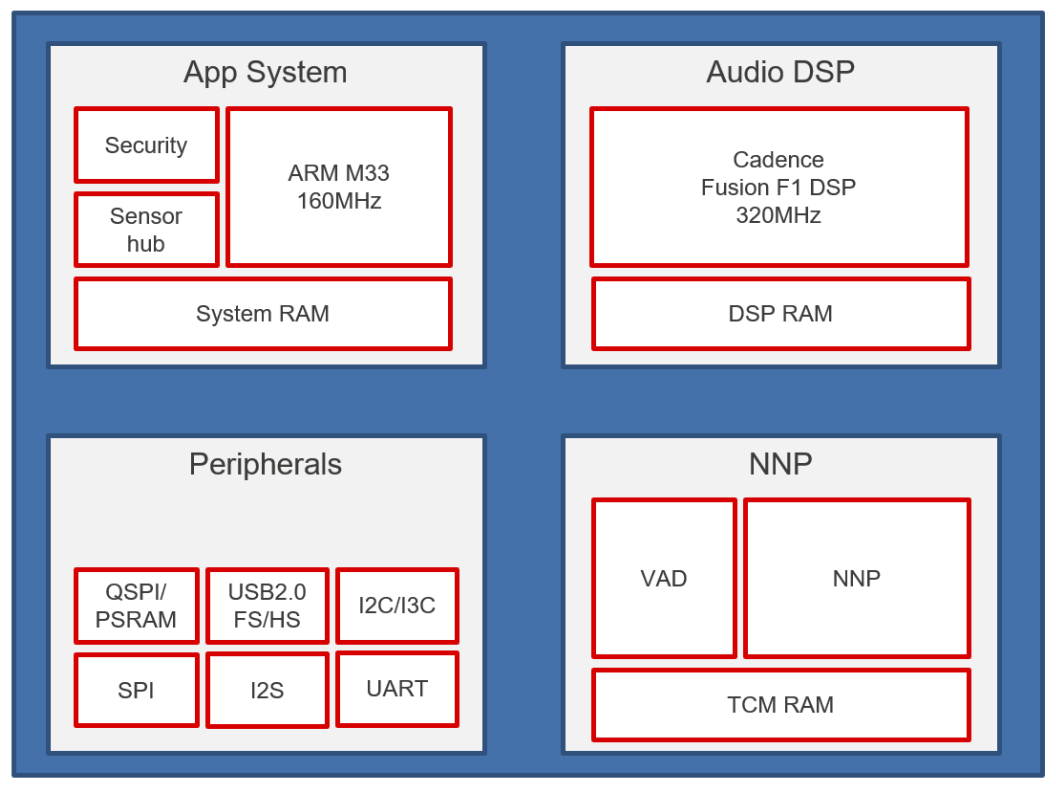
- 32-bit Arm Cortex-M33F up to 160MHz
- Tensilica Fusion F1 DSP up to 320MHz
- Always-on low power Voice Activation Detection (VAD) and Hot-Word Detector (HWD) engine
- USB 2.0 HS/FS Device
- 80 MHz Quad/Octa SPI FLASH controller with On-the-fly M33 XIP decryption
- 80 MHz Quad SPI PSRAM/FLASH Controller
- Cryptographic engine with AES128/192/256, SHA-224/256
- Work for power-critical applications by a fully customized highly efficient PMIC
Description
The DA14850 is Renesas’ next generation low power audio processor. The device combines Renesas Smart Codecs and PMIC devices to form a flexible, powerful chipset optimized for low power consumption and high-performance audio products. The DA14850 integrates an Arm® Cortex®-M33F application processor, a Tensilica® Fusion F1 DSP, and a rich set of peripherals and communication interfaces including USB 2.0 HS/FS.
The DA14850 features multi-core AI (artificial intelligence) capability. The device integrates a dedicated low-power NNP (neural network processor) technology to support VAD (voice activity detection), HWD (hot-word-detection), acoustic event detection (ex. glass breaking, police car siren, etc.), and audio scene detection (ex. restaurant, music, etc.) to offer Machine-Learning contexture awareness features. The Renesas Reality AI tool seamless works with the DA14850 application processor by Arm Cortex-M33 and Cadence Fusion F1 DSP processor. Renesas’ Reality AI tool comes with Renesas global support including AI model generation at highly compact code, design review, monitor tool, and many optional add-ons.
Renesas DA14850 processor enables many new applications including USB audio devices for communication, audio processor, as well as battery-powered portable applications for sound detection and hearing enhancement.
Application Block Diagrams
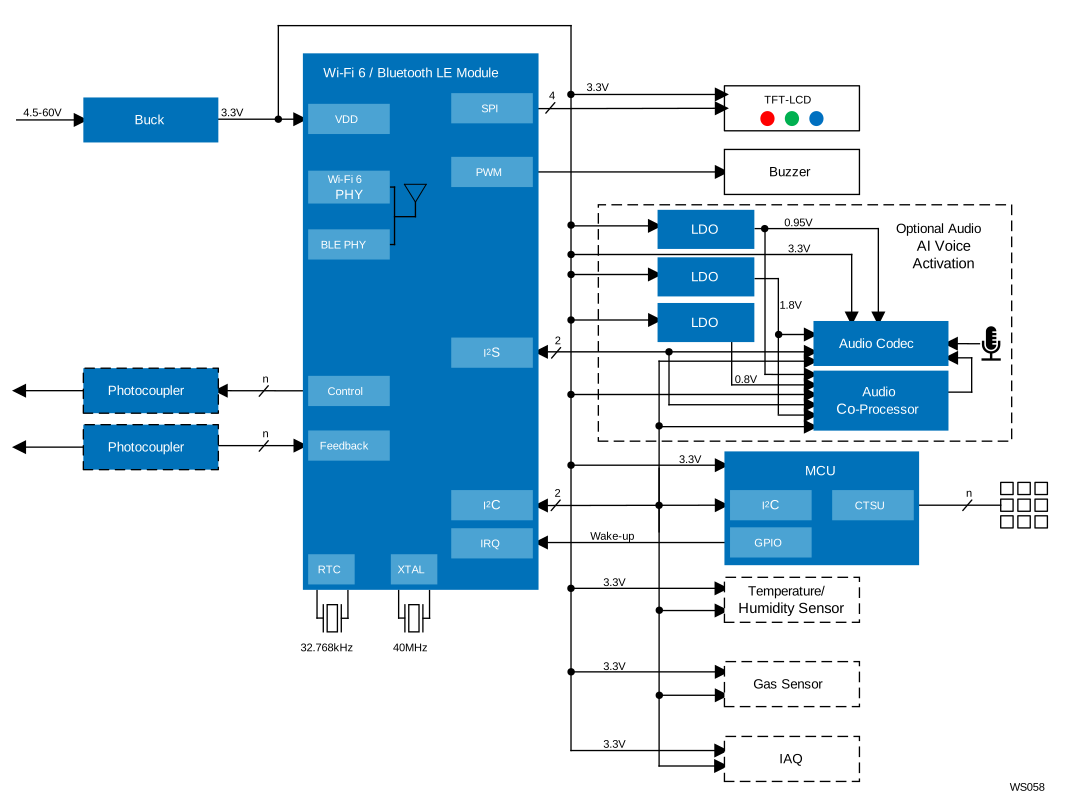
| Advanced Low-Power Wireless HMI for Household Appliances Advanced low-power HMI with Wi-Fi 6 and Bluetooth 5.1 enables seamless smart appliance control. |
Additional Applications
- USB headset, headphone, headphone processing amp
- USB and or wireless microphone
- USB speakerphones
- Portable audio processor/ Co-processor
- Portable camera
- Hearing aids and assistive sound systems
- Low power portable voice command applications
- Sound detection applications
Complete Your Design
Explore complementary products to elevate your design
| Part Number | Status | Samples | Stock | Package | Lead Count (#) | Pitch (mm) |
|---|---|---|---|---|---|---|
| DA14850-10D00GH2 | Active | N/A | Out of Stock | WLCSP64 | 64# | 0.35mm |
| DA14850-10N00GH2 | Active | N/A | Out of Stock | WLCSP64 | 64# | 0.35mm |
| DA14850-11N00H26 | Active | N/A | Out of Stock | VFBGA104 | 104# | 0.39mm |
Complete Your Design
Explore complementary products to elevate your design
- DatasheetDA14850 DatasheetRECOMMENDED
Recommended Documents (2)
- DatasheetDA14850 DatasheetRECOMMENDED
Datasheets (2)
No Results Found.
Make sure all keywords are spelled correctly.
Try fewer, different, or more general terms to vary your search.
If you have filters applied, consider deselecting some to broaden your results.
- Search our extensive knowledgebase, designed to help customers with their FAQs.
- Get help from our expert Renesas technical staff and community on our support forums.
No Results Found.
Make sure all keywords are spelled correctly.
Try fewer, different, or more general terms to vary your search.
If you have filters applied, consider deselecting some to broaden your results.
- Search our extensive knowledgebase, designed to help customers with their FAQs.
- Get help from our expert Renesas technical staff and community on our support forums.
No Results Found.
Make sure all keywords are spelled correctly.
Try fewer, different, or more general terms to vary your search.
If you have filters applied, consider deselecting some to broaden your results.
- Search our extensive knowledgebase, designed to help customers with their FAQs.
- Get help from our expert Renesas technical staff and community on our support forums.
No Results Found.
Make sure all keywords are spelled correctly.
Try fewer, different, or more general terms to vary your search.
If you have filters applied, consider deselecting some to broaden your results.
- Search our extensive knowledgebase, designed to help customers with their FAQs.
- Get help from our expert Renesas technical staff and community on our support forums.
No Results Found.
Make sure all keywords are spelled correctly.
Try fewer, different, or more general terms to vary your search.
If you have filters applied, consider deselecting some to broaden your results.
- Search our extensive knowledgebase, designed to help customers with their FAQs.
- Get help from our expert Renesas technical staff and community on our support forums.
No Results Found.
Make sure all keywords are spelled correctly.
Try fewer, different, or more general terms to vary your search.
If you have filters applied, consider deselecting some to broaden your results.
- Search our extensive knowledgebase, designed to help customers with their FAQs.
- Get help from our expert Renesas technical staff and community on our support forums.
No Results Found.
Make sure all keywords are spelled correctly.
Try fewer, different, or more general terms to vary your search.
If you have filters applied, consider deselecting some to broaden your results.
- Search our extensive knowledgebase, designed to help customers with their FAQs.
- Get help from our expert Renesas technical staff and community on our support forums.
No Results Found.
Make sure all keywords are spelled correctly.
Try fewer, different, or more general terms to vary your search.
If you have filters applied, consider deselecting some to broaden your results.
- Search our extensive knowledgebase, designed to help customers with their FAQs.
- Get help from our expert Renesas technical staff and community on our support forums.
No Results Found.
Make sure all keywords are spelled correctly.
Try fewer, different, or more general terms to vary your search.
If you have filters applied, consider deselecting some to broaden your results.
- Search our extensive knowledgebase, designed to help customers with their FAQs.
- Get help from our expert Renesas technical staff and community on our support forums.
No Results Found.
Make sure all keywords are spelled correctly.
Try fewer, different, or more general terms to vary your search.
If you have filters applied, consider deselecting some to broaden your results.
- Search our extensive knowledgebase, designed to help customers with their FAQs.
- Get help from our expert Renesas technical staff and community on our support forums.
No Results Found.
Make sure all keywords are spelled correctly.
Try fewer, different, or more general terms to vary your search.
If you have filters applied, consider deselecting some to broaden your results.
- Search our extensive knowledgebase, designed to help customers with their FAQs.
- Get help from our expert Renesas technical staff and community on our support forums.
No Results Found.
Make sure all keywords are spelled correctly.
Try fewer, different, or more general terms to vary your search.
If you have filters applied, consider deselecting some to broaden your results.
- Search our extensive knowledgebase, designed to help customers with their FAQs.
- Get help from our expert Renesas technical staff and community on our support forums.
Filters
Applied Filters
Software & Tools
Filter by Type
Filter by Provider
Sample Code
Filter by Application
Filter by Function
Filter by Compiler
Filter by IDE
Simulation Models
Partner Solutions
- IDE and Coding ToolEclipse-based Renesas integrated development environment (IDE). [Support MCU/MPU: RA, RE, RX, RL78, RH850, Renesas Synergy, RZ]
No Results Found.
Make sure all keywords are spelled correctly.
Try fewer, different, or more general terms to vary your search.
If you have filters applied, consider deselecting some to broaden your results.
- Search our extensive knowledgebase, designed to help customers with their FAQs.
- Get help from our expert Renesas technical staff and community on our support forums.
- IDE and Coding ToolEclipse-based Renesas integrated development environment (IDE). [Support MCU/MPU: RA, RE, RX, RL78, RH850, Renesas Synergy, RZ]
Software & Tools (1)
No Results Found.
Make sure all keywords are spelled correctly.
Try fewer, different, or more general terms to vary your search.
If you have filters applied, consider deselecting some to broaden your results.
- Search our extensive knowledgebase, designed to help customers with their FAQs.
- Get help from our expert Renesas technical staff and community on our support forums.
No Results Found.
Make sure all keywords are spelled correctly.
Try fewer, different, or more general terms to vary your search.
If you have filters applied, consider deselecting some to broaden your results.
- Search our extensive knowledgebase, designed to help customers with their FAQs.
- Get help from our expert Renesas technical staff and community on our support forums.
No Results Found.
Make sure all keywords are spelled correctly.
Try fewer, different, or more general terms to vary your search.
If you have filters applied, consider deselecting some to broaden your results.
- Search our extensive knowledgebase, designed to help customers with their FAQs.
- Get help from our expert Renesas technical staff and community on our support forums.
Support Communities
-
Use of Windows source files in SDK5.0.3 ?
... proximity" What is the use of those examples? Can i run those examples with BLE supported Laptop without having of DA14580 based dev kit? OR Please explain it with more details. Corrected product code from DA14850 to DA14580 [edited by: June at 17:41 (GMT 0) on 12 Feb 2025]
Jan 23, 2017 -
Programing DA14580 with UART
... fault? RST pin is ok and module is reset we can not Communicate with module by smart snippest like otp programm or eeprom read or like this. Thank for your support Corrected product code from DA14850 to DA14580 [edited by: June at 17:38 (GMT 0) on 12 Feb 2025]
Apr 10, 2018 -
DSPS Android version not showing the device number
Hi, I am using PAN1740 USB Dongle board. I have flashed sps_device code in to PAN1740. (1) I can see the device serial number in IOS DSPS app. Howervr I can not see the serial number in android app. Is this facility is ot available in android?. (2) I ...
May 17, 2019