Renesas Electronics Corporation

Renesas Web Data MCP Server

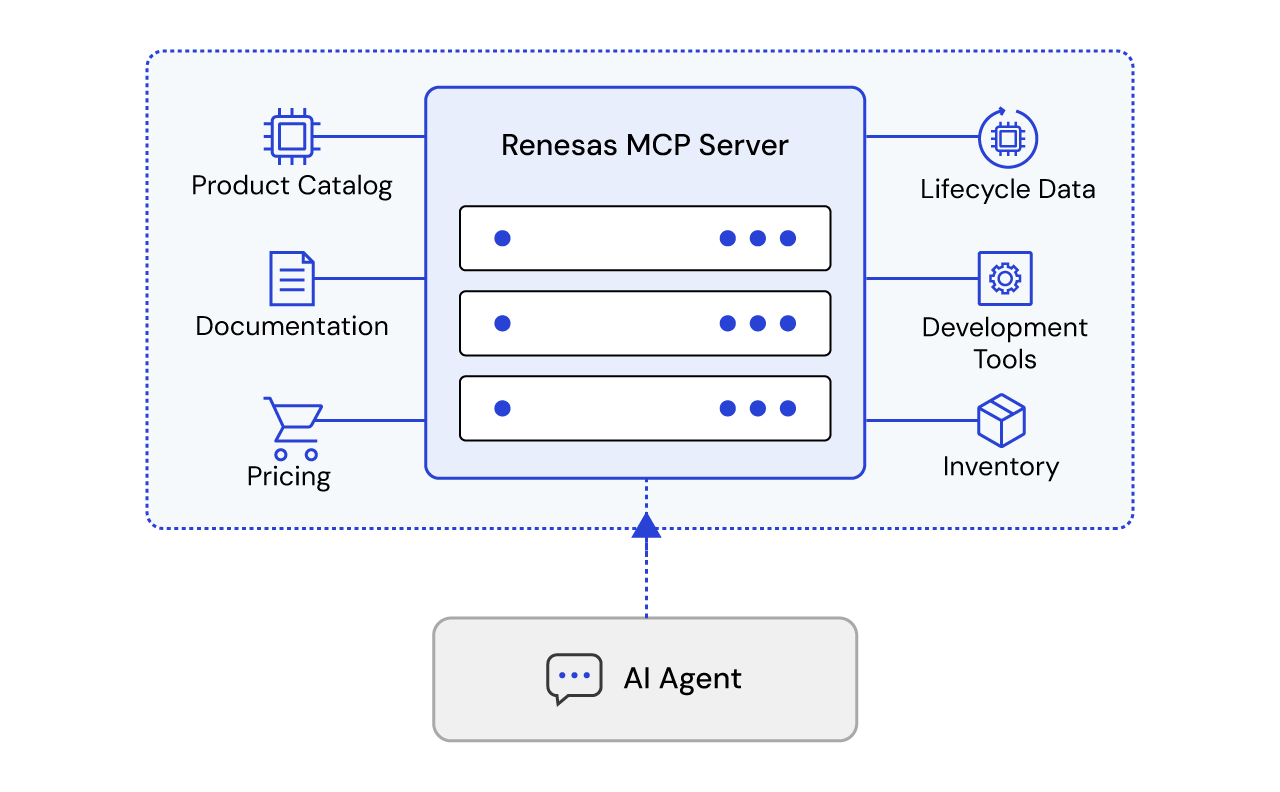
Illustrative diagram featuring an AI agent connecting to an Renesas MCP server to access tools, data sources, and external systems for real-time information and actions.

Give Your AI Agent Live Access to Renesas Data

Renesas provides a free, public Model Context Protocol (MCP) server that connects AI assistants, agentic IDEs, and chatbots directly to our live product catalog, documentation library, and parts lifecycle data: no authentication, no cost, no local install required.

Why Connect to the Renesas MCP

Language models are trained on a snapshot of the past. Part numbers get discontinued, datasheets get revised, and new families launch every quarter. The Renesas MCP Server closes that gap by letting your AI tool query our systems in real time, so every answer about a Renesas part is grounded in what's actually true today, not what an LLM remembers from training.

What the Renesas MCP Can Answer

You ask...The server returns
"What Renesas parts support CAN-FD?"Matching product families with descriptions and links
"Give me full specs for this orderable part"Pricing, packaging, dimensions, regulatory data, distributor stock
"Is this part still active or end-of-life?"Lifecycle status for up to 20 parts in one call
"Find the datasheet for RA6M5"Datasheets, app notes, manuals, and errata
"What's the Renesas equivalent of this competitor part?"Cross-referenced alternatives for up to 200 parts
"Which RA6M5 variants have 2MB flash?"Parametric search results filtered by attribute

Full List of Tools

ToolMCP description
search_productsSearch Renesas product families. A query uses Algolia keyword search and returns Web Data API product summaries. If keyword search is disabled, keyword search via query is unavailable; use product_id or category instead. Without query, product_id and category use the structured Web Data API. Do not combine query with product_id or category. Limit and offset paginate either path; offset must be a multiple of limit.
search_documentsFind Renesas datasheets, application notes, manuals, errata, and related documents. A query uses Algolia full-text search and hydrates Web Data API document summaries. If keyword search is disabled, keyword search via query is unavailable; use structured filters instead. Without query, use structured filters such as product_id, type, sub_type, category, DCP document ID prefix, language, or revision dates. Language defaults to English and may also narrow keyword search; do not combine query with other filters. Limit and offset paginate either path; structured offsets must be a multiple of limit.
get_documentGet one Renesas document by DCP document ID. Returns document identity, content metadata, categories, product IDs, and compact translation references in a token-efficient projection.
get_productGet details for one Renesas product family by product ID. Returns a token-efficient projection of product features, applications, documents, orderable products, block diagrams, software tools, and related boards or kits. Related documents and orderable products are capped at 20 entries each.
get_lifecycle_statusScreen one to 20 Renesas part numbers for BOM lifecycle review. Returns a compact result for every requested part in input order, keyed by the part number as requested. A failed lookup is reported on that part without aborting the batch.
get_product_partGet details for one Renesas orderable product part. Returns lifecycle, pricing, dimensions, packaging, regulatory data, distributor inventory, parametric attributes, and first-party CAD documents in a token-efficient projection. Parametric attributes are capped at 100 entries; distributors and CAD documents at 20. Use an orderable ID returned by get_product or search_products.
get_product_part_attributesList parametric attribute definitions available for filtering product parts. Optionally scope the list to one product family with product_id. Returns documented display, type, unit, filter, and possible-value metadata. Limit and offset paginate results; offset must be a multiple of limit.
search_product_partsSearch orderable parts within one Renesas product family using parametric filters. Use get_product_part_attributes to discover filter IDs and allowed values. Returns lightweight summaries with lifecycle, price, packaging, and matched attributes when available. Use get_product_part for full details on a promising result. Limit and offset paginate results; offset must be a multiple of limit.
get_cross_referenceFind Renesas alternatives for one to 200 competitor part numbers. Returns results grouped by requested part number with match type, Renesas orderable ID, generic ID, lifecycle status, and description when available.

How the Renesas MCP is Connected

The server exposes a fixed set of read-only tools that map cleanly onto engineering workflows:

  • Discovery
    • Search product families and datasheets by keyword or structured filters.
  • Specification
    • Pull full product-family and orderable-part detail, including block diagrams and CAD-ready documents.
  • Parametric selection
    • Filter parts within a family by electrical, mechanical, or packaging attributes.
  • Lifecycle and sourcing
    • Screen BOMs for EOL/obsolete risk and find cross-reference alternatives to competitor parts.

Every response is structured JSON, shaped for reliable machine consumption rather than free text.

Set up the Renesas MCP in Minutes

No account, API key, or installation is required and point any MCP-capable client at the endpoint
URL: https://api.renesas.com/mcp

ChatGPT Desktop: go to Settings → Connectors → Advanced settings → Add custom connector, then enter the server URL above. Once added, enable it for the conversation and ChatGPT will call it automatically when relevant.

Claude Desktop: add a custom connector pointing to the URL above (Settings → Connectors), or bridge with mcp-remote if your version only supports local servers.

Microsoft Copilot Studio: on your agent's Tools page, select Add a tool → New tool → Model Context Protocol. Enter a server name, description, and the server URL above, set authentication to None, and select Create.

Cursor: add to .cursor/mcp.json:

JSON
{  "mcpServers": {    "renesas-web-data": { "url": "https://api.renesas.com/mcp" }  } }

Any other MCP Streamable HTTP client works the same way, just supply the endpoint URL.

Built for Real Engineering Use

  • Live pricing, stock, and lifecycle data pulled straight from Renesas' systems of record.
  • No manual datasheet hunting or spec-sheet PDFs to parse.
  • Structured output an agent can act on directly for BOM checks, part selection, sourcing, and design research.
  • Same data whether you're building a chatbot, an internal tool, or wiring it into an IDE assistant.

Terms of Use

Use of the Renesas MCP Server is governed by Renesas' standard website terms, plus these conditions:

  • Use the server only for lawful access to publicly available Renesas data, including AI/agent integrations.
  • Do not use it for unlawful, harmful, fraudulent, or abusive purposes.
  • Do not attempt to overload, probe, or impair Renesas systems or infrastructure.
  • Do not redistribute derivative data in a way that misrepresents Renesas' catalog.