
Overview
Description
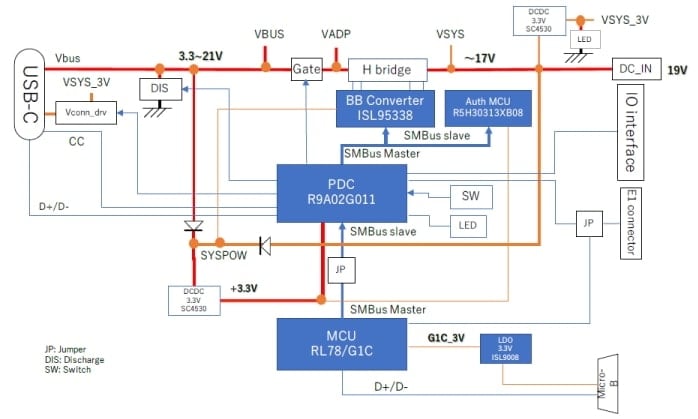
This is the single port evaluation board converts USB Type-C® input power to DC output or DC input to USB Type-C® output sourcing power. The USB Type-C® port is dual role power (DRP) and supports both sink and source modes. By using a dedicated FW, this board can also function as a USB PD Exerciser (sends or responds to USB PD commands like a real device) that can be used to investigate or analyze USB PD communications.
The following tool supports firmware customization—the Firmware Generation Support Tool (PDC Image Generator, PDC-IMGGEN), a GUI application that enables modification of USB Power Delivery (PD) protocol parameters.
Features
- USB Power Delivery and USB-Type-C®
- One USB Type-C® port
- Power role: Dual Role Power (DRP)
- Power source voltage: 5V, 9V, 15V, 20V (up to 20 V)
- Power sink voltage: 5V to 20V
- Supports Programmable Power Supply (PPS) up to 5VProg (3.3 V to 5.9 V VBUS; additional voltages under evaluation)
- Supports USB Type-C® Authentication (C-Auth) (RTK0EUG011D08010BJ only)
- Supports USB Power Delivery Firmware Update (PDFU) (RTK0EUG011D08010BJ only)
- Interface
- LEDs: System power (1 × orange), R9A02G011 indicator (1 × blue)
- Switch: External interrupt input to R9A02G011
- On-chip debugging: Renesas interface for R9A02G011 and RL78/G1C
- USB Micro-B port: PC exerciser interface; connected to and powers RL78/G1C
- GPIO/SMBus: SMBus master/slave interface and GPIOs of R9A02G011
- Protections
- Over Temperature Protection (USB-Type-C® Receptacles)
- Over Voltage Protection (VBUS voltage)
- Over Current Protection (VBUS current)
- Mode Options
- USB PD Exerciser mode
- FW update mode
Applications
Documentation
Featured Documentation
Log in required to subscribe
|
|
|
|
|---|---|---|
| Type | Title | Date |
| Manual - Development Tools |
PDF
2.15 MB
AI-generated Summary:
The document details the RTK-251-DRPEVB features, supporting USB Power Delivery 3.0 ver.2.0 and USB Type-C with dual role power capabilities. It supports programmable power supply (PPS), USB Type-C authentication, and firmware updates. The board includes LED indicators, switches, debugging interfaces, USB Micro-B port, and GPIOs. It provides protections like over-temperature, over-voltage, and over-current monitoring. Various modes such as USB PD Exerciser and firmware update modes are available. The manual also outlines configurations, board setup, and flash memory programming.
|
|
| PCB Design Files | RTK-251-DRPEVB Design Kit (USB PD Evaluation Board to develop firmware/Exerciser) [Kit Rev. A1.5]
|
|
2 items
|
||
Design & Development
Product Options
| Part Number | Status | Stock | Budgetary Price (USD) | Description |
|---|---|---|---|---|
| RTK0EUG011D08000BJ | Active | In Stock | 1u | $204.45 | RTK-251-DRPEVB |
| RTK0EUG011D08010BJ | Active | Out of Stock | 1u | $217.73 | RTK-251-DRPEVB with USB Type-C Authentication |
Support

Support Communities
Get quick technical support online from Renesas Engineering Community technical staff.

Knowledge Base
Browse our knowledge base for helpful articles, FAQs, and other useful resources.

